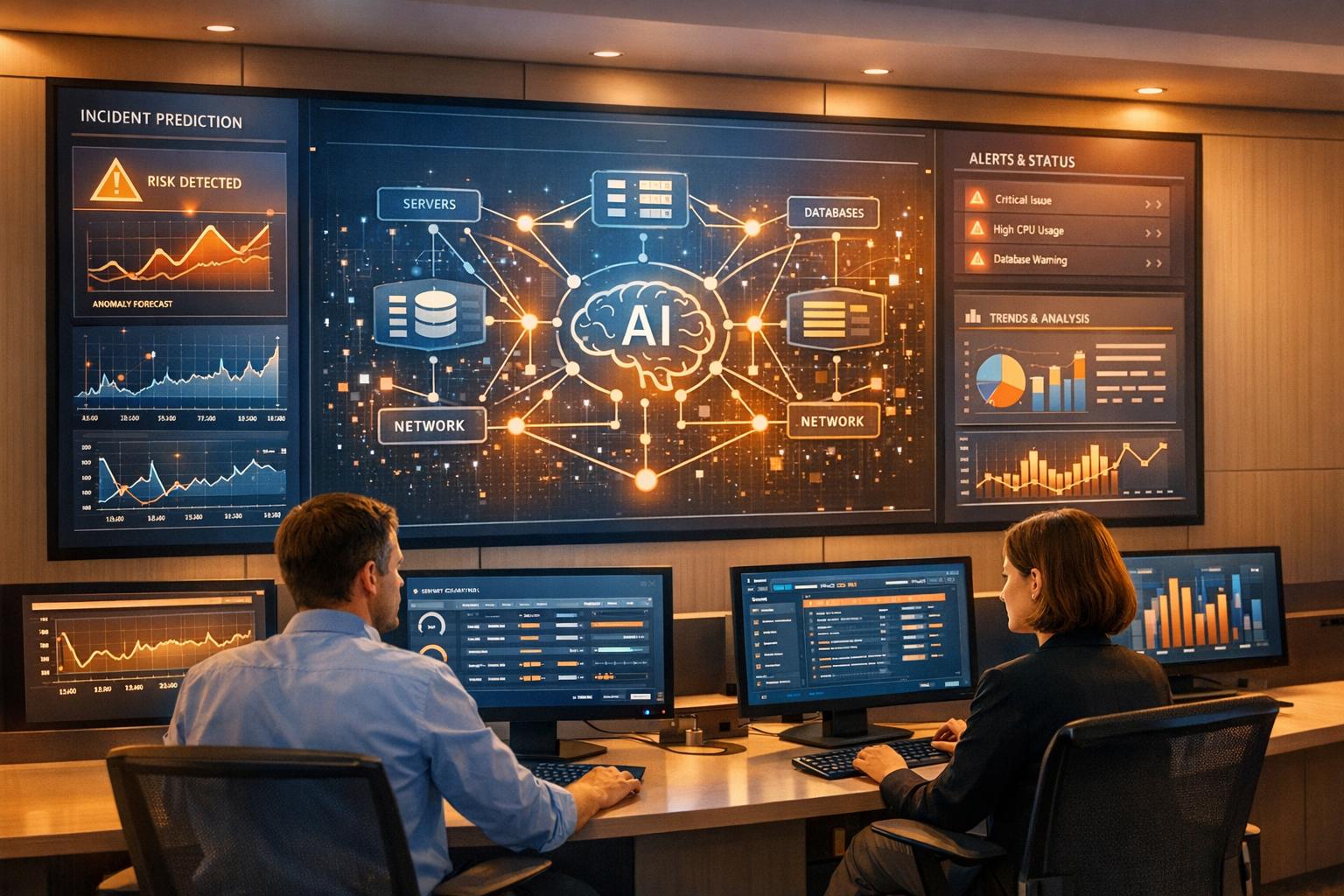
Recurring incidents in DevOps waste time, drain resources, and disrupt services. These repeated problems often stem from unresolved root causes, like configuration issues or dependency failures, and lead to £4,200 in losses per minute of downtime. Despite adopting monitoring tools, 43% of organisations faced rising operational toil in 2024, highlighting the need for better solutions.
AI is transforming incident management by predicting failures, reducing alert noise by 60–80%, and cutting incident resolution times by 50–70%. It analyses patterns in metrics, automates root cause analysis, and even performs self-healing actions for routine issues. For example, AI tools like those used by Ramp’s SRE team pinpoint root causes faster than engineers, while predictive analytics forecast potential failures before they occur.
Key benefits include:
- Faster resolutions: AI diagnoses issues up to 3x faster than manual methods.
- Cost savings: AI-driven systems save hundreds of hours annually by preventing outages.
- Reduced burnout: Automating repetitive tasks allows engineers to focus on critical work.
For successful integration, start small, allow AI tools to observe workflows, and gradually expand their role. Measure success with metrics like MTTR, alert noise reduction, and automation success rates. AI isn't just a tool - it’s a shift towards smarter, more efficient DevOps practices.
::: @figure 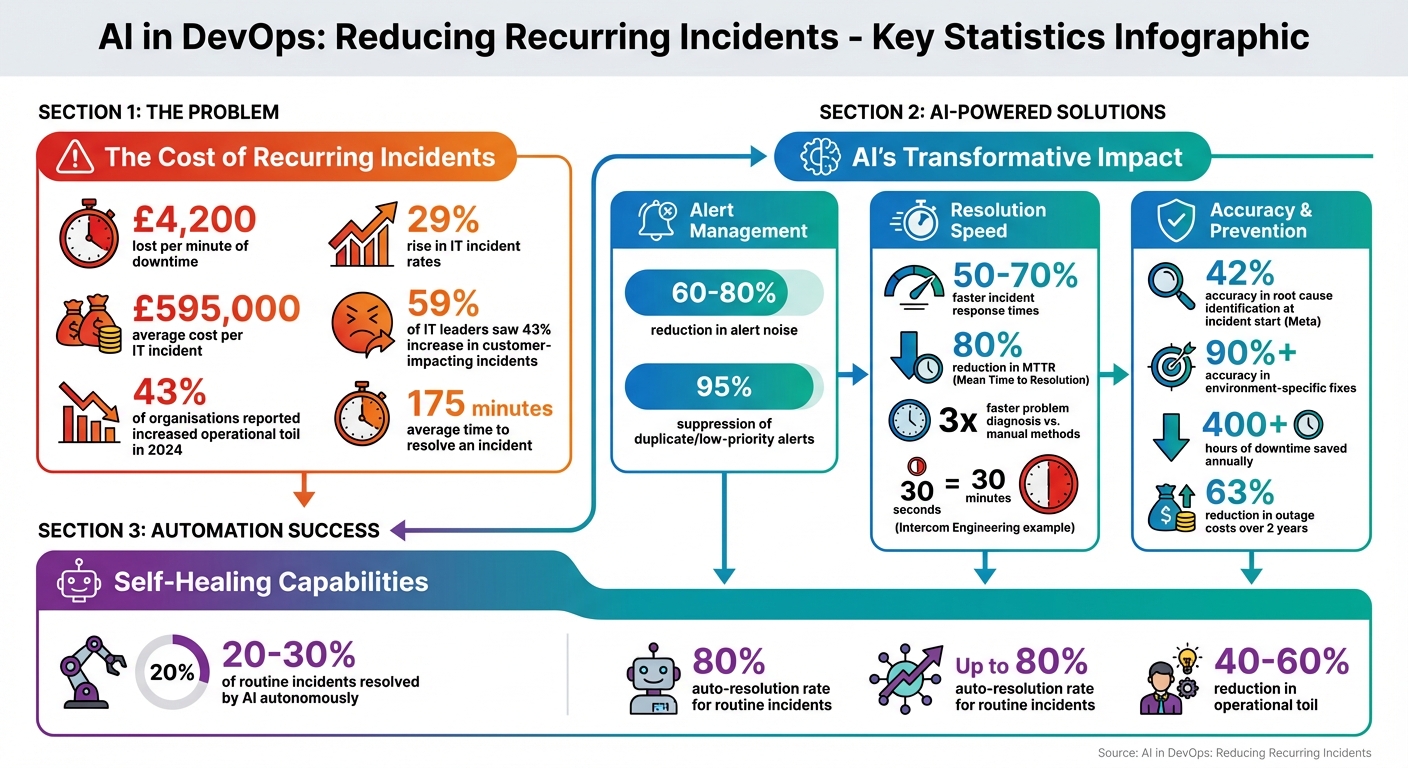 {AI Impact on DevOps Incident Management: Key Statistics and Benefits}
:::
{AI Impact on DevOps Incident Management: Key Statistics and Benefits}
:::
What Are Recurring Incidents in DevOps?
Defining Recurring Incidents
Recurring incidents are those repeated disruptions that stem from unresolved problems like configuration errors, infrastructure bottlenecks, dependency breakdowns, or flawed datasets [3][9]. The rise of microservices and serverless architectures has made this issue even more challenging, as modern applications rely on hundreds of interconnected services. Quick fixes - such as restarting a service or rolling back a deployment - may temporarily resolve the issue but leave the underlying cause untouched, setting the stage for the same problem to reappear [2][7][8][10].
These repetitive problems fuel what's often referred to as operational toil.
This is the manual, repetitive work that grows as systems become more complex [2]. Instead of focusing on innovation - like building new features or improving infrastructure - engineers find themselves stuck in a cycle of troubleshooting and temporary fixes. In 2024, 43% of organisations reported an increase in operational toil, even with the adoption of more monitoring tools [2]. Not only does this impact system performance, but it also leads to significant financial losses.
The Financial Impact of Recurring Incidents
Recurring incidents don’t just disrupt operations - they come with a hefty price tag. On average, businesses lose around £4,200 for every minute of downtime [7], and the typical cost of a single IT incident is approximately £595,000 [8]. These figures only account for direct financial losses. The wider consequences include wasted engineering hours, poor customer experiences, and reduced system reliability.
For engineers, these incidents create a constant struggle to balance development work with firefighting. This juggling act erodes productivity, as frequent context switching increases coordination challenges [4]. During outages, coordinating teams adds further delays and communication hurdles [4].
Reliability takes a hit too. Teams often ignore low-severity recurring alerts - like minor latency spikes or intermittent errors - dismissing them as unimportant noise. However, these alerts frequently act as early warnings of larger, system-wide failures [4]. By the time these issues escalate into full-blown outages affecting customers, the problem may have already rippled through multiple services. Incident rates in IT environments have risen by 29% in recent years [7], and 59% of IT leaders reported a 43% increase in customer-impacting incidents over the past year [8].
The human toll is another major factor. Constant firefighting and alert fatigue contribute to engineer burnout. Replacing burned-out on-call staff brings additional costs, though these are often overlooked [2]. The average time to resolve an incident is 175 minutes [8], nearly three hours of disruption that could potentially be avoided with better proactive incident management.
Creating an incident prevention workflow with AIOps
Using AI to Predict and Prevent Incidents
The days of simply reacting to incidents are behind us. In modern DevOps, AI is stepping up to prevent problems before they spiral into major outages. Instead of depending on static thresholds that only trigger alerts after the damage is done, AI uses machine learning to analyse patterns in metrics, logs, and traces. This allows it to spot subtle warning signs that might otherwise go unnoticed. This shift has ushered in AI-powered anomaly detection, which examines system data to catch early indicators of failure.
Anomaly Detection with AI
Anomaly detection relies on machine learning to sift through historical data - like CPU usage, latency, and error rates - to establish a baseline of normal behaviour [11][14]. When current data strays significantly from this baseline, it raises a red flag [12].
These anomalies generally fall into three categories:
- Point anomalies: Single, unusual events, like a sudden CPU spike.
- Contextual anomalies: Data points that seem normal on their own but are concerning in specific contexts, such as high latency during off-peak hours.
- Collective anomalies: Groups of data points that only indicate a problem when viewed together, like simultaneous failures across multiple microservices [12].
By distinguishing between these types, AI dramatically reduces the noise caused by false alarms - an issue that often plagues traditional monitoring systems.
The results speak for themselves. Teams leveraging AI for incident management have slashed their Mean Time to Resolution (MTTR) by as much as 80%. Companies adopting AIOps (Artificial Intelligence for IT Operations) have reported saving over 400 hours of downtime annually. Additionally, outage costs have dropped by 63% over two years with AIOps, while at Meta, their AI investigation tool achieved 42% accuracy in pinpointing root causes at the start of incidents [11]. Beyond faster resolutions, these tools actively prevent incidents by combining anomaly detection with predictive analytics, which forecasts potential problems before they occur.
Predictive Analytics for Incident Prevention
Predictive analytics takes things a step further by forecasting failures before they happen. These systems blend historical incident data with real-time telemetry to identify patterns that often precede outages [15][13]. For instance, gradual memory pressure, creeping latency, or disk space nearing capacity can serve as early indicators of resource exhaustion [13][4].
Take Ramp's SRE team as an example: AI pinpointed the root causes of their last three incidents before senior engineers even joined the call [2].
Predictive models also evaluate system changes against historical data to assign risk scores to deployments. This allows teams to take proactive measures, such as scaling resources, tweaking configurations, or delaying potentially risky updates. By correlating current signals with past patterns, predictive tools can suppress up to 95% of duplicate or low-priority alerts, ensuring engineers focus on genuine threats [2]. The impact is undeniable - teams using predictive AI report incident response times that are 50–70% faster, with problem diagnosis happening three times quicker than with manual methods [2].
AI for Incident Management and Resolution
When an incident occurs, every second counts. AI is reshaping how teams tackle and resolve these issues by automating repetitive tasks that traditionally slow down response times. Instead of engineers manually combing through endless logs or juggling multiple monitoring tools, AI steps in to handle the grunt work - collecting data and even executing fixes. This allows human responders to focus on making crucial decisions rather than getting bogged down by routine tasks. Let’s dive into some key ways AI is transforming incident management workflows.
Automated Root Cause Analysis
AI takes a different approach to root cause analysis compared to humans. It creates a knowledge graph that maps out relationships between services, dependencies, and resources. When an incident arises, the AI taps into this graph while simultaneously querying observability tools like Datadog and Kubernetes logs. This method enables it to evaluate multiple potential causes all at once, using parallel hypothesis testing [4].
For example, Intercom Engineering reported that their AI identified the precise fix their team would have implemented - but in just 30 seconds instead of the usual 30 minutes [2]. These tools are incredibly effective, achieving over 90% accuracy in pinpointing environment-specific fixes by analysing data such as telemetry, code changes, deployment history, and even Slack discussions [2].
Many organisations implement a three-tier automation framework. Tier 1 issues - like database scaling or certificate renewals - are fully resolved by AI. For more complex Tier 3 problems, AI gathers and organises relevant data to assist human-led investigations [1].
Smart Alert Management
Alert fatigue is a constant headache for DevOps teams, but AI offers a solution by streamlining how alerts are handled. Machine learning algorithms cut down alert noise by 60–80% by deduplicating and suppressing transient events that resolve themselves [2]. Take PagerDuty, for instance: it processed 86 billion events and generated 828 million incidents in a single year to train its AI models. This training enables the system to group alerts and suppress duplicates, significantly reducing the number of alerts engineers need to address [1].
Context-aware routing ensures that alerts are sent to the right people or automated workflows. The AI considers factors like service ownership, the expertise of available engineers, and their current workload before deciding where to direct an alert. It also enriches these alerts automatically, attaching relevant logs, performance metrics, service dependencies, and recent configuration changes so that engineers have everything they need at a glance [16].
Automated Incident Response
Building on smart alert management, AI can also take direct action to resolve familiar issues. For well-defined problems, AI platforms execute predefined response actions without waiting for human input. These actions are guided by playbooks and historical data. For instance, if error rates exceed 5% for three minutes while response times surpass two seconds, the system might automatically restart affected services or allocate additional resources [17].
AI’s consistency is a game-changer. Unlike humans, who may falter under stress or during late-night shifts, AI applies the same precision to every incident, no matter the circumstances [19]. Netflix’s engineering team summed it up perfectly:
It's like having a senior engineer who never sleeps, constantly monitoring and understanding our systems [2].
To build trust, many organisations start with read-only access, allowing teams to observe AI’s diagnostic accuracy before granting it the ability to take action. This phased approach - from visibility and triage to autonomous diagnosis and eventually self-healing with safeguards - helps teams adopt AI at a comfortable pace while minimising risks [2, 5].
Adding AI to DevOps Workflows
Bringing AI into your DevOps processes doesn’t require a complete overhaul. The best results come from a step-by-step approach that gradually integrates AI into your systems, building trust and minimising disruption along the way. Instead of jumping in headfirst, successful integration involves letting AI tools familiarise themselves with your workflows before taking on more critical tasks.
At Hokstad Consulting (https://hokstadconsulting.com), we recommend a phased strategy for incorporating AI into DevOps. This ensures new tools work alongside your existing systems without creating unnecessary interruptions.
Start small. Many organisations begin by granting AI tools read-only access, allowing them to observe operations and suggest fixes without making changes. Over time, as the AI demonstrates reliable and consistent recommendations, teams can allow it to take on low-risk tasks, such as restarting services. This gradual approach builds confidence while paving the way for selecting the right AI tools for your needs [2][4].
Your infrastructure also needs to be prepared for this integration. AI tools rely on API-first connectivity to interact with your toolchain. For example, they connect to Kubernetes clusters, monitoring platforms like Datadog, and ticketing systems such as Jira through their APIs. To enable this, your current setup must expose the necessary endpoints and permissions to allow the AI to gather data and eventually take action [2][4].
A key challenge to avoid is the operational toil paradox. Surprisingly, 43% of organisations report that adding more tools increases their maintenance burden rather than reducing it [2]. To sidestep this issue, prioritise AI platforms that integrate smoothly with your existing stack. Avoid tools that require extensive customisation or add yet another dashboard to monitor.
Selecting AI Tools for DevOps
Choosing the right AI tools depends on where your team currently stands in its DevOps journey and the specific challenges you’re trying to solve. For example, if your team struggles with excessive alert noise, look for tools that specialise in intelligent deduplication and correlation, which can reduce alert noise by 60–80% [2]. If slow incident resolution is a problem, focus on platforms with strong automated root cause analysis capabilities.
Transparency is crucial. During critical incidents, you need to understand why an AI tool is recommending a particular action. White-box models - those that explain their reasoning - are far safer for production environments. If an AI tool can’t justify its decisions, it’s not suitable for tasks where reliability is essential [2].
Don’t overlook hidden costs. Expenses like data ingestion, model training, and API calls can add up quickly. A tool that seems affordable upfront might become costly when factoring in the volume of logs and metrics it processes. Always request a detailed breakdown of pricing based on your actual data volumes [2].
Once you’ve selected the right tools, the next step is to focus on training them with quality historical data.
Training AI Models with Historical Data
To train AI models effectively, you need high-quality historical incident logs. These logs help the AI learn to predict and resolve future issues. Essential details to capture include timestamps, error codes, the engineers involved, resolution steps, and any relevant technical discussions from communication channels [18].
The accuracy of your AI depends heavily on the quality of your logs. For instance, Incident.io’s AI assistant achieves over 90% accuracy in autonomous investigations, but this level of performance requires meticulous data preparation [2]. One technique to improve results is document chunking, where overlapping chunks are used to maintain context during data retrieval. This helps the AI better understand complex incidents [20].
| Essential Incident Data to Log | Purpose for AI Training |
|---|---|
| Error Codes & Titles | Helps the AI categorise incidents and spot recurring patterns [18] |
| Technical Discussions | Provides context for automated root cause analysis [18] |
| Assigned Responders | Enables the AI to suggest routing based on expertise [18][2] |
| Resolution Steps | Trains the model on effective remediation actions for self-healing [18][20] |
Start by training small models to validate specific use cases before scaling up. For instance, you might first train a model to handle common issues like database connection timeouts. Once the model proves accurate, you can expand it to address more complex problems [20].
To ensure reliability, compare the model’s outputs against known correct answers. Metrics like relevance scores (to measure how well the AI’s suggestions match the incident context) and factual accuracy (to check for errors or hallucinated system states) are key. Continuous feedback loops allow the model to learn from real-world incidents, improving its performance over time [20].
Measuring AI's Impact on Recurring Incidents
Once AI is integrated into DevOps, it's crucial to measure its impact to ensure it reduces recurring incidents and simplifies operations. By leveraging AI's ability to automate incident resolution, tracking clear metrics can confirm its effectiveness and sustain long-term benefits like improved efficiency and cost savings through proactive issue prevention.
Key Performance Indicators (KPIs)
Start with Mean Time to Resolve (MTTR), which measures how long it takes to resolve an incident from start to finish, and Mean Time to Detect (MTTD), which tracks how quickly AI monitoring identifies issues. AI has been shown to cut MTTR by 50–70% by automating tasks like investigation, diagnosis, and remediation [2].
Alert noise reduction gauges the percentage of irrelevant or duplicate alerts filtered out by AI. Teams using AI report a 60–80% reduction in alert noise [2].
Another key metric is the automation success rate, which measures the percentage of incidents or routine tasks (such as service restarts or rollbacks) handled entirely by AI without human input [2]. Aiming for AI to resolve 20–30% of routine production incidents is realistic [2]. For example, Intercom Engineering highlighted:
The AI generated the exact same fix our team would have implemented, but in 30 seconds instead of 30 minutes [2].
Measure operational toil reduction to track how much repetitive manual work AI eliminates. Many organisations report a 40–60% decrease in toil after adopting AI-driven Site Reliability Engineering (SRE) tools [2]. It's important to choose AI platforms that integrate seamlessly into your existing systems rather than adding complexity.
| Metric | Traditional DevOps | AI-Enhanced DevOps |
|---|---|---|
| Alert Handling | Manual triage | Automated deduplication with 60–80% noise reduction [2] |
| Investigation | Manual log and metric searches | Simultaneous analysis of thousands of signals [4] |
| Resolution | Human-led, runbook-based remediation | Autonomous self-healing (e.g., restarts, rollbacks) [2] |
Creating a Continuous Improvement Loop
Metrics aren't just for tracking progress - they're also the foundation for ongoing refinement. AI's effectiveness improves when its performance is continuously evaluated and fine-tuned. Develop a structured process where every resolved incident feeds data back into the AI model [2]. This ensures the AI learns from real-world scenarios, reducing the chance of the same issue recurring.
Use post-incident reviews as opportunities to refine AI models. High-performing teams examine Service Level Objective (SLO) trends and error budget usage to adjust both AI systems and engineering processes [18][2]. If an AI suggestion is incorrect, capture that feedback to improve its future decision-making [2][4].
Incorporate human-in-the-loop feedback mechanisms, allowing engineers to review and validate AI-generated hypotheses and mitigation plans. Tools that enable quick feedback, like thumbs up/down
options or natural language corrections in platforms like Slack or Microsoft Teams, make this process straightforward [2][5].
Track the development and accuracy of the AI's knowledge graph, which maps service dependencies and historical failure patterns [4][6]. This graph should evolve alongside your infrastructure, updating with new documentation, infrastructure changes, and team communications. A more accurate knowledge graph enables the AI to better predict and prevent recurring incidents.
Lastly, segment KPI data by service, priority, or geographic region to avoid blended averages that might obscure specific risks [21]. Start by focusing on a few impactful KPIs, such as MTTR, SLA compliance rate, or uptime percentage, to keep the data manageable [21]. As your AI capabilities grow, expand your metrics to capture more detailed improvements.
Conclusion
AI is reshaping incident management in DevOps, moving teams away from constant reactive problem-solving towards a more proactive and preventative approach. Recent data highlights significant drops in alert noise, faster incident resolution times, and reduced operational burden [2]. These gains not only improve system reliability and reduce cloud expenses but also free engineers to focus on innovation rather than repetitive troubleshooting tasks.
One standout benefit of AI is its ability to analyse thousands of signals simultaneously while creating knowledge graphs that store critical team insights from every incident [4][6]. This capability speeds up issue resolution and reinforces the shift towards proactive management. Some teams have even achieved auto-resolution rates of up to 80% for routine incidents [22].
For organisations grappling with complex systems and alert fatigue, AI provides a practical solution by integrating seamlessly into existing workflows. This eliminates the need to juggle multiple dashboards, streamlining operations and reducing stress [2][6].
The strategies discussed earlier emphasise the transformative role of AI in DevOps incident management. The recommended path forward is clear: start by improving visibility and automating triage to build trust in the system, progress to autonomous diagnosis, and then introduce self-healing capabilities with safeguards in place [2]. Opt for AI tools that provide transparent, understandable recommendations, ensuring engineers trust the system's decisions [2][4]. For businesses ready to embrace this transformation, Hokstad Consulting offers expert guidance.
FAQs
How can AI help reduce unnecessary alerts in DevOps?
AI plays a key role in cutting down unnecessary alerts in DevOps by using machine learning to analyse and group related events. It eliminates duplicate notifications and filters out false positives or low-priority signals. The result? Teams only receive the most critical alerts, reducing distractions and allowing them to stay focused on what truly matters.
In fact, AI can shrink the total volume of alerts by up to 90%, giving teams the ability to address real issues more efficiently. By prioritising actionable notifications, it not only boosts productivity but also helps combat alert fatigue, paving the way for a smoother and more efficient DevOps workflow.
How can companies effectively integrate AI into their DevOps workflows?
Integrating AI into DevOps successfully starts with aligning efforts to clear business objectives, whether that’s reducing recurring incidents, improving recovery times, or cutting cloud costs. The first step is identifying specific challenges - like overwhelming alert noise or time-consuming manual rollbacks - and translating these into actionable AI use cases, such as predictive anomaly detection or automated log analysis.
It’s also crucial to ensure your current tools, like monitoring systems, CI/CD pipelines, and chat platforms, are prepared to support AI integration. This means organising data - metrics, logs, and traces - into a structured and accessible format. Begin with a small-scale pilot project targeting a non-critical service. Define measurable goals, such as saving £10,000 a month or cutting down alerts by 30%, and use the outcomes to fine-tune your approach before scaling up.
Once the pilot proves successful, establish governance practices to keep AI systems effective as workloads evolve. This includes processes like model monitoring and continuous improvement loops. Hokstad Consulting offers support in crafting a tailored roadmap, implementing AI agents, and streamlining workflows to help UK businesses maximise efficiency and reliability.
How does AI help reduce engineer burnout in DevOps?
AI plays a critical role in easing engineer burnout in DevOps by taking over repetitive and high-pressure tasks. For example, self-healing infrastructure can automatically detect and fix issues, eliminating the need for engineers to constantly respond to alerts. This approach breaks the exhausting cycle of manual interventions and allows teams to focus on more meaningful work. Additionally, AI-powered tools can filter out unnecessary alerts, prioritise the most critical ones, and even carry out pre-set responses. This not only helps cut down on alert fatigue but also makes on-call responsibilities far less stressful.
On top of that, AI agents are invaluable for tasks like incident investigation, root cause analysis, and suggesting fixes. By automating these routine activities, engineers have more time to concentrate on creative and strategic projects, such as system design and optimisation. The result? Increased productivity, a better work-life balance, and a stronger, more collaborative team environment.
Hokstad Consulting specialises in implementing AI-driven solutions tailored to your DevOps needs. With their expertise, you can streamline workflows, reduce team stress, and build a healthier, more sustainable working culture.