
If one Kubernetes cluster fails, traffic should move on its own - and for stateful apps, data must switch first.
I’d boil the whole article down to this: set clear RTO and RPO targets, keep both clusters in sync with GitOps, automate health-based traffic switching for stateless services, and promote replicas before moving traffic for stateful ones. The failover pattern you pick changes recovery time a lot: DNS often takes minutes, global load balancers tend to work in seconds, and service mesh can shift traffic with almost no delay for stateless workloads.
If you want the short version, here it is:
- Start with your recovery target: RTO tells me how long downtime can last; RPO tells me how much data loss I can accept.
- Pick the failover model: active-passive, active-warm, or active-active.
- Pick the traffic layer: DNS, global load balancer, or service mesh.
- Keep clusters matched: same manifests, same policies, same scaling rules.
- For stateless apps: health checks + automatic traffic switching are the main job.
- For stateful apps: promote data first, then switch traffic.
- Test it every quarter: record results against RTO/RPO and update the runbook after each drill.
Multi-cluster failover using Linkerd

Need help optimizing your cloud costs?
Get expert advice on how to reduce your cloud expenses without sacrificing performance.
Quick comparison
| Option | Setup effort | Failover time | Best for |
|---|---|---|---|
| DNS failover | Low | Minutes, based on TTL | Simple setups with looser RTO |
| Global load balancer | Medium | Seconds | Regional traffic switching |
| Service mesh | High | Near-instant for stateless traffic | Fine-grained service failover |
A few numbers stand out. DNS records should usually have a TTL of 60 seconds or less. Active-passive setups often land around 15–60 minutes RTO, active-warm around 5–15 minutes, and active-active can get close to zero interruption for stateless services. For data, replication lag sets the limit: PostgreSQL streaming replication can aim for 0-second RPO, while snapshot-based backup tools may sit closer to 15 minutes.
So when I read this piece, the message is simple: automated failover is not just traffic routing. It is traffic routing, data order, config control, and repeatable testing working together.
Choose a failover design that supports automation
::: @figure 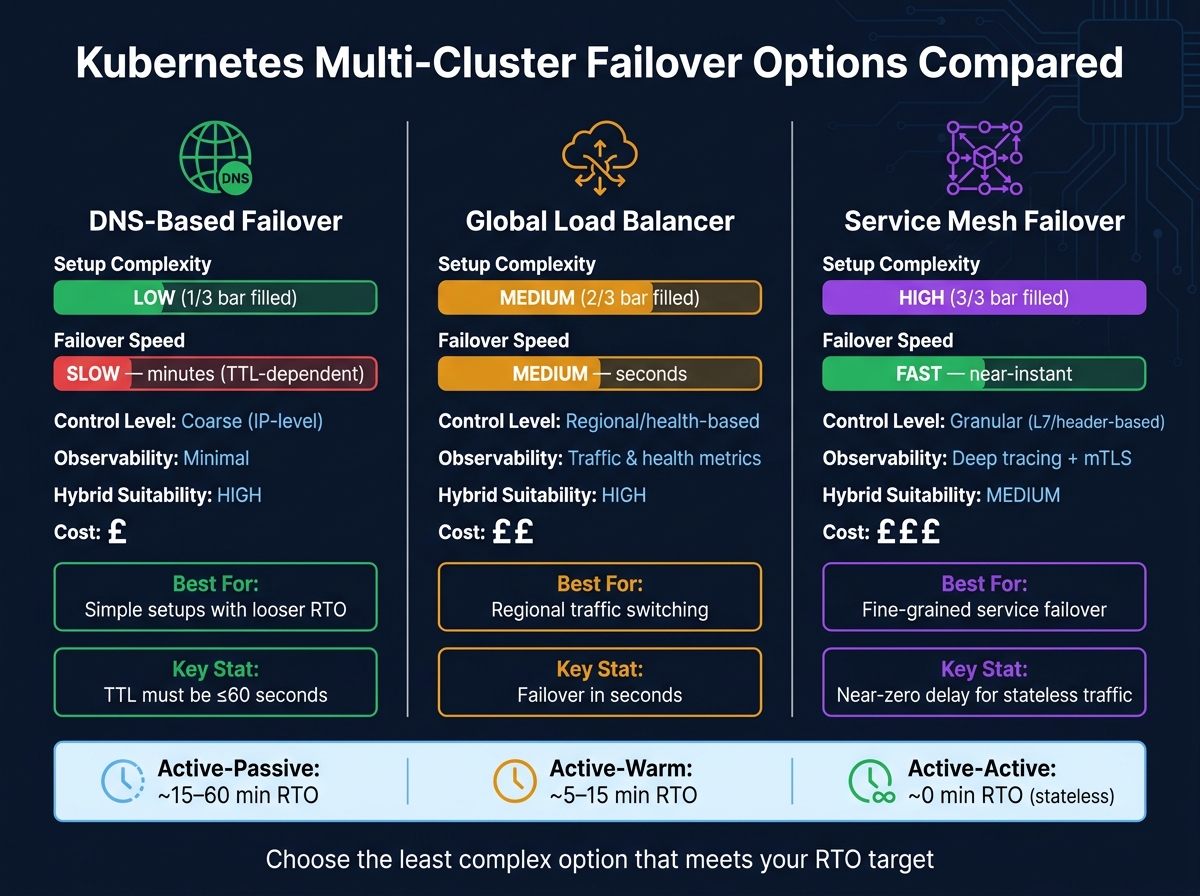 {Kubernetes Multi-Cluster Failover: DNS vs Load Balancer vs Service Mesh}
:::
{Kubernetes Multi-Cluster Failover: DNS vs Load Balancer vs Service Mesh}
:::
Pick the simplest setup that still hits your RTO and fits the way your team works. DNS gives you the easiest automated failover path. Global load balancers automate traffic moves between regions. Service mesh gives you the fastest and most fine-grained traffic shifts.
Compare DNS, global load balancers, and service mesh failover
DNS-based failover is the easiest place to start. You point your domain at the primary cluster, then switch to a secondary cluster when health checks show a problem. The catch is DNS TTL delay. In practice, failover can take several minutes. So if you need fast recovery, DNS is often too slow. But in hybrid setups, where keeping things simple matters more than raw speed, it can be a good fit.
Global load balancers sit in front of your clusters and route traffic based on health status and region-aware rules. They do a solid job of handling incoming traffic and land in the middle on both speed and setup effort.
Service mesh failover works at the application layer, so it can reroute traffic almost in real time. It can also keep traffic local unless a failure forces it to send requests to another place. That level of control comes with a cost, though. Meshes use extra CPU and RAM, and federation across clusters can get fiddly.
| Feature | DNS-Based Failover | Global Load Balancer | Service Mesh Failover |
|---|---|---|---|
| Setup Complexity | Low | Medium | High |
| Failover Speed | Slow (minutes/TTL) | Medium (seconds) | Fast (near-instant) |
| Control Level | Coarse (IP-level) | Regional/health-based | Granular (L7/header-based) |
| Observability | Minimal | Traffic/health metrics | Deep tracing/mTLS |
| Hybrid Suitability | High | High | Medium (complex setup) |
| Cost (Resource/£) | Low (£) | Medium (££) | High (£££) |
Start with the least complex pattern that meets your recovery target, then automate the traffic switch around it.
Plan separately for stateless and stateful services
Stateless services mainly need traffic to move. Stateful services are different. You need to promote data first, then move traffic.
Prevent configuration drift between clusters
Use one Git repository as your source of truth and keep both clusters aligned to the same manifests. In plain terms, Git should be the only place changes start.
Once both clusters stay in sync, you can automate stateless traffic switching next.
Automate failover for stateless workloads
Stateless workloads are usually the best place to start. There’s no local state to juggle, so the job is simpler: keep both clusters ready for production, then move traffic when health checks show the primary has gone down.
Deploy the application to both clusters with consistent capacity rules
Build both clusters with the same node pools, machine types, storage, and networking so the workload behaves the same way in either region [6]. In active-passive mode, you can keep the passive cluster smaller. But it should use the same HPA and Cluster Autoscaler policies and thresholds as the primary, so it can scale up at once during failover [6].
Keep the passive cluster ready for production, and test its scaling before failover. If that cluster can’t take the load when it matters, the setup looks fine on paper but falls apart in practice.
Once both clusters can handle traffic, health checks can drive the switch on their own.
Add health checks and automate traffic switching
Use health checks to trigger the move from primary to secondary. For DNS-based failover, keep the TTL at 60 seconds or less on every record involved in the switch [2]. That short TTL cuts down the time clients may still be sent to the failed cluster.
Use controller-driven or mesh-based failover
If DNS can’t meet your RTO, move traffic control into a controller or service mesh.
A controller-driven setup uses a component such as Linkerd's Failover extension to watch health and update TrafficSplit resources, moving traffic from a primary service to a secondary service without manual action [5][7]. A service mesh can do this too with locality-aware routing, which prefers local endpoints and sends traffic to a remote cluster only when local health checks fail [4].
If you use Istio, set two values for full failover:
- Set
maxEjectionPercentto100in yourDestinationRule, because the default of 10% can stop a full cluster failover [3]. - Tune
consecutive5xxErrorsto a low value such as1to3, with a shortintervalof1sto5s[3].
The best fit comes down to what level of control you need - cluster-level or service-level - and how much mesh overhead your team is ready to run.
Automate failover for stateful workloads and data dependencies
Stateful failover needs one thing above all: promote the data layer before you send traffic anywhere.
If traffic moves first, apps may come up against a database that is still read-only, behind on replication, or simply not ready. That’s where write errors and messy state start to show up.
Map data dependencies and replication methods
Start by listing every stateful dependency. That means databases, queues, object storage, and persistent volumes. For each one, define the replication method and the RPO you can live with.
| Workload Type | Replication Method | Failover Mechanism |
|---|---|---|
| PostgreSQL | Streaming replication / WAL shipping |
Patroni / pg_ctl promote
|
| Kafka | MirrorMaker 2 | Consumer group offset sync |
| Object storage | S3 Cross-Region Replication (CRR) | DNS / Global Load Balancer update |
| Persistent volumes | Portworx / StorageOS | Cross-cluster volume replication |
| Kubernetes config | Velero / Kasten K10 | GitOps sync (ArgoCD / Flux) |
Replication lag sets your RPO. PostgreSQL streaming replication can achieve an RPO of 0 seconds [8]. Snapshot-based tools like Kasten K10 typically give you about a 15-minute RPO [9].
That map gives you a plain answer to a hard question: what must be healthy before traffic can move?
Sequence database promotion before switching traffic
In this part of failover, order matters more than anywhere else. If you send users to the secondary disaster recovery cluster before the database is promoted, you’ll get write failures and inconsistent state.
Keep the sequence tight:
- Confirm the failure
- Promote the standby
- Update database connection strings or Secrets
- Shift traffic
Don’t move traffic until promotion is confirmed. With PostgreSQL, skip hard-coded sleeps in scripts. Use polling that checks pg_is_in_recovery() until it returns false. That tells you the standby has finished promotion before application pods try to connect.
And don’t start or scale application pods until that check passes.
There’s also a simple safeguard that helps in a bad day: use a dedicated health check subdomain that never takes part in failover routing. That keeps the health endpoint from affecting routing decisions during an outage [8].
Test failover, automate failback, and build an operating model
Once failover is set up, put it under strain. Then write down exactly how failback should work.
Run scheduled failover tests and record recovery results
An untested failover plan is just an assumption.
Run a quarterly drill at minimum. Simulate failure by cordoning nodes, scaling replicas to zero, or disabling ingress. Then check that traffic moves to the secondary cluster and that services return healthy.
Record every drill against your RTO and RPO. Log dates in DD/MM/YYYY format. Use what you learn from each drill to adjust failback thresholds and update the runbook.
Automate failback without causing repeated switching
Failback has its own danger: traffic bouncing between clusters.
If the primary comes back but your health checks are too sensitive, traffic can swing back and forth between clusters. That creates instability instead of fixing the problem.
Only trigger failback after the primary has passed sustained health checks. Complete reverse replication before updating DNS. Set DNS TTL to 60 seconds or less so the switch spreads within roughly two minutes [1][6]. After failback, return the DR cluster to standby capacity.
Turn the process into a maintained operating model
Once the mechanics are working, make the process repeatable with version-controlled runbooks and regular reviews.
Document a runbook for every failover scenario - stateless and stateful - and keep it alongside your infrastructure code. Assign an owner, set a review cadence, and maintain an incident record.
Keep the runbook version-controlled, review it after every drill or incident, and update it straight away.
FAQs
How do I choose the right RTO and RPO?
Choose your RTO and RPO by weighing uptime and data consistency needs against infrastructure cost and architectural complexity.
Active-active setups can deliver near-zero RPO and low RTO. The trade-off is higher cost and trickier data consistency across systems.
Active-passive is usually more cost-effective. But it often comes with higher RTOs and possible RPO lag while replication catches up.
Review these targets during quarterly disaster recovery tests, and adjust failover automation thresholds when needed.
When should I use active-active instead of active-passive?
Use active-active when you need maximum resilience, near-zero recovery time, and better use of your resources. It fits stateless workloads best, or mature systems that can deal with data consistency and concurrent writes across clusters.
It can also improve performance by spreading traffic across all clusters. The trade-off is cost: it often needs 100% more infrastructure than active-passive.
How can I avoid split-brain during stateful failover?
To avoid split-brain during stateful failover, make sure only one instance of a critical service is active at any given time. If two nodes both think they’re in charge, things can go wrong fast. A solid leader election mechanism helps stop multiple clusters from claiming primary control at the same moment.
For databases, tools like Patroni can automate failover while keeping data consistent. An active-passive setup helps too: the passive cluster stays in sync, but it does not serve production traffic unless the primary is confirmed offline.