
If I want to deploy more often, I need to do five things: measure my baseline, ship smaller changes, cut review delays, automate the path to production, and make rollback safe.
That’s the whole playbook in plain English. The article shows that deployment frequency is not just about shipping faster. It affects risk, feedback speed, and how much work builds up in each release. DORA data in the piece says high-performing teams are 2.3x more likely to deploy more than once a week, and top teams average around 4 deployments a day.
If I had to boil it down, I’d focus on this:
- Count successful production deployments each week or month
- Track all four DORA metrics, not frequency alone
- Cut batch size with small PRs and short-lived branches
- Set review targets, such as a first review within 4 working hours
- Automate build, test, and deploy so each change follows the same path
- Use feature flags to separate deployment from release
- Run unit, integration, and smoke tests before and after release
- Define rollback triggers like error rate, latency, and failed health checks
- Use canary or blue/green releases to limit blast radius
- Work to a 30-60-90 day plan: diagnose, automate, then harden safety
A few numbers stand out. The article notes that elite teams often keep change failure rate at 0–15%, while low performers can sit at 46–60%. It also gives a canary example: send 5–10% of traffic to the new version, watch it for 15–30 minutes, then continue or roll back.
The main point is simple: if I want more deployments, I should not start with pressure or extra meetings. I should start with measurement, smaller changes, and fewer manual steps.
The rest of the article then walks through how to do that in a safe, staged way.
5 Ways to Increase Your Deployment Frequency (DORA Metrics)

Measure your current baseline before changing the process
::: @figure 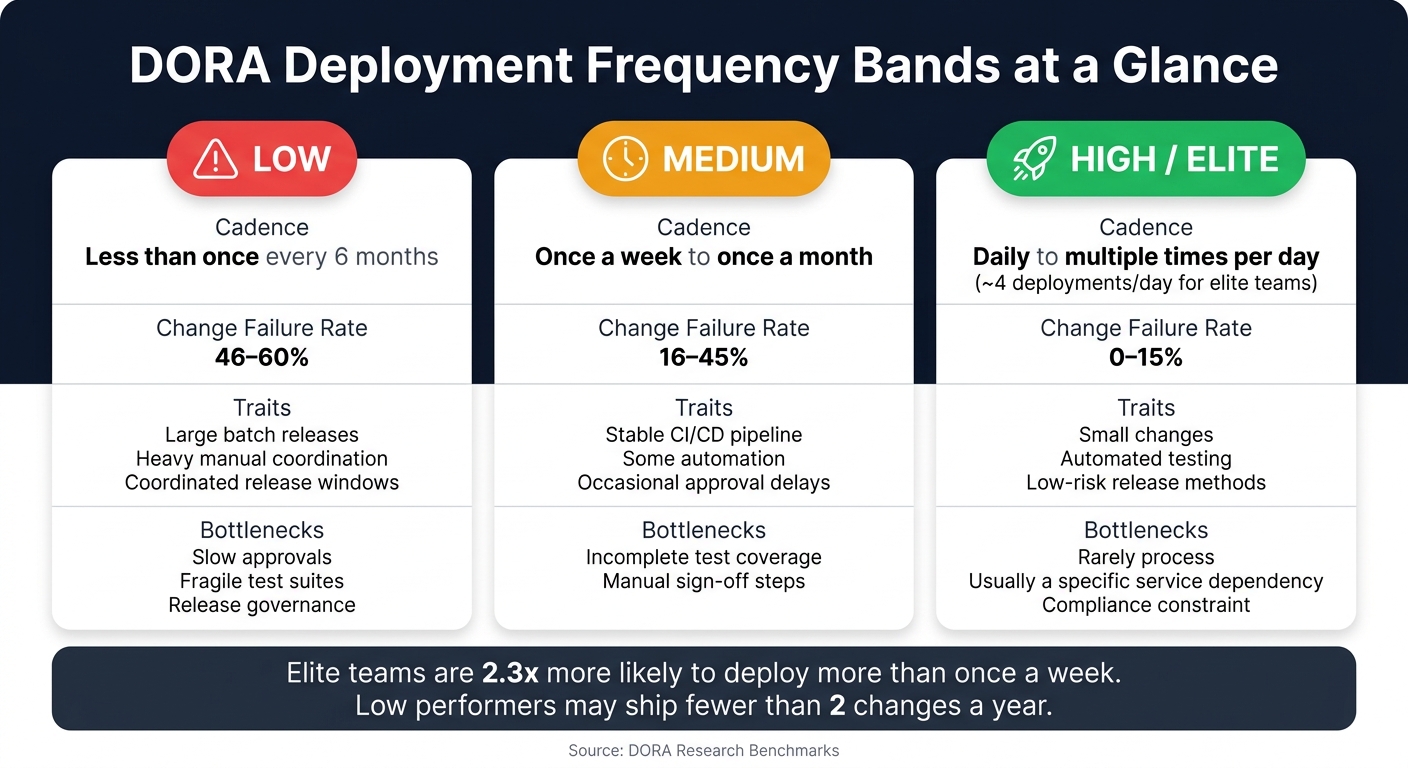 {DORA Deployment Frequency Bands: Low vs Medium vs High Performers}
:::
{DORA Deployment Frequency Bands: Low vs Medium vs High Performers}
:::
Start by counting successful production deployments over a four-week or one-month period. Leave out failed runs, staging pushes and any test environment activity. Once you can see the baseline, it becomes much easier to spot where the process is slowing down.
Set a simple deployment frequency scorecard
Use three sources: pipeline logs, deployment records and change calendars. Pipeline logs show when deployments finished. Deployment records confirm what actually reached production. Change calendars help you split planned releases from emergency fixes and freeze periods.
If your organisation runs more than one service, measure each one on its own. A customer-facing API and a back-office billing component often move at very different speeds. Blend them together, and you hide the actual constraint.
A simple scorecard should include:
- deployments per week or month
- the reporting window
- the service or product area
- any known release constraints, such as manual approval gates or scheduled change freezes
Count, classify and compare each service before you change the process.
Track the DORA metrics that affect release speed
Deployment frequency only makes sense when you look at it alongside the other three DORA metrics.
Lead time for changes shows how long code takes to get from commit to production. If that number is long, the hold-up may be in the pipeline or in slow approvals. Change failure rate shows what share of deployments lead to incidents or rollbacks, which gives you a clear view of release risk. Mean time to recover (MTTR) measures how fast the team restores service after a bad release. If MTTR is high, the issue may be resilience rather than release tooling.
Tracking all four together helps you move faster without making the service less stable.
Comparison table: low, medium and high deployment frequency
Use DORA benchmarks to put each service into context.[3][4] Use the table below to sort each service, then focus your effort on high-value areas that are still stuck in the lower bands.
| Frequency band | Typical cadence | Common operational traits | Likely bottlenecks |
|---|---|---|---|
| Low | Less than once every six months | Large batch releases, heavy manual coordination, coordinated release windows | Slow approvals, fragile test suites, release governance |
| Medium | Once a week to once a month | Stable CI/CD pipeline in place, some automation, occasional approval delays | Incomplete test coverage, manual sign-off steps |
| High | Daily to multiple times per day | Small changes, automated testing, low-risk release methods | Rarely a process issue; usually a specific service dependency or compliance constraint |
Elite performers pair high deployment frequency with a change failure rate of 0–15%, while low performers often see failure rates of 46–60%.[1][2] Use the table as a diagnostic tool, not a league table. Set targets based on product risk, team size and customer expectations.
If a service sits in the low or medium band, the next constraint is often batch size or approval flow.
Reduce batch size and remove delivery bottlenecks
One of the steadiest ways to deploy more often is simple: make each change smaller. Smaller changes tend to show you where work gets stuck. It might be review, testing, or approval. Use your baseline to spot where work spends the most time waiting. In many teams, the biggest wins come from smaller PRs, shorter review queues, and fewer hand-offs.
Break work into small, shippable changes
Instead of building a whole feature before merging, split it into small end-to-end slices. Each slice should ship a working piece of behaviour, even if it’s small. A branch should ideally live for a day or two, not for weeks. Keep each pull request tight and centred on one change, small enough for someone to review in 30–60 minutes.
Feature flags help a lot here. You can deploy code without showing unfinished work to customers. The code goes live, but the feature stays switched off until it’s ready. That means deployment and user release are no longer tied together. Engineers can merge and ship in small steps, while product managers decide when users see the change.
Once changes get smaller, the next hold-up is often review.
Speed up code review and approvals
Review queues are one of the most common places where work stalls. Set a clear target for review time, such as a first review within four working hours. Then back that up with automatic reviewer assignment so pull requests don’t just sit there waiting for someone to notice them.
Automated tools should deal with routine checks before a human gets involved. That includes linters, static analysis, and security scanners. This gives reviewers more time to focus on design choices and risk instead of getting dragged into formatting arguments.
For low-risk changes, pair review or group review can work well, with the change merged straight after approval. If governance rules apply, sort changes into clear categories. Use a lighter, faster review path for routine updates, and keep stricter review for anything that touches payments, sensitive data, or compliance-critical changes.
Shorter review queues can lift deployment frequency without adding more people.
Improve collaboration between engineering, operations and product
Bottlenecks often show up between teams, not inside them. When engineering, operations, and product each chase their own goal, whether that’s stability, features, or speed, releases turn into hand-off events. And hand-offs are where momentum goes to die. The fix is pretty direct: fewer hand-offs, shorter queues, and faster decisions.
A good place to start is a shared release-ready checklist. That might include:
- automated tests passing
- monitoring updated
- rollback steps confirmed
- compliance checks green
Alongside that, a short weekly deployment review can help keep everyone aligned. Engineering, operations, and product look at recent deployments, queue times, and any failures together. That steady rhythm makes it easier to spot bottlenecks early and fix them as a group. When all three teams share ownership of deployment frequency, changes tend to stick.
After the bottlenecks are smaller, automate build, test, and deployment to keep work moving.
Need help optimizing your cloud costs?
Get expert advice on how to reduce your cloud expenses without sacrificing performance.
Automate the CI/CD pipeline and strengthen release safety
Once batch size is down and review delays are shorter, automation clears out the last manual hand-offs. The goal is simple: remove manual steps between merge and deployment so every change goes through the same path, every time.
Automate build, test and deployment stages
Each deployment should begin with one scripted build that creates a versioned artefact, such as a container image or package, linked straight to the commit that started it. The code should stay the same across environments. The thing that changes is the configuration.
That’s where infrastructure-as-code comes in. It lets you move the same artefact through each environment instead of rebuilding it again and again. A sensible way to start looks like this:
- automate builds on every push
- add automatic deploys to staging
- promote to production based on risk
A fully automated pipeline can increase deployment frequency by a large margin.
Once that pipeline is in place, testing becomes the main thing that sets the pace of release speed.
Use automated testing and staging validation
Automated tests give teams confidence to deploy often without flying blind. Unit tests should run on every commit and stop the pipeline if they fail. After that, integration tests should run in the CI environment to check that services work together before the artefact moves forward.
From there, smoke tests and key end-to-end checks can run right after deployment to staging. That helps confirm that the main user journeys and core endpoints are working as expected.
Staging should stay close to production, but it doesn’t need to match it pound for pound. Use smaller instances and lower autoscaling caps. Use production data that is anonymised or reduced to a subset, and scale staging down outside working hours to keep costs under control.
Faster pipelines also need a clear way out when a release starts going wrong.
Prepare rollback and recovery paths before each release
A rollback plan written in the middle of an incident is already too late. Define it, document it and rehearse it before release. That includes knowing exactly what should trigger a rollback, such as:
- specific error rates
- latency thresholds
- failed health checks
It also means being clear on who has the authority to trigger it.
Blue/green and canary deployments make this much easier to handle. With blue/green, the old version stays live until the new one is shown to be healthy, so switching back is almost instant. With canary releases, the new version is sent to a small share of traffic first, usually 5–10%, while automated checks watch error rates and response times for 15–30 minutes before the pipeline moves to full rollout.[5]
If those metrics move outside the set thresholds, the pipeline should stop or roll back on its own. Database changes need their own treatment too. Handle them separately and make sure they are safe to roll back.
Track deployment frequency alongside change failure rate and MTTR, then turn those numbers into a 30-60-90 day plan.
Build a practical improvement plan and next steps
A 30-60-90 day plan for improving deployment frequency
Use three phases: diagnose, automate, then harden safety.
Once you know where the delays are, turn that into a 90-day delivery plan. Keep it simple. Each phase should lead to one visible change in release cadence, not a big process shake-up.
| Phase | Focus | Key Actions |
|---|---|---|
| Days 1–30 | Diagnose and baseline | Set a baseline dashboard, map the release path, and rank the top three bottlenecks. |
| Days 30–60 | Reduce batch size and automate | Shrink batch size, automate build-to-staging flow, and set review-time targets. |
| Days 60–90 | Strengthen safety and reporting | Expand test coverage, rehearse rollback paths, and publish shared DORA dashboards. |
In the first 30 days, focus on finding the bottlenecks. Then pick one service and push for a clear lift in deployment cadence. Top-performing teams average around 4 deployments a day, whilst low performers may ship fewer than 2 changes a year.[6] The goal of the 90-day cycle is simple: move one service up a tier.
Key points to carry into execution
Three ideas matter most:
- Measure production deployments
- Ship smaller changes
- Keep CI/CD fully automated
Deployment frequency on its own doesn’t tell the whole story. Lead time, change failure rate, and mean time to restore sit alongside it, showing whether faster delivery is hurting stability. Looking at all four together helps teams keep momentum after the first 90 days.
If pipeline design, rollback risk, or cloud cost growth is still holding back deployment frequency, Hokstad Consulting can help with DevOps automation and transformation.
FAQs
What is a good deployment frequency to aim for?
Elite teams often deploy multiple times a day, while high-performing teams usually deploy from once a day to once a week.
Instead of obsessing over a single target, use these benchmarks as a sense check for your own performance. The main goal is to ship small, manageable releases that keep work moving without trading away stability. Hokstad Consulting helps improve DevOps processes and CI/CD pipelines so teams can tighten deployment cycles and cut operational risk.
How can we deploy more often without increasing risk?
Break work into smaller batches. That makes each change simpler to check, easier to debug, and less risky to ship.
Use feature flags so deployment and release don't have to happen at the same time. Automate your CI/CD pipeline, work with trunk-based development, and lean on automated testing plus staging environments to catch problems early.
Which bottleneck should we fix first?
Start by mapping every manual process. That’s usually where delays and mistakes creep in first.
The best places to look early on are:
- manual testing
- long approval workflows
- fragmented pipelines that create data silos
A lot of teams find that 85% of lead time is spent waiting, not building. So the first job isn’t writing more code. It’s cutting the pauses between steps.
That means automating manual hand-offs and moving to trunk-based development first, because those changes tend to remove the biggest sources of delay.