
Enterprise CI/CD usually slows down for four reasons: too many tools, slow pipelines, weak controls, and unclear team ownership.
From the research I’ve reviewed, the pattern is plain. As delivery grows across many teams, local pipeline choices turn into drift, runner queues grow, flaky tests waste time, and audit evidence gets harder to prove. The data in this article points to the same pressure points again and again: 34% of firms still use partial or ad hoc delivery, main-branch success has dropped to 70.8%, and failed-build recovery now averages 72 minutes.
If I had to boil the article down to the main fixes, they would be these:
- Standardise pipeline templates instead of letting each team maintain its own files
- Track queue time, lead time, deployment frequency, change failure rate, MTTR, and flaky test rate
- Cut build delays with parallel jobs, caching, selective test runs, and short-lived runners
- Shift security checks earlier and use policy-as-code, signed artefacts, and short-lived identity tokens
- Replace ticket-based hand-offs with platform self-service and clear guardrails
What this means for you is simple: if your teams are writing more code but shipping feels slower, the pipeline is often the limit. The first job is not buying another tool. It is reducing drift, fixing capacity issues, and making controls automatic.
This article explains where enterprise CI/CD starts to strain, what the data says, and which changes usually come first.
CI/CD Standardization Framework | From Pipeline Chaos to Scalable Enterprise Delivery
Toolchain sprawl and standardisation gaps
Enterprise toolchain sprawl rarely arrives all at once. It tends to build up through lots of small local choices, until delivery rests on a brittle integration stack that's hard to change.
How disconnected tooling slows delivery
The main cost isn't just inconsistency. It's maintenance. When pipelines differ from team to team, somebody has to look after each one by hand. That usually means brittle pipeline files spread across many repositories, messy hand-offs between tools, and failures caused by configuration drift between dev, staging and production [4][5][6].
Central DevOps teams can also turn into bottlenecks if every pipeline change needs a ticket. In the absence of standardisation, teams usually drift towards tools and workflows that fit their own preferences. The result is a patchwork of one-off pipelines that central operations can't easily audit, support or reuse [4][1].
That lack of shared structure has a very practical cost. Even answering a basic question like which version of a library is running in production can take days [1].
How shared pipeline definitions reduce drift
Research points to a clear pattern: move away from copy-pasted configuration files and towards managed inheritance. In that setup, pipelines refer back to a central master template instead of cloning it. So when a security patch or tool update is made in the master, every inheriting pipeline gets it at once - no pull requests and no manual sweep across repositories [4].
The numbers make the point pretty quickly:
- Morningstar cut 36,000 pipelines to 50 reusable templates.
- Ancestry reduced developer effort 80-fold after consolidating Jenkins instances.
- United Airlines cut deployment time from 22 minutes to 5 for 3,000 engineers [4].
Pipeline reuse maturity shows how standardisation cuts drift:
| Level | Name | Methodology | Operational reality | Biggest Risk |
|---|---|---|---|---|
| L1 | Copy/Paste | Cloned config files | High maintenance; 500+ PRs per change | Security drift & audit failure |
| L2 | Component Reuse | Shared scripts/actions | Fragmented logic; hard to reason end-to-end | Complexity explosion |
| L3 | Static Scaffolding | IDP / Createbuttons |
Manual retrofit work; retrofits require manual sweeps |
Day 2cost shock |
| L4 | Managed Inheritance | Templates by reference | Zero-toil updates; stronger compliance | Over-centralisation; too rigid |
| L5 | Flexible Governance | Inheritance + team-specific blocks | Speed and control; IT owns guardrails, devs own logic | Requires balanced fence building |
(Source: Pipeline Reuse Maturity Model [4])
Standardising definitions cuts drift, but it doesn't remove the next bottleneck: build, test and deployment throughput.
Performance limits in builds, tests, and deployments
Once pipeline definitions are standardised, the next choke point is usually throughput. Builds start queueing, tests take too long, and deployments slow to a crawl. At that point, the key job is simple: find the numbers that show the problem first.
Main causes of slow pipeline throughput
One of the most common causes is bloated test suites paired with serial job execution. If a large suite runs on a single agent, feedback can slip from minutes into hours. In large monorepos, build times can reach nearly an hour before teams split work across multiple agents [8].
Poor caching makes that worse. If teams rebuild Node.js dependencies from scratch on every run, they burn time for no good reason. Caching can cut build times by 60% to 80% [11].
Infrastructure limits can slow things down even more. If runner pools are too small, even urgent hotfixes can end up stuck waiting. Manual approval gates add further delay, and undersized runner pools can hold up work that should move straight through [7].
Flaky tests create a different kind of drag. A 1% flakiness rate in a large test suite can trigger a near-constant stream of false rejections in merge queues. That chips away at developer trust and burns compute resources [10].
Even small delays add up at scale.
A 5-minute delay in a pipeline, when multiplied across 1,000 daily builds, results in hours of lost engineering time [3].
These issues usually show up first in queue time, lead time, and flaky-test rates.
Metrics enterprises should track first
Many teams collect pipeline data. Fewer track the numbers that help with capacity planning. The metrics below cover throughput, reliability, and test quality, which makes them a solid starting point for deciding where time and spend should go.
| Metric | What it measures | Why it matters |
|---|---|---|
| Lead time | Time from code commit to production | Measures the efficiency of the entire delivery process |
| Queue time | Time a job spends waiting for an available runner | Indicates infrastructure bottlenecks or undersized runner pools |
| Deployment frequency | How often code is successfully deployed | Reflects organisational agility and the ability to ship value |
| Change failure rate | Percentage of deployments causing a failure | Indicates the quality of automated testing and validation stages |
| Mean time to recovery (MTTR) | Time taken to restore service after a failure | Measures how quickly the team recovers from failures |
| Flaky test rate | Tests that pass and fail without code changes | Erodes trust and wastes compute resources |
Of these, queue time is often the clearest early warning sign. If jobs spend too long waiting for runners, the bottleneck is usually capacity, not the code.
What research recommends for scaling capacity
The clearest recommendation from the research is parallelisation. When teams shard large test suites across multiple agents, feedback loops can drop from 40 minutes to under 10 minutes [9][6]. That is a big shift. It means developers get answers while the change is still fresh in their heads, not after they have already moved on.
How the split is done matters too. Timing-based splitting uses past test duration data instead of file count. That tends to balance workloads better and stops one slow shard from holding up the full run.
The next lever is selective test execution. Path-based filters run only the jobs linked to the files changed in a pull request. That trims wasted work without lowering confidence. At the far end of scale, one organisation managed a 50-million-line monorepo by swapping static scripts for a Go-based pipeline that sized agents according to each change [8].
Ephemeral, containerised runners are another common step, often on Kubernetes. They spin up when needed and shut down after a single job. That keeps environments clean and ties cost more closely to usage [7][9].
For deployments, the same idea applies: keep speed high without losing control. Canary rollouts and blue/green deployments let teams move fast while still checking system health. Automated rollback, triggered by health checks rather than manual action, helps release stages keep pace as the rest of the pipeline gets faster.
At this point, the hard part is no longer just making pipelines faster. It is making sure release controls can keep up.
Security, governance, and auditability at scale
Once pipelines speed up, control needs to shift left and become automated.
At enterprise scale, governance starts to crack when local controls can't give you steady policy, traceability, or evidence across teams and environments. As pipelines stretch across more teams, repositories, and environments, permissions drift, approvals get murky, and security checks end up shoved to the end of the release flow.
Why governance breaks down as pipelines expand
As teams grow, ownership gets split between developers, platform engineers, and security teams. That often leaves controls uneven and without clear ownership [12]. One team may enforce one set of checks, another team may use different approval steps, and a third may manage access in its own way. When an audit lands, proving steady compliance becomes a headache [12].
Blanket approval gates slow things down without adding risk-based control, so reviewers start approving out of habit [13]. Late-stage security checks bring a different problem. When deadlines loom, teams look for ways around them, and that builds silent risk over time [12].
Controls that improve assurance without slowing releases
The most direct fix is to move security earlier. Run SAST and SCA alongside unit tests so issues are caught during the build, without stretching total elapsed time [13].
For access and credentials, use OIDC workload identity instead of long-lived API keys. Short-lived tokens cut the odds of leaked credentials hanging around longer than they should [13].
Approvals work better when they match the level of risk. Automated policy checks can handle low-risk changes, like patches or non-production deployments. Dual-human approvals can then be kept for high-risk infrastructure changes or production releases [13].
The table below links common governance concerns to pipeline controls that work at scale.
| Governance Concern | Scalable Pipeline Control | Benefit at Scale |
|---|---|---|
| Unauthorised access | Role-based access control (RBAC) and OIDC | Prevents credential leakage and limits production access |
| Audit failures | Automated evidence collection and SBOMs | Provides a verifiable software bill of materials for every release |
| Security drift | Central templates with inherited policy | Security updates propagate to all teams instantly |
| Manual bottlenecks | Policy-as-code (OPA) | Automates compliance checks so humans only intervene on exceptions |
| Tampered artefacts | Artefact signing (Cosign/Notation) | Guarantees integrity of the binary from build to deployment |
| Secret exposure | External secret stores (Vault/AWS Secrets Manager) | Removes sensitive data from code and logs |
The harder part is getting teams to work from the same operating model without slowing delivery.
Cross-team alignment, operating model, and key takeaways
::: @figure 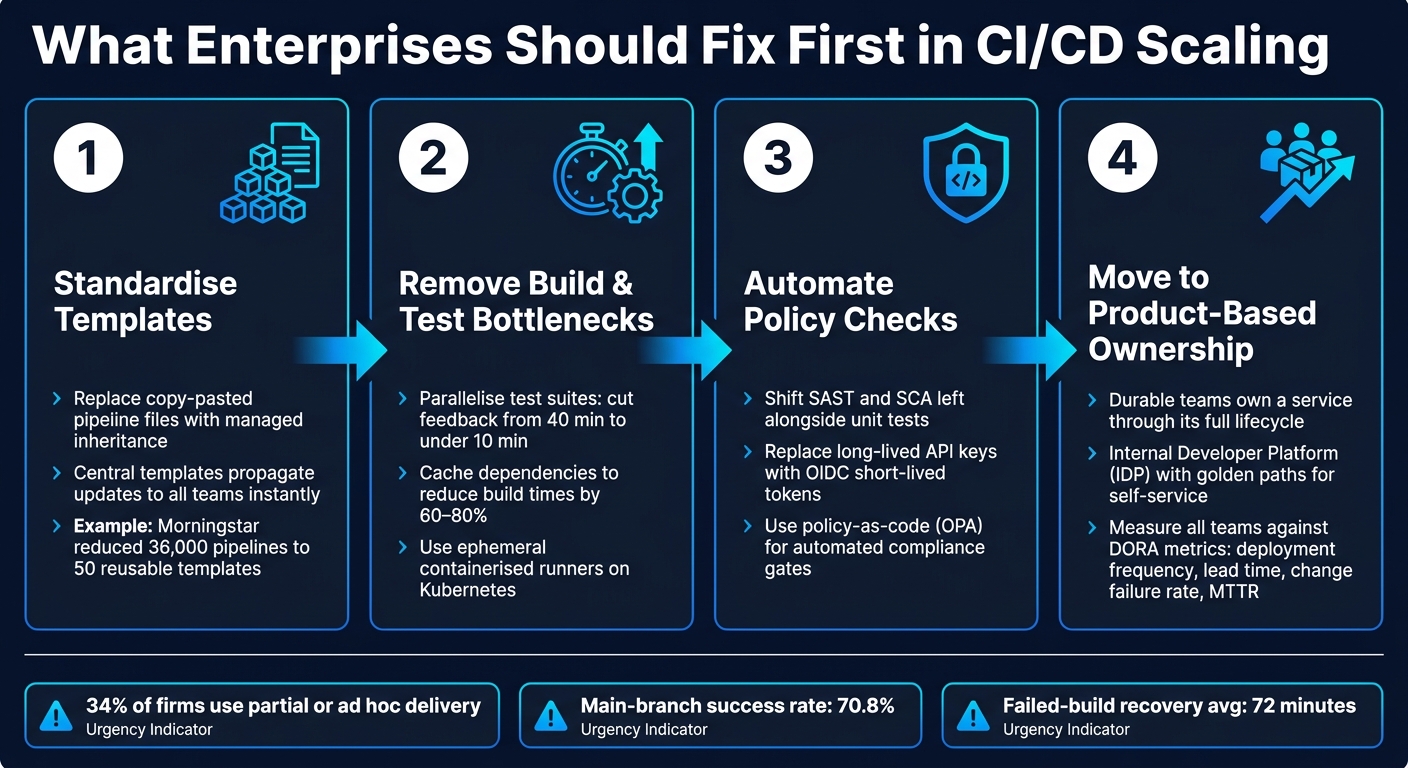 {Enterprise CI/CD Scaling: 4-Step Fix Sequence}
:::
{Enterprise CI/CD Scaling: 4-Step Fix Sequence}
:::
How shared standards reduce team friction
Once pipeline controls are automated, delivery speed comes down to ownership and the way teams work together. At scale, weak operating-model choices tend to show up in familiar ways: slower approvals, duplicate pipelines, and patchy controls.
Most CI/CD scaling problems are organisational, not technical. Development teams are pushed to move fast, while operations teams are pushed to keep things stable [2][1]. That tension creates friction that no pipeline tool can sort out on its own.
One common mistake is setting up a dedicated DevOps team
as a hand-off layer. On paper, that sounds tidy. In practice, it often turns into a bottleneck. Developers file tickets, wait for replies, and then start skirting the process when it drags. If the standard route is slow, people will find another route.
Platform engineering takes a different approach. It uses a central Internal Developer Platform (IDP) with golden paths: shared templates that already include security and compliance gates. Teams can self-serve inside clear guardrails. That cuts hand-offs and helps keep delivery standards steady across the estate [14].
It also helps to track teams against the same DORA metrics:
- deployment frequency
- lead time
- change failure rate
- MTTR
When everyone is measured against the same outcomes, the urge to optimise one part of the process at the expense of another starts to fade.
What enterprises should fix first
Once the operating model is clear, the next step is deciding what to fix first. The sequence is straightforward:
- Standardise templates
- Remove build and test bottlenecks
- Automate policy checks
- Move to product-based ownership, where durable teams own a service throughout its lifecycle [1]
For UK organisations in regulated sectors such as finance, healthcare, and central government, platform engineering makes it possible to keep compliance in place without slowing delivery [14]. The next step is applying those same standards the same way across teams.
FAQs
How do we know if our CI/CD pipeline is the bottleneck?
Look for systemic friction, not just green builds. A pipeline can look healthy on the surface while still draining time in the background.
The usual signs are easy to miss at first: deployment cycles that slip from hours into days, development slowdowns caused by tangled dependencies, delays from manual environment setup or approval gates, and teams working around central tools by building their own fixes.
That last one matters more than it may seem. When people start sidestepping the main system, it’s often a sign that the official path is too slow, too awkward, or both.
What should we standardise first across teams?
Start by auditing your existing pipelines so you can spot where they differ and where the main pain points sit.
Then standardise the core stages first: build, test and deployment. Do the same for shared infrastructure, including security scanning, artefact management and compliance reporting. A common framework with reusable templates helps you keep control and governance in place, while still giving teams room to work in ways that fit their day-to-day needs.
How can we speed up pipelines without weakening controls?
Speed up pipelines by swapping manual approval gates for automated, embedded governance. Hokstad Consulting points to a self-service model, where teams run their own pipelines inside predefined guardrails, with standardised templates and components helping them stay compliant.
The core idea is simple: build compliance into the pipeline instead of bolting it on at the end. That means using pipelines as code to keep a clear audit trail, policy as code to enforce rules automatically, and running security checks early rather than waiting until late in the process.
It also helps to run independent tasks and tests in parallel. If one check doesn’t depend on another, there’s no point making teams wait in a queue. Small changes like that can shave a lot of time off delivery without losing control.