
If I set Kubernetes requests and limits badly, I usually get one of two problems: wasted spend or unstable performance. The short version is simple: I use tight settings for critical services that must stay steady, and looser CPU settings for workloads that can use spare node capacity without hurting users.
Here’s the article in plain English:
- Requests control scheduling. Kubernetes places pods based on requested CPU and memory, not live usage.
- Limits control runtime behaviour. CPU over the limit gets throttled. Memory over the limit gets OOM-killed.
- Requests = limits gives Guaranteed QoS. That means lower eviction risk, but less burst room.
- Requests < limits gives Burstable QoS. That means better node use and lower spend, but more variation.
- CPU and memory should not be treated the same way.
- For CPU, many teams leave limits off for some workloads, or set them at 3–5× the request to avoid throttling.
- For memory, I keep limits in place and size them from observed peaks, often around 1.5–2× the request.
- High requests can waste money. A usage-to-request ratio below 0.3 often means a pod is reserving far more than it uses.
- Autoscaling depends on requests too. If requests are too high, HPA can scale too late.
- Pod savings only matter if node count drops. If rightsizing does not remove nodes, your £ bill may not move much.
::: @figure 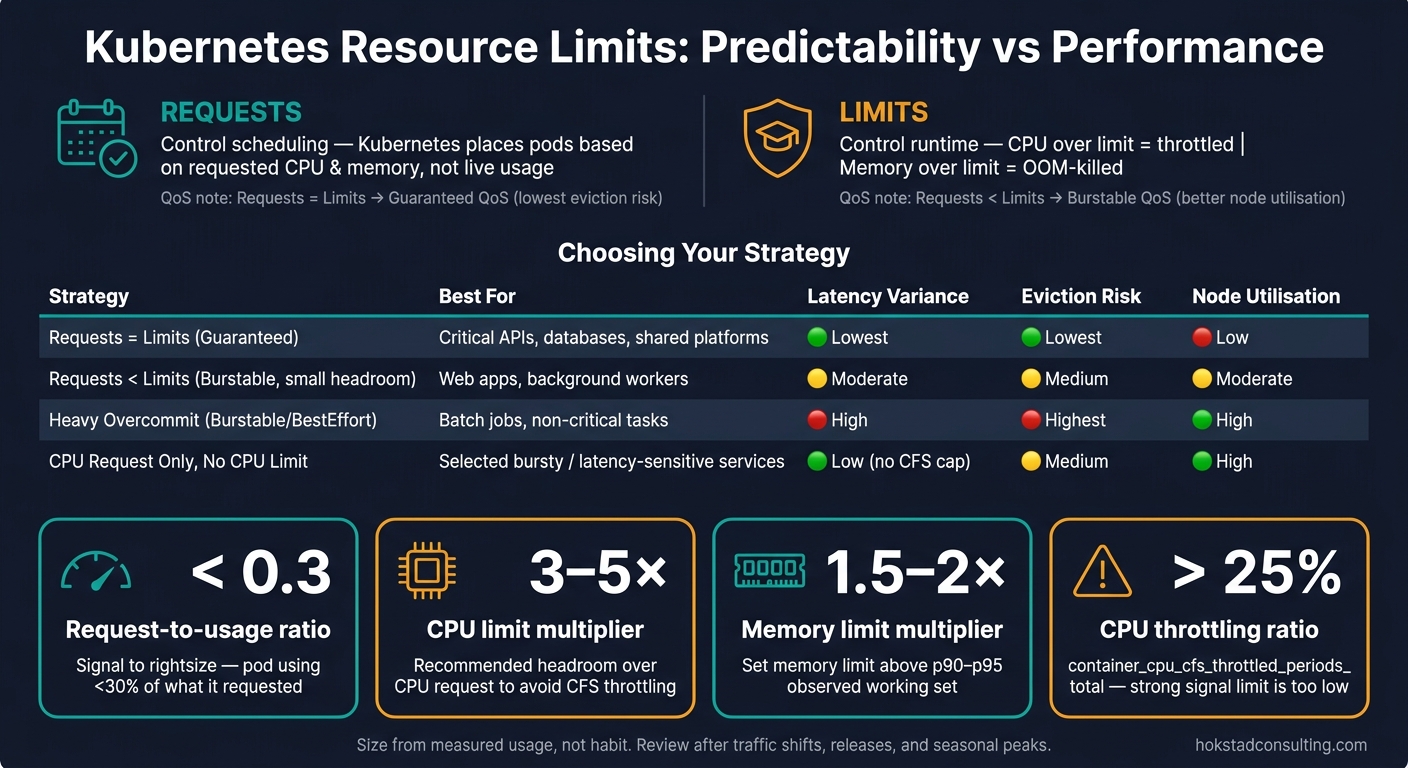 {Kubernetes Resource Limits: Predictability vs Performance Cheat Sheet}
:::
{Kubernetes Resource Limits: Predictability vs Performance Cheat Sheet}
:::
Kubernetes Resource Limits & Requests Explained: Stop Overspending on Cloud (With Real Examples)
Quick comparison
| Approach | Best for | Main upside | Main downside |
|---|---|---|---|
| Requests = Limits | Critical APIs, shared platforms, databases | Steadier behaviour, lowest eviction risk | Less burst room, more CPU throttling, lower node use |
| Requests < Limits | Web apps, workers, batch jobs | Better bin-packing, more burst capacity, lower spend | More noisy-neighbour risk, more tuning needed |
| CPU request only, no CPU limit | Selected bursty services | No CFS throttling cap, better tail latency | Less isolation on shared nodes |
| Tight memory limits | Most workloads | Prevents node-wide memory pressure | Poor sizing can trigger OOM kills |
My main takeaway: I size from measured usage, not habit. For latency-sensitive services, I bias toward stable performance. For batch and background work, I bias toward better node use. And I review the settings after traffic shifts, releases, and seasonal peaks.
That’s the trade-off this article walks through: predictability versus performance, and when each side makes sense.
Predictability-first: tighter limits and clearer capacity planning
On the predictability-first side of the trade-off, tighter limits give you steadier behaviour, but you give up some burst capacity. Use conservative limits when stable latency and fewer restarts matter more than short spikes in output. That’s usually the safer default when the cost of an SLO miss is higher than the savings from spare capacity [6].
Fixed reservations also make node headroom easier to plan. They can make benchmarking results line up more closely between staging and production too [6][2].
How QoS classes affect reliability under pressure
Guaranteed pods sit at the back of the eviction queue, and they can also get exclusive CPU cores with the CPU Manager's static policy [2][7][8]. The kubelet evicts BestEffort pods first, then Burstable pods that are using more than their request, and Guaranteed pods last [7][8].
The trade-off is pretty straightforward: CPU bursts get throttled, even when the node still has spare capacity [4]. If steady throughput matters more than peak throughput, that’s often a fair price to pay.
Where conservative settings help most
This approach fits workloads with strict latency or availability needs best. Production APIs, checkout flows, and internal systems with known peaks tend to benefit from the steadier behaviour that Guaranteed QoS provides. In regulated environments, conservative settings can also help with compliance and isolation, because they cut the chance of one workload eating resources that another one needs [9].
The difference becomes clearer when you look at the day-to-day effects side by side:
| Strategy | Latency Variance | Throttling Risk | Eviction Risk | Node Utilisation | Cost Certainty |
|---|---|---|---|---|---|
| Requests = Limits (Guaranteed) | Lowest | High (CPU) | Lowest | Low | Highest |
| Small Headroom (Burstable) | Moderate | Moderate | Medium | Moderate | High |
| Heavy Overcommit (Burstable/BestEffort) | High | Low until the node is saturated | Highest | High | Low |
There’s one catch worth calling out. Heavy overcommit can get shaky for stateful or critical workloads. If several pods burst at the same time, you can end up with an OOMKill cascade [4]. For services like checkout flows or payment processors, that’s often a worse outcome than the savings from packing the node more tightly.
For important but non-critical services, set limits at 1.1–1.2× requests [6][2]. The performance-first approach makes the opposite bet: more burst capacity, less certainty.
Performance-first: looser limits, more burst capacity and better utilisation
A performance-first setup loosens CPU limits, or drops them altogether, so workloads can use spare capacity on a node when it’s there. That tends to work best for batch jobs, queue consumers and background workers that don’t live or die by strict latency targets. Web services, for example, often use only 10% to 30% of the resources they’ve been given in normal conditions, with spikes reaching 60% to 80% [2]. If limits are too tight, that unused headroom just sits there doing nothing.
The trade-off is pretty simple: once limits are loose, tail latency depends more on what other pods are doing on the same node [6][11]. For batch work, that’s often fine. For user-facing services, it can be a gamble. What matters is whether that variation is acceptable for the workload.
| Workload Type | Configuration Focus | CPU Setup | Memory Setup | Performance Benefit | Operational Risk |
|---|---|---|---|---|---|
| Latency-sensitive API | Performance | Request = p95; No Limit | Limit = 1.5–2× Request | Minimal p99 latency; no artificial throttling | Noisy-neighbour risk if requests are inaccurate |
| Batch / Non-interactive | Predictability | Request = p50; Limit = 2× Request | Limit = Request | High cluster density; predictable costs | Slower completion if throttled |
| Background worker | Performance | Request = p50; No Limit | Limit = 1.5× Request | Faster backlog clearing during spikes | Can starve other pods on the same node |
Why CPU limits often hurt throughput
CPU throttling can be hard to spot if you only look at dashboards. Under the hood, the Linux Completely Fair Scheduler (CFS) applies CPU limits in 100 ms windows. That sounds harmless until you look at how multi-threaded apps behave.
A Go, Java or Node.js service can burn through its full 100 ms CPU budget in as little as 10 ms, then spend the next 90 ms waiting, even when the node itself is mostly idle [5][4][2]. The process hasn’t crashed. It just stalls. And that stall shows up where users feel it most.
By the time a dashboard shows 10% CPU throttling, user-visible p99 latency may have already increased by 300 ms [12].
That’s why some teams remove CPU limits for selected workloads and keep CPU requests accurate, so the scheduler can still place pods in a sensible way. Others keep limits, but set them at 3–5× the request to allow bursty patterns without dropping the safety barrier altogether [3][4]. If you’re running kernels 5.14 and above - including EKS 1.28+ and GKE 1.27+ - cpu.cfs_burst_us can reduce throttling-driven tail latency without removing limits outright [12].
Memory headroom without unnecessary instability
Memory is a different story. CPU gets throttled. Memory does not. If a container goes past its memory limit, the kernel sends an immediate SIGKILL [1][3][5]. That makes average-based sizing a bad bet.
A safer approach is to set memory requests at the p90 or p95 of observed working set usage, then set limits at 1.5× to 2× the request. That gives room for garbage collection pressure, cache rebuilds and rollouts [1][3]. For JVM services, set -Xmx to about 75% of the container memory limit so there’s still space for off-heap buffers, thread stacks and runtime overhead [4].
One thing to avoid: huge gaps between memory requests and limits. A 10× or 20× ratio is asking for node instability, while 2× to 4× is a more sensible upper bound [4]. In plain terms, memory should be sized against observed peaks, not averages. The right number comes from the workload in front of you, not from a one-size-fits-all rule.
Choosing the right approach for each workload
Once you understand the trade-off, the next step is picking the right bias for each workload. There isn't a cluster-wide default. The safest way to think about it is simple: match the resource policy to the risk of the workload. Services that are sensitive to latency need room to burst. Interruptible jobs usually need tighter control.
A decision model for APIs, batch jobs and shared platforms
Start with two questions: What happens if this workload slows down? And: What happens if it gets evicted? A user-facing API that slows down hits customer experience straight away. A nightly batch job can often just be run again. Same cluster, very different setup.
A practical default matrix [2][13]:
| Workload Type | Default bias | CPU Strategy | Memory Strategy | QoS Class |
|---|---|---|---|---|
| Stateless web API | Performance / Burst | Low request; burst room | Low request; moderate headroom | Burstable |
| Batch processing | Efficiency / Throughput | Low request; moderate cap | Request = Limit | Burstable |
| Analytics / Background | Throughput | Low request; burst room | Higher request; modest headroom | Burstable |
| Shared multi-tenant platform | Predictability / Isolation | Request = Limit (Guaranteed QoS) | Request = Limit | Guaranteed |
| Critical stateful services (e.g. databases) | Reliability | Request = Limit (Guaranteed QoS) | Request = Limit | Guaranteed |
Use Guaranteed QoS on shared nodes when one team's burst can damage another team's latency or availability. That's usually the point where letting workloads share nicely
stops being a good bet.
How autoscaling changes the trade-off
Autoscaling shifts this trade-off because it depends on the same requests you set here. HPA scales replicas based on utilisation against requests, not limits. So if requests are too high, HPA can wait too long to scale out even when the app is already under strain.
The Vertical Pod Autoscaler (VPA) changes requests over time based on observed usage. It's a good fit for memory right-sizing. But don't aim both HPA and VPA at the same CPU metric. They will clash and can create instability [2][10][1]. A sensible split is to use HPA for replica scaling and VPA for tuning memory requests on workloads where usage is hard to predict at the start.
Connecting cloud cost targets to service objectives
Cost control follows the same rule: size from evidence, not habit. Over-provisioning is one of the most common causes of wasted cloud spend in Kubernetes. Most enterprise clusters run at only 20–40% actual CPU utilisation compared with requested capacity [14]. In plain terms, that gap often means extra nodes and a bigger monthly bill than needed.
Set requests from observed usage, then add only modest headroom. A utilisation ratio below 0.3 - meaning a pod uses less than 30% of what it requested - is a strong sign that requests are too high [1]. For UK teams planning around seasonal peaks such as Black Friday or end-of-quarter demand, a fixed-fraction headroom approach works well: keep requests tied to observed usage and add a modest buffer instead of baking extra capacity into everything all year round [6]. That keeps planning grounded in evidence and helps keep cloud costs predictable alongside service reliability.
Conclusion: size by evidence, not by a fixed rule
Requests shape scheduling, while limits cap runtime behaviour through cgroups. You should size both based on what the workload actually does, not on habit or a hand-me-down rule. Once you work from observed usage, that trade-off gets a lot easier to handle.
Use P50 for services where efficiency matters most. Use P95 for latency-sensitive services. For memory, use P90–P95, because memory can't be throttled safely. Run VPA in UpdateMode: "Off" for 7–14 days before changing production settings. After that, watch container_cpu_cfs_throttled_periods_total. If the throttling ratio goes above 25%, that's a strong sign the CPU limit is too low for the workload's burst pattern, even if average utilisation still looks fine [3][5].
Also, check whether the change cuts node count. Pod-level savings on their own don't reduce the bill. Rightsizing pods only saves money if it leads to fewer nodes. So track the request-to-usage gap at the node level, not just per pod [15].
Hokstad Consulting helps teams automate right-sizing and line up Kubernetes policy with cloud cost targets.
Key takeaways for UK teams
Use Guaranteed QoS for critical or shared services, where one team's burst could hurt another team's reliability. Use controlled overcommit with Burstable QoS when variability is acceptable and the cost of the odd eviction is low. Review request-to-usage ratios on a regular basis, and again after major traffic shifts, such as a seasonal peak.
| Operating Practice | Impact on Predictability | Impact on Performance & Cost | Typical Tooling |
|---|---|---|---|
| Guaranteed QoS (Req = Lim) | High: Minimal eviction risk; stable worst-case behaviour | Lower performance / Higher cost: No burst capacity | Prometheus, Static CPU Manager |
| Burstable QoS (Req < Lim) | Medium: Eviction possible under node pressure | Higher performance / Lower cost: Better bin-packing | VPA, HPA, Goldilocks |
| CPU Request Only (No Limits) | Lower: Noisy-neighbour risk on shared nodes | Maximum throughput: Eliminates CFS throttling |
kubectl top, Grafana (PSI metrics) |
| Automated Right-sizing | Variable: Depends on eviction and update settings | Optimal cost: Aligns spend with actual demand | VPA (Auto), Karpenter |
| Request-to-usage ratio < 0.3 [1] | - | Signal to revisit: Pod is using less than 30% of what it requested | VPA recommendations, kubectl top
|
Tie each tuning decision to a measured outcome: p99 latency, OOM rate, throttling, or monthly spend.
FAQs
When should I remove CPU limits?
Consider removing CPU limits for latency-sensitive workloads, or when you want to avoid performance drops caused by silent throttling. CPU is a compressible resource, so without limits, containers can use spare capacity when it’s available. That can help cut response times.
For most services, CPU requests are usually enough to reserve capacity and keep things stable without adding an artificial bottleneck.
It often makes sense to keep CPU limits only in a few cases, such as:
- batch processing
- containing buggy software that uses more resources than it should
How do I choose memory requests and limits?
Set memory requests to match your application's usual steady working set. That should include start-up spikes and any background processes, so the scheduler can reserve enough memory from the start.
Set memory limits as a hard cap above what you've seen at peak usage. In many cases, that means around 1.5 to 2.0 times the request. If the container goes past that limit, it gets an immediate OOMKilled restart. That's why it's worth watching memory use over several days or weeks, then adjusting the numbers based on what the app actually does.
How do I know if rightsizing will cut costs?
Compare your current resource requests with what your workloads have actually used over time. If requests sit far above real consumption, you’re probably over-provisioned. And that usually means the same thing: wasted capacity and higher infrastructure spend.
A usage ratio below 0.3 is a strong signal that you’re asking for far more than you use.
When you make rightsizing calls, don’t lean on a tiny snapshot. Use at least two weeks to one month of data so you catch normal traffic patterns instead of odd spikes or one-off dips.