
AI can cut cloud waste by matching each workload to the right pricing model, then acting on low-risk changes with controls in place.
If I strip this down to the part that matters most, it comes to four points:
- UK firms often spend 12–18% of revenue on cloud
- About 30–35% of that spend may be wasted
- A £2 million annual cloud bill can hide £100,000 to £200,000 in avoidable cost
- The main gains come from better use of on-demand, commitments, and spot
What I take from the article is simple: AI is not there to replace finance, platform, or engineering teams. It helps them make pricing choices faster, based on workload signals such as steadiness, spikes, interruption tolerance, and latency needs.
Here’s the short version of how it works:
- It pulls in billing, usage, traffic, and deployment data
- It groups workloads by behaviour
- It forecasts near-term demand
- It suggests the lowest-cost safe pricing model
- It applies low-risk actions automatically
- It sends high-risk changes through approval checks
The article also makes a clear point about control. Not every action should run on its own. Production, regulated, and customer-facing systems still need policy rules, approval gates, and rollback limits.
For me, the most useful takeaway is this: AI pricing automation only works when data, policy, and measurement stay linked. If tags are messy, approvals are loose, or teams only watch cost and ignore latency or errors, the system can make bad calls.
A simple way to think about workload fit:
| Workload type | Best fit | Main watch-out |
|---|---|---|
| Stable | Reserved / Savings Plans | Paying for too much if demand drops |
| Bursty | Mix of reserved and on-demand | Baseline set too low or too high |
| Interruptible | Spot | Capacity can disappear |
| Latency-sensitive | On-demand or reserved | Service risk if pricing chases savings too hard |
If I were starting from scratch, I’d begin in dev or test, run in read-only mode first, compare AI suggestions with SRE decisions, and only then allow automatic execution for low-risk cleanup.
That’s the core idea of the article: use AI to turn cloud pricing from a slow manual task into a controlled decision loop that cuts waste without hurting service.
ignio AI Agent for Cloud Cost Optimization | Optimize Cloud Costs Across AWS, Azure & GCP
How does AI-powered pricing model automation work?
::: @figure 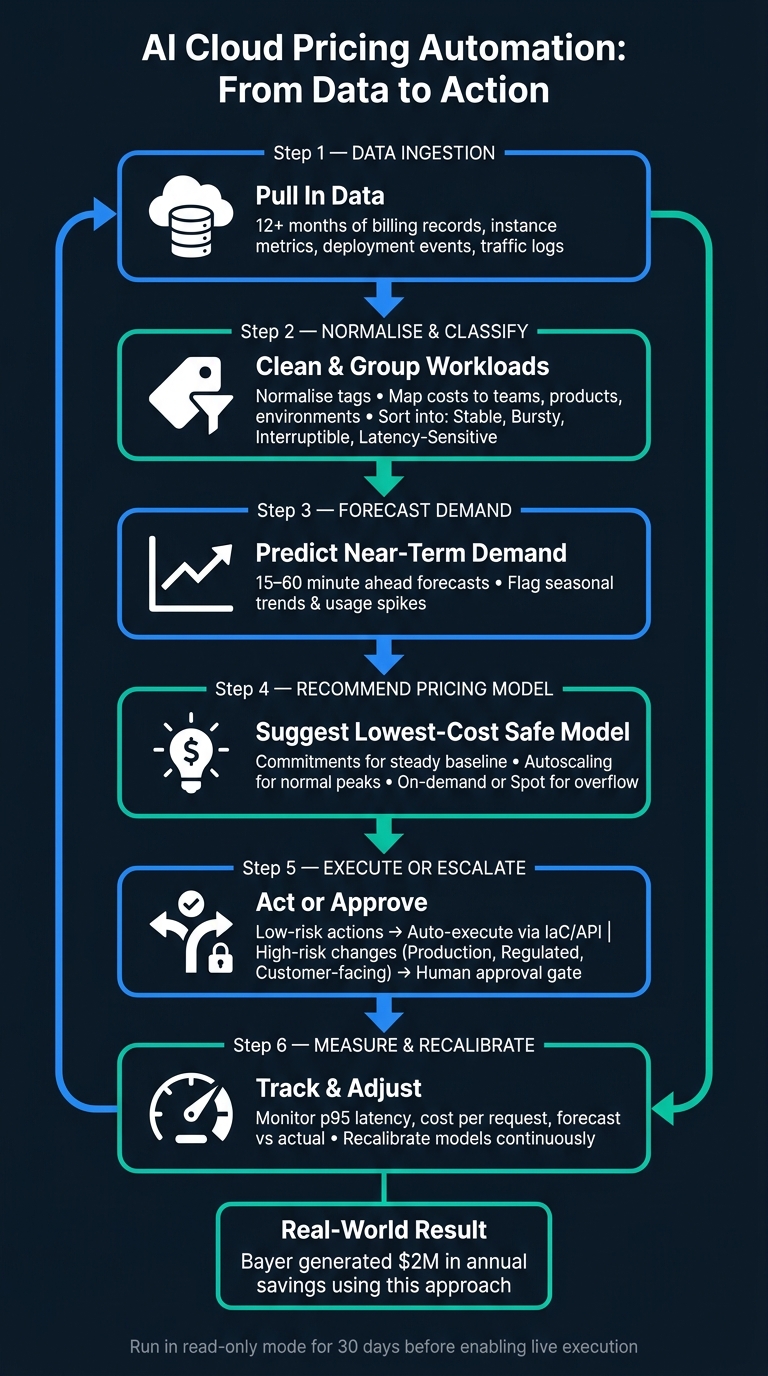 {AI Cloud Pricing Automation: From Data to Action}
:::
{AI Cloud Pricing Automation: From Data to Action}
:::
At its core, this system runs in a loop: it takes in data, spots usage patterns, forecasts demand, suggests a pricing model, and then applies approved changes. That’s how AI turns cloud billing data into pricing moves.
The pricing models AI can optimise
AI-powered automation can work across the three main cloud pricing models. Each one fits a different kind of workload.
| Pricing Model | Best For | Key Risk |
|---|---|---|
| On-demand | Short-lived or uncertain demand | Highest unit cost |
| Reserved / Savings Plans | Stable, predictable baseline workloads | Overcommitment waste |
| Spot instances | Interruptible batch jobs, CI/CD pipelines | Capacity interruption |
These are a starting point, not a hard rulebook. What matters most is how the workload behaves, and the next section gets into that.
The automation cycle from data to action
The cycle starts by pulling in at least 12 months of billing records, instance metrics, deployment events, and traffic logs. Tags are then normalised so costs map cleanly to products, teams, and environments.
Once the data is cleaned up, the system sorts workloads into groups like critical services, bursty web workloads, and interruptible batch jobs. From there, forecasting models predict demand 15 to 60 minutes ahead and flag seasonal trends or usage spikes before they land.
The decision logic is fairly simple:
- Use commitments for the steady baseline
- Use autoscaling for normal peaks
- Use on-demand or spot for overflow
Low-risk actions, like terminating zombie containers, can run automatically through Infrastructure as Code or API calls. After that, the system watches the results by tracking metrics such as p95 latency and cost per request. It then adjusts its models based on the gap between forecast and actual usage. [3]
Bayer used this approach for autonomous cloud spend optimisation and generated $2 million in annual savings. [4]
Where human approval still matters
Automation doesn’t mean taking people out of the loop. Production systems, customer-facing services, and regulated workloads should still go through human approval gates before any change goes live.
Open Policy Agent (OPA) Gatekeeper rules in Kubernetes can stop agents from cutting replica counts below high-availability thresholds. Service Control Policies can also block AI roles from terminating instances tagged as Production
or Stateful
. [5] It also helps to add a 72-hour cooldown period so the agent can’t keep mutating the same resource again and again. [5]
A sensible first move is to run agents in read-only mode for 30 days before live execution. That gives teams a log of proposed actions and a way to compare those actions against human SRE decisions. [5]
AI that doesn't take into account existing autoscalers (HPA, VPA, Cluster Autoscaler, Karpenter, Keda, etc.) cannot offer accurate predictions or scale safely and efficiently.- Danielle Inbar, Komodor [1]
That control layer makes it safer to move from policy to workload-specific optimisation. With guardrails in place, the next step is matching each workload type to the right pricing model.
Which workloads fit each cloud pricing model?
Building on the automation loop above, the next step is simple: match each workload pattern to the cheapest safe pricing model. That’s where AI helps. It looks at how a workload behaves over time, then maps that shape to the pricing option that cuts spend without putting service at risk.
Stable, bursty, interruptible and latency-sensitive workloads
AI systems usually sort workloads into four groups: stable, bursty, interruptible and workloads with strict latency or uptime requirements. Each one behaves differently, so each one tends to suit a different buying model.
Stable workloads run at a fairly steady level all day and night. Bursty workloads stay quiet for long stretches, then spike. Interruptible workloads can stop and restart without much damage. Latency-sensitive workloads need steady performance and very low risk of disruption.
| Workload Type | Best Pricing Model | Cost Predictability | Reliability Risk | Practical Example |
|---|---|---|---|---|
| Stable | Reserved Instances or Savings Plans | High | Low (risk of over-paying if demand drops) | Steady SaaS back ends, production databases |
| Bursty | Hybrid (Reserved + on-demand) | Medium | Low | E-commerce traffic spikes, month-end batch reporting |
| Interruptible | Spot Instances | Low | High (risk of termination) | Overnight analytics, CI/CD build agents |
| Latency-Sensitive | On-Demand or Reserved | High | Low | Real-time payment processing, production APIs |
One small but important point: low CPU use doesn’t always mean a database should be downsized. Sometimes that spare capacity is there for traffic bursts and SLA protection.[1]
How AI matches workload signals to pricing choices
The main signals behind these pricing decisions are usage stability, seasonal peaks, interruption tolerance and latency sensitivity. AI reads those patterns, not just average CPU, to work out which model fits each workload at that moment.
A workload with a repeatable schedule and little tolerance for interruption usually points to committed capacity. A workload with sharp swings and no strict latency need is often a better fit for spot or on-demand. But those matches only work if the source data is clean and the rules behind the system are sound.
That means the automation still needs clean data, policy guardrails and approval controls.
What data, policies and controls does reliable automation need?
Once workloads line up with the right pricing models, automation only works when the data is clean and the guardrails are clear.
Minimum data needed for accurate recommendations
Reliable automation starts with structured data. If the inputs are messy, the output will be too. The core data points are:
- Granular billing exports by service, usage type and tag [6]
- Current Savings Plans and Reserved Instance coverage, plus 90-day usage history for baseline and break-even analysis [6]
- VPC flow logs to show cross-AZ traffic and egress cost drivers [6]
That data then feeds the policy rules that decide what the system can change on its own.
Guardrails that cut cost without breaking services
The goal here is simple: decide which actions can run automatically and which need a person to sign off. AI can draft a Terraform plan or produce a deletion candidate list for review, but resource deletion should require human approval [6]. Every recommendation should also link back to the metric, deployment or tag change that triggered it [6].
Clear ownership matters too. Without it, cost control turns into finger-pointing. The split should look like this:
- Engineering and DevOps check technical recommendations and approve infrastructure changes
- Finance and procurement own long-term commitment decisions
- Platform teams own governance and tagging rules [6]
Start in non-production first, then move into production with approval gates in place [4].
How consulting support can speed up delivery
Some teams just don’t have enough in-house FinOps or automation capacity to set this up fast. That’s where outside support can help. Hokstad Consulting helps organisations put governed cloud pricing automation in place through cloud cost engineering, DevOps transformation, custom development and AI strategy.
That kind of support can speed up tagging, approvals and governance, which means AI recommendations can be trusted sooner.
With data, controls and ownership in place, the next step is checking whether the automation is saving money.
How do you measure success and what should you do next?
Metrics that show automation is delivering value
Use the same workload patterns the model relied on when it made the pricing choice. Once guardrails and ownership are set, the next step is simple: check whether the automation is doing its job. That means looking at numbers, not hunches.
The table below shows the main before-and-after metrics teams should watch as they move from manual pricing decisions to AI-driven automation:
| Metric | Before Automation | After AI Automation |
|---|---|---|
| Unit cost | High; based on peak provisioning | Optimised; tracks actual workload demand |
| Commitment utilisation | Inconsistent; buy-too-many vs. buy-too-few decisions | Kept aligned as infrastructure changes [7] |
| Forecast accuracy | Low; 17–22% variance common [2] | High; continuously recalibrated per deployment |
| Service health | Reactive cleanup sprints [8] | Continuous; low-risk resources cleaned up automatically |
Cost on its own won't tell the whole story. Track latency, errors, traffic and saturation alongside spend. If costs fall but performance slips, that's not a win.
A practical starting plan for UK organisations
Once those metrics are live, use them to roll out automation in stages. The aim isn't full autonomy on day one. It's better pricing decisions, with less manual work and less risk.
A sensible place to begin is in development or testing environments, where the blast radius is smallest [8] [7]. Start in read-only mode. Then switch on automatic execution once the recommendations line up with actual outcomes [7]. Version the rollout rules so engineering and finance can review them together [8].
For medium-risk actions, a 24-hour notification window works well: the action goes ahead automatically unless someone steps in and blocks it [8]. After the first trial, extend autonomy into non-production, automate low-risk cleanup, and measure the savings in £ per month.
Key takeaways
AI improves pricing-model selection only when workload signals, controls and measurement stay in sync. The biggest gains come from matching the right model to the right workload, then backing that up with clear controls. Judge success on both cost and operational performance, and expand automatic execution step by step as trust in the system builds.
FAQs
How much cloud spend can AI realistically save?
AI-powered tools can cut cloud spend by 25% to 50% for many organisations. Most of that comes from automating workload rightsizing and scaling based on demand, which helps reduce the overprovisioning behind a lot of yearly cloud waste.
In more advanced set-ups, some businesses have reported production savings of up to 50%. Hokstad Consulting supports these results with tailored AI-driven DevOps solutions that improve resource allocation and forecast accuracy.
What risks come with automating pricing changes?
Automating pricing and resource changes can backfire when the AI doesn’t understand how the application works.
Take a database, for example. It might get flagged as overprovisioned because CPU use looks low. But that low use may be deliberate. The system could be sized that way to handle burst traffic.
If the AI acts on that signal alone, the result can be nasty: latency spikes, service incidents, and outages that cost far more than the money saved. And without human-in-the-loop controls, a single bad policy can set off cascading failures, especially across complex multi-cloud setups.
What should we fix before using AI for cloud pricing?
Before you use AI for cloud pricing automation, get the basics sorted first.
Start with full resource tagging, a usage audit, and right-sized resources that match actual workload demand. If those pieces aren’t in place, AI ends up working from messy inputs and weak cost signals.
You’ll also want financial guardrails in place, make sure applications can shut down cleanly for spot instances, and gather at least six months of clean, standardised historical data.
Think of it like this: if your cloud estate is messy, AI won’t fix the mess. It’ll just make decisions on top of it.