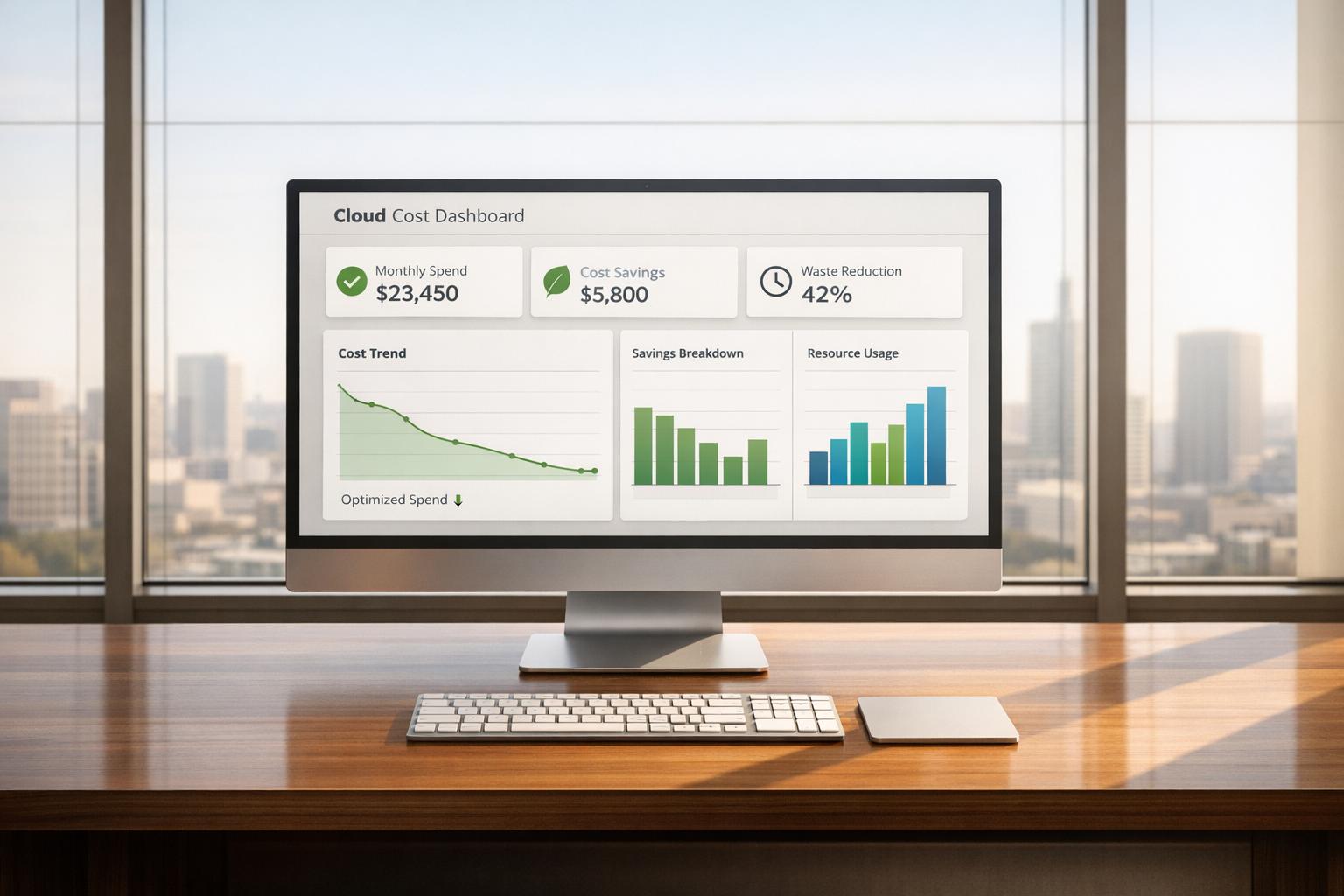
Automation simplifies cloud cost reporting by reducing errors, saving time, and providing real-time insights. Instead of relying on manual processes like merging spreadsheets or delayed monthly reviews, automated tools handle data collection, analysis, and reporting across platforms like AWS, Azure, and Google Cloud. This ensures better accuracy and faster decision-making, helping organisations manage budgets effectively and cut unnecessary expenses. Key benefits include:
- Error Reduction: Automation achieves accuracy rates of 99.5%–99.9%, minimising mistakes caused by manual data entry.
- Time Savings: Monthly reporting tasks that take 30+ hours manually can be completed in minutes.
- Real-Time Alerts: Automated systems flag unusual spending patterns immediately, preventing budget overruns.
- Cost Optimisation: Tools identify idle resources, adjust resource allocation, and scale usage dynamically, reducing waste by up to 60%.
- Improved Forecasting: Historical data analysis helps predict future costs and set realistic budgets.
Companies like Adaptavist, GE Vernova, and Finova have achieved savings of 20%–70% by automating cost management processes. Automation not only controls spending but also allows teams to focus on high-priority projects instead of repetitive tasks.
::: @figure 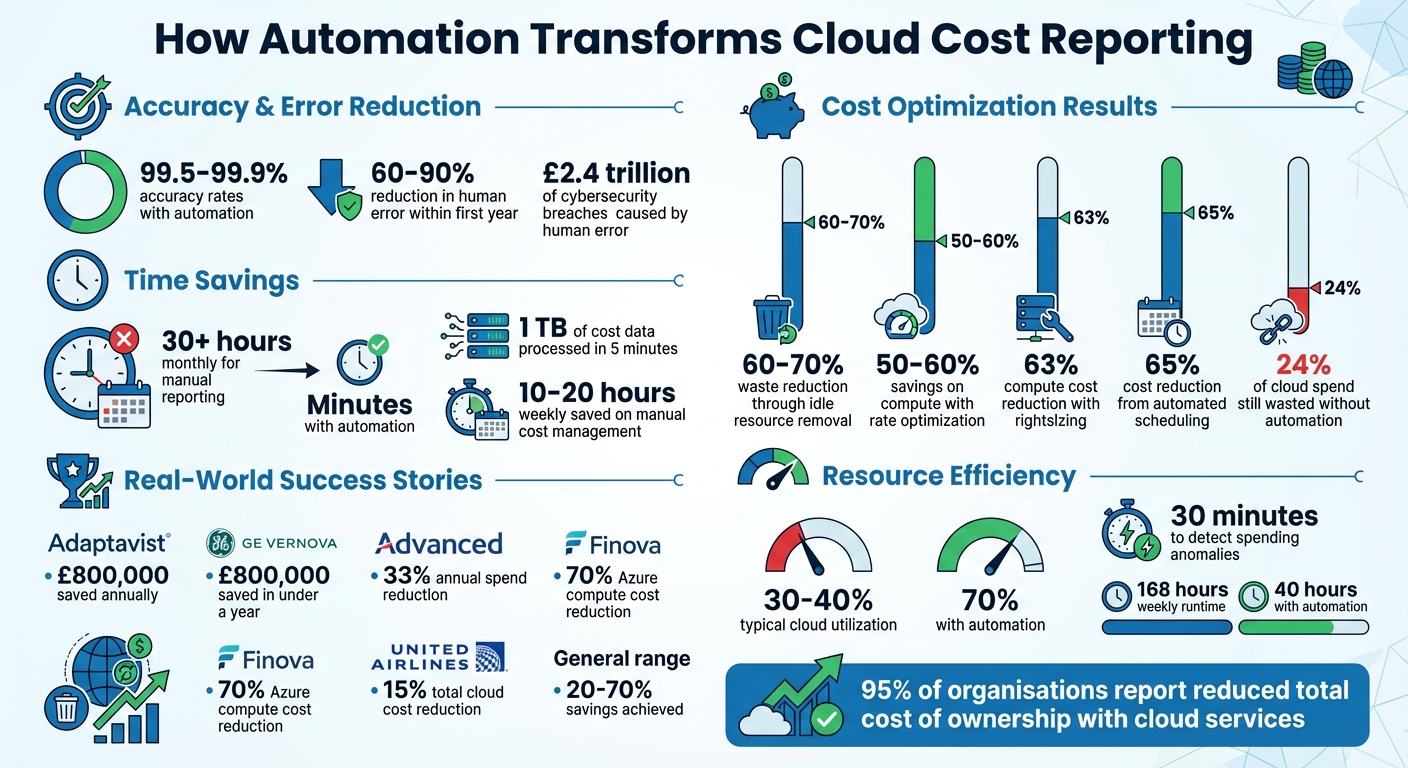 {Cloud Cost Automation Benefits: Key Statistics and Savings}
:::
{Cloud Cost Automation Benefits: Key Statistics and Savings}
:::
Main Benefits of Automation in Cloud Cost Reporting
Better Accuracy and Fewer Errors
Relying on manual processes for cloud cost reporting often means spreadsheets and manual data entry, which can be a recipe for mistakes. Poor data quality costs businesses in the U.S. around £2.4 trillion annually[6][10], and human error is behind a staggering 95% of cybersecurity breaches[6][9]. A single misplaced decimal or an incorrect formula can wreak havoc on an entire report, leading to flawed financial decisions.
Automation steps in to address these risks by handling repetitive tasks with consistent, rule-based processes[6][7]. Automated systems boast accuracy rates ranging from 99.5% to 99.9%[11], and studies indicate that AI-driven automation can cut human error by 60% to 90% within the first year of use[11]. These platforms not only catch problematic data in real time but also prevent errors from spreading through financial analyses[7][11]. By enforcing consistent naming conventions and standardised procedures across cloud resources, automation reduces variability caused by manual management[7]. As accuracy improves, the manual workload decreases, enabling faster and more reliable reporting.
Faster Reporting and Time Savings
When data is more accurate, reporting becomes quicker and more efficient. Manual cloud cost reporting can take over 30 hours each month, as teams struggle to consolidate data from multiple providers[12]. This is a major drain on time that could be better spent on strategic projects rather than administrative chores.
Automation completely redefines this process. Tasks that once took days or even weeks - like compiling month-end reports - can now be completed in minutes. For example, automated tools can process 1 TB of unstructured cost data in just 5 minutes[13]. Reports can also be scheduled to automatically reach key stakeholders, such as Finance, Engineering, or Executives, ensuring everyone has access to the same consistent data as often as needed[8]. This shift from monthly reviews to real-time updates allows organisations to address cost spikes immediately, instead of reacting weeks later when the bill arrives[13].
Real-Time Data for Faster Decision-Making
Manual reporting often suffers from delays, leaving decision-makers with outdated information. This lag makes it tough to respond to cost anomalies in real time, forcing teams to focus on explaining past overspending rather than preventing it in the first place[12][13]. Automation solves this by providing real-time insights, enabling teams to quickly detect, decide, act, and review[13][14].
With automation, engineering and finance teams can shift their focus from managing spreadsheets to tackling high-impact strategic initiatives[12][14]. Real-time monitoring transforms cost management into a forward-thinking exercise, allowing organisations to anticipate and mitigate potential overspend before it becomes an issue. This proactive approach turns cloud cost management into a strategic advantage rather than a reactive chore.
How Automation Improves Cost Visibility and Forecasting
Combining Data from Multiple Cloud Providers
Managing costs across platforms like AWS, Microsoft Azure, and Google Cloud can feel like piecing together a puzzle. Each provider uses its own billing formats and reporting systems, which often leads to a fragmented understanding of overall expenses. Automation tools tackle this challenge by consolidating and analysing data from all these providers, giving organisations a clear picture of their spending patterns, cost allocation, and trends[1][2].
These tools create a unified dashboard that displays exactly where money is going, no matter which cloud platform is in use. This centralised view not only simplifies cost management but also empowers engineering teams by showing them the financial impact of their work. With this level of transparency, teams can make informed decisions and take ownership of their spending. Plus, having all the data in one place paves the way for accurate cost forecasting.
Forecasting Future Costs and Setting Budgets
Automation tools go beyond just tracking current spending - they also predict future costs by analysing historical data and usage trends. By examining 12–18 months of past data, these tools identify spending cycles and help businesses prepare for potential cost spikes. Unlike manual forecasts, which can quickly become outdated, automated systems provide real-time updates that account for usage changes and even currency fluctuations - particularly useful for UK companies dealing with USD-billed services.
For instance, a public-sector agency managed to cut costs by about 20% by better aligning cloud services with application requirements, eliminating unused resources, and adopting simple storage tiering guidelines[1]. This level of precision allows organisations to create budgets based on actual usage rather than rough estimates. Additionally, automated forecasting tools enable what-if
scenarios, like estimating the financial impact of seasonal traffic surges or launching new features. This proactive approach helps organisations anticipate challenges before they arise, rather than scrambling to address them later. Alongside forecasting, automation ensures unusual spending patterns don’t go unnoticed.
Detecting Unusual Spending and Sending Alerts
Automation tools monitor spending in real time and send threshold-based alerts when costs exceed predefined limits[2][3]. This immediate feedback allows organisations to take corrective action quickly, ensuring they stay within budget. Real-time tracking keeps spending under control and prevents small issues from snowballing into larger financial problems[2][3].
Using Automation to Reduce Resource Waste
Automatic Scaling and Rightsizing
Cloud environments often operate with only 30–40% utilisation, meaning up to 60% of capacity sits idle, racking up unnecessary costs[17]. Automation tackles this inefficiency by dynamically adjusting compute power to align with actual demand. Instead of over-provisioning resources to handle peak loads - leaving them underused during quieter times - automated systems scale resources up when demand spikes and scale them down as traffic decreases.
Rightsizing takes this optimisation a step further by analysing historical usage patterns to suggest the ideal instance sizes. By examining P99 utilisation data, automation can boost resource efficiency from 30% to nearly 70% without compromising performance[17]. This ensures organisations only pay for the resources they truly need, eliminating waste caused by over-provisioned infrastructure. Cloud provider recommendations, combined with automated rightsizing, can even slash compute costs by as much as 63%[19].
Identifying and Removing Idle Resources
Automation doesn’t just optimise active resources - it also addresses waste by targeting idle ones. These so-called zombie
resources, such as orphaned storage volumes, unattached load balancers, or unused instances in development environments, can quietly drain budgets. It’s estimated that cloud waste globally could reach £44.5 billion[15].
Automated systems can identify these idle assets in real time and either shut them down or decommission them entirely. For instance, United Airlines implemented automation to eliminate idle resources, cutting total cloud costs by 15% without disrupting developer productivity[15]. Similarly, Discover Dollar reduced its cloud expenses by 60–70% after CTO Dheemanth R introduced automation to clean up unused resources. Another smart approach is shutting down non-production environments during off-hours, reducing weekly runtime from 168 hours to just 40 hours, which significantly lowers costs[19].
Examples of Resource Optimisation Success
Real-world examples highlight how effective these strategies can be. In October 2025, Adaptavist saved £800,000 in AWS costs over a year by automating non-production scheduling and rightsizing their infrastructure. Monthly savings included £5,315 on EKS nodes and £8,200 on EC2[16].
GE Vernova achieved similar success, saving roughly £800,000 in under a year by automating the shutdown of 80% of non-production RDS instances during off-hours. This alone recovered £368,000 annually, with an additional £80,000 saved by decommissioning idle instances[17].
Advanced reduced its annual cloud spend by 33% through automated rightsizing and idle resource elimination, ensuring three consecutive quarters with costs matching their budget[15]. Meanwhile, UK-based fintech Finova slashed Azure compute costs for development and test environments by 70% by automating stateful workloads on spot instances, achieving an impressive 98.5% spot coverage[18]. These examples show how automation not only reduces waste but also translates into tangible cost savings.
Financial and Business Benefits of Automation
Measurable Cost Reductions
Automation doesn’t just streamline processes - it directly slashes costs. For instance, automating the scheduling of non-production workloads can cut running costs by up to 65%[20]. Similarly, rate optimisation tools that automatically apply discounts like Reserved Instances and Savings Plans can save 50% to 60% on compute resources[21].
Unlike manual reviews that often come too late, automation acts swiftly to prevent financial leaks. Automated anomaly detection can identify spending spikes within 30 minutes[21], halting runaway costs almost instantly. This approach shifts organisations from reacting to bill shock
to proactively managing expenses at the point of resource creation.
Yet, despite these tools, 24% of cloud spend is still wasted[21]. Automation tackles this by enforcing guardrails that block the creation of non-compliant or wasteful resources. As Samarth Kulkarni, Senior Research Associate at CloudThat, puts it:
Manual reviews are reactive and slow. By the time issues are identified, money is already wasted. Automation prevents non-compliant or wasteful resources from being created[22].
These cost-saving measures highlight a critical shift: moving from reactive, delayed reviews to proactive, data-driven financial decisions.
More Time for High-Value Work
Beyond cost savings, automation frees up valuable engineering hours. Manual cost management can consume 10–20 hours every week[20], while automated systems require little to no oversight. This isn’t just about saving time - it’s about enabling highly skilled teams to focus on more impactful work.
When IT professionals no longer have to track idle resources or compile cost reports manually, they can dedicate their energy to innovation. Tasks like application development, refining system architecture, and tackling business-critical projects take centre stage. Automated governance also enforces cost policies during deployment, issuing real-time alerts that eliminate the need for constant monitoring. This reduces the time spent on triage and shifts teams from a reactive firefighting
approach to forward-thinking, strategic planning.
Need help optimizing your cloud costs?
Get expert advice on how to reduce your cloud expenses without sacrificing performance.
How Hokstad Consulting Helps with Cloud Cost Optimisation
Custom Automation Solutions
Hokstad Consulting crafts tailored automation tools for AWS, Azure, Google Cloud, and hybrid setups. They specialise in creating custom Python or PowerShell scripts that pull billing data, enforce tagging policies via CI/CD pipelines, and produce dashboards tailored to your organisation's needs. This approach has proven effective, with automation often delivering 20% savings by adjusting services and eliminating unused resources[1][2].
Their solutions address common challenges faced by UK businesses, such as zombie resources, oversized compute instances, and rising storage expenses. By using AI-driven agents for continuous monitoring and deploying autoscaling scripts that adjust resources based on demand, they ensure every pound spent delivers measurable value. All reporting for UK clients is formatted to local standards, including £ currency, DD/MM/YYYY dates, and metric units. Plus, they ensure compliance with UK GDPR and HMRC's Making Tax Digital requirements. These bespoke tools integrate seamlessly with broader cost management strategies, complementing the methods discussed earlier.
Cloud Cost Audits and Planning
Hokstad Consulting’s cloud cost audits dig into historical usage, categorise spending, and highlight inefficiencies like oversized storage or poorly configured load balancers. These audits frequently uncover opportunities for 20–50% cost reductions and 75% performance gains[2][4], freeing up engineering teams to focus on strategic projects instead of constant troubleshooting.
Their planning services use AI forecasting to project future costs, set tiered budget thresholds (e.g., 50%, 80%, 100%), and send real-time alerts to prevent overspending. This proactive strategy eliminates the cash flow surprises that often come with relying solely on monthly reviews. Detailed reports are presented in UK-friendly formats, such as £1,234.56 on 18/03/2026, streamlining decision-making for finance teams by removing the need for additional formatting.
Hokstad Consulting also offers flexible engagement terms, including a No Savings, No Fee
model where their fees are tied to the percentage of savings achieved. This ensures their success is directly aligned with yours, turning cloud cost management into a proactive and controlled process.
Smarter FinOps Starts Here: How Customers Are Automating Cloud Costs with ServiceNow
Conclusion
Automation takes cloud cost reporting from being a chaotic, error-prone chore to a streamlined, proactive process. By removing the need for manual data aggregation, businesses can access real-time insights across platforms like AWS, Azure, and Google Cloud. This allows for quicker decision-making, helping to prevent budget overruns before they spiral out of control. The financial advantages are clear: companies often cut costs significantly through automated rightsizing, eliminating idle resources, and smarter forecasting[1][4].
With 95% of organisations reporting a reduction in total cost of ownership when using cloud services[5], the real question is how soon you can start automating. Features like real-time alerts, autoscaling, and anomaly detection ensure your cloud spend stays aligned with your business goals, turning unpredictable expenses into manageable investments.
This isn't just about saving money - it’s about shifting operational priorities to focus on growth and innovation.
You can't manage what you can't measure. Cost alerts ensure you're always one step ahead of budget overruns.- CloudifyOps
For UK organisations, these benefits are particularly crucial. With strict regulatory frameworks like UK GDPR and initiatives like Making Tax Digital, automation tailored to local demands becomes essential. Hokstad Consulting offers bespoke solutions that integrate seamlessly with your DevOps workflows, delivering AI-driven monitoring, custom scripts, and audits designed to uncover annual savings. Their No Savings, No Fee
model ensures they’re fully invested in your success.
Whether you're dealing with zombie resources, oversized instances, or fragmented multi-cloud reporting, automation delivers the clarity and control you need to drive sustainable growth.
FAQs
What should we automate first in cloud cost reporting?
The first step to automating cloud cost reporting is resource auditing. This process involves pinpointing unused or underutilised resources, which helps improve visibility and cut unnecessary expenses. By automating this step, you can simplify cost management and make smarter, data-driven decisions.
How do we set sensible real-time cost alerts without false alarms?
To minimise false alarms, establish realistic thresholds rooted in historical spending patterns - such as 50%, 80%, and 100% of usual costs. Make sure permissions, currency settings (£), and time zones align with UK standards for consistency. Incorporate automation tools with anomaly detection and dynamic thresholds to fine-tune alerts. Periodically review and adjust these configurations to ensure notifications remain precise and meaningful.
How can we enforce tagging and cost allocation across AWS, Azure and Google Cloud?
Organisations can maintain consistent metadata on cloud resources by enforcing tagging and cost allocation through automated governance strategies. Tools like AWS Config, Azure Policy, and Google Cloud's resource management allow teams to set tagging standards that are applied before deployment.
Pairing these native tools with Infrastructure as Code (IaC) solutions, such as Terraform, helps ensure tagging remains consistent across all resources. To keep everything compliant, regular audits and automated monitoring are essential, especially when managing multi-cloud environments.