
If cloud spend still depends on spreadsheets, the problem is not scale alone. It is control. I’d sum it up like this: automate your allocation rules, enforce tags at deployment, feed billing exports into one rule set, and reconcile every month so every £ on the invoice has an owner.
Here’s the short version:
- I use direct allocation for dedicated resources
- I use usage-based splits for shared services
- I use fixed splits where usage data is weak
- I enforce tags like CostCentre, BusinessUnit, Environment, Product, and Owner
- I connect those tags to billing exports from AWS, Azure, and Google Cloud
- I track unallocated spend, tag coverage, and AAI
- I aim for 95%+ AAI for finance-grade reporting
Manual allocation often breaks for the same reasons: missing tags, uneven spreadsheet logic, delayed exports, and different people splitting the same shared cost in different ways. Automation fixes that by applying the same rules every time and leaving a clear record of what changed and when.
A few points matter most if you want this to work:
- Tagging must be enforced before deployment
- Billing tags must be switched on in the cloud billing console
- Shared-cost rules must be written down and version-controlled
- Allocated totals should tie back to the provider invoice each month
- Rule ownership should sit with Finance and Engineering together
FinOps Success Case in Azure: FOCUS, Tagging, and Cost Allocation
Need help optimizing your cloud costs?
Get expert advice on how to reduce your cloud expenses without sacrificing performance.
Quick comparison
| Area | Manual approach | Automated approach |
|---|---|---|
| Effort | High | Low |
| Accuracy | Mixed | More consistent |
| Audit trail | Hard to follow | Clearer |
| Shared cost handling | Often uneven | Rule-based |
| Month-end reconciliation | Slower | Easier |
| Scale across teams | Weak | Better |
If I were putting this into practice, I’d start with the allocation model first, then enforce metadata in IaC and policy, then automate exports and checks, and finally review the numbers every month.
Build an allocation model ready for automation
::: @figure 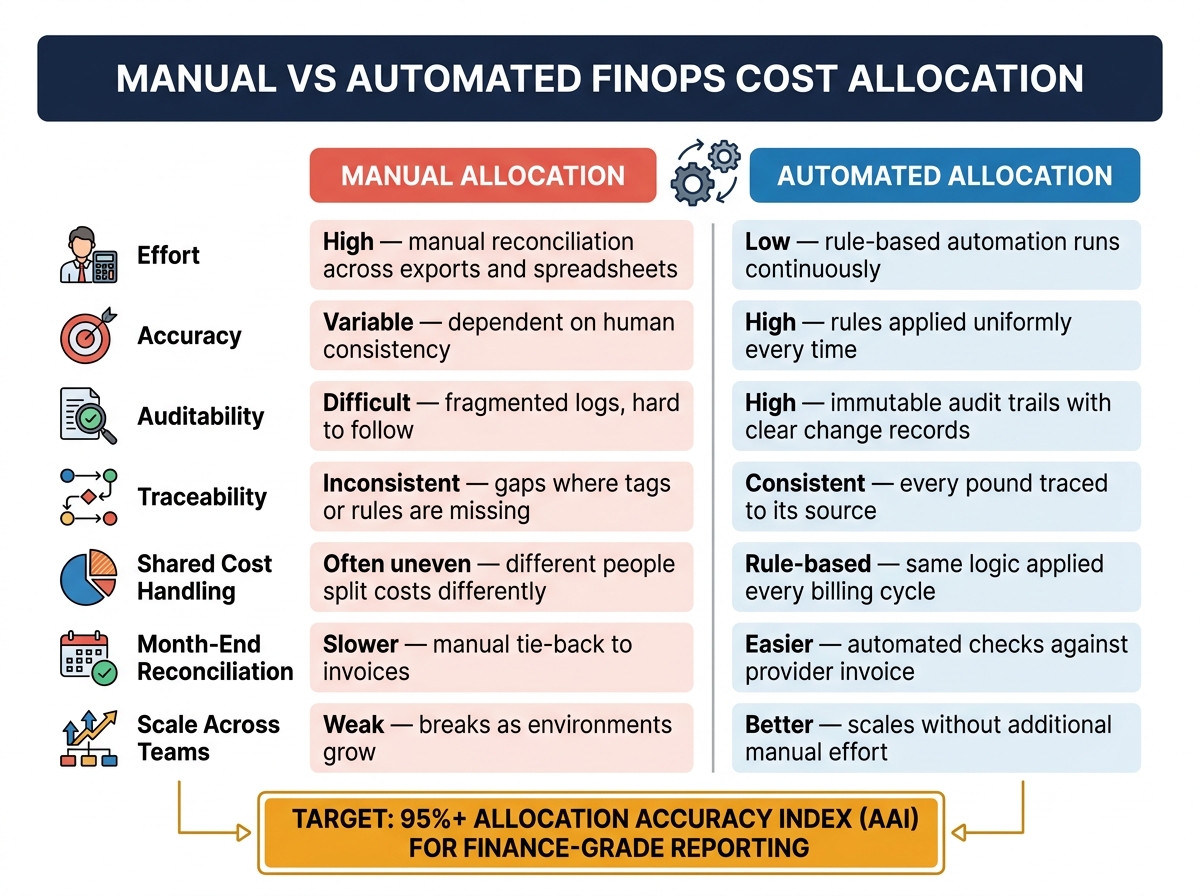 {Manual vs Automated FinOps Cost Allocation: Key Differences}
:::
{Manual vs Automated FinOps Cost Allocation: Key Differences}
:::
Before you automate anything, you need a model the system can follow. That means clear rules, consistent metadata, and a structure that lines up with finance reporting. If the model is machine-readable, deployment and billing automation can use it without guesswork.
Define allocation targets and rules
Start by deciding where costs should go. For most UK organisations, that usually means cost centres, departments, products, or environments.
Once that’s clear, pick the right method for each type of cost:
- Direct allocation works when a resource belongs fully to one team or product. A dedicated database, for example, goes straight to the right cost centre.
- Proportional allocation fits shared resources, where costs are split by usage.
- Fixed splits work for central services where usage is hard to measure. A shared security tool, for instance, can be divided equally across departments.
The goal is simple: set rules that automation can apply the same way every time.
Standardise tags, labels and account structure
Tags and labels tell automation where a cost belongs. If they’re missing or inconsistent, the model gets messy fast. Every resource should have a core set of mandatory tags before deployment.
| Tag Key | Purpose | Example Values |
|---|---|---|
| CostCentre | General ledger link | CC-1001, CC-2002 |
| BusinessUnit | Organisational ownership | Engineering, Marketing |
| Environment | Separates prod, staging and dev | prod, staging, dev |
| Product | Connects spend to a specific service | checkout-api, data-pipeline |
| Owner | Named owner | [email protected] |
Use naming patterns such as prod-finance-db01 only when tags are missing [2].
Manual vs automated allocation: a direct comparison
The gap in day-to-day effort between manual and automated allocation gets much bigger as environments grow. What feels manageable in a spreadsheet can turn into a headache once usage spreads across teams, services and accounts.
| Feature | Manual Allocation | Automated Allocation |
|---|---|---|
| Effort | High (manual reconciliation across exports and spreadsheets) | Low (rule-based automation) |
| Accuracy | Variable (dependent on human consistency) | High (rules applied uniformly every time) |
| Auditability | Difficult (fragmented logs) | High (immutable audit trails) [1] |
| Traceability | Inconsistent (gaps where tags or rules are missing) | Consistent (every pound traced to its source) |
For UK organisations, automated allocation is much easier to audit and maintain.
Once the model is standardised, the next step is to enforce it in deployment and billing systems.
How to implement automation across cloud and hosting environments
With a clean allocation model in place, the next step is to enforce it across every environment - public cloud, hybrid infrastructure and managed hosting. The aim is simple: turn the allocation model into a live control, not just a rule sitting in a spreadsheet.
Enforce tagging and metadata at deployment
Use IaC and policy-as-code to stop non-compliant resources before deployment. When you build mandatory tags straight into Terraform modules or Azure Bicep templates, every resource gets them at provisioning. No manual step. No chasing people after the fact.
Policy-as-code tools help enforce those rules before anything reaches production. HashiCorp Sentinel can block a Terraform deployment during the CI/CD plan phase if tagging rules aren't met. In multi-cloud or hybrid setups, Open Policy Agent (OPA) gives you vendor-neutral rules that work across providers. The main cloud platforms also have native controls in place:
- AWS SCPs and Tag Policies
- Azure Policy
- Google Cloud Organisation Policy constraints
You can also use automated remediation to flag or quarantine stray resources deployed outside the standard pipeline. That gives teams a window to fix the issue before it turns into an escalation.
Automate billing exports and allocation logic
Once tagging is enforced, billing exports can feed allocation rules without manual clean-up. Each major provider has its own native export path: AWS Cost and Usage Reports (CUR), Azure Cost Management exports and Google Cloud Billing export to BigQuery.
On AWS and Azure, cost allocation tags need to be activated manually in the billing console before they appear in finance reports. This catches teams out all the time. A tag may exist on the resource, but if it hasn't been activated, it won't show up in the export. That's where reporting gaps start. Clean exports help keep allocation tied to invoice totals.
Once the data is flowing, you can apply allocation rules against it. Shared costs can be split by actual consumption, such as CPU-hours, GB or requests.
For organisations working across hybrid or managed hosting environments, the FinOps Open Cost & Usage Specification (FOCUS) v1.x helps normalise billing data across providers into a single normalisation layer [3].
How AWS, Azure and Google Cloud support automated allocation
The operating model stays much the same across cloud platforms. What changes are the native controls.
| Feature | AWS | Azure | Google Cloud |
|---|---|---|---|
| Metadata term | Tags | Tags | Labels |
| Case sensitivity | Yes (case-sensitive) | No (case-insensitive) | Yes (lowercase only) |
| Native enforcement | SCPs / Tag Policies | Azure Policy | Organisation Policy constraints |
| Tag inheritance | No native auto-inheritance | Native (resource group to child resources) | Project-level labels |
| Billing export source | Cost and Usage Report (CUR) | Cost Details Export | BigQuery Billing Export |
| IaC validation | Required Tags for IaC | Bicep / ARM validation | Resource Manager API |
Azure's native tag inheritance from resource groups to child resources is a practical edge for teams managing large numbers of resources under a shared structure.
How to keep your allocation model accurate over time
Once allocation is automated, governance is what keeps it on track as the business changes. Cloud estates move fast. Teams shift, shared services expand, and cost ownership can blur before anyone spots it. Without regular checks, even a solid automated setup can slip out of line within a few billing cycles.
Reconcile allocated totals against invoices and internal reports
Each month, compare your total allocated spend with the provider invoice. The goal is a full tie: every pound on the invoice should have an owner. If anything lands in an “unallocated” bucket, dig into it before Finance sees the month-end numbers.
In most cases, drift comes from two places:
- Missing tags on new resources
- Split rules that no longer match the business after a restructure
A reconciliation view that compares Effective Cost in the allocation engine with Total Due on the invoice makes gaps easy to spot [3].
Mature FinOps teams often track an Allocation Accuracy Index (AAI), worked out as (Directly Attributed Costs ÷ Total Infrastructure Costs) × 100. A score of 95% or above is usually the mark for Finance-grade reporting [3]. Scores in the 80–94% range are often fine for showback, but leftover spend can still cause reconciliation headaches [3].
That gap gives you something concrete to fix before month-end: tags, rules, or ownership.
Track tag coverage, allocation cycle time and allocation quality
Once reconciliation is in place, the next step is to watch for early warning signs. The point is simple: catch drift before it turns into a Finance problem.
Treat AAI as an operational metric that Finance, Engineering and leadership can all see [3]. Alongside that, track tag coverage, unallocated spend and rule exception rates. Those signals show where the model is starting to slip, even if the invoice still looks close enough on the surface.
Assign ownership and update rules as the business changes
Clear ownership stops allocation from becoming everyone’s problem and no one’s job. Finance sets the allocation logic and budgets. Engineering or DevOps puts the rules into practice. Compliance reviews any material changes.
Store allocation rules in Git so there’s a clear audit trail, and tell Finance before each billing cycle if a rule change could explain month-on-month variance [3].
For change control, a tiered approval model tends to work well. Changes affecting spend below £500 can go live automatically, while changes above £2,000 need Finance sign-off first [3].
Review the model every quarter, and also after restructures, project closures or the rollout of new cloud services.
Conclusion: What businesses gain from automated FinOps allocation
Taken together, these controls shift allocation from a once-a-month admin job into a steady control that runs all the time. With automation in place, allocation becomes a near-real-time control, which means Finance and Engineering can work from the same cost data before month-end. Cost spikes show up earlier too, before they turn into an end-of-month surprise.
A 95%+ AAI is usually enough for finance-grade reporting and board reporting [3].
Accuracy matters, but trust matters more. That trust is the main result. When Finance and Engineering rely on the same normalised data, it becomes much easier to stand behind budget calls and ownership decisions.
For teams that need implementation support, Hokstad Consulting helps with cloud cost engineering, automation and hybrid infrastructure cost control.
Key takeaways for UK organisations
In practice, the payoff comes from consistency. Start with a clear allocation model. Enforce metadata at deployment, automate billing exports and rules, then reconcile monthly, track AAI, and update ownership as the business changes. That gives each team one trusted view of cloud spend and helps people make better decisions.
FAQs
How do we start automating cost allocation?
Start with clean tagging and governance. Set up 5 to 7 core tags like owner, project, and cost centre, then enforce them with infrastructure-as-code tools or cloud governance policies so unallocated resources can't be created in the first place.
After that, turn financial policies into machine-readable code and run automated checks in your CI/CD pipelines. Then bring it all into a single multi-cloud dashboard, so teams get the same view across every cloud account.
What should we do about unallocated spend?
Move from manual reconciliation to automated, policy-driven governance. Start by enforcing mandatory tagging at creation with AWS Service Control Policies or Azure Policy, so untagged resources can't slip through.
If tags are still missing, use rule-based allocation based on account ownership, naming conventions, or resource groupings. Then apply Policy as Code to turn finance rules into machine-readable logic, so teams can enforce them the same way every time and see what's happening without digging through spreadsheets.
How often should allocation rules be reviewed?
Use a tiered review routine to keep cost allocation accurate:
- Daily automated compliance checks
- Weekly reviews of automation results
- Monthly updates to cost models and data quality checks
- Quarterly reviews of allocation strategy and tagging policies
This helps keep your rules in step with changes in cloud usage, business goals, technology, and organisational structure.