
AWS cost allocation tags are key-value pairs used to track and manage spending across resources like EC2, S3, and RDS. They help categorise costs by team, project, or environment, making it easier to analyse and allocate expenses. Tags are essential for financial management strategies like showback (informing teams of their costs) and chargeback (billing departments for their usage). Here's a quick rundown of key points:
-
Types of Tags:
- AWS-generated tags: Created automatically (e.g.,
aws:createdBy), non-editable, and don't count towards the 50-tag limit. - User-defined tags: Created by your team (e.g.,
user:Project), editable, and count towards the limit.
- AWS-generated tags: Created automatically (e.g.,
-
Tagging Strategy:
- Enable tags in the Billing and Cost Management console for them to appear in reports.
- Use consistent naming conventions (e.g., lowercase with hyphens like
org:cost-centre). - Start with high-priority tags such as
CostCentre,Environment, andProject.
-
Governance:
- Create a tagging dictionary to define mandatory tags and accepted values.
- Use tools like AWS Organisations Tag Policies to enforce consistency.
- Automate tagging during resource creation with tools like Terraform, AWS CDK, or CloudFormation.
-
Handling Costs:
- Use AWS Cost Categories for shared resources and Amortised Cost for discounts like Reserved Instances.
- Tags are not retroactive; activate them early to avoid missing historical data.
-
Analysis:
- Leverage Cost Explorer for grouped insights and Cost and Usage Report (CUR) for detailed data.
- Integrate tags with AWS Budgets and Cost Anomaly Detection for proactive cost management.
AWS re:Invent 2020: Cost allocation best practices
Need help optimizing your cloud costs?
Get expert advice on how to reduce your cloud expenses without sacrificing performance.
Setting the Foundation for Cost Allocation
::: @figure 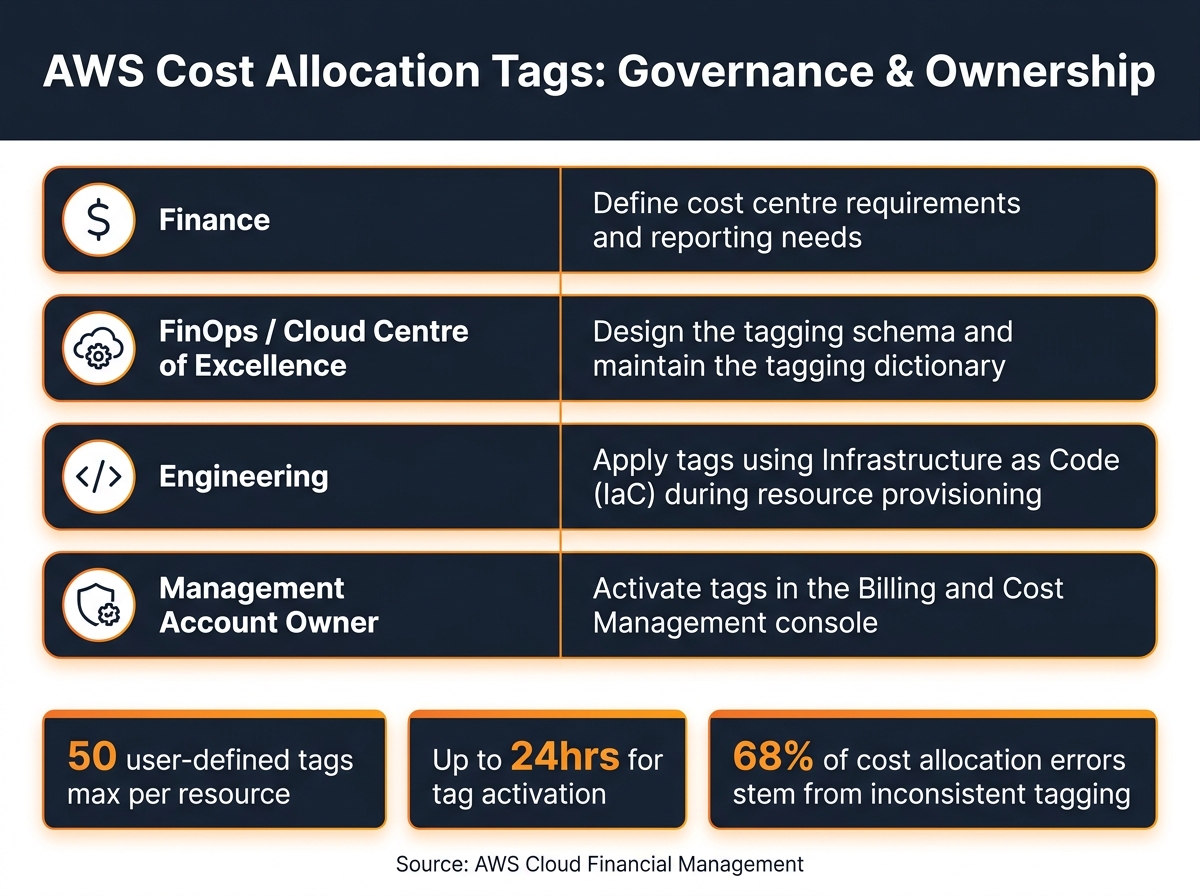 {AWS Cost Allocation Tags: Governance & Ownership RACI Model}
:::
{AWS Cost Allocation Tags: Governance & Ownership RACI Model}
:::
Understanding AWS Billing Structure
AWS operates on an account-based billing system, where a Management Account consolidates invoices within AWS Organisations [9][5]. If your organisation follows a model where each team or environment has its own account, cost allocation is largely handled at the account level. However, when multiple teams or projects share a single account, resource-level detail becomes crucial. This is where tags come into play - they provide the granularity needed for accurate cost tracking. To achieve this, you’ll need to enable tags for resource-level visibility in your cost reports.
Accurately allocating cloud costs in AWS is essential for fostering accountability and maximizing the value derived from cloud investments.- AWS Cloud Financial Management [9]
How to Enable Cost Allocation Tags
Enabling cost allocation tags is not automatic and requires manual activation. Even if tags are applied to resources, they won’t show up in billing reports until they’re enabled in the Billing and Cost Management console. Importantly, only the Management Account within an AWS Organisation (or a standalone account) can perform this activation [2][6].
Here’s how it works:
- Once a tag key is applied, it may take up to 24 hours to appear in the console for activation.
- After activation, it can take another 24 hours for the tag status to update to
Active
[3].
For teams dealing with numerous tag keys, the UpdateCostAllocationTagsStatus API is a time-saver, allowing bulk activation. Additionally, AWS automatically adds the awsApplication tag to resources in the AWS Service Catalog AppRegistry, and this tag is pre-activated for cost allocation. This makes it an effortless way to track application-level spending without needing manual intervention [3].
Once tags are enabled, the next step is to establish proper governance to ensure consistency.
Tag Governance and Ownership
Without a clear tagging strategy, inconsistencies can arise. For instance, teams might use variations like env
, Env
, or environment
for the same purpose, leading to messy and unreliable cost reports. To avoid this, governance needs to be in place from the start.
A cross-functional team - comprising Finance, Engineering, and Operations - should create a tagging dictionary. This document should define:
To streamline responsibilities, use a simple RACI model:
| Role | Responsibility |
|---|---|
| Finance | Define cost centre requirements and reporting needs |
| FinOps / Cloud Centre of Excellence | Design the tagging schema and maintain the dictionary |
| Engineering | Apply tags using Infrastructure as Code during resource provisioning |
| Management Account Owner | Activate tags in the Billing and Cost Management console |
Tagging is one of the foundational steps required in order to establish a meaningful cost allocation model.- AWS Cloud Operations Blog [10]
Start with essential tags like CostCentre, Environment, and Project. Avoid overloading teams with too many mandatory tags initially, as this could lead to pushback. Instead, focus on building a manageable and effective tagging framework.
Designing a Cost Allocation Tagging Strategy
Once governance is in place, the next step is to decide what to tag and how to do it effectively. A well-structured tagging strategy transforms raw AWS spending data into actionable insights, but it only works if it reflects the way your organisation operates. By building on your governance framework, you can create a systematic way to track costs.
Choosing Tag Categories and Keys
The best tagging strategies mirror the categories already used by your finance team. If they track spending by cost centre, business unit, or project code, your tags should match those categories. This alignment makes it easy to link AWS expenses with internal budgets and reporting systems [4].
Start with a small number of high-priority tag keys. Here are some core tag keys to consider:
| Tag Key | Purpose | Example Values |
|---|---|---|
org:cost-centre |
Links spending to finance codes |
123-finance, 456-it
|
org:business-unit |
Tracks costs by line of business |
marketing, retail
|
org:owner |
Identifies the budget holder |
squad-01, team-alpha
|
org:environment |
Indicates the SDLC stage |
prod, dev, test
|
org:application-id |
Associates costs with specific apps |
datalake-x, web-portal
|
AWS allows up to 50 user-created tags per resource [8]. Tags generated by AWS (those starting with aws:) don’t count toward this limit, giving you some flexibility. However, it’s still important to decide which tags are mandatory and which are optional to avoid overcomplicating your tagging system.
Setting Naming Conventions
Tag keys in AWS are case-sensitive, so variations like CostCentre, costcentre, and cost-centre are treated as entirely different tags. This can lead to disorganised and confusing cost reports. The solution? Agree on a standard format and stick to it.
A good practice is to use all lowercase letters with hyphens as separators (e.g., org:cost-centre). Adding a prefix such as org: or your company name ensures your tags remain distinct from AWS-generated or third-party tags. AWS tag keys can be up to 128 Unicode characters, while values can go up to 256 characters, giving you plenty of space to be descriptive [8].
One critical rule: never include personally identifiable information (PII) or sensitive data in your tag values. Tags appear in billing reports and are accessible to various AWS services, so treat them as semi-public metadata [8][11].
Handling Untaggable and Shared Costs
Some AWS costs can’t be tagged directly. Examples include data transfer charges, AWS Support fees, and subscription fees for Reserved Instances or Savings Plans. These untaggable costs show up as unallocated
, which can lower the accuracy of your reports [13][6].
For commitment-based discounts like Reserved Instances or Savings Plans, the Amortised Cost view in AWS Cost Explorer is a practical workaround. This feature spreads the discount value across your tags daily, providing a more accurate view of what each team or project is consuming [6].
When it comes to shared infrastructure - like a centralised database or networking layer used by multiple teams - AWS Cost Categories can help. They let you set allocation rules based on metrics like usage or account footprint, eliminating the need for manual calculations [13][6]. Research shows that 68% of cost allocation errors stem from inconsistent tagging practices [13], so addressing these issues early can save you trouble as your infrastructure grows.
Applying and Enforcing Tags at Scale
Ensuring consistent tagging at scale is essential for effective cost allocation and resource management within AWS. Once you've established a tagging strategy, it's crucial to integrate it into the tools your teams already rely on.
How to Tag Resources Efficiently
To maintain consistency, embed tagging into your infrastructure provisioning workflows. For example:
- In Terraform, use the
default_tagsblock within the provider configuration to automatically apply a standard set of tags to all resources. - In AWS CDK, the
Tags.of()construct can apply tags at the stack level. - In CloudFormation, tags defined at the stack level are propagated to all supported resources.
For legacy resources or bulk updates, the AWS Tag Editor is invaluable. This tool allows you to search across multiple regions and services from a single console and apply or update tags in bulk.
However, not all resources inherit tags automatically. For instance, EBS volumes created during an EC2 launch or Elastic Network Interfaces may lack inherited tags. In such cases, you can use an EventBridge-triggered Lambda function to detect resource creation events and apply the correct tags by inheriting them from the parent resource.
Once tagging is in place, enforce these standards across your organisation using AWS Organisations tag policies.
Using AWS Organisations Tag Policies
Tag policies, written in JSON, can be applied to your AWS Organisation root, specific Organisational Units (OUs), or individual accounts [14][15]. These policies ensure consistent tag key formats, preventing variations like CostCentre and costcentre, which can fragment billing data [14][15]. The effective policy
for an account combines all inherited rules from parent OUs, and you can review these via the Resource Groups console or the DescribeEffectivePolicy API [15].
Tag policies allow you to standardize the tags attached to the AWS resources in your organization's accounts.- AWS Organisations Documentation [14]
If you're ready to go beyond reporting, you can enable enforcement mode. This mode actively blocks non-compliant tagging operations, such as rejecting updates if a tag value isn't on the approved list [14][17].
One limitation to note: tag policies validate existing tags but won't prevent the creation of resources without any tags [16][17]. This is where Service Control Policies (SCPs) come into play.
Automating Tagging Compliance
To achieve comprehensive compliance, combine tag policies with SCPs. While tag policies ensure tag values are valid, SCPs enforce the existence of tags. By using a Null condition on aws:RequestTag in an SCP, you can deny API calls for resource creation if a required tag is missing [16][17].
Tagging consistency is critical for both cost tracking accuracy and attribute-based access control (ABAC) security policies that rely on precise tag matching.- AWS Organisations Documentation [17]
Before switching to enforcement mode, start with reporting mode. This approach helps identify non-compliant resources without disrupting operations, giving teams time to address issues [14][16]. For ongoing monitoring, use AWS Config's required-tags rule. This evaluates resources against your tagging requirements and can trigger automated Lambda functions to remediate any gaps. This setup ensures high tag coverage while minimising friction for development teams.
Analysing Costs and Improving Over Time
Using Cost Explorer and CUR for Tag-Based Reporting
Cost Explorer lets you filter and group your expenses by tag keys, offering a clear view of where your money is going. On the other hand, the Cost and Usage Report (CUR) provides a more granular approach by adding a column for each tag key, allowing you to create detailed and customised dashboards. Cost Explorer retains 13 months of historical data and can even forecast spending up to 18 months into the future [2]. Meanwhile, the CUR delivers line-item data that's perfect for use with tools like Amazon Athena or your preferred business intelligence (BI) software [6].
AWS Cost and Usage Report (CUR) provides most detailed cost and usage data and enables creation of customized optimization dashboards, allowing filtering and grouping by accounts, services, cost categories, cost allocation tags, and multiple other dimensions.- AWS Whitepaper [6]
You can use AWS Cost Categories to combine tags or accounts into broader business dimensions. For instance, you might group several project tag values under a single Digital Products
business unit. This kind of grouping makes it easier to align your cloud expenses with UK financial reporting periods, like monthly or quarterly summaries for board meetings.
It’s worth noting that cost allocation tags are not retroactive. They only start appearing in billing reports for usage that occurs after the tags have been activated. And since activation can take up to 24 hours to reflect in the console, it’s best to enable your tags as soon as possible to avoid missing out on historical data [2][6].
By combining this detailed reporting with your FinOps strategies, you can adopt a more proactive approach to managing your cloud costs.
Integrating Tags into FinOps Practices
Tags are invaluable for linking cloud spending to specific business metrics, enabling practices like showback and chargeback. These methods can significantly improve cost management when incorporated into FinOps workflows.
For example, tagging resources with an environment key (e.g., dev, staging, prod) allows you to identify non-production workloads that may be running outside business hours. You can then schedule these to shut down automatically, saving costs. Additionally, tying tag data to business metrics lets you calculate unit costs, such as the cost per API call. This shifts the conversation from Why is our cloud bill growing?
to How efficiently are we using our resources?
[6].
Tags also play a vital role in AWS Budgets and Cost Anomaly Detection. You can create budgets tied to specific tags, like a team or application, and receive alerts if spending exceeds a set threshold. This way, you can catch unexpected costs before they spiral out of control.
By integrating these tagging practices into your FinOps approach, you can turn raw cost data into actionable insights that drive better business decisions.
Common Tagging Mistakes and How to Avoid Them
Even with a solid tagging strategy, errors can disrupt your cost tracking efforts.
One frequent issue is inconsistent tag values. For instance, using both prod and production for the same environment can fragment your data, as AWS tags are case-sensitive. This makes it harder to aggregate costs accurately in tools like Cost Explorer.
Another common problem is tag sprawl. Without proper oversight, teams might create unnecessary or redundant tags, cluttering your billing reports. To avoid this, establish a tagging dictionary that outlines approved keys and their allowed values. Enforce these standards using AWS tag policies and Service Control Policies.
A less obvious but equally important mistake is overlooking shared resources. For shared costs, use predefined distribution keys in AWS Cost Categories to ensure they’re allocated fairly and transparently [6][7].
Lastly, make sure the aws:createdBy tag is enabled in your account. This system-generated tag tracks which IAM user or role created a resource, making it easier to audit untagged or unexpected items in your billing reports. It’s a simple step that can save a lot of time when troubleshooting.
Conclusion
Key Takeaways
A well-thought-out tagging strategy is essential for keeping track of cloud expenses, identifying ownership, and ensuring resources are being used effectively. Tags act as a bridge between finance and engineering teams, enabling chargeback processes, automation, and secure access management [7].
To make the most of tagging, a few principles are crucial. Start with a pre-defined tagging dictionary to ensure consistency. Use the Billing and Cost Management console to activate tags [2][12]. Automate compliance with tools like AWS CloudFormation or Service Control Policies, and avoid including sensitive or personally identifiable information in tag keys or values [2].
Establishing good financial practices... will help achieve measurable outcomes for the business and encourage teams to build with cost in mind.- AWS Whitepaper [4]
Tagging isn’t a one-and-done task. As your infrastructure expands, maintaining accurate and consistent tags becomes more complex. Treat tagging as an ongoing operational responsibility rather than a one-time setup. Regularly review and adjust your tagging approach as your AWS environment evolves.
How Hokstad Consulting Can Help
If your team is finding it challenging to gain clear visibility into AWS costs, Hokstad Consulting offers tailored solutions to put strategies into action. They specialise in cloud cost engineering and DevOps transformation, with proven results - reducing cloud costs by 30–50% through structured optimisation efforts like tagging strategies, cost audits, and automation.
Their no savings, no fee
model ensures risk-free engagement, as their fee is capped at a percentage of the savings achieved. Whether you need a one-time cloud cost audit or ongoing support for your infrastructure, they adapt their approach to fit your specific needs, covering public, private, hybrid, and managed hosting environments.
FAQs
Which tag keys should we make mandatory first?
Start by using tag keys that help with cost tracking and resource organisation. Examples include:
- Department: To allocate costs to specific teams or units.
- Project: For tracking expenses tied to individual projects.
- Environment: To distinguish between development, testing, and production setups.
These tags make it easier to assign costs accurately and maintain accountability right from the start.
How do we enforce tags without breaking deployments?
To maintain tagging standards without hindering deployments, blend proactive strategies with automation. Tools like Infrastructure as Code (IaC) solutions, such as CloudFormation or Terraform, allow you to define mandatory tags within deployment templates. These tags can then be validated before creating any resources. Additionally, leveraging AWS tag policies within AWS Organisations ensures tagging compliance by preventing the creation of untagged resources. By combining automation with well-defined policies, you can achieve consistent tagging practices while avoiding deployment disruptions.
How can we allocate shared and untaggable AWS costs fairly?
To distribute shared AWS costs effectively, it's important to use a model that mirrors actual usage. Common approaches include account-based or workload-based methods. When dealing with costs that can't be tagged, you can allocate them using fair rules, such as splitting based on historical usage patterns or dividing them equally.
It's also crucial to review your allocation methods regularly to keep them accurate as usage changes over time. Tools like AWS Cost Explorer and well-implemented tagging strategies can simplify this process, ensuring both clarity and fairness. To make it work smoothly, focus on clear communication and maintain documented policies for cost allocation.