
AWS Elastic Disaster Recovery (DRS) can save you money compared to traditional disaster recovery methods, but costs can add up if you're not careful. Here's what you need to know:
- Pre-Failover Costs: These are ongoing costs like the DRS service fee (£0.021/hour per server), staging EBS volumes (£0.06/GB-month for gp3), snapshots (£0.038/GB-month), and replication servers (£0.016/hour for t3.small instances).
- Post-Failover Costs: These are event-driven costs, such as target EC2 instances and high-performance EBS volumes during failovers or disaster recovery drills.
Key Cost-Saving Tips:
- Optimise Source Servers: Reduce disk sizes and exclude non-critical volumes to cut staging and snapshot costs.
- Choose Cost-Efficient Storage: Switch to gp3 or st1 volumes based on workload needs.
- Right-Size Failover Instances: Use EC2 launch templates to avoid overprovisioning.
- Monitor Costs: Enable AWS Cost Explorer tags, set up budget alerts, and use the AWS Pricing Calculator to forecast expenses.
- Leverage Regional Pricing: Compare costs across AWS regions while meeting data residency and latency requirements.
By following these steps, you can keep AWS DRS costs under control while ensuring your disaster recovery setup is effective.
Use AWS Cost Explorer with AWS Elastic Disaster Recovery | Amazon Web Services
Need help optimizing your cloud costs?
Get expert advice on how to reduce your cloud expenses without sacrificing performance.
AWS DRS Cost Components Explained
::: @figure 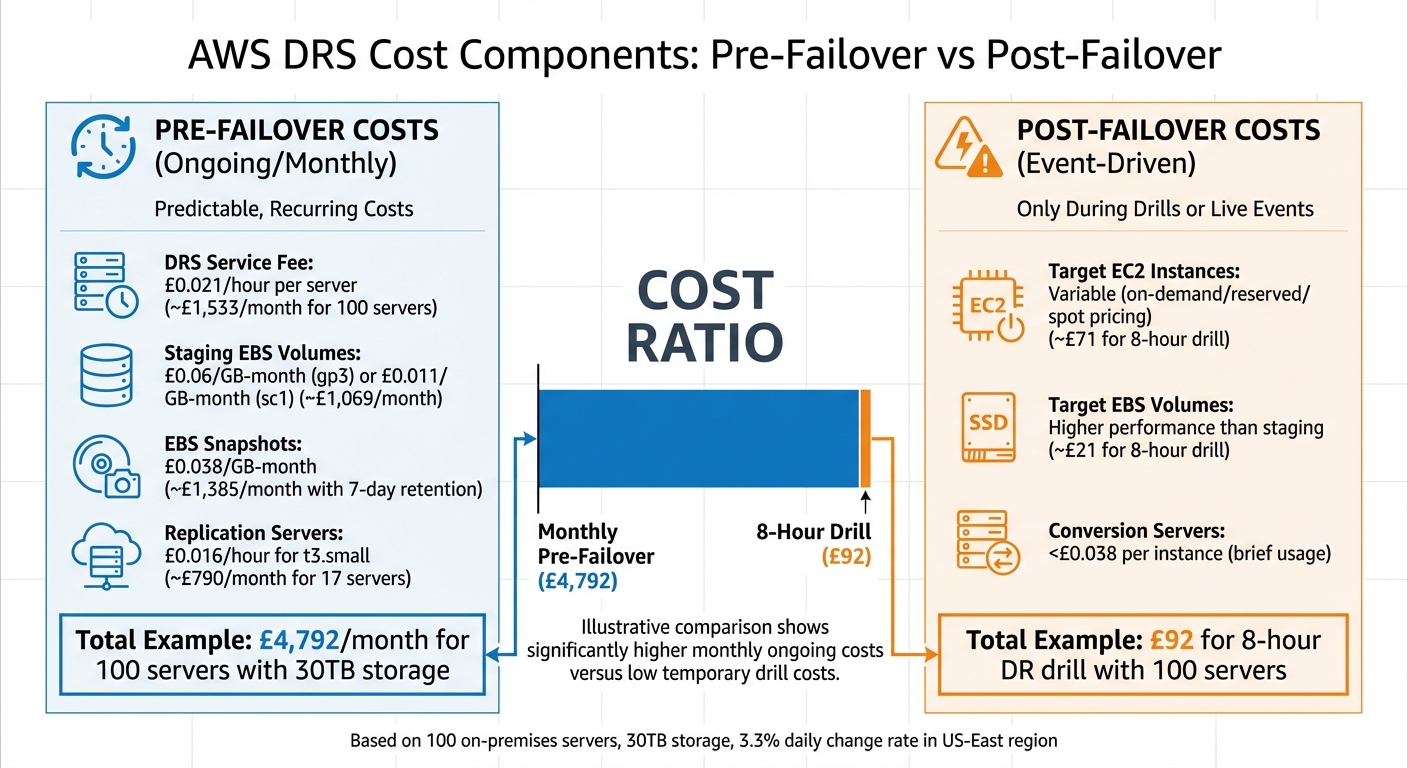 {AWS Elastic Disaster Recovery Cost Breakdown: Pre-Failover vs Post-Failover Components}
:::
{AWS Elastic Disaster Recovery Cost Breakdown: Pre-Failover vs Post-Failover Components}
:::
Main Cost Drivers
AWS DRS operates on a pay-as-you-go model, meaning you only pay for what you use, with no upfront commitments. The base cost is £0.021 per hour per source server (approximately $0.028 USD) for continuous data replication [2]. Beyond this, there are additional charges for:
- Staging EBS volumes: £0.06/GB-month for gp3 volumes and £0.011/GB-month for sc1 volumes [2].
- EBS snapshots: £0.038/GB-month [2].
- Replication servers: t3.small instances cost £0.016 per hour, with each server capable of supporting up to 15 staging disks [2].
- Conversion servers: These are used briefly during recovery events and cost less than £0.038 per instance [2].
To give a practical example, running 100 on-premises servers with 30TB of total storage and a 3.3% daily data change rate in the US-East (N. Virginia) region resulted in a monthly cost of around £4,792 ($6,389 USD). Here’s how that breaks down:
- £1,533 for the DRS service fee.
- £1,069 for staging EBS volumes.
- £1,385 for EBS snapshots (with a 7-day retention policy).
- £790 for 17 replication servers [2].
These figures highlight the key cost drivers and set the stage for understanding the two distinct cost phases: pre-failover and post-failover.
Pre-Failover vs Post-Failover Costs
The costs associated with AWS DRS fall into two categories: pre-failover (predictable, ongoing costs) and post-failover (event-driven costs).
Pre-failover costs: These are the baseline expenses incurred as your systems replicate to AWS. They include the DRS service fee, staging disks, snapshots, and replication servers. These costs are consistent and recur monthly, regardless of whether you ever need to initiate a failover [3].
Post-failover costs: These arise only during disaster recovery drills or live failover events. When workloads are launched, you'll pay for fully provisioned target EC2 instances (at on-demand, reserved, or spot pricing) and target EBS volumes, which typically have higher performance requirements than staging disks [3].
For instance, using the same 100-server setup, an 8-hour disaster recovery drill cost approximately £92 ($122.94 USD). This included £21 for EBS volumes and £71 for 100 EC2 instances of varying sizes [2]. While these costs are temporary, they can escalate quickly if you don’t carefully manage instance sizing.
| Cost Phase | Component | When You Pay |
|---|---|---|
| Pre-Failover | DRS Service Fee, Staging Disks, Snapshots, Replication Servers | Continuously, every month |
| Post-Failover | Target EC2 Instances, Target EBS Volumes, Conversion Servers | Only during drills or live events |
How to Reduce AWS DRS Costs
Optimising Source Server Configurations
One of the fastest ways to cut costs is by reducing the size of your source disks before the initial synchronisation. AWS DRS creates a staging disk for each source disk, and its size matches the original disk exactly. If your on-premises servers have overprovisioned storage, you could end up paying for space you’re not even using. For instance, in one case, reducing disk sizes from 75 TB to 36 TB slashed monthly costs from £7,020 to £3,530 - an impressive 50% saving - and also cut the synchronisation time nearly in half, from 6.9 days to 3.3 days [3].
You can also exclude non-critical volumes, like swap files, temporary volumes, and backup targets. Use the --no-prompt flag during installation and disable the Automatically replicate new disks
option [4][7]. This simple step reduces both staging storage and snapshot costs.
Another effective method is right-sizing your failover infrastructure with EC2 launch templates. Instead of mirroring the exact source configuration, you can map each server to a more appropriately sized EC2 instance. This keeps failover costs in check without affecting recovery capabilities [3].
Additionally, consider adjusting your snapshot retention period. The default is 7 days, but shortening this period based on your organisation’s needs can lower incremental EBS snapshot storage expenses [3][4].
Standardising replication settings across servers can also help consolidate resources and reduce costs. For example, AWS DRS allows you to combine multiple source servers onto a single t3.small replication instance - handling up to 15 volumes - if they share the same staging area subnet and configuration. On the other hand, unique configurations for each server will require AWS to deploy separate, more expensive replication instances [5].
Choosing Cost-Efficient Storage Options
Once you’ve optimised server configurations, selecting the right storage options becomes essential. Switching from gp2 to gp3 EBS volumes for staging can reduce costs by around 20%, while still offering similar performance [3][4]. For larger disks (over 125 GiB), enabling Auto volume type selection allows AWS to dynamically choose between performance-focused and cost-saving EBS types based on actual write throughput [6][7].
For servers with minimal changes, consider transitioning to st1 volumes after the initial synchronisation. Start with faster SSDs to speed up the first synchronisation and then switch to st1 for ongoing replication to save money [4]. For workloads with very low input/output demands, sc1 volumes are the most budget-friendly option, costing about £0.011 per GB-month compared to roughly £0.06 per GB-month for gp3 [2].
Regional Cost Considerations
Regional pricing differences can also play a role in reducing expenses. While the AWS DRS service fee is a flat £0.021 per hour per server worldwide, costs for EC2 replication servers, EBS staging volumes, and snapshots vary significantly between regions [3][4]. Use the AWS Pricing Calculator to compare prices across regions, but ensure that your chosen region aligns with latency and data residency requirements.
To further control costs, aggregate as many source servers as possible into a single staging subnet. This maximises the use of replication servers - AWS can consolidate up to 15 source volumes onto a single t3.small instance. However, using separate subnets or unique configurations can lead to additional, higher-cost replication instances [5].
Tracking and Monitoring AWS DRS Costs
Using AWS Cost Explorer and Tags
Start by enabling the AWSElasticDisasterRecoveryManaged cost allocation tag in the AWS Billing console. Keep in mind that this activation process can take up to 24 hours [8][9].
Once the tag is active, you can organise your disaster recovery expenses with cost categories. For example, you can create a Regular
rule type where the Service
is set to AWSElasticDisasterRecovery. This setup helps you separate licensing fees from infrastructure costs like EC2 instances and EBS volumes [1]. By doing this, you can pinpoint whether your spending is driven more by the service itself or by the resources it uses.
AWS Cost Explorer's Usage Type
grouping is another valuable tool. It breaks down costs into specific components, such as:
-
USE2-BoxUsage:t3.smallfor replication servers -
USE2-EBS:VolumeUsage:gp3for staging volumes -
USE2-EBS:SnapshotUsagefor snapshots
This detailed breakdown not only clarifies how your budget is allocated but also highlights areas where you might save money, like switching from gp3 to sc1 volumes or reducing snapshot retention periods [1].
For further analysis, export Cost Explorer reports to CSV. This makes it easier to share detailed spending insights with finance teams or stakeholders. These reports can help justify disaster recovery expenses and forecast future costs based on historical data [1][8]. Additionally, you can use AWS Budgets to monitor and control spending by setting alerts for unusual cost increases.
Setting Up AWS Budgets for Alerts
Once you have a clear view of your costs, AWS Budgets can help you stay on track by allowing you to set real-time alerts tailored to AWS Elastic Disaster Recovery [10][12].
You can create alerts for different thresholds. For example:
-
Actual
spend alert at 80% of your budget to warn you early. -
Forecasted
spend alert at 100% to pre-emptively address potential overages [11][12].
AWS Budgets updates up to three times daily, generally every 8–12 hours, ensuring timely notifications [13]. Alerts can be sent via email or SNS for immediate action [11][12].
To add an extra layer of control, use Budget Actions to automatically restrict further resource provisioning once thresholds are reached [11][13]. This automation ensures your disaster recovery costs remain within budget without requiring constant manual intervention.
Forecasting Costs with the AWS Pricing Calculator
Estimating Pre-Failover Costs
The AWS Pricing Calculator is a handy tool for predicting both replication and failover costs, ensuring you're prepared for both routine operations and disaster scenarios. To get accurate forecasts, you'll need two separate estimates: one for ongoing replication costs and another for the expenses tied to post-failover EC2 operations [3]. This dual approach helps you account for both steady-state costs and those associated with disaster recovery.
For pre-failover replication, there are four key components to consider. First, there's the standard AWS DRS fee. Second, staging EBS volumes, as each source disk replicates to a corresponding staging disk. Third, EBS snapshots, which include a base snapshot along with incremental changes for point-in-time recovery. Lastly, replication servers: AWS DRS uses one t3.small instance for every 15 source volumes, costing around £0.0208 per hour [2][3].
When it comes to EBS snapshots, you'll need to specify the daily change rate (e.g., 3.3%) and the retention period, which defaults to 7 days but can be adjusted between 1 and 365 days [2][3]. For instance, with 100 replicating servers and 30TB of total storage, EBS snapshots alone could contribute £1,846.50 to a total monthly cost of £6,389.03 [2].
The choice of storage type also plays a big role in cost management. For disks larger than 500GB, you might opt for gp3 for faster initial syncs or st1 if you're looking to save on costs for lower write rates [2][3].
Once pre-failover costs are calculated, the focus shifts to estimating expenses during a failover event.
Estimating Post-Failover Costs
Post-failover costs are tied to the resources you'll need during an actual disaster recovery event or drill. Having accurate estimates here is key to avoiding budget surprises when disaster strikes. The biggest cost factor is your target EC2 instances, which are determined by the instance types in your launch templates. To avoid overprovisioning, use right-sizing data from AWS Migration Evaluator or monitoring tools rather than simply mirroring your source server specs [3].
Other costs to include are the target EBS volumes attached to these instances and a small expense for Conversion Servers, which prepare replicated data for EC2 deployment. These servers are relatively inexpensive, typically costing under £0.05 per launched recovery instance [2][3]. For example, running a disaster recovery drill for 100 servers over 8 hours might cost around £122.94, compared to the monthly replication cost of approximately £6,389.03 [2].
Keep in mind that the calculator bases recurring costs on a standard month of 730 hours [15]. Regional pricing can vary significantly, so make sure you select the AWS Region where your disaster recovery resources will be deployed [15][3]. It's also wise to include a buffer of 15–20% to cover unexpected spikes, additional log storage, or fluctuating data transfer costs [14].
These detailed forecasts are essential for managing your budget effectively and ensuring your disaster recovery planning is as efficient as possible.
Conclusion
Key Takeaways for Cost Management
To effectively manage the costs of AWS Elastic Disaster Recovery, it's crucial to understand the main cost drivers, optimise configurations, and keep a close eye on expenses. Some of the primary cost contributors include the service fee (£0.021 per hour per source server), staging volumes, snapshots, and replication servers. Use tools like AWS Migration Evaluator to right-size your target EC2 instances and avoid over-provisioning.
Storage decisions play a big role in controlling expenses. For instance, switching from gp2 to gp3 volumes can cut costs by 20% while maintaining performance. For disks that don’t change often, st1 or sc1 volumes offer even lower costs. Additionally, exclude unnecessary volumes, such as swap and temporary files, from replication, and ensure your snapshot retention policy (e.g., 7 days) matches your business needs [3][4].
To stay on top of spending, activate the AWSElasticDisasterRecoveryManaged cost allocation tag in AWS Cost Explorer [1]. This allows you to track DRS-related expenses. Setting up AWS Budgets with alerts can help you catch unexpected cost spikes. Finally, use the AWS Pricing Calculator to estimate both pre-failover replication charges and post-failover EC2 costs.
How Hokstad Consulting Can Help
While these strategies can significantly reduce costs, expert advice can take your savings even further. Hokstad Consulting specialises in helping UK businesses optimise cloud spending and disaster recovery setups. Their expertise in DevOps transformation and cloud cost management has helped clients achieve savings of 30–50% through tailored solutions.
Whether you need a full cloud cost audit, support in right-sizing your disaster recovery infrastructure, or ongoing cost management, Hokstad Consulting offers flexible options, including a no savings, no fee
model. For businesses looking to optimise their AWS DRS deployment without compromising on disaster recovery capabilities, their team provides the expertise and practical solutions needed to strike the right balance between cost efficiency and resilience. Visit hokstadconsulting.com to explore how they can help you achieve your cloud infrastructure goals.
FAQs
What’s the quickest way to cut AWS DRS costs?
To cut AWS DRS costs quickly, start by fine-tuning your resource configuration. Choose lower-cost AWS regions, ensure your infrastructure is appropriately sized for your needs, and leverage tools like AWS Cost Explorer. By using tagging, you can track and manage expenses more effectively. These strategies allow you to manage costs efficiently while keeping your disaster recovery systems intact.
How do I estimate my DRS snapshot costs accurately?
To get a clear picture of AWS Elastic Disaster Recovery (DRS) snapshot costs, AWS Cost Explorer and cost allocation tags are your go-to tools. These help you monitor storage and resource expenses effectively. Keep in mind that costs are influenced by factors like how much storage you use, how often you take snapshots, and the level of replication activity.
AWS charges for storage, such as Amazon EBS volumes, as well as for any extra resources involved in the replication process. By using these tools, you can create detailed cost forecasts and spot areas where you might save money.
Which AWS Region is cheapest for AWS DRS (and what are the trade-offs)?
When it comes to AWS Elastic Disaster Recovery (AWS DRS), the most budget-friendly AWS Region is often one with reduced infrastructure expenses - typically found in locations like the US or parts of Asia. However, opting for a cheaper region isn’t without its drawbacks. You might face higher latency, potential compliance hurdles, or complications related to data sovereignty. It’s crucial to balance these considerations against the cost savings to determine what works best for your specific requirements.