
If I run AWS in two regions, I should expect the bill to jump fast. In most cases, multi-region setups cost around 2–3× more than single-region ones, and the main extra spend comes from duplicate services, data replication, and cross-region traffic at about US$0.02 per GB.
Before I build anything, I’d keep the decision simple:
- Pilot light is the lowest-cost disaster recovery option, but failover can take 10–60 minutes
- Warm standby is often the best middle ground for SaaS and e-commerce, with the secondary region running at about 20% capacity
- Active-active gives the lowest downtime, but it can push costs up by 80–100%+ or more
I’d also keep three rules in mind from day one:
- Keep writes in one main region
- Keep reads local where possible
- Replicate only the data I need
For UK workloads, the usual starting point is London (eu-west-2) for local users and UK data location, with Ireland (eu-west-1) as the second region because it is often lower cost and close by at roughly 12 ms away.
A few cost traps stand out:
- A steady 10 MB/s cross-region change rate can add about US$520 per month in transfer fees alone
- DynamoDB Global Tables and Aurora Global Database can become costly fast for write-heavy workloads
- Poor service-to-service routing can add both delay and extra transfer charges
- Transit Gateway can cost more than VPC Peering for simple one-to-one links
For performance, I’d use the lowest-cost network layer that fits the job:
- Route 53 for low-cost DNS failover
- CloudFront for caching and origin failover
- Global Accelerator when I need lower latency for TCP/UDP or static IPs and can justify the extra spend
And I would not treat failover as “done” until it has been tested. Quarterly drills, monthly quota checks, drift control, and region-by-region monitoring are what stop a second region from becoming an expensive backup that fails when I need it.
This article boils multi-region AWS down to one idea: pay only for the resilience and speed you actually need, then design traffic, replication, and failover to keep the bill under control.
AWS re:Invent 2024 - Best practices for creating multi-Region architectures on AWS (ARC323)

Need help optimizing your cloud costs?
Get expert advice on how to reduce your cloud expenses without sacrificing performance.
Choose regions and resilience patterns that match your business needs
::: @figure 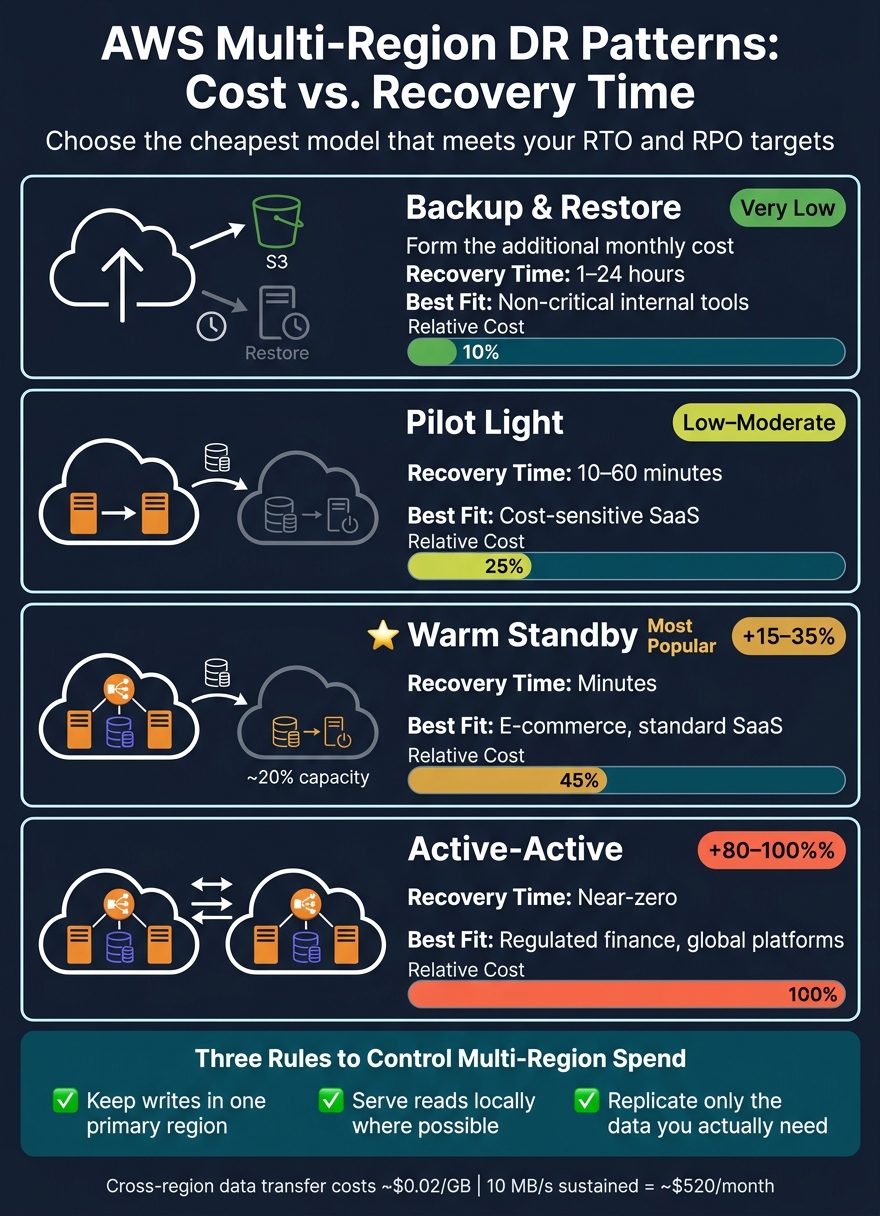 {AWS Multi-Region Disaster Recovery Patterns: Cost vs. Recovery Time}
:::
{AWS Multi-Region Disaster Recovery Patterns: Cost vs. Recovery Time}
:::
Start with user location, pricing and data residency rules
For UK-facing workloads, begin with eu-west-2 (London) if you want lower latency for local users and UK data residency. Then use eu-west-1 (Ireland) as your default secondary region. It tends to cost less, supports a broad set of services, and sits about 12 ms from London [5].
Prices change by region, so don’t guess. Compare EC2, S3 and RDS costs across London, Ireland and Frankfurt using your actual traffic patterns and usage data [4][6].
It’s also worth checking service parity early. Some managed services arrive in London later than they do in Ireland [4][5].
Once you’ve settled on a region pair, pick a recovery model that lines up with how much downtime and data loss the business can accept.
Use the cheapest disaster recovery model that meets your requirements
After choosing your regions, the next call is simple: how much standby capacity are you prepared to pay for?
For most SaaS, e-commerce and internal systems, warm standby usually gives the best mix of cost and recovery time.
| Pattern | Additional Monthly Cost | Best Fit |
|---|---|---|
| Backup & Restore | Very low | Non-critical internal tools |
| Pilot Light | Low–moderate | Cost-sensitive SaaS |
| Warm Standby | 15–35% | E-commerce, standard SaaS |
| Active-Active | 80–100%+ | Highly regulated financial services and global customer-facing platforms |
A common way to control spend is to run the secondary region at roughly 20% capacity until failover is needed [1].
Control data replication and transfer costs without slowing users down
Stateful services - databases, object storage and file systems - drive most multi-region spend. The smartest move is usually simple: keep reads local, keep writes in one primary region, and only replicate the data you actually need. After that, the next savings usually come from routing users and service-to-service traffic so requests stay in-region as much as possible.
Pick the right AWS replication model for each data type
Replication pricing can vary a lot depending on the AWS service. DynamoDB Global Tables are the priciest option here: adding a second region can effectively triple your single-region write cost, because you pay normal write capacity in each region and a replicated write charge on top [1]. Aurora Global Database can also get expensive fast, since storage costs and write I/O costs apply in both the primary and secondary regions [1].
If your SQL workload doesn't have many writes, RDS Cross-Region Read Replicas are often the lower-cost route. Replication data falls under standard network transfer pricing, and you don't pay the separate write I/O replication charge that Aurora Global Database brings [1][11].
The practical rule is straightforward: match each data type to the lowest-cost model that still hits your RPO and RTO targets.
| Replication Model | Best For | Replication Lag | Main Cost Driver |
|---|---|---|---|
| DynamoDB Global Tables | Write-heavy global NoSQL apps | Sub-second | Replicated WCUs (high) [1] |
| Aurora Global Database | Sub-second RPO for SQL | Sub-second | Storage and write I/O in each region [1] |
| RDS Cross-Region Replica | Read scaling / DR for SQL | 1–5 seconds [11] | Instance compute and transfer [11] |
| S3 Cross-Region Replication | Object storage DR / distribution | Minutes | GB transferred and PUT fees [1] |
Cut transfer bills by designing for local reads and fewer cross-region writes
For write-heavy systems, a read-local, write-primary setup is usually the safer and cheaper pattern. Send all writes to the primary region, then serve reads from local replicas. That keeps you away from bidirectional sync and the extra conflict-resolution overhead it brings [1].
Wide replication and bidirectional sync can make data transfer one of your biggest cost lines before you even notice what's happening.
S3 is a good example. Prefix filtering is one of the biggest levers you have. Instead of replicating whole buckets, set Cross-Region Replication rules for only the prefixes that matter - such as profile-images/ or user-documents/ - and leave out temporary files, logs, and build artefacts. Around 42% of cross-region replicated bytes in large enterprises sit in rules that no longer support a business need [10].
You can also pair that with lifecycle rules that move replicated data to STANDARD_IA or GLACIER in the destination region. That can cut destination storage costs by 40–95% [1][10].
Two easy wins often get missed:
- Compress text-heavy payloads such as JSON, logs, and CSV with gzip or zstd. That usually cuts transfer volume by 70–90% [7][8].
- Use VPC Gateway Endpoints for S3 and DynamoDB. They're free to enable and can save $0.045/GB by bypassing NAT Gateway processing fees [8][9].
A structured cost audit from Hokstad Consulting can surface stale replication rules and redundant transfer paths.
Once data movement is under control, routing and caching become the main latency levers.
Improve latency with better routing, caching and network design
Routing and network design are the next big levers for latency. Get this layer right and you can trim response times without sending every request down a pricier route.
When to use Route 53, CloudFront and Global Accelerator
Amazon Route 53 handles DNS traffic well in a standard failover setup. With latency-based routing, it sends users to the healthy region with the lowest measured latency [3]. The cost stays low too, since you're mainly paying normal query and hosted-zone fees [14]. For failover records, use a TTL of 60 seconds so clients stop talking to a failed endpoint without too much delay [1][3].
Amazon CloudFront sits in front of your origins and serves cached content from the edge location nearest to the user. That helps cut delay, and it also keeps origin traffic on AWS's network instead of the public internet. CloudFront Origin Groups work well when you need failover between a primary and secondary origin, such as regional S3 buckets or ALBs. If the primary starts returning errors, CloudFront can switch over to the secondary origin [1][12].
AWS Global Accelerator takes a different route. It uses two static anycast IPs and sends traffic across AWS's private global network. For TCP and UDP workloads, that can cut latency by 20–50% [3][13]. The trade-off is cost, so it's worth modelling the hourly fee and DT-Premium charges before rolling it out everywhere [14].
| Service | Main role | Failover speed | Cost profile | Best for |
|---|---|---|---|---|
| Route 53 | DNS-level steering | Slow, bound by DNS TTL | Very low | Cost-sensitive web apps; simple failover |
| CloudFront | CDN and edge caching | Moderate, with Origin Groups | Variable, driven by egress | Static assets and dynamic HTTP(S) content |
| Global Accelerator | Anycast IP and path optimisation | Fast, at the edge | Higher, with hourly and DT-Premium charges | Non-HTTP traffic, gaming, VoIP and static IP requirements |
Health checks matter just as much as routing. If they only test a TCP connection, they can give you a false sense that things are fine. A service may answer a TCP ping and still fail real requests. It's better to check actual business logic, like database connectivity, so the health signal matches what users would see [1][15].
User-facing traffic is only one side of the story. Internal traffic can quietly drag performance down too.
Stop microservices and private traffic from crossing regions by default
Service-to-service traffic that crosses regions is one of those problems that sneaks up on teams. Each hop adds transfer cost and makes latency less predictable. The cleaner pattern is to keep each microservice inside a single region and use local endpoints for API Gateway and load balancers, so traffic stays in the regional stack unless there's a good reason for it to leave [12].
When you do need controlled cross-region links across several VPCs, AWS Transit Gateway with inter-region peering is usually the right fit. But for a simpler one-to-one VPC connection, VPC Peering is often the cheaper option. Both have the same US$0.02/GB transfer cost, but VPC Peering has no hourly attachment fee. Transit Gateway adds US$0.05/GB in processing charges plus US$0.05/hour for each VPC attachment [16]. So Transit Gateway makes sense for a planned hub-and-spoke setup, not as the default route for east-west traffic.
Track these paths on a regular basis. Otherwise, cross-region traffic can creep in, push up spend, and chip away at the latency gains you thought you had.
Run multi-region environments with cost discipline and reliable failover
Once routing and replication are in good shape, day-to-day discipline is what keeps a multi-region setup both dependable and sane on cost.
Monitor cost, capacity and failover readiness across every region
Don’t lean on a global average. You need to watch each region on its own, because a global number can hide a spike or even a full failure in one region [2]. Amazon CloudWatch works well for per-region health. It also helps to pair it with CloudWatch Synthetics canaries running from the standby region, so you can probe the primary from the outside [17][18]. That extra view can catch quiet failures that internal metrics never show.
Data transfer costs are another slow burner. They tend to creep up, then suddenly show up on the bill. Use AWS Cost Explorer and the Cost and Usage Report to review egress volumes on a regular basis. If cross-region transfer jumps without warning, that’s often the first clue that a microservice has started making calls it was never meant to make.
Quota limits matter too, and they matter in every region. If the standby region hits a limit during failover, recovery can fall over no matter how well the rest of the setup was planned. Check quotas every month and again before any major deployment with the Service Quotas console [17].
Drift between regions is just as risky. One manual tweak in a single region can leave the secondary quietly out of step. Using AWS CloudFormation or AWS CDK to manage all regions from one codebase helps keep things lined up. Push changes to the primary region first, then the standby. Don’t deploy to both at the same time, because that can increase the chance of a shared failure across the stack [17][2].
And here’s the blunt truth: monitoring is only useful if failover gets tested.
Untested recovery is not recovery. Quarterly drills with AWS Fault Injection Service (FIS) and AWS Application Recovery Controller (ARC) help check the full failover path end to end [1][17]. It also makes sense to run a monthly failover test by returning HTTP 500s from a maintenance endpoint [1].
| Practice | Primary AWS Tool | Cost impact if neglected | Performance & resilience risk | Review frequency |
|---|---|---|---|---|
| Quota alignment | Service Quotas Console | Low (Direct) | High: failover denied at capacity limit | Monthly / pre-deployment |
| Transfer tracking | Cost Explorer / CUR | High: unnoticed egress bill spikes | Low: primarily financial | Monthly |
| Drift detection | CloudFormation / CDK | Medium | High: secondary region breaks silently | Continuous / CI/CD |
| Synthetic testing | CloudWatch Synthetics | Low | Medium: silent regional degradation | Continuous |
| Failover drills | AWS FIS / ARC | Medium (drill costs) | Critical: untested DR fails when needed | Quarterly |
When specialist support helps
Hokstad Consulting can audit cross-region spend, remove redundant replication paths, and automate multi-region deployments so regions stay aligned.
Conclusion: lower latency, controlled spend and resilience by design
After monitoring and drills, the next step is to keep the operating model simple.
Use the simplest setup that still meets your RTO and RPO targets. In many cases, pilot light or warm standby comes with much lower overhead than active-active [1]. Monitoring, quota checks, and regular failover tests aren’t side tasks. They’re part of cost control just as much as resilience. Teams that handle multi-region well treat it as an operating habit, not a one-off deployment task.
FAQs
How do I choose between pilot light, warm standby and active-active?
Choose based on your RTO, RPO and budget.
- Pilot light: the lowest-cost option, with recovery in about 10–30 minutes.
- Warm standby: faster recovery, using a scaled-down live environment.
- Active-active: the highest level of resilience, with near-zero RTO and RPO, but also the highest cost and most complexity.
When is a second AWS region worth the extra cost?
A second AWS region is worth the extra cost and complexity when your business needs outgrow what a single-region setup can handle.
Use it when your Recovery Time Objective (RTO) or Recovery Point Objective (RPO) is too strict for single-region failover, when users in different parts of the world need sub-100 ms latency from more than one location, or when data residency rules mean data must sit across different geographies.
For most businesses, though, a single-region, multi-AZ setup is still the right default.
Which AWS services usually drive the highest multi-region costs?
In AWS multi-region deployments, the biggest costs usually come from continuous cross-region data transfer.
The main cost drivers are Aurora Global Database, DynamoDB Global Tables, RDS cross-region read replicas, S3 Cross-Region Replication, cross-region EBS snapshot copies, and ECR cross-region image pulls.
There’s also a quieter cost that can add up fast: architectures where compute in one region reads data from storage or databases in another. On paper, that can look fine. In practice, those repeated cross-region reads can pile on transfer charges over time.