Most firms do not lose money on cloud because list prices are too high. They lose it in the contract. From the article, the main pattern is simple: both AWS and Azure offer private discounts for multi-year spend commitments, but the fit depends on your estate, your forecast, and what spend counts.
If I had to boil it down fast, I’d say this:
- AWS EDP is usually the simpler model to negotiate and track.
- Azure MACC / EA often gives more room if you already buy a lot from Microsoft.
- In both cases, I’d keep the commitment around 70%–80% of forecast spend to lower shortfall risk.
- I’d start renewal work 9–15 months before expiry.
- For UK buyers, I’d pay close attention to USD exposure, GBP terms, procurement timing, and public sector approval steps.
- The headline discount is only part of the picture. Support, Marketplace, excluded services, AI pricing, and rollover terms can change the end result by a lot.
- The article’s core warning is clear: firms can overpay by 31% against similar accounts if the contract is set up badly.
If your estate is heavy on Windows Server or SQL Server, Azure can come out ahead because of Azure Hybrid Benefit on top of MACC, Reservations, and Savings Plans. If your workloads are more cloud-native and still moving around, AWS EDP plus Savings Plans may be easier to use well.
The short version: I wouldn’t judge AWS vs Azure by discount percentage alone. I’d compare commit size, covered spend, support costs, licence position, Marketplace treatment, FX risk, and renewal leverage before picking a side.
The Cloud Cost Comparison Guide
Quick Comparison
| Checkpoint | AWS | Azure |
|---|---|---|
| Main enterprise model | EDP | MACC within EA or MCA-E |
| Usual term | 3 years | 3 years |
| Entry spend | Often US$1m–US$3m a year | Often US$500k–US$1m a year |
| Discount style | Private discount on eligible AWS usage | Tiered discount on eligible Azure consumption |
| Savings tools stack? | Yes - after RIs / Savings Plans | Yes - after Reservations / Savings Plans |
| Support treatment | Separate, often usage-based | Separate, often fixed-fee |
| Marketplace treatment | Not always standard | Eligible third-party Marketplace spend can count |
| Best fit in the article | Simpler cloud-only buying | Firms with a large Microsoft estate |
| Main UK watch-outs | USD pricing, support, exclusions, year-end timing | USD pricing, Microsoft estate tie-in, renewal timing |
So if I were reading this article for a buying decision, my answer would be: pick the model you can forecast, govern, and fully use - not the one with the biggest headline number.
AWS enterprise discount model: EDP and private pricing agreements
AWS’s main enterprise commercial vehicle is the Enterprise Discount Programme (EDP), a private pricing addendum to the standard AWS Customer Agreement. In simple terms, it swaps a committed annual spend for a negotiated discount on eligible usage. So the main issue isn’t whether AWS offers discounts. It’s how much spend, term length, and service mix the contract actually pulls in.
Contract structure, commitment levels, and term length
EDP contracts usually run for three years, with annual spend commitments agreed upfront [4][9]. Entry often starts at US$1 million to US$3 million a year, while deeper discounts tend to need commitments of US$5 million or more [9][10].
Discounts usually climb as commitment levels go up:
| Annual AWS Commitment | Typical EDP Discount Range |
|---|---|
| US$1M – US$5M | 5% – 12% |
| US$5M – US$20M | 12% – 22% |
| US$20M – US$100M | 22% – 35% |
| US$100M+ | 35% – 55% |
Three-year terms usually get better pricing than annual commitments [1][12]. But headline price is only one part of the story. The next thing to pin down is which charges the discount actually applies to.
Mid-term ramp adjustments are rare and usually need escalation through AWS’s global commercial approval process [9]. That’s why many teams set commitments below forecast spend to leave some headroom. If spend falls short, the gap is usually settled in cash [9].
How AWS discounts and credits are applied
The EDP discount is applied at billing time to eligible on-demand usage after Reserved Instance and Savings Plan discounts [10][11]. Put another way, the EDP discount applies to the remaining on-demand spend, not the gross total.
It usually covers most native AWS services, including EC2, S3, RDS, and Lambda [10][11]. Common exclusions include AWS Marketplace software, Support, and professional services [9][11]. That matters more than it may seem at first glance. Marketplace and Support spend can trim the realised discount by 1.5 to 4 percentage points [11].
Enterprise Support starts at 15% of monthly usage, although large accounts often negotiate that down to 6% to 8% [7][12]. Support has to be negotiated on its own; it does not automatically sit inside the EDP discount.
Agreements can also include migration credits, service-specific addenda, and egress concessions. Negotiated egress pricing can cut effective rates by 30% to 50% [7][12]. AWS Bedrock and other AI inference services are also becoming more likely to qualify for EDP discounts, sometimes with model-specific private pricing addenda layered on top [11][12].
UK public sector considerations
For UK public sector bodies, procurement lead times mean renewal work should start 9 to 12 months early [13]. That extra time gives teams more room to shape commercial terms and avoid getting squeezed into a rushed negotiation window. It also helps keep procurement discipline and renewal timing in step.
Azure’s commercial model handles commitment and consumption differently, which changes how the savings are calculated.
Need help optimizing your cloud costs?
Get expert advice on how to reduce your cloud expenses without sacrificing performance.
Azure enterprise discount model: Enterprise Agreement and consumption commitments
Azure’s main enterprise model is the Microsoft Azure Consumption Commitment (MACC). In most cases, it sits inside an Enterprise Agreement (EA) or a Microsoft Customer Agreement for Enterprise (MCA-E).
Enterprise Agreement structure and committed consumption
The MACC works as a tiered commitment model. An organisation agrees to a minimum level of Azure spend over a set term, usually three years, and gets tiered discounts on eligible consumption during that period [4][1]. Entry points often begin at US$500,000 to US$1,000,000 in annual Azure spend [7][1].
As commitment levels go up, discounts tend to increase too:
| Annual MACC Commitment | Median Discount | Upper Range |
|---|---|---|
| US$1M – US$5M | 10% [8] | 14% – 22% [8] |
| US$5M – US$25M | 19% [8] | 25% – 35% [8] |
| US$25M+ | 28% [8] | 34% – 48% [8] |
There’s another detail that can make a big difference. Eligible third-party ISV software bought through the Microsoft Commercial Marketplace can count towards the MACC commitment [14]. If your estate leans heavily on software, that gives you one more lever to work with.
Spend is reconciled against the commitment each year [7]. If usage comes in below target, unused commitment risk can leave you paying for spend that never took place. That’s why setting commitments at 70–80% of your honest forecast is a sensible starting point [1][5].
So Azure pricing isn’t just one discount slapped on top. It’s a layered commercial setup.
How Azure discounts interact with renewals and service categories
The MACC discount applies to eligible Azure consumption during the active term. But here’s the part many teams leave too late: the renewal window opens much earlier than expected. Buyers tend to have more leverage when they start renewal talks 9 to 15 months in advance and show a believable alternative commercial path [4].
It also helps to check which services are covered under your contract version. Some Marketplace items, and some newer services, may not qualify by default [4]. Unified Support is handled as a separate negotiation and does not sit inside the MACC discount as standard [7].
That matters because Azure commitments are usually negotiated in the context of the full Microsoft estate, not Azure on its own.
How savings instruments stack with Azure commitments
Azure Reserved Instances and Azure Savings Plans for Compute apply first at the usage level, which lowers the base charge. After that, the MACC discount applies to the remaining consumption [2][15].
Azure Hybrid Benefit (AHB) adds another layer for organisations that already hold Windows Server or SQL Server licences with Software Assurance. Using AHB can cut effective compute rates by 40–55% against list prices [4][6]. Across a three-year period, that can create a US$15M–US$50M TCO gap on a US$100M+ cloud spend [4].
That stacked setup is the main contrast with AWS’s simpler private-discount model. The next step is to look at whether this layered approach gives buyers more value than AWS’s more centralised EDP structure.
AWS vs Azure: direct comparison of terms, pricing, and enterprise fit
::: @figure 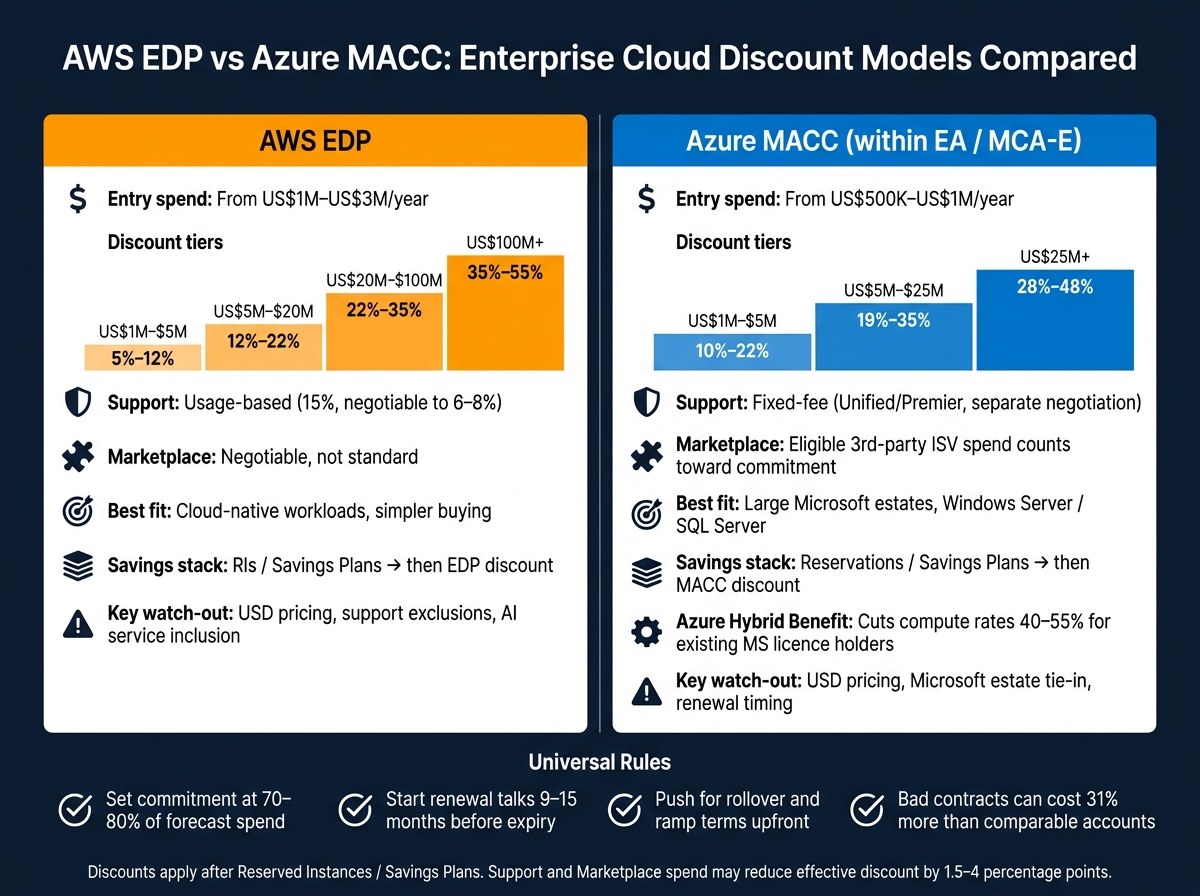 {AWS EDP vs Azure MACC: Enterprise Cloud Discount Models Compared}
:::
{AWS EDP vs Azure MACC: Enterprise Cloud Discount Models Compared}
:::
Contract structure, negotiation complexity, and flexibility
The main gap isn’t just the size of the discount. It’s the way the contract is put together.
AWS tends to keep the agreement tighter and more cloud-focused. In practice, that often makes the negotiation easier to run. There are fewer moving parts, fewer side issues, and a more direct commercial discussion.
Azure usually sits inside a much broader Microsoft relationship. That can make the process harder to manage, but it can also give buyers more room to push on price and terms. For UK organisations with large Microsoft estates, that broader setup often creates extra leverage across the whole account.
Running AWS and Azure negotiations side by side often improves leverage [1].
Discount coverage, credits, and cost control
Both models cover a lot of ground, but the fine print does the heavy lifting here. AWS EDP often needs more specific negotiation if you want newer services included, such as Amazon Bedrock or some SageMaker tiers [2][6]. Azure MACC covers most native Azure services, including compute, storage, PaaS and Azure OpenAI, but it does not include Microsoft 365, Dynamics 365 or Power Platform [16].
Third-party software is one of the clearest differences. With Azure, eligible third-party purchases through the Azure Marketplace count towards commitment consumption [16]. On AWS, Marketplace inclusion can be negotiated, but it is not standard by default [2]. If your organisation spends a lot on SaaS, that difference can have a big effect on how easy the commitment is to use.
Support pricing also works differently. AWS support is usually usage-based, while Azure support is often agreed as a fixed fee [3].
That means the better option depends less on headline discount rates and more on what sits inside your estate.
| Factor | AWS EDP | Azure MACC |
|---|---|---|
| Contract type | Narrower cloud-only contract | Consumption commitment within a broader Microsoft agreement |
| Service coverage | Broad, but some AI/ML services may need specific inclusion | Broad, but Microsoft 365, Dynamics 365 and Power Platform are excluded |
| Marketplace inclusion | Negotiable; not always standard | Eligible third-party software can count towards commitment consumption |
| Support pricing | Usage-based | Often fixed-fee (Unified/Premier) |
Which model fits different UK enterprise scenarios
If your organisation has a heavy Windows Server or SQL Server footprint, Azure often makes more commercial sense. Azure Hybrid Benefit can cut effective compute rates by 40% to 55% against list prices [4][6], and that edge builds over a three-year term. AWS does not offer a like-for-like licence-bundling model.
For teams running modern cloud-native workloads, AWS Savings Plans can be a better fit. They apply across EC2, Fargate and Lambda regardless of region or instance family [3]. That suits organisations in the middle of migration, where the target architecture is still shifting. Azure Reservations are more granular, which can make them harder to use well when the architecture keeps changing.
In the UK public sector, procurement routes can shape the choice just as much as price. Azure often starts from a strong position because many central and local government bodies already have Microsoft Enterprise Agreements in place [3][4]. AWS, of course, has its own public sector frameworks [3][4].
One point stays the same whichever provider you choose: sizing the commitment at 70% to 80% of your honest usage forecast is usually the safer range if you want to avoid shortfall penalties or spend you cannot use [5].
Conclusion: choosing the right discount model and managing it well
The choice comes down to the shape of the contract, not just the headline discount. AWS EDP is simpler and more focused on cloud spend. Azure MACC covers more ground and gives you more room to work across Microsoft services. The right pick depends on how predictable your spend is, which services you plan to use, and how your procurement team prefers to buy.
That said, both models have the same weak spot: the deal only pays off when your usage lines up with the commitment. Most of the money left on the table comes from commitments that were set too high or too low, spend that does not count towards the deal, and poor control after signing.
Once the contract is in place, the hard part starts. You need to keep actual spend on track. If you need support, Hokstad Consulting helps UK organisations review contracts, align architecture to commitments, and turn discounts into savings you can actually see.
Key takeaways for decision-makers
Focus on the parts of the deal that shape day-to-day outcomes: commitment size, term length, renewal timing, eligible spend, and shortfall terms. Set commitments at 70–80% of forecast [5] and start renewal talks 9–15 months early [4][7]. Push for rollover and ramp terms from the start - they are rarely offered by default [5]. If a commitment cannot be consumed, the discount means very little.
The best deal is the one you can forecast, govern, and fully consume.
FAQs
How do I choose the right commitment size?
Choose a commitment size based on a conservative, defensible forecast of what you’ll use in practice, not on chasing a bigger discount tier. If part of that commitment goes unused, it’s usually lost when the term ends. And that means over-committing can cost more than the extra discount ever saves.
A common approach is to commit 70% to 80% of your rebaselined forecast, with the focus on core, stable workloads.
Which services usually do not count towards the discount?
For both AWS EDP and Azure MACC, it comes down to the contract you negotiated.
AWS EDP usually applies to a broad set of services, but some exclusions can still show up. Azure MACC works in a similar way. What counts often depends on how your Enterprise Agreement is set up, so not every Azure service will count by default.
One area that often trips people up is third-party Marketplace purchases. These may not be included unless that was clearly agreed during the contracting process.
When should I start renewal planning?
Start 12 to 18 months before your current commitment ends. That gives you time to build a solid alternative and improve your commercial leverage.
Then, 6 to 12 months before the renewal date, get more precise. Benchmark pricing, align your strategy, right-size your environment, measure steady-state usage across a full quarter, and model commitments against actual usage.