
Cloud commitments can cut spend by 30–60%, but poor buying and renewals can waste a lot of that money. If I were shortlisting tools today, I’d split them into three groups straight away: full automation, finance-heavy control, and managed service support.
Here’s the short version:
- Hokstad Consulting: managed service with human oversight across AWS, Azure, GCP and OCI
- ProsperOps: hands-off automation with strong commitment execution, mainly for teams that want less manual work
- nOps: AWS-first automation with FinOps features like anomaly checks, tagging, and showback
- Usage AI: billing-layer automation with daily rebalancing and approval-based options
- Apptio Cloudability: stronger on reporting, allocation, budgets, and finance control than pure autopilot
A few numbers stand out from the article:
- Cloud discounts can be up to 72% lower than on-demand rates
- Automated commitment tools can improve savings by about 20%
- Some platforms target 90%+ coverage
- One example in the article shows £117,000 in annual savings
If I boil the article down to one point, it’s this: the best tool is not just the one with the most automation, but the one that matches your cloud mix, buying process, and finance controls.
::: @figure 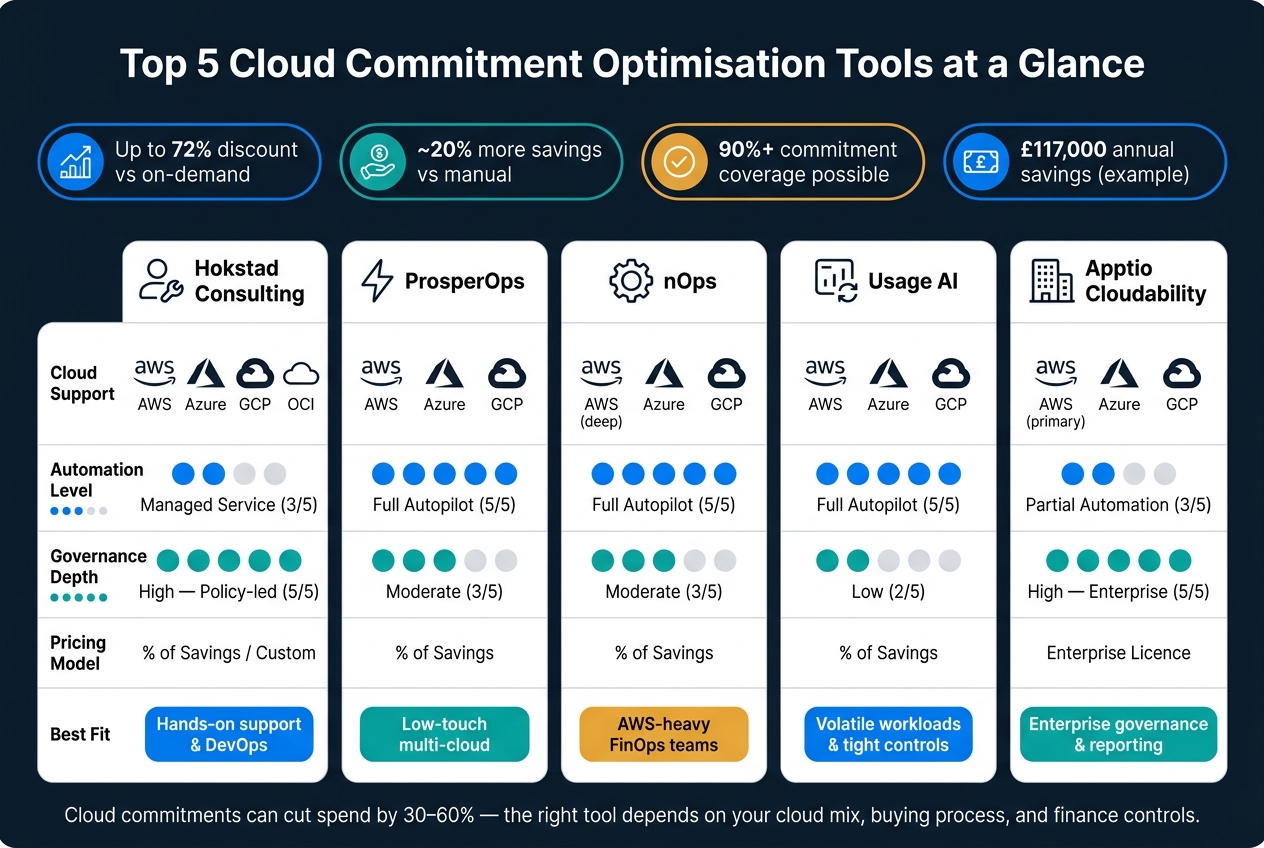 {Top 5 Cloud Commitment Optimisation Tools Compared}
:::
{Top 5 Cloud Commitment Optimisation Tools Compared}
:::
Using Cloud Cost Optimization for the Best Commitment Discounts| Flexera
Need help optimizing your cloud costs?
Get expert advice on how to reduce your cloud expenses without sacrificing performance.
Quick Comparison
| Tool | Cloud support | Main style | Best fit | Pricing |
|---|---|---|---|---|
| Hokstad Consulting | AWS, Azure, GCP, OCI | Managed service | Teams that want support with buying, renewals, and rebalancing | Custom / share of savings |
| ProsperOps | AWS, Azure, GCP | Full automation | Teams that want low-touch commitment management | Share of savings |
| nOps | AWS, Azure, GCP | Full automation, AWS-led | AWS-heavy FinOps teams | Share of savings |
| Usage AI | AWS, Azure, GCP | Daily automation or approval mode | Teams that want low-access setup and tight controls | % of savings |
| Apptio Cloudability | AWS, Azure, GCP | Governance-led platform | Enterprises that need chargeback, budgeting, and reporting | Licence / spend-based |
What follows is a short, practical look at where each option fits, where each one is lighter, and what I’d check before picking one.
How Cloud Commitment Optimisation Tools Cut Waste
These tools look at billing data from sources like AWS Cost and Usage Reports and GCP Billing Export to work out demand and size commitments with more precision. They track usage hour by hour, factor in seasonality, pick up cyclical workloads, and forecast future demand. From there, they shape two choices: how much to commit and how often to rebalance.
A strong platform doesn’t just buy once and hope for the best. It uses laddering instead. That means making smaller purchases on overlapping terms, rather than one big commitment in a single go. If usage falls, only part of the portfolio is exposed. Some platforms go further and rebalance hourly by exchanging convertible RIs or shifting Savings Plan coverage as demand changes. Done well, that can improve savings rates by about 20% compared with manual management [1].
One of the biggest differences between tools comes down to advice versus action. Some give recommendations and leave your team to carry them out. Others execute changes through APIs with little day-to-day input.
| Advisory-Only | Automated Execution | |
|---|---|---|
| Execution | Manual - you act on recommendations yourself | Autonomous - the platform executes via API |
| Frequency | Periodic (monthly or quarterly) | Continuous (hourly rebalancing) |
| Risk management | Manually tracking expiry dates | Automated laddering and rebalancing |
| Human effort | High - requires dedicated FinOps resource | Low - set guardrails, then largely hands-off |
For UK teams, buying criteria matter just as much as the automation. Before signing off, check these points:
- Multi-cloud support across AWS, Azure, and GCP
- Approval workflows so larger purchases can still get manual sign-off, while lower-risk changes run on their own
- Tagging and Infrastructure-as-Code integration to keep chargeback or showback clean across business units
- Reporting that matches the April–March UK financial year [1]
1. Hokstad Consulting
Hokstad Consulting provides a managed service for cloud commitment optimisation. The setup blends automation with human oversight, which matters because cloud commitments can drift fast if no one is paying attention.
Commitment automation depth
The managed service centres on buying, rebalancing, and renewing commitments on a set cadence. Its monthly FinOps cycle uses a 'see, cut, lock' workflow[7][8].
It covers Reserved Instances, Savings Plans, and Committed Use Discounts across major clouds[7][8]. The service also uses laddering to stagger term lengths, which helps limit exposure if demand changes[7][8]. In the Run phase, it handles exchanges, resales, and new tranches when needed[7].
Cloud coverage
It supports AWS, Azure, GCP, and OCI[7][8].
Forecasting and performance
That cloud coverage is backed by strong utilisation results. Hokstad Consulting reports an average cost reduction of 31% and reservation utilisation above 97%[7].
Pricing and savings
Pricing is custom. There is also a no-savings, no-fee option, capped at a percentage of savings. One documented case shows annual savings of £117,000[9].
2. ProsperOps
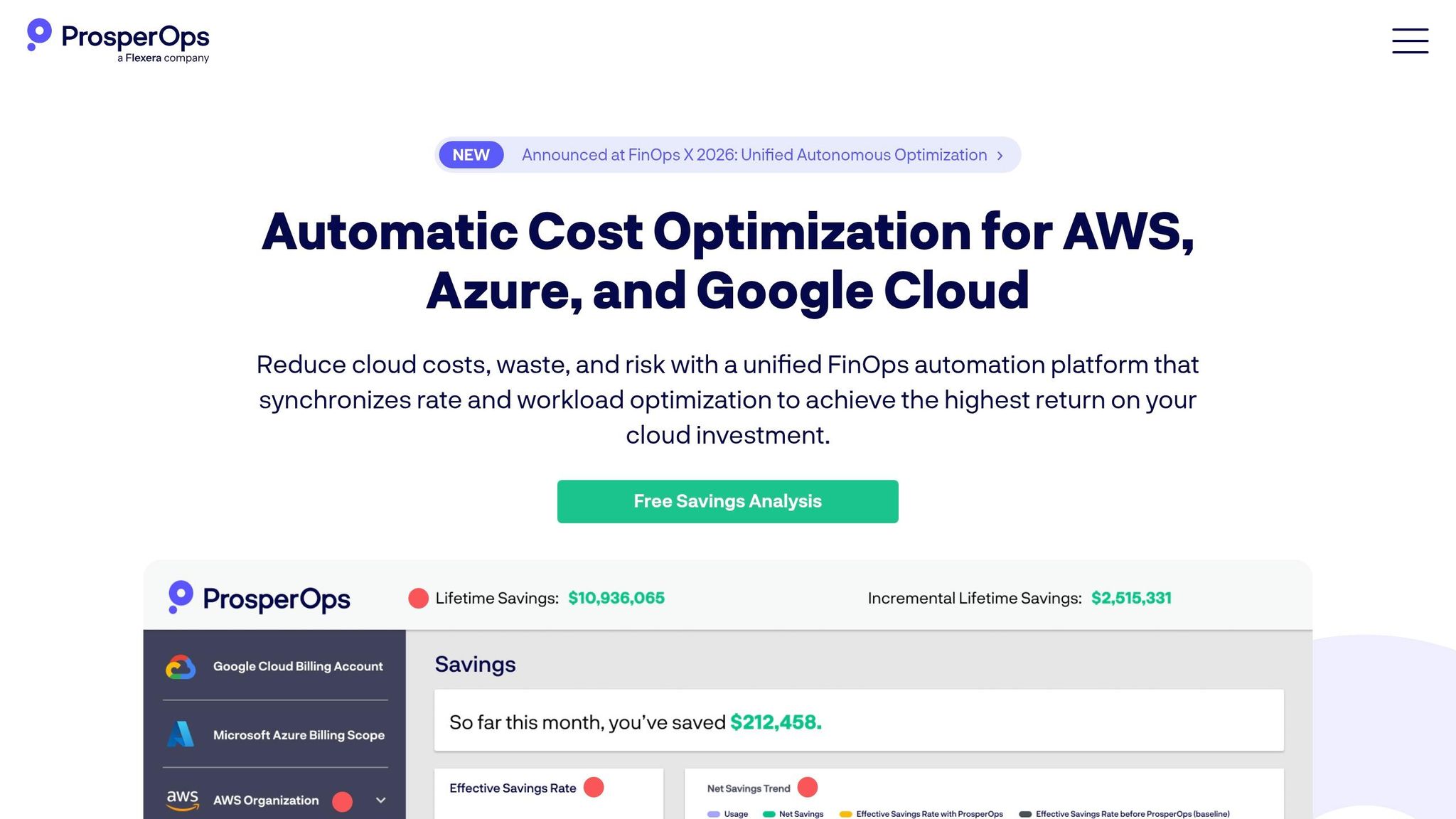
For teams that want fully automated AWS commitment management, ProsperOps takes the manual grind out of buying, exchanging, rebalancing and renewing discounts. Its Autonomous Discount Management (ADM) engine handles those jobs on its own. The platform manages more than $7 billion in annual cloud spend and has generated over $4.2 billion in lifetime savings for customers [10][5].
Commitment automation depth
The ADM engine carries out thousands of actions each month to keep the commitment portfolio lined up with actual usage [10]. It uses Adaptive Laddering to stagger expiries and cut lock-in. It also applies cyclical optimisation to follow recurring usage patterns and adjust coverage over time [5].
The numbers are hard to ignore. Customers average a 68% monthly savings uplift, and 75% see at least 50% [11][10][5]. That approach has also worked well for UK customers. Capita plc increased its Effective Savings Rate from 37% to 49% in two months [6][13].
Cloud coverage
ProsperOps covers AWS, Azure and Google Cloud [10][5]. On AWS, coverage includes:
- EC2
- Lambda
- Fargate
- RDS
- ElastiCache
It does not cover on-prem costs or workload optimisation work such as rightsizing or spot management [12][1].
Forecasting and governance
The platform blends historical data with machine learning to estimate demand and coverage points [10][11][5]. Teams can set guardrails for:
- term length
- budget
- payment preference
- risk tolerance
For governance, Intelligent Showback splits costs and savings across accounts, regions and resources. Least-privilege access, RBAC and SOC 2 Type II add more control for finance and platform teams [10][5].
UK finance support
Pricing uses a savings-share model with no upfront platform fee [10][1]. That makes ProsperOps a good fit for teams that want hands-off commitment execution without giving up control.
3. nOps
nOps is a strong fit for teams that want commitment optimisation as part of a broader FinOps workflow. It manages more than $4 billion in annual cloud spend across 600+ customers, with commitments, rightsizing, container optimisation and cost visibility in one platform [1][18].
Commitment automation depth
nOps runs in a fully autonomous mode. After setup, it buys, exchanges and renews Savings Plans and Reserved Instances without manual input [1][3]. It also rebalances commitments hourly as usage shifts across instance families and regions, covering core AWS services [14][15].
One part that stands out is its adaptive laddering approach. Instead of making large purchases in one go, it staggers buys in smaller increments to cut lock-in risk [3][19]. nOps also offers a 100% utilisation guarantee, with fee credits for unused commitments [14][16].
Its deepest automation is on AWS. Azure and GCP support is there, but it is lighter.
Cloud coverage
nOps supports AWS, Azure and Google Cloud Platform (GCP), though the AWS side is much more developed than the Azure and GCP offering [1][16][17]. For multi-account AWS estates, it can handle automated tagging plus showback and chargeback, which helps teams attribute centrally purchased commitments across more complex account setups [20].
Forecasting and governance
nOps goes beyond buying and renewing commitments. It also helps teams keep spend under control and spot issues earlier. The platform uses ML-driven analysis of CloudWatch and CloudTrail logs to forecast demand and guide commitment planning [14].
On the governance side, it includes:
- Anomaly detection with root cause analysis [17][18]
- Tag governance to enforce naming policies [17][18]
A feature worth calling out is Clara, an agentic FinOps assistant. It answers billing queries in plain language and can carry out approved remediations directly [18].
UK finance support
nOps clearly serves the United Kingdom market and supports AWS Cost and Usage Report (CUR) ingestion alongside Azure FOCUS exports for multi-cloud billing visibility [15][19]. Its pricing uses a share-of-savings model, with annual enterprise contracts usually ranging from $25,000 to $500,000 [17][18].
4. Usage AI
Usage AI is built around commitment optimisation. In plain terms, it looks for gaps, cuts waste and rebalances commitments automatically, with 24/7 monitoring and a free savings analysis. It suits teams that want commitment management to run on its own, but still within tight controls.
Commitment automation depth
Usage AI offers two modes. Autopilot buys, rebalances and adjusts commitments every day. CoPilot shows recommendations for a person to approve first. That split matters. Some teams want full automation; others want the system to do the heavy lifting without giving up sign-off.
Its Flexible Savings Plans offer 1- or 3-year rates with a 30-day exit. That's handy for seasonal demand or kit that's being phased out. The platform updates its commitment analysis every 24 hours [24][23].
Cloud coverage
Usage AI supports AWS, Microsoft Azure and Google Cloud Platform (GCP), across both compute and database layers. On AWS, it covers core compute and database services, along with Savings Plans and Reserved Instances. It also manages Azure Reservations and Savings Plans, plus GCP Committed Use Discounts.
With automated management through Usage AI, commitment coverage can reach 85–95%. Manual processes usually land around 25–40% [24]. At £2 million in annual spend, that difference can mean about £200,000–£400,000 in extra savings [23]. That's not a small gap. It's the sort of number finance teams notice straight away.
Forecasting and governance
Usage AI combines past usage with event-based forecasting. So if a team is planning a migration, winding down part of its setup or expecting a demand spike, those changes can be built into commitment planning instead of guessed at later.
The governance model is fairly light. The platform reads metadata such as instance sizes and launch times, and it only needs write access when buying commitments [21]. For UK firms, that's often easier to get past security and risk reviews than tools that need deeper access.
Teams can also set exclusions. That means certain accounts or services can be kept outside the autonomous engine during architecture freezes or other business-critical periods [24].
UK finance support
Usage AI's billing-only access model is a good fit for UK organisations because it doesn't touch live workloads or personal data. That can help with UK GDPR and Data Protection Act 2018 compliance [23].
It also tunes optimisation for UK cloud regions, including AWS eu-west-2 (London) and Azure UK South [23]. Pricing is percentage-based:
- 20% on EC2 savings
- 35% on database savings
- No subscription fees or upfront costs
If it doesn't save money, it doesn't charge a fee [21][22].
The main draw here is simple: daily optimisation with guardrails. You get speed, limited access and clear cost visibility, without handing over the keys to the whole estate.
5. Apptio Cloudability
Apptio Cloudability is aimed at enterprise FinOps teams that want commitment automation without giving up control. It fits organisations that need strict governance around cloud spend, not just automated buying. The platform was named a Leader in the 2025 Gartner® Magic Quadrant™ for Cloud Financial Management Tools [27] and a Leader in the Forrester Wave, Q3 2024 [28], which gives it a strong position in this part of the market.
Commitment automation depth
Cloudability’s Savings Automation module handles AWS commitment purchasing, exchanges and rebalancing, with a target of 90%+ coverage [27]. That matters because manual commitment management can get messy fast, especially at enterprise scale.
Users report 60–80% higher savings rates on 3-year commitments than they get from manual management [26]. That’s a big jump. The trade-off is that rightsizing is still a manual job. Cloudability points out the opportunities, but teams still need to act on them themselves [25].
Cloud coverage
Cloudability supports AWS, Microsoft Azure and Google Cloud Platform. AWS is where the platform is strongest. Azure and Google Cloud support are there, but they’re less developed [25][28].
If your estate is heavily AWS-based, that’s less of an issue. If you need the same level of depth across all three cloud providers, it’s worth looking closely at how far the non-AWS features go.
Forecasting and governance
Governance is where Cloudability stands out. It offers AI-backed bottom-up forecasting and top-down budgeting, using machine learning to account for trends and seasonality [27]. For finance teams, that means forecasts aren’t just based on a flat line and wishful thinking.
It also includes:
- Automated chargeback and showback
- 100% multi-cloud cost allocation through a business mapping engine
- Proactive alerts for budget breaches or anomalies [27]
That mix gives finance and platform teams a tighter grip on spend, while still letting them track usage across different business units and cloud environments.
UK finance support
For UK buyers, the commercial and compliance side can matter just as much as the automation itself. Cloudability is available through the UK Government’s G-Cloud 14 framework, with UK data storage and processing, plus £ GBP reporting [29].
G-Cloud 14 pricing is listed at £21,000 per licence per year, while enterprise pricing is usually worked out as a percentage of cloud spend under management [25][29]. For public sector teams or firms with strict data handling rules, that setup may make procurement a lot more straightforward.
Key Differences Between These Tools
The main split is simple: autonomous commitment automation versus governance-led FinOps platforms.
After that, the choice depends on how much control you want to keep in-house. Hokstad Consulting fits hybrid or bespoke setups that need tailored cloud cost engineering and automation. ProsperOps and nOps lean the other way. They’re autonomous automation platforms that keep buying and rebalancing commitments with very little human input [1][5].
nOps is a good fit for teams that want pricing tied to savings. Cloudability makes more sense for larger organisations that need governance, chargeback and reporting. For UK enterprises, the day-to-day upside is pretty clear: cleaner business mapping and GBP reporting across business units.
So in practice, the decision comes down to automation depth, cloud scope and governance.
At-a-Glance Comparison
The table below sums up the differences that tend to matter most in practice: cloud coverage, how far the automation goes, commitment options, day-to-day fit, governance, and pricing.
| Feature | Hokstad Consulting | ProsperOps | nOps | Usage AI | Apptio Cloudability |
|---|---|---|---|---|---|
| Supported Clouds | Multi-cloud | AWS, Azure, GCP | AWS (deep), Azure, GCP | AWS, Azure, GCP | AWS (primary), Azure, GCP |
| Automation Level | Managed service | Full autopilot | Full autopilot | Full autopilot | Partial automation |
| Commitment Types | All (strategy-based) | RIs, SPs, CUDs | RIs, SPs | RIs, SPs (buyback) | RIs, SPs, CUDs |
| Operational Fit | High (implementation) | Low (hands-off) | High (K8s/Spot) | Low (billing layer only) | Moderate |
| Governance Depth | High (policy-led) | Moderate | Moderate | Low | High (enterprise) |
| Pricing Model | Project / retainer | % of savings | Savings-share model | % of savings | Enterprise licence |
| Best Suited For | Hands-on optimisation and DevOps support | Multi-cloud rate optimisation | AWS-heavy FinOps automation | Teams with volatile workloads and tight controls | Enterprise FinOps visibility and reporting |
The main decision usually comes down to three things: hands-off automation, enterprise governance, or services-led support.
Usage AI stands out if you want low-access automation that works at the billing layer. Hokstad Consulting is a better fit for organisations that need hands-on optimisation, implementation, and DevOps support. Those differences shape the pros and cons of each tool type.
Pros and Cons by Tool Type
These five tools split by operating model, not just by features. Cloud commitment tools usually fall into three camps: automation-first, governance-first, and consultancy-led. The best fit comes down to one thing: how much of the execution your team wants to keep in-house.
| Automation-First | Governance-First | Consultancy-Led | |
|---|---|---|---|
| Best for | Automatic rebalancing and higher savings | Renewal control, allocation and reporting | Human-approved buying and renewal |
| Weakest point | Limited governance depth | Recommendations without execution | Depends on scoping and collaboration |
| Typical buyer | Teams wanting hands-off commitment execution | Enterprises needing chargeback and audit trails | Organisations needing hands-on support during migrations or major platform changes |
| Multi-Cloud Support | Strong across AWS, Azure and GCP | Broad coverage across major cloud providers | Varies by environment; consultancy-led services may support public, private, hybrid and managed hosting |
| Fit for UK SMEs | Low overhead and faster ROI | Often too heavy for smaller teams | Good for focused projects and audits |
| Fit for Enterprises | Best as an optimisation layer alongside other tools | Essential for chargeback, reporting and governance | Useful for strategic oversight in complex environments |
So the main decision is less about brand and more about who does the optimisation work.
Governance-first FinOps platforms focus on allocation, reporting and control at scale. That sounds good on paper, but there’s a catch: they usually surface recommendations instead of acting on them. Your team still needs the time and people to carry out the work.
Consultancy-led services take the opposite route. They add hands-on support for buying, rebalancing and renewal decisions. That can help a lot during migrations or major platform changes, when the stakes are higher and teams don’t want to wing it.
These trade-offs make the shortlist smaller before you even get into governance, budget or internal capacity. For UK SMEs and scale-ups, the choice is often between fast automation and hands-on support. Larger enterprises tend to need a reporting layer, plus either automation or advisory delivery.
Conclusion
The right tool comes down to four things: how steady your workloads are, which clouds you use, how much control your finance team wants, and how much time your engineering team has to act on recommendations. The best pick depends on how your team works day to day. If the fit is off, wasted spend tends to show up fast. In practice, the best tool is the one your team can use consistently.
Automated commitment management can deliver around 20% more savings than manual approaches, which matters most for lean teams and workloads that change often [1][15].
That is why execution support matters just as much as the software itself. Specialist support helps bring FinOps into engineering workflows and keep optimisation part of regular operations [2]. For teams that want hands-on support, Hokstad Consulting can help turn cloud cost engineering into part of day-to-day operations rather than a separate exercise.
To close the shortlist, judge tools on measurable outcomes. Track Effective Savings Rate (ESR) as the main success metric: it combines utilisation, coverage and waste [2][4].
FAQs
How do I choose between automation and human oversight?
It depends on your organisation’s risk tolerance, compliance duties, and internal resources. If you need strict regulatory compliance, approval-based workflows or granular role-based access control can give you documented oversight while still letting you use AI-driven recommendations.
If your main goal is to maximise savings and efficiency, full automation often works well for volatile or fast-scaling workloads. The aim is to balance agility with strong financial control.
What should I check before committing to a long-term cloud discount?
Before you commit, rightsize first and commit second. Cut idle or oversized resources, then give usage a few weeks to settle. That way, you don’t lock waste into a long-term deal.
Put your attention on stable baseline usage, not peak demand. Use hourly data instead of broad averages, because averages can hide what’s going on. It’s also worth checking lock-in risk, including whether you can exchange commitments later or spread maturity dates across different points in time.
Which cloud commitment metrics matter most?
Start with Effective Savings Rate (ESR). It shows what you’re actually saving after utilisation and unallocated costs are taken into account.
Coverage and utilisation rates still matter, but they sit in the second tier. They help explain performance, but ESR gives you the clearest view of the financial outcome.
It also helps to track:
- burn-down against your commitment budget
- net savings
- how savings are split across teams and business units
That way, you’re not just looking at headline savings. You’re seeing where the money is going, who’s using it well, and whether your commitments are paying off.