
Disaster recovery (DR) is critical for minimising downtime, but choosing between cloud and on-premises solutions often comes down to cost. Here's the key takeaway:
- Cloud DR is flexible with low upfront costs, charging based on usage. However, recurring expenses like storage, data egress, and compute can add up, especially for long-term or large-scale workloads.
- On-Premises DR requires a high initial investment in hardware and facilities but offers predictable ongoing costs. It’s typically more cost-effective over several years for stable workloads.
Key Cost Insights:
- Cloud DR uses a pay-as-you-go model, with monthly costs varying based on usage. Example: Protecting 10 servers and 10TB of data costs £415–£530/month.
- On-premises DR involves upfront hardware costs (£5,000–£50,000+) and ongoing expenses like power, cooling, and staffing.
- Over five years, on-premises setups often cost less, with an estimated total of £324,605 compared to £674,610 for cloud DR.
Quick Comparison Table:
| Factor | Cloud DR | On-Premises DR |
|---|---|---|
| Upfront Cost | Minimal (subscription-based) | High (hardware and setup) |
| Monthly Cost | Variable (usage-based) | Predictable (fixed) |
| Scalability | Instant | Limited by hardware capacity |
| Data Egress Fees | £0.06–£0.09/GB | None |
| Maintenance | Managed by provider | In-house IT staff required |
| Long-Term Cost (5 years) | ~£674,610 | ~£324,605 |
Bottom Line:
Cloud DR suits businesses with fluctuating workloads or growth needs, while on-premises DR is better for stable environments looking for long-term savings. Evaluate your recovery objectives, compliance needs, and total cost of ownership over 3–5 years to make the best choice.
::: @figure 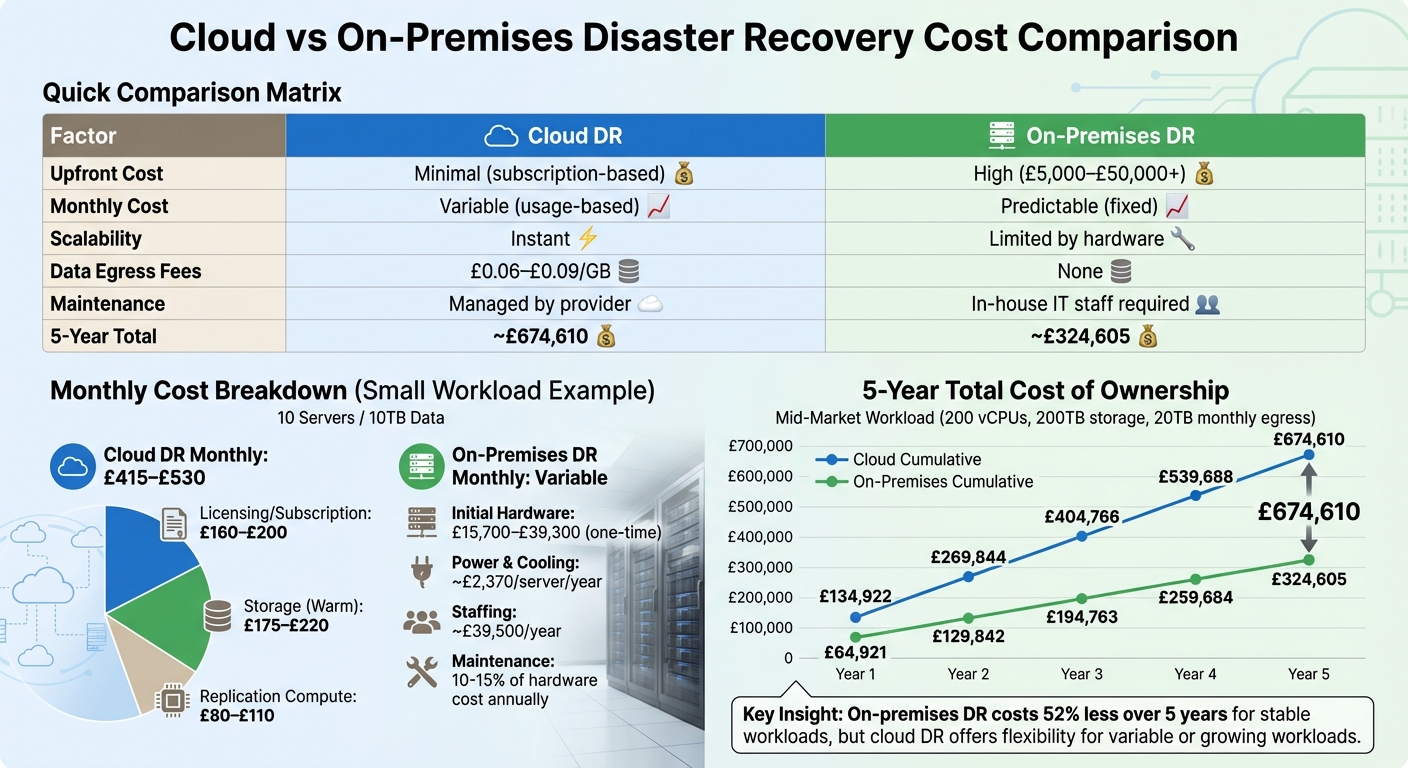 {Cloud vs On-Premises Disaster Recovery: 5-Year Cost Comparison}
:::
{Cloud vs On-Premises Disaster Recovery: 5-Year Cost Comparison}
:::
Project AWS Elastic Disaster Recovery Costs | Amazon Web Services
Need help optimizing your cloud costs?
Get expert advice on how to reduce your cloud expenses without sacrificing performance.
Cloud Disaster Recovery Costs Explained
Cloud Disaster Recovery (DR) uses a pay-as-you-go pricing model, avoiding hefty upfront capital expenses. Instead, you’re billed monthly based on actual usage, making it essential to grasp the cost structure to manage your ongoing operational expenses effectively.
The costs generally fall into three categories: subscription fees for each protected server, storage costs for replicated data, and compute charges for the systems that handle replication and recovery. For instance, AWS Elastic Disaster Recovery charges approximately £0.022 per server per hour [7], while Azure Site Recovery costs around £19.50 per instance per month after a 31-day free trial [8]. Among these, storage often becomes the largest recurring expense, covering staging disks
used for continuous data replication [7][9].
With AWS Elastic Disaster Recovery, you pay only for the servers you are actively replicating to AWS... There are no resources to manage, no upfront costs, and no minimum fee.- Amazon Web Services [7]
Compute costs are split into two types: low-cost Replication Servers
, which handle data flow in the background, and Recovery Instances
, fully provisioned servers activated only during testing or actual recovery events [7][8]. You won’t incur charges for unused compute capacity. Testing costs remain manageable; for example, an 8-hour DR drill for 100 servers on AWS costs around £96 [7]. Additional expenses can include data egress and API request fees [9]. A cost-saving measure is to use tiered storage: keep recent backups in warm storage and older ones in cold storage, which costs about £0.008 per GB per month, potentially reducing storage costs by up to 80% [9].
Main Cost Components in Cloud DR
Subscription fees form the foundation of your costs. AWS charges hourly per server (around £16.50 per month per server), while Azure uses a flat monthly rate of approximately £20.50 per instance [10]. Storage costs depend on the storage tier and region. For 10TB of warm storage, you can expect to pay between £175 and £220 per month [10]. If you opt for cold storage for less frequently accessed backups, the price drops to about £0.008 per GB per month [9]. Replication compute, which handles ongoing data synchronisation, adds another £80 to £110 monthly for smaller workloads [10]. Finally, data transfer fees - especially during failback when recovered data is returned to the primary site - typically run around £0.07 per GB [10].
Cost Comparison for Different Workload Sizes
Costs vary depending on the scale of your workload. Here’s a breakdown:
| Workload Size | Licensing/Subscription | Storage (Warm) | Replication Compute | Total Estimated Monthly |
|---|---|---|---|---|
| Small (10 Servers / 10 TB) | £160 - £200 | £175 - £220 | £80 - £110 | £415 - £530 |
| Medium (50 Servers / 50 TB) | £800 - £1,000 | £875 - £1,100 | £400 - £550 | £2,075 - £2,650 |
| Large (100 Servers / 100 TB) | £1,600 - £2,000 | £1,750 - £2,200 | £800 - £1,100 | £4,150 - £5,300 |
Estimates include licensing, warm storage, and replication compute based on UK/European regional pricing [10].
When an actual recovery is required, additional compute charges for the active Recovery Instances apply, but only for the duration of the event. This scalability is a key benefit: whether you’re protecting 10 servers or 1,000, you avoid the need to purchase physical hardware, paying only for the resources you actively use [7].
Breaking down these cost components provides a clear foundation for comparing cloud DR with traditional on-premises solutions.
On-Premises Disaster Recovery Costs Explained
On-premises disaster recovery (DR) systems require a substantial financial commitment upfront, along with ongoing expenses. Unlike cloud-based solutions, which often use a flexible subscription model, on-premises DR operates on a capital expenditure (CapEx) model paired with operational expenditure (OpEx). This means you must invest heavily in physical infrastructure at the start and then cover recurring costs for maintenance, staffing, and facilities. Even if you never need to activate the system, these expenses persist year after year.
Initial Investment and CapEx
The initial costs for setting up on-premises DR are significant and encompass a wide range of expenses. At the core of this investment are physical servers, which cost approximately £4,700 each [5], along with storage solutions like NAS or SAN arrays, networking equipment (routers, switches, firewalls, and load balancers), and a secondary site equipped with essentials such as racks, UPS systems, generators, and cooling systems [3][4][6]. Additionally, software licensing for operating systems, virtualisation platforms, and business continuity tools, as well as physical security measures like surveillance cameras and access control systems, add to the total cost [4][6].
The scale of investment varies depending on the organisation's size. For example:
- Small enterprises (100–500 employees): Hardware costs range from £15,700 to £39,300.
- Large enterprises (2,000+ employees): Hardware expenses can climb to between £157,000 and £393,000 [3].
Other expenses include tape libraries and backup software, which might add around £15,700 [5]. Facility costs for the secondary site range from £11,800 to £31,400 annually for smaller organisations, while large enterprises might spend £118,000 to £314,000 [3].
One key challenge with on-premises DR is overprovisioning. Because hardware capacity is fixed, organisations often purchase systems based on peak load predictions, leading to unused capacity that still incurs costs [6][11].
On-premises can cost nearly a million dollar to install, implement. Another side effect, is wastage of valuable resources.- Columbus Global [11]
These upfront investments are just the beginning, as ongoing operational costs quickly add up.
Ongoing Operational Costs
Once the DR system is live, continuous operational expenses become another financial burden. Power, cooling, maintenance, and staffing are among the most significant recurring costs.
Staffing, in particular, represents a major expense. Dedicated IT personnel are needed to manage system health, troubleshoot issues, apply patches, and perform upgrades. This alone can cost approximately £39,500 annually [5].
Energy consumption is another ongoing cost, with each server requiring around £2,370 per year for power and cooling [5]. For a mid-sized system managing 40–50 virtual machines, facilities costs for power and cooling can amount to £11,400 over three years [12]. Maintaining a high-speed link between primary and secondary data centres adds another £5,700 over the same period [12].
Other recurring expenses include:
- Maintenance contracts: Typically 10–15% of the initial hardware cost annually [13][14].
- Software licence renewals: Estimated at £9,700 over three years [12].
- Monitoring tools and testing: Around £1,700 over three years [12].
- Labour for patching and upgrades: Adds approximately £8,500 [12].
In total, excluding staffing costs, a mid-sized on-premises DR setup (40–50 VMs) incurs operational expenses of roughly £37,000 over three years.
On-premise systems require IT personnel to manage and maintain them... you'll reduce the efficiency of your IT staff as they'll have to take on more tasks or increase costs by hiring new staff.- S-PRO [5]
Direct Cost Comparison: Cloud vs On-Premises
Cloud and on-premises disaster recovery (DR) differ significantly in how costs are structured. Cloud DR follows an operational expenditure (OpEx) model, where you pay a monthly fee based on usage. On the other hand, on-premises DR involves a capital expenditure (CapEx) model, with a hefty upfront investment in hardware, infrastructure, and facilities that you fully own. Here's a breakdown of some key cost factors:
| Cost Factor | Cloud DR | On-Premises DR |
|---|---|---|
| Initial Investment | Minimal (OpEx) | Significant (CapEx: £5,000–£50,000+) |
| Pricing Model | Pay-as-you-go / Subscription | Fixed hardware investment with depreciation |
| Scalability Costs | Automatic; pay for only what you add | High; requires purchasing new physical hardware |
| Testing | Easier; spin up and down on demand | Complex; requires maintaining idle hardware |
| Data Retrieval Fees | Egress charges (£0.06–£0.09 per GB) | None (internal network transfer) |
| Maintenance | Managed by cloud provider | Managed by in-house IT staff (10–15% of hardware cost annually) |
One notable cost in cloud DR is data egress fees, which range from £0.06 to £0.09 per GB. For a workload requiring 20 TB of data retrieval each month, this adds up to approximately £15,800 annually [13]. On-premises DR avoids this expense, as data moves internally within your network.
Cloud DR is especially cost-effective for variable workloads. For example, if utilisation drops to 30%, compute costs can decrease by as much as 70% [13]. However, for steady workloads running continuously, on-premises solutions often work out cheaper in the long run.
5-Year Total Cost of Ownership (TCO)
Looking at costs over five years gives a clearer picture of how these models scale. For a mid-market workload with 200 vCPUs, 200 TB of storage, and 20 TB of monthly egress, here's how the numbers compare:
| Year | Annual Cost (On-Premises) | Cumulative (On-Premises) | Annual Cost (Cloud) | Cumulative (Cloud) |
|---|---|---|---|---|
| Year 1 | £64,921 | £64,921 | £134,922 | £134,922 |
| Year 2 | £64,921 | £129,842 | £134,922 | £269,844 |
| Year 3 | £64,921 | £194,763 | £134,922 | £404,766 |
| Year 4 | £64,921 | £259,684 | £134,922 | £539,688 |
| Year 5 | £64,921 | £324,605 | £134,922 | £674,610 |
Over five years, on-premises DR totals approximately £324,605, while cloud DR reaches £674,610 - more than twice as much [13]. This difference grows because cloud costs remain steady year after year, while on-premises costs stabilise after the initial investment as hardware depreciates.
These figures assume continuous operation. For DR environments that only activate during testing or actual disasters, cloud costs can drop significantly. However, managing cloud spending can be tricky: 84% of companies report challenges in controlling cloud expenses [16]. This often stems from underestimating usage patterns or overlooking hidden costs like egress fees and premium support, which typically add 10% to monthly bills [13].
For high-performance workloads, the cost disparity becomes even clearer. A Lenovo study compared on-premises servers with 4× NVIDIA A100 GPUs to AWS p5 instances. Over five years, the on-premises option cost £688,880, while continuous cloud usage exceeded £3.4 million. Even with three-year reserved instances, cloud was still about £1.2 million more expensive [16].
Factors That Influence Cost Decisions
When it comes to disaster recovery (DR), the choice between cloud and on-premises solutions involves much more than just comparing price tags. Several key factors can significantly shape your decision, especially when optimising costs.
Scalability and Flexibility
The nature of your workloads plays a major role in determining the right DR approach. For stable workloads, on-premises solutions often offer a lower total cost of ownership (TCO). In contrast, variable or rapidly growing workloads are better suited to the cloud, thanks to its ability to scale up or down as needed.
Cloud DR eliminates the need for over-provisioning hardware, which is a common issue with on-premises setups. For example, on-premises environments require you to invest in enough hardware to handle peak disaster scenarios, even if that capacity sits idle most of the time. However, this flexibility has its downsides. Hidden costs, such as data egress fees during large-scale recoveries or migrations, can quickly add up - sometimes reaching tens of thousands of pounds [18]. Additionally, shadow IT
(unauthorised cloud resources) accounts for 38% of SaaS spending, silently inflating bills [2].
Recovery Objectives and Compliance
Your recovery time objective (RTO) and recovery point objective (RPO) are critical factors that directly influence DR costs. Achieving near-zero RTOs can increase expenses by 40–60%, while tight RPOs can drive costs up by 30–50% [3]. In cloud environments, meeting aggressive RTOs often requires maintaining a hot standby
setup, which means paying for compute and storage 24/7 [15].
Compliance is another important consideration. Major cloud providers come with built-in certifications like ISO 27001 and HIPAA. These can help reduce the cost of audits and regulatory documentation [17]. On the other hand, on-premises environments give you full control over compliance, but you’ll need to cover all associated costs, including audits and documentation, yourself.
Cloud has changed the economics of disaster recovery. Some years back, only the biggest organisations could fully implement DR because it was so expensive to duplicate infrastructure.- Phil Goodwin, Research Director at IDC [15]
Pros and Cons of Each Model
Both cloud and on-premises DR solutions have their own cost benefits and hidden expenses. Here's a quick comparison of how they stack up:
| Factor | Cloud Disaster Recovery | On-Premises Disaster Recovery |
|---|---|---|
| Upfront Cost | Low/None (Operational Expense) | High (Capital Expense) |
| Ongoing Cost | Variable (Usage-based) | Predictable (Fixed) |
| Scalability | Instant and elastic | Limited by hardware capacity |
| Hidden Fees | Data egress, API requests, support tiers | Power, cooling, floor space, maintenance |
| Staffing | Lower (Provider manages hardware) | Higher (Requires in-house expertise) |
| Data Growth | Compounding monthly storage fees | Fixed cost until capacity is reached |
| Compliance | May require costly add-ons | Easier to control and audit internally |
One thing to keep in mind is the temporary cost spike during migrations. Running duplicate environments can effectively double your DR spending during this phase [18]. With DR accounting for 15–25% of total IT budgets [3], it’s crucial to evaluate costs over three to five years rather than focusing only on the first year. For example, on-premises hardware often reaches cost parity with cloud subscriptions within 15 to 18 months [1].
Conclusion: Choosing the Right Solution for Your Business
When deciding on the best disaster recovery (DR) solution for your business, it's essential to weigh your workload requirements against the associated costs. If your operations involve stable, predictable workloads, on-premises solutions might be the better fit. This is especially true since hardware costs can align with cloud subscription expenses in as little as 15 months [1]. On the other hand, businesses experiencing fluctuating demands or rapid growth often gain more flexibility and scalability from cloud-based solutions.
Recovery objectives also play a critical role in shaping costs. Meeting stringent recovery requirements can drive up expenses significantly [3]. Since disaster recovery typically accounts for 15–25% of IT budgets [3], these decisions have a major financial impact. To ensure clarity, compare solutions using a five-year total cost of ownership (TCO). This should include not only upfront costs but also hidden expenses like power, cooling, staffing, and maintenance [1].
It's wise to think beyond the first year and evaluate costs over a three-to-five-year period. Consider compliance needs, your company's growth trajectory, and whether your team has the expertise to handle on-premises infrastructure. This broader perspective allows for smarter, more informed decision-making as you develop your DR strategy.
For those seeking expert advice, Hokstad Consulting offers tailored support to align your DR strategy with your budget and goals. Whether you're looking to migrate to the cloud, explore hybrid solutions, or cut current cloud expenses by 30–50%, they provide services like cost audits, strategic migration planning with minimal downtime, and ongoing optimisation. Their expertise ensures your DR solution meets your business needs while remaining cost-efficient.
FAQs
What costs are most often missed in cloud DR pricing?
When planning for cloud disaster recovery, it's easy to miss some hidden costs that can quickly add up. Data transfer fees and egress charges - the costs of moving data in and out of the cloud - are often underestimated. Similarly, idle resources, like unused virtual machines or storage, can quietly drain your budget if left unchecked.
On top of these, expenses for migration and security add-ons can significantly inflate the total cost if you're not paying close attention. Regularly reviewing these aspects is crucial to keeping your disaster recovery plan both effective and cost-efficient.
When does on-premises DR become cheaper than cloud DR?
When it comes to disaster recovery (DR), on-premises setups can be more cost-effective in the long run - but only under certain conditions. This holds true if an organisation has already made significant investments in its hardware and infrastructure.
If workloads are stable and predictable and there's no pressing need for rapid scalability or widespread geographic redundancy, the fixed costs of maintaining on-premises solutions can outweigh the recurring expenses of cloud services. In such cases, the absence of ongoing cloud subscription fees, combined with existing resources, can make on-premises DR a more budget-friendly option over time.
How do RTO and RPO targets change DR costs?
RTO and RPO targets play a huge role in shaping disaster recovery (DR) expenses. Lowering these values - aiming for quicker recovery and minimal data loss - often drives up costs. Why? It requires more advanced infrastructure, such as redundant systems and real-time replication, to achieve those goals.
On the other hand, setting more lenient RTO and RPO targets can reduce costs significantly. However, this comes with trade-offs: longer downtimes and a higher risk of data loss. While it may save money upfront, these delays could disrupt business operations and continuity in the long run.