
Managing costs in multi-cloud environments can be tricky but highly rewarding when done right. Here's what you need to know:
- 89% of enterprises now use multi-cloud setups to avoid vendor lock-in and optimise workloads.
- However, 84% of organisations say managing cloud costs is their biggest challenge. Poor strategies can lead to 20–30% wasted spending.
- Key cost drivers include compute, storage, networking, and egress charges, with data transfer fees often being the most surprising expense.
- Tools like AWS Cost Explorer only cover single platforms, leaving gaps in visibility across providers.
- Strategies like resource tagging, chargeback models, and rightsizing can help control costs.
- Consolidating billing data into a unified platform simplifies tracking and reduces overspending.
Top tips to save money:
- Use monthly rightsizing reviews to eliminate unnecessary resources.
- Implement standardised tagging to track costs accurately.
- Optimise data transfers with CDNs and compression to avoid high egress fees.
- Consolidate billing data for a clear view of multi-cloud spending.
- Regularly review support plans and shared resource allocations to find savings.
::: @figure 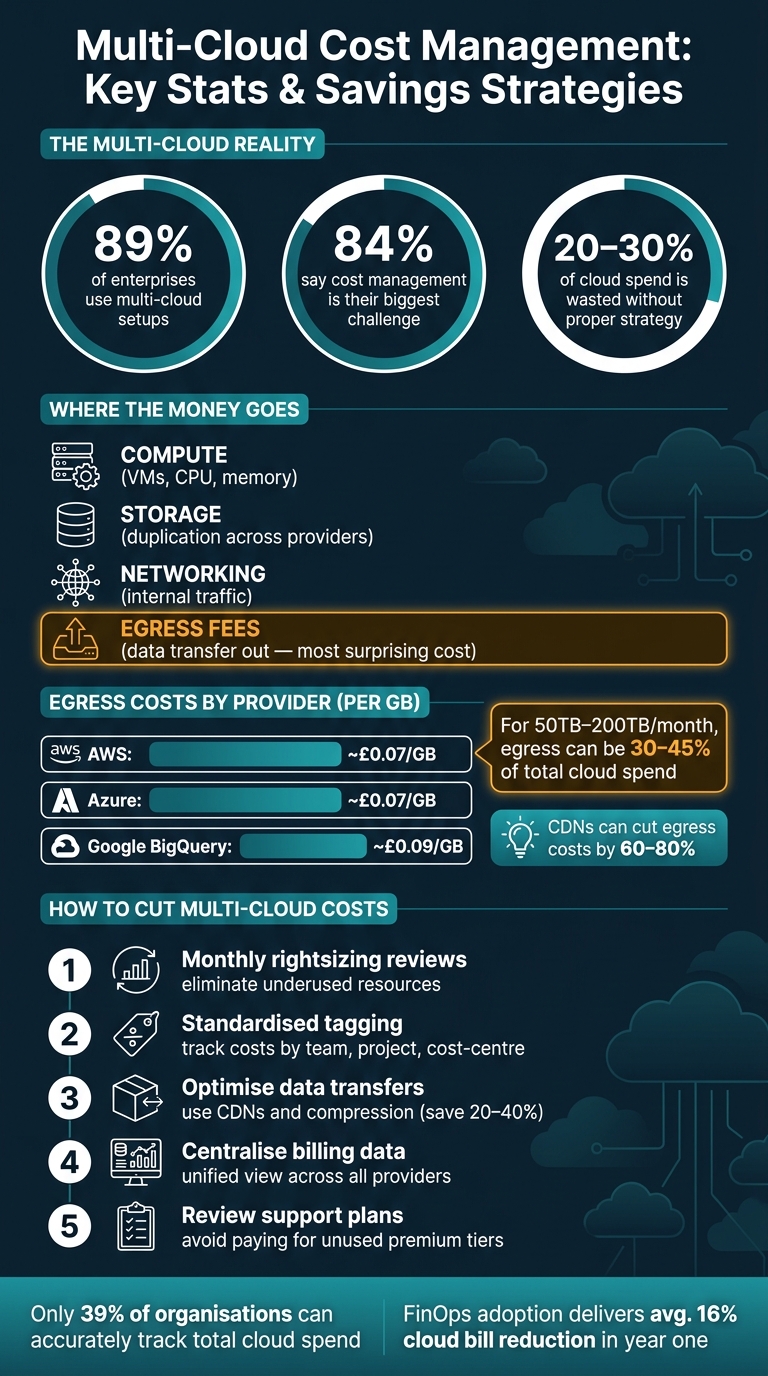 {Multi-Cloud Cost Management: Key Stats & Savings Strategies}
:::
{Multi-Cloud Cost Management: Key Stats & Savings Strategies}
:::
Main Cost Drivers in Multi-Cloud Workloads
Compute, Storage, and Networking Costs
When it comes to cloud expenses, compute resources tend to dominate the bill. Across platforms like AWS, Azure, and Google Cloud, the pricing for virtual machines (such as AWS EC2, Google Compute Engine, or Azure Virtual Machines), storage volumes, and internal network traffic follows a similar structure, even though the discount models may vary.
Storage costs can escalate quickly in multi-cloud environments, especially when data is duplicated across providers. For instance, maintaining backups on a secondary cloud provider can result in hefty storage and transfer fees. The smarter move? Design your architecture to limit cross-cloud data movement from the start - it’s far cheaper than trying to fix it later on [3].
Another issue is utilisation drift. Over time, the capacity you've provisioned often exceeds the actual demand, typically within six months. This leads to unnecessary spending. To avoid this, conducting monthly rightsizing reviews can help keep costs in check [3].
These foundational costs pave the way for understanding additional charges, particularly those related to data transfers.
Data Transfer and Egress Charges
Egress fees - charges for moving data out of a cloud platform - are often the most surprising part of a multi-cloud bill. While data ingress (data moving into a cloud) is usually free, transferring data out comes with a price tag. For example, AWS charges roughly £0.07 per GB for the first 10TB of egress to the internet [4], Azure has a similar rate of around £0.07 per GB [5], and Google BigQuery exports cost about £0.09 per GB [4]. For large-scale transfers, such as 50TB of data, these fees can range from £2,700 to £5,400 [4].
Egress costs can balloon as user traffic grows, especially with features like mobile sync, real-time alerts, or cross-region replication - all of which add to the bill. For enterprise workloads transferring between 50TB and 200TB monthly, egress fees can account for 30%–45% of the total cloud expenditure [4]. To manage these costs, consider using a Content Delivery Network (CDN) to cache frequently accessed data at edge locations, which can cut egress expenses by 60%–80%. Additionally, compressing data before transfer could reduce charges by another 20%–40% [4].
These challenges with data movement costs often overlap with expenses tied to managed services, which we’ll dive into next.
Managed Services and Support Costs
Managed services - such as cloud databases, AI tools, and analytics platforms - can become a financial headache when duplicated across providers without a clear strategy. For example, Zuellig Pharma, a medical products distributor with 12,000 employees, tackled this issue in June 2025. By partnering with Crayon to implement a FinOps practice across Microsoft Azure and Google Cloud, the company achieved a 20% reduction in Azure costs while also optimising its Google Cloud spend [1].
Support plans can also add up quickly. Many organisations pay for premium support across multiple platforms simultaneously, often without fully utilising the benefits. A simple way to identify savings is to evaluate the value of each support contract against actual usage. This can reveal opportunities to scale back unnecessary expenses.
Need help optimizing your cloud costs?
Get expert advice on how to reduce your cloud expenses without sacrificing performance.
Cost Allocation Methods for Multi-Cloud
Tagging and Cost Attribution
Linking cloud spending to specific teams and projects starts with resource tagging. Tags are key-value labels attached to resources like virtual machines, storage, or databases. These labels connect costs to a team, project, or application, forming the backbone of cost attribution in multi-cloud setups.
However, each cloud provider - AWS, Azure, and Google Cloud - handles tags differently. They have varying rules for tag length, character limits, and case sensitivity. Without a standardised tagging system across all platforms, your cost reports will likely have gaps. These gaps can make fair budgeting a nightmare. To avoid this, establish a core set of mandatory tags - like environment, team, project, and cost-centre - and enforce them at the point of resource creation. Automated compliance checks can flag or block non-compliant resources, reducing manual effort and ensuring consistency.
Poorly tagged or untagged resources can severely distort your cost reports, making it harder to allocate budgets fairly.
Chargeback and Showback Models
Once costs are accurately attributed, the next step is to decide how to allocate them internally. Two common approaches are showback and chargeback.
- Showback provides visibility into resource consumption without billing teams internally. It’s a great way to introduce cost awareness, especially for organisations starting their FinOps journey.
- Chargeback takes it further by assigning actual costs to the relevant department’s budget. This approach fosters accountability but requires more advanced processes and collaboration with finance teams.
| Model | Internal Billing | Best For |
|---|---|---|
| Showback | No | Building cost awareness in early stages |
| Chargeback | Yes | Mature organisations with clear budgets |
For UK-based organisations, it's crucial to separate capital expenditure (CapEx) and operational expenditure (OpEx). This distinction supports accurate HMRC reporting and can help with R&D tax credit claims.
Allocating Costs for Shared and Cross-Cloud Components
Shared resources add another layer of complexity to cost allocation. Infrastructure like networking hubs, monitoring tools, or security platforms often supports multiple teams. These costs need to be allocated fairly, even though no single team owns these components.
A common solution is proportional allocation, where costs are divided based on measurable usage metrics - like a team’s percentage of total compute usage or request volume. While not perfect, this method is more defensible than splitting costs equally or leaving them unallocated. Make sure to document the logic behind your allocations clearly to avoid internal disputes.
For tools that span multiple cloud providers, such as a monitoring platform ingesting data from both AWS and Azure, allocate costs at the platform level. Then, split these costs using the same proportional method. Consistency is key - apply the same approach across all shared services to ensure your cost reports remain comparable over time.
Monitoring and Reducing Multi-Cloud Costs
Rightsizing and Commitment Planning
Rightsizing is all about aligning your cloud resources with what your workloads actually require. Regularly check how much CPU, memory, and storage you're using, and scale back any resources that are consistently underutilised. For predictable workloads, take advantage of commitment discounts like AWS Reserved Instances, Azure Reservations, or GCP Committed Use Discounts. For workloads that fluctuate, spot or preemptible instances can save costs. Automating resource adjustments can also help you capture savings in real time. Interestingly, over half of organisations highlight workload optimisation and waste reduction as their main cloud priority [6].
Once you've optimised resources, the next crucial step is centralising cost data to get a clearer view of your multi-cloud expenses.
Centralised Cost Monitoring Tools
Managing costs across multiple cloud providers without a unified view can quickly lead to overspending. Relying on separate dashboards for each provider often results in fragmented data and missed insights. Instead, consolidate billing data from all providers into a single platform. For example, you can integrate AWS Cost and Usage Reports, Azure Cost Management Exports, and GCP BigQuery Billing Exports into a central data store or a FinOps platform. This allows you to normalise the data, apply consistent cost groupings, and create dashboards that align with your organisational structure rather than just the cloud account layout. Frameworks like the FinOps FOCUS specification can further standardise billing data formats, making cross-cloud comparisons much easier [7].
Currently, only 39% of organisations can accurately track their total spend across all cloud platforms [2]. Centralising billing data is a key step towards achieving meaningful insights and better control over multi-cloud spending.
Once your cost data is unified, the next step is to monitor expenses against budgets to avoid overspending.
Budgeting and Variance Tracking
Setting budgets is straightforward, but keeping spending in check can be tricky. Variance tracking helps by comparing actual spend to projections and flagging any anomalies before they spiral into major issues.
Use automated budget alerts alongside regular team and account reviews. Alerts can notify you when spending approaches budget limits, prompting timely action. Consistent tagging of resources also makes it easier to trace variances back to specific teams or projects. However, only 30% of organisations have a clear understanding of where their cloud budget is being spent [7]. Analysing these trends over time can lead to better forecasting and smarter resource allocation.
Conclusion and Key Takeaways
Key Lessons for Multi-Cloud Cost Analysis
Managing costs in a multi-cloud environment is not a one-time effort - it’s an ongoing process. Organisations that excel in this area tend to follow specific practices: they consistently tag all resources, monitor data transfer fees closely, and consolidate visibility across providers into a single, unified view. These approaches provide a solid foundation for keeping costs under control.
Here are some standout principles:
- Visibility is essential. Consistent tagging and unified reporting help uncover hidden cost drivers, particularly networking expenses.
- Egress fees can’t be ignored. Keeping a handle on data transfer costs is key to avoiding unpleasant surprises.
- Cost impacts start with design. Early architecture decisions directly influence monthly bills. Regular cost reviews during the design phase are just as important as end-of-month checks.
- Chargeback and showback drive accountability. When teams see their own spending, they adjust their behaviour. Relying solely on central IT oversight limits savings potential.
- Optimise before committing. Focus on rightsizing resources before locking in discount commitments. Optimisation first, discounts second.
- Guardrails should be automated. Dashboards show what’s already happened; automated policies, like shutting down non-production resources after hours, prevent unnecessary costs before they occur.
Adopting a formal FinOps approach can lead to substantial savings. On average, organisations report 16% reductions in cloud bills within the first year [8]. For larger enterprises in the UK, combining rightsizing with commitment planning can result in six-figure annual savings on compute costs alone.
How Hokstad Consulting Can Help
For businesses looking to maximise efficiency, expert guidance can make all the difference. Hokstad Consulting specialises in simplifying cloud cost management through tailored services like audits, tagging strategies, commitment planning, FinOps implementation, and custom automation. They aim to reduce cloud spend by 30–50%, offering a No Savings, No Fee model. Whether you need a one-off audit or ongoing support, their flexible approach ensures solutions are designed to meet your organisation's specific needs.
AWS re:Invent 2025 - Advanced multicloud cost reporting with FOCUS (COP419)
FAQs
How do I measure total spend across AWS, Azure and Google Cloud in one view?
To get a clear picture of your total spend across AWS, Azure, and Google Cloud, start by consolidating billing data from all three providers into a single, centralised cost management system. Make sure to normalise metrics - for example, calculating costs per transaction - and apply consistent tagging and categorisation to avoid confusion.
It's also a good idea to use tools designed for multi-cloud environments. These can help automate data collection, standardise how resources are tagged, and track combined expenses in real time. This approach not only simplifies cost tracking but also makes it easier to allocate expenses accurately and identify areas where you can cut costs.
Which cost allocation method should I use: showback or chargeback?
When deciding between showback and chargeback, it all comes down to what your organisation wants to achieve.
- Showback gives teams visibility into costs but doesn’t hold them financially responsible. This approach helps raise awareness and encourages accountability without direct pressure.
- Chargeback, on the other hand, directly assigns costs to specific teams, pushing them to make more cost-conscious decisions.
In the UK, many organisations begin with showback to help teams understand and manage their spending. As governance processes strengthen, they often move to chargeback, striking a balance between transparency and responsibility.
How can I reduce cross-cloud data transfer and egress charges?
To keep cross-cloud data transfer and egress charges under control, focus on improving data routing. Tools like Virtual Cloud Routers or dedicated network connections can help by providing private connectivity solutions. Another effective strategy is using content delivery networks (CDNs). CDNs cache data at edge locations, cutting down the need to rely on public networks and, in turn, reducing transfer expenses.