
If you want one release process across AWS, Azure and GCP, I’d keep it simple: build once, deploy the same artefact everywhere, use short-lived access, and put policy, cost and health checks into every release.
In plain terms, this setup works best when I start with clear targets for deployment time, recovery time, monthly spend in £, and how environments stay separate. From there, I keep apps in containers, use Kubernetes for runtime consistency, split infrastructure code by cloud, and run one shared pipeline with cloud-specific values instead of three different pipelines.
Here’s the core of it:
- Package once with OCI images
- Deploy across clouds with Kubernetes
- Provision with Terraform split into AWS, Azure, GCP and shared code
- Use GitOps with Argo CD or Flux so Git stays the source of truth
- Use short-lived identities and central secret storage
- Run one pipeline flow: test → build → push → plan/apply → deploy → smoke test
- Add approval gates and auto-rollback on failed smoke tests
- Keep rollout style consistent across clusters
- Send logs, metrics and traces to one observability stack
- Check security, policy and cost before release
- Review build time, failure rate, MTTR, spend and access on a fixed schedule
One stat stands out: teams that standardise shared workflows report 68% shorter release cycles and 72% higher deployment success rates, while cloud-native CI/CD is linked to 25–40% lower MTTR.
If I were setting this up today, on 27 June 2026, I’d aim for one clean delivery path, not a patchwork of cloud-led tools and one-off steps.
::: @figure 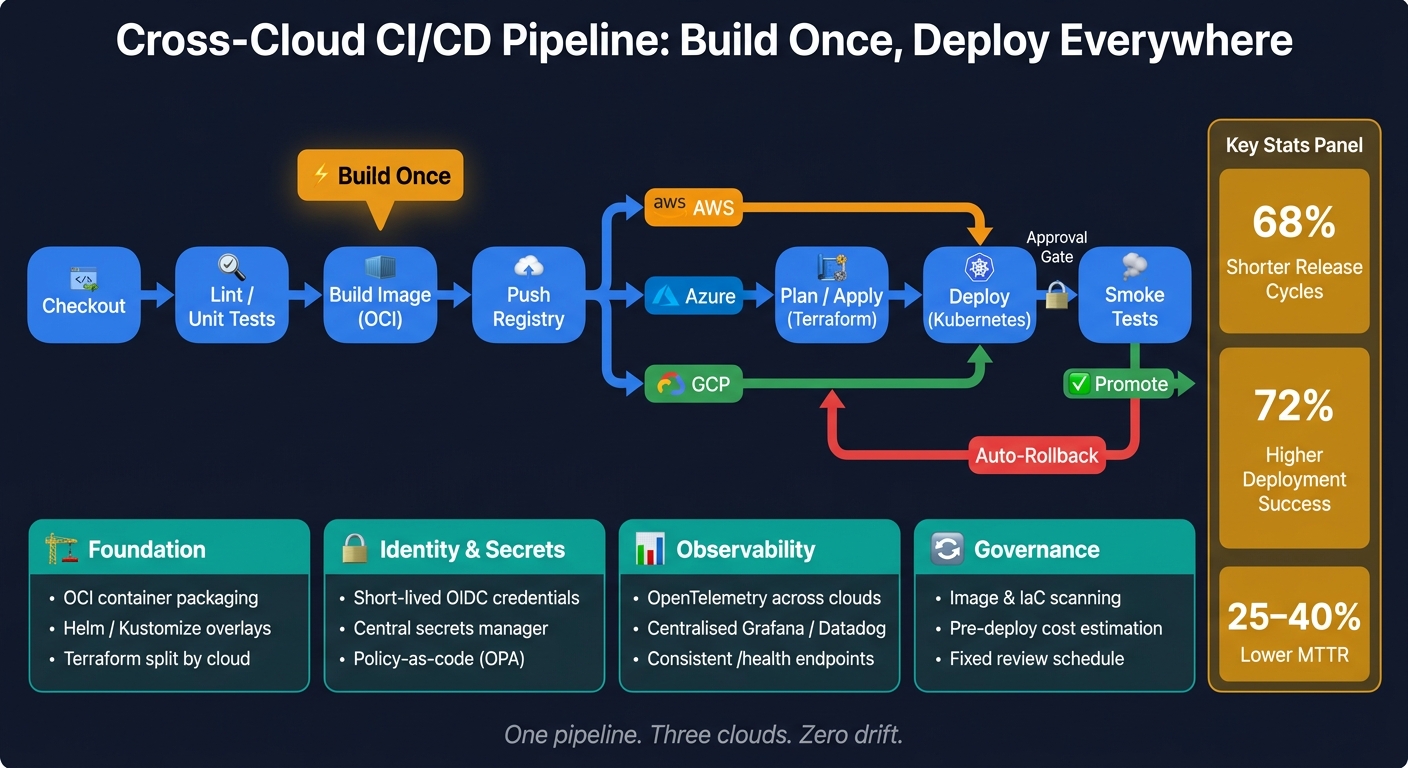 {Cross-Cloud CI/CD Pipeline: Build Once, Deploy Everywhere}
:::
{Cross-Cloud CI/CD Pipeline: Build Once, Deploy Everywhere}
:::
Building a cloud native CI/CD pipeline
Need help optimizing your cloud costs?
Get expert advice on how to reduce your cloud expenses without sacrificing performance.
Step 1: Design the cross-cloud foundation
Before you run the first pipeline job, get three basics in place: packaging, repository structure, and identity. Once your delivery goals are set, standardise the layers that every pipeline run relies on.
Standardise application packaging with containers and Kubernetes
Package applications as OCI images so the same build runs the same way across clouds and on-premises [6][7]. Manage Kubernetes configuration with Helm charts or Kustomize overlays for cloud-specific differences [5].
Keep the base manifests the same, and use overlays only where an environment needs something different. When the image and manifests are steady, the pipeline can push the same artefact through each cloud without changing course.
Structure your infrastructure code and Git repositories
Separate application code and infrastructure code into different repositories or top-level directories. Organise Terraform by cloud so each provider’s resources stay isolated and can be managed on their own [5].
For example, use:
-
infrastructure/aws/ -
infrastructure/azure/ -
infrastructure/gcp/ -
infrastructure/shared/ -
kubernetes/manifests/
This setup keeps cloud-specific and shared resources tidy, while kubernetes/manifests/ holds Helm or Kustomize overlays. It also means the same pipeline can trigger the right provisioning and deployment steps without splitting off into different delivery systems.
Use locked remote state backends to stop concurrent pipeline runs from corrupting state [5]. Then use a pull-based GitOps model with tools like Argo CD or Flux to reconcile the live cluster state with the desired state stored in Git. That gives you a dependable source of truth across all environments [1][3].
This structure gives the pipeline one source of truth for provisioning and deployment.
Use short-lived credentials and central secrets handling
Use short-lived workload identities for pipeline access, store secrets in a central secrets manager, and give each environment only the minimum read access it needs. Apply policy-as-code with Open Policy Agent (OPA) to enforce compliance guardrails before provisioning, which cuts deployment risk [3].
These controls let the next stage run deployments without long-lived credentials or ad hoc exceptions.
Step 2: Build a unified CI/CD pipeline
Next, define one pipeline shape for every cloud. The goal is simple: one definition, or a small set of shared templates, that runs the same core stages from commit to production across all three clouds. You don't want three separate delivery systems drifting apart over time. You want one repeatable flow.
Define the main pipeline stages from commit to deployment
A practical sequence looks like this: checkout → lint/unit tests → build image → push registry → plan/apply → deploy → smoke tests.
The key idea here is build once, deploy many. Build and test the container image one time, then pass that checked artefact into parallel, cloud-specific deployment jobs further down the pipeline [8]. That keeps releases more consistent and cuts the usual mess of rebuilding the same thing in different places.
Use the speed, recovery-time and spend targets you set earlier to decide which stages should block a release and which can run as post-deploy checks.
You should also add a production approval gate. And if smoke tests fail, roll back to the previous revision automatically [8]. That way, the pipeline doesn't just ship code - it also protects production when something goes wrong.
Handle cloud-specific steps without duplicating the whole pipeline
Cloud-specific differences should come in as variables, not as separate pipelines [8][5]. That's the trick. Keep the core logic in one place, then pass in the values each provider needs.
Use reusable workflows - such as GitHub Actions reusable workflows or GitLab templates/includes - so you define the shared logic once and call it with different parameters for each cloud [9][10]. Add path-based triggers so only the matching cloud job runs when a given area changes [5].
Conditional logic helps with the odd bits that vary by provider. In GitHub Actions, that means if statements. In GitLab, it means when clauses. Used well, this keeps the pipeline lean instead of turning it into a giant tangle of one-off steps. Teams that standardise in this way report a 68% shorter release cycle and 72% higher deployment success rates [10].
CI/CD orchestrators for multi-cloud delivery: a comparison
Pick the orchestrator that keeps maintenance low without breaking delivery into disconnected parts. The table below compares common options against the points that matter most in cross-cloud delivery.
| Orchestrator | Multi-Cloud Auth | Reusable Workflows | Secret Handling | K8s Support | Approval Gates | Operational Overhead |
|---|---|---|---|---|---|---|
| GitHub Actions | Strong (OIDC) | Reusable Workflows/Actions | Encrypted Secrets/Vault | High (via Actions) | Environment Protection | Low (SaaS) |
| GitLab CI/CD | Strong (OIDC/Vault) | Templates/Includes | Built-in/Vault | Native/Deep | Protected Environments | Moderate (SaaS/Self) |
| Jenkins | Plugin-dependent | Shared Libraries | Credentials Plugin | High (via Plugins) | Input Step | High (Self-hosted) |
| Argo Workflows | K8s-native | Templates | K8s Secrets/Vault | Native (CRDs) | Manual Steps | Moderate (K8s-only) |
| Spinnaker | Native multi-cloud | Pipeline Templates | Vault/Cloud KMS | Native (V2 Provider) | Manual Judgements | High |
For many teams, GitHub Actions or GitLab CI/CD hit a good balance: OIDC-based authentication, reusable templates, and low day-to-day upkeep. Jenkins can still be a solid choice if you already have mature shared libraries, but self-hosted upkeep can eat time fast. Argo Workflows fits well if your delivery model is deeply Kubernetes-native. Spinnaker gives you strong built-in multi-cloud support, but the operational load is heavy.
Once the orchestrator is set, the next job is rollout control, observability and policy.
Step 3: Deploy, observe and govern across clouds
Once the shared pipeline stages are in place, the next job is to standardise how releases move, how they’re checked, and how they’re controlled across clouds.
Rollout strategies that reduce production risk
Pick the rollout model based on how critical the workload is and how fast you may need to roll back.
| Strategy | Risk Level | Rollback Speed | Complexity | Best For |
|---|---|---|---|---|
| Rolling | Medium | Slow (incremental) | Low | Internal services, non-critical updates |
| Blue-Green | Low | Instant (DNS/LB switch) | High (requires 2× resources) | Mission-critical, customer-facing apps |
| Canary | Lowest | Fast (traffic dial-back) | Medium | High-traffic apps, testing new features |
Across Kubernetes clusters, stick to the same release pattern in every cloud. That matters more than it may seem. If one team uses canary in AWS and another uses rolling updates in Azure, troubleshooting gets messy fast.
Use one traffic management layer to move traffic during canary and blue-green releases [9][3]. That gives teams a single way to control shifts, instead of piecing together different cloud-specific methods.
Once the rollout path is clear, connect deployment checks to shared telemetry.
Centralise logs, metrics and release health checks
Send logs, metrics, and traces to one observability platform. OpenTelemetry gives you a common telemetry format across clouds. From there, feed the data into a centralised visualisation layer such as Grafana or Datadog, and use Fluent Bit to forward logs from each cluster.
Also, keep /health endpoints consistent so the pipeline can check readiness and liveness before promotion [9][2]. If every service reports health in a different way, release gates become brittle. If they all follow the same pattern, the pipeline can make clean go/no-go decisions.
There’s a direct payoff here too. Organisations adopting cloud-native CI/CD report a 25–40% reduction in mean time to recovery (MTTR) [4].
Use that same telemetry and release data to enforce policy, cost, and access checks before anything goes live.
Add policy, cost and security controls to every release
Build these checks into every release, not as an afterthought.
| Category | Check Type | Tooling Examples |
|---|---|---|
| Security | Image & IaC scanning | Trivy, Checkov, Snyk, Cosign |
| Security | Secrets management | HashiCorp Vault, Azure Key Vault |
| Policy | Compliance-as-code | Open Policy Agent (OPA), Sentinel |
| Cost | Pre-deploy cost estimation | HCP Terraform, Infracost |
| Cost | Tagging enforcement | OPA, Azure Policy, AWS Config |
| Access | Identity federation | OIDC, SPIFFE/SPIRE |
Tag every resource at deploy time so cross-cloud cost reporting is easier to track. Pair that with Infracost or HCP Terraform to show estimated spend before a change is applied. That way, cost surprises show up in the pull request instead of landing at month-end.
It’s also worth adding automated validation to catch misconfigurations early. A bad image, a missing tag, or a policy breach is far easier to fix before release than after traffic has already hit production.
Step 4: Standardise the workflow and improve it over time
With deployment up and running, the next job is to make repeat work predictable across services and clouds.
Create shared templates, release rules and GitOps patterns
Once a pipeline works, keep it consistent as more services, teams and environments come online.
The goal is simple: standardise the common 80% of deployment logic, then document the exceptions for cloud-specific cases such as AWS Nitro instances [3]. That gives teams a clear default path without pretending every setup is the same.
It also helps to build a private library of approved IaC modules for common resources, such as secure storage buckets and compliant databases. Keep naming consistent across those modules: use snake_case for module and variable names, and include units in variable names like ram_size_gb.
For Kubernetes estates, Argo CD or Flux can generate and apply cluster-specific manifests from metadata labels such as env: prod or platform: aws [3][1]. That keeps release patterns steady across clusters instead of leaving each team to reinvent the wheel.
Review pipeline performance, cost and access on a fixed schedule
A fixed review rhythm stops the workflow from drifting off course. It also makes cost, risk and access issues easier to spot before they turn into bigger problems.
| Review Category | What to Check | Recommended Frequency |
|---|---|---|
| Performance | Build time, lead time, feedback loop time (<10 min) | Monthly |
| Reliability | Deployment failure rate, MTTR, drift detection alerts | Weekly |
| Cost (FinOps) | Unit cost per service (£), untagged resources, egress fees | Monthly |
| Security | IAM role usage, OIDC token TTL, secret rotation | Quarterly |
| Infrastructure | Unused VMs/storage, container rightsizing (HPA) | Monthly |
Auto-delete staging and test environments after a fixed retention period. It’s one of those small rules that saves money and cuts clutter at the same time.
Add drift detection with Terraform or Crossplane to flag unauthorised changes [9]. Pair that with automated pre-deploy checks so misconfigurations get caught before release, not after.
Conclusion: The key setup steps to remember
Once the workflow is standardised, lock in a steady operating rhythm.
Define outcomes first, because they shape branching, packaging and rollout. From there, standardise packaging, identity, reusable pipelines, observability and governance, then review the pipeline on a fixed schedule.
FAQs
Why build once and deploy everywhere?
Build once, deploy everywhere. That simple idea helps organisations ship software in a steady, predictable way across different cloud environments.
Instead of creating separate builds for each platform, teams use one build artefact and deploy it where it’s needed. That cuts duplicate work, reduces configuration drift, and lowers the risk of manual mistakes.
There’s another upside too. This approach can improve resilience and support disaster recovery, because workloads aren’t tied to a single setup. It can also help organisations meet regional compliance rules or data sovereignty needs when data has to stay in a specific location.
And from a commercial point of view, it gives teams more room to move. You reduce vendor lock-in, while giving the business more choice on cost and performance.
How do I handle cloud-specific differences?
Use an abstraction-first approach. Define environments with IaC tools like Terraform or Pulumi, then standardise packaging with containers and Kubernetes so you have one consistent deployment target.
Keep to a single CI/CD platform, and use parameterisation plus environment-specific variables for cloud-specific steps. The goal is simple: keep the main workflow the same, while allowing the small changes each cloud needs.
To hold that together across AWS, GCP, and Azure, rely on:
- centralised secrets management
- policy-as-code
- observability across all environments
That gives you a setup that's consistent without being rigid. You get shared ways of working, but still leave room for cloud-level differences where they matter.
What should I measure after launch?
After launch, use unified observability to track deployment latency, performance metrics, and application health in one dashboard. That gives your team a single place to see what’s happening, instead of jumping between tools and cloud consoles. It should also cover business KPIs, error rates, and response times across all cloud providers.
To keep costs under control, run FinOps analysis to spot waste and check workload unit economics. In plain terms, you want to know where money is slipping away and whether each workload is worth what it costs. At the same time, confirm that automated security and compliance policies, health checks, and readiness probes are working as expected.