If you run hybrid cloud, custom IAM can cut access gaps, tighten control, and make audits less painful. I’d boil it down to this: one identity model, one policy layer, cleaner offboarding, better SSO, tighter service account control, and less IAM sprawl.
Here’s the short version of what matters most:
- One identity across cloud and on-premises helps stop duplicate and orphaned accounts
- Zero Trust checks can use device, location, behaviour, and time before access is allowed
- RBAC, ABAC, and JIT access help keep permissions tight
- Central audit trails make UK GDPR, ISO 27001, and NCSC-aligned reporting easier to show
- SSO for old and new systems cuts password fatigue and local account spread
- Machine identities need the same control as people, especially when they outnumber human users by 17:1 or even 25x–50x
- Policy-as-Code and workload federation help remove static secrets and drift
- Legacy systems and private cloud can stay under the same access model through proxies, connectors, and vaults
- Multi-cloud growth is easier when one IdP federates into each provider
- Lower admin work and less IAM debt can trim cost over time
A few figures stand out. Only 23% of firms have unified identity across all systems, even though 85% run hybrid or multi-cloud setups. And 74% of breaches involve privileged, human, or service accounts. So the core issue is plain: if identity is split, risk spreads.
::: @figure 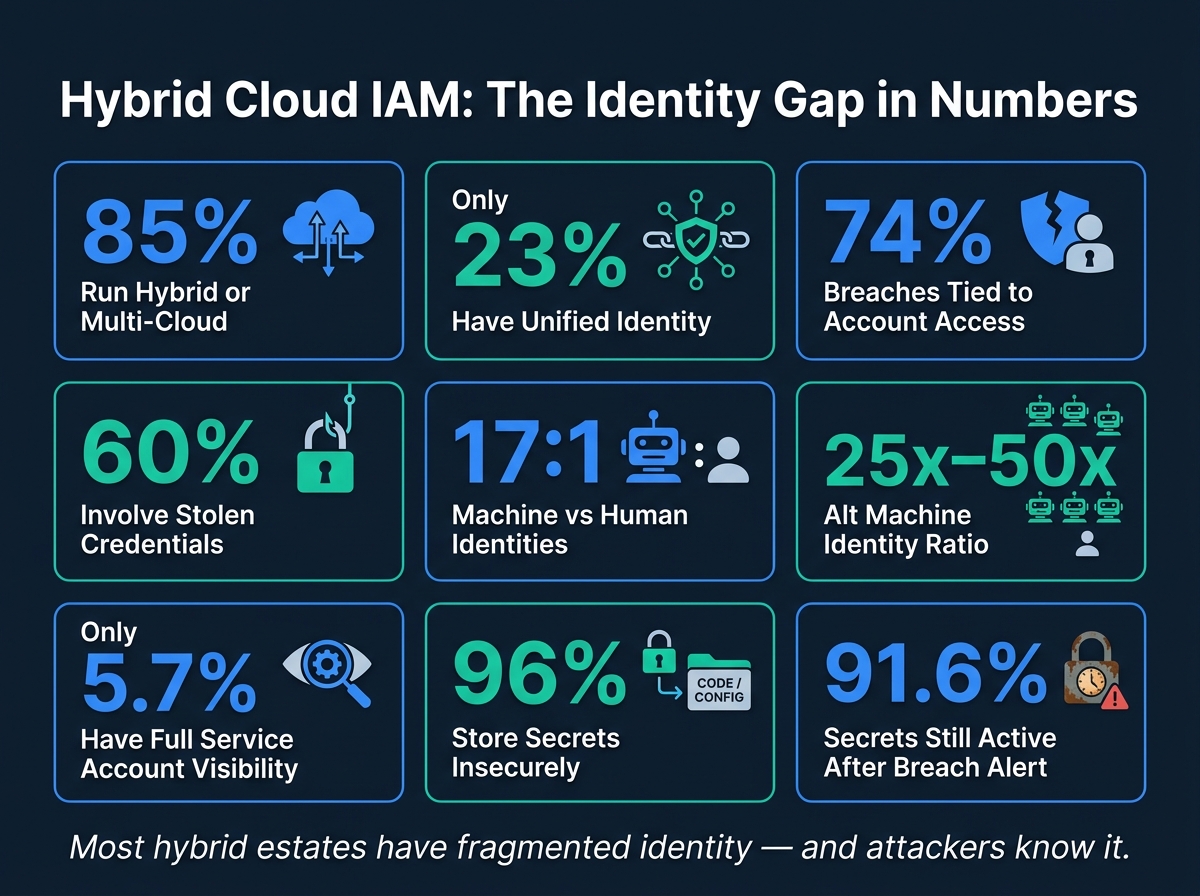 {Hybrid Cloud IAM: Key Statistics & Security Gaps}
:::
{Hybrid Cloud IAM: Key Statistics & Security Gaps}
:::
Beyond the Perimeter: Implementing Zero Trust IAM in Hybrid & Multi-Cloud Realities | SHIFT 2025
Quick comparison
| Area | What custom IAM helps with |
|---|---|
| Security | Applies Zero Trust checks across hybrid systems |
| Identity | Uses one source of truth for users and access |
| Access control | Supports tighter roles, context rules, and short-term privilege |
| Compliance | Puts logs and access events in one place |
| User access | Gives users one sign-in path across systems |
| Automation | Controls bots, pipelines, APIs, and service accounts |
| Cost | Cuts repeat admin work and duplicate tooling |
| Legacy systems | Brings older apps into the same control model |
| Growth | Extends into new cloud platforms without starting again |
To me, the article’s main point is simple: custom IAM gives hybrid estates one clearer way to control access across everything, not a patchwork of separate rules.
1. Stronger Zero Trust Security Across Hybrid Environments
Zero Trust means every access request must be checked before access is allowed. In hybrid estates, custom IAM applies that rule across public cloud, private cloud and on-premises systems through one policy-as-code layer. That matters because the same user or service account can face different controls in cloud and on-premises setups.
Custom IAM can use context-aware ABAC to check identity, device, behaviour and location before access is granted. That allows tighter, time-bound permissions and cuts the blast radius if an account is compromised.
Non-human identities matter just as much. Service accounts and automation bots now outnumber human identities by 17 to 1 [5]. A custom IAM model can apply the same context-aware checks to those identities, so permissions stay temporary and tied to a specific task.
Here are the contextual signals that matter most in a hybrid environment:
| Contextual Factor | Security Impact | UK Compliance Value |
|---|---|---|
| Device Health | Blocks unmanaged or infected devices | Supports ISO 27001 asset protection standards |
| Geographic Location | Restricts access to approved regions | Ensures UK GDPR data residency and sovereignty |
| User Behaviour (UEBA) | Flags anomalies such as impossible travel or unusual downloads | Provides the accountability evidence required by the ICO |
| Time of Day | Limits privileged actions to business hours | Aligns with NCSC principles for monitoring and operational security |
There’s also a practical upside. Access reviews and incident investigations move faster because each request carries its own context.
That same identity layer gives users and systems one consistent access experience across cloud and on-premises environments, which leads into single identity across both.
2. A Single Identity Model for Cloud and On-Premises
Zero Trust falls apart if each environment uses a different identity source.
That’s the trap many hybrid estates fall into. SaaS tools, cloud platforms and on-premises systems often end up with their own access rules. Then a policy changes in one place, but not in another. Before long, you’ve got duplicate accounts, uneven access controls and weak spots that attackers can slip through.
85% of enterprises operate in hybrid or multi-cloud environments, yet only 23% have unified identity management for all systems [1]. In plain terms, most organisations still handle identity in pieces instead of through one model.
A single identity model solves that by using on-premises Active Directory as the source of truth and syncing changes to a cloud Identity Provider (IdP), which then acts as the central IdP. From there, every system - AWS, Azure, private cloud or an internal app - authenticates through that same IdP.
This matters day to day. Joiners, leavers and role changes can all be handled from one place. That cuts the risk of orphaned accounts and makes it easier to shift workloads to the cloud without throwing users off course. It also makes policy work far less messy, because access rules can be applied the same way across the estate.
For UK organisations, this kind of central setup also supports one access review cycle across environments.
The table below shows how a siloed setup creates risk compared with a single identity model:
| Area | Siloed Identity Model | Single Identity Model |
|---|---|---|
| Offboarding | High risk of orphaned accounts remaining active | Instant, global access revocation from one place |
| Security Policy | Inconsistent MFA and password rules per system | Unified MFA and conditional access across all environments |
| Administration | Manual provisioning in each system separately | Automated SCIM provisioning from a central IdP |
| Audit & Compliance | Fragmented logs across multiple platforms | Centralised audit trail for UK regulatory reporting |
3. Precise Access Control and Custom Policy Design
Once identity is centralised, the next step is to tighten permissions. A single identity model tells you who a user is. Precise access control decides what that user can actually do.
74% of all data breaches involve access to a privileged, human, or service account [6]. That number makes the point on its own. If access is too broad, trouble follows.
Custom IAM helps you shape policies around the way your organisation works, instead of squeezing daily work into a one-size-fits-all setup. Use RBAC for core job roles, then layer in ABAC for cases where context matters, such as location, device or time, across cloud, private cloud and on-premises systems.
The same idea applies to service accounts and automation. Custom IAM supports JIT access and workload federation, so service accounts don't depend on static keys that sit around waiting to be misused.
These steps cut back over-provisioned access:
| Policy Design Practice | Impact on Over-Provisioning |
|---|---|
| JIT Access | Eliminates permanent high-level access |
| ABAC | Prevents broad access by adding context |
| Policy-as-Code | Prevents manual configuration drift |
| Workload Federation | Removes static service account keys |
Tighter policy design also leads to cleaner audit trails and makes access reviews less of a slog.
4. Centralised Compliance and Audit Reporting for UK Regulations
Access policies mean very little if you can't show that they work in practice. For UK organisations, custom IAM gives teams one control plane for governance and policy enforcement across a hybrid estate. That matters because compliance teams need proof, not promises.
With central IAM, access events, privilege changes and authentication records sit in one place. That makes it far easier to match activity across systems and spot what doesn't line up. For example, it can show where a deprovisioned account still has an active cloud session. In the audit trail, that gap stands out straight away.
The contrast between fragmented logging and a central IAM audit trail is hard to miss:
| Feature | Fragmented Application-Level Logging | Centralised IAM Audit Trail |
|---|---|---|
| Visibility | Siloed; needs manual reconciliation across consoles | Unified view across on-premises and all clouds |
| Effort to Audit | High; auditors must manually pull and reconcile reports from separate systems | Low; automated reporting and continuous compliance dashboards |
| Risk of Gaps | High; inconsistent logging formats and blind spots in east-west traffic | Low; consistent telemetry feeds SIEM/SOAR for full traceability |
| Compliance Alignment | Difficult to prove UK GDPR residency or NCSC principle adherence | Built-in proof of continuous compliance and data sovereignty |
There's another issue here that often gets missed: non-human identities. Service accounts and API keys now outnumber human identities by 17 to 1 [5]. That's a huge blind spot if they're tracked separately. Custom IAM keeps those identities in the same audit trail as human users, which helps close that gap. Once reporting is centralised, users also get simpler access through single sign-on.
5. Better User Experience with Single Sign-On
Once identity is centralised, the user experience gets better too. When identity is split across systems, people end up juggling different usernames and passwords for each environment. That leads to password fatigue, more local accounts, and more risk. 60% of data breaches involve stolen credentials [1].
Custom SSO means users sign in once and then move between cloud and on-premises systems without being asked to log in again and again. With a central IdP, access stretches across both environments, so one sign-in can carry users through the rest of their work.
Legacy applications are often where hybrid setups get messy. Older systems built on Oracle, SAP or IBM ERP usually don't support newer standards like OIDC or SAML. Identity proxies help close that gap by translating modern tokens into formats those older apps can accept. In plain terms, they let older software stay in the same sign-in flow as newer cloud services.
On domain-joined devices, transparent Kerberos-based SSO takes this a step further. Authentication happens quietly in the background, so users don't see a login prompt at all. That also helps keep conditional access aligned across environments. The same access model can support service accounts and automation as well.
6. Consistent Access Controls for DevOps and Automation
The same identity rules that make user access easier should also apply to pipelines, bots and APIs. Automation, service accounts and API links need the same level of control as users, and in many cases they can do even more damage if left unchecked.
This matters because machine identities now dwarf human ones. In modern enterprises, non-human identities outnumber human identities by 25x to 50x [7]. Yet only 5.7% of organisations have full visibility into their service accounts [8]. In a hybrid cloud setup, that’s a huge blind spot.
The problem is pretty simple. Automation tends to collect permissions quietly over time. On top of that, 96% of organisations store secrets outside dedicated managers, often in code, config files or CI/CD tools [8]. That leaves keys and tokens scattered across places where they can be missed, reused, or exposed.
Custom IAM tackles this by giving non-human identities the same least-privilege treatment as people. Workload Identity Federation swaps long-lived API keys for short-lived OIDC tokens issued when needed. That means machine access follows the same policy model as human access, without leaving static credentials lying around.
Policy-as-Code (PaC) pushes this one step further. Access rules live in version-controlled files, so teams can test, review and deploy them through the same pipelines as application code. The result is more consistent permissions, cleaner audits, and fewer surprises between environments.
| DevOps Security Gap | Custom IAM Solution | Impact |
|---|---|---|
| Hard-coded API keys | Workload Identity Federation | Eliminates static secrets; uses short-lived tokens |
| Over-privileged service accounts | Least-privilege role enforcement | Reduces unused permissions |
| Federated workload identity | Short-lived identity across cloud and private platforms | Removes static credentials and simplifies cross-environment access |
| Manual configuration errors | Policy-as-Code (PaC) | Testable, version-controlled and automated deployment |
| Orphaned automation accounts | Automated lifecycle management | Immediate revocation upon task or project completion |
It also helps to revoke identities as soon as a service is retired, with the service catalogue acting as the source of truth. That should cover AI agents and automation scripts too, not just standard service accounts.
Less manual admin work is a nice side effect here. When access is handled in a clear, repeatable way, teams spend less time cleaning up permissions and chasing old accounts, which helps bring down operating cost.
7. Lower Costs Through Purpose-Built IAM Design
Manual IAM work doesn't just slow teams down. It turns identity and access management into a repeat bill.
In hybrid cloud setups, IAM sprawl adds admin cost again and again: separate IdPs, repeated MFA enrolments, and manual compliance reporting. Over time, that builds IAM debt: stale accounts, standing privileges, and fragmented access reviews that add cost and risk [9].
A purpose-built IAM design cuts that mess down by using one central IdP and a shared policy layer. That means fewer duplicate systems and less admin work spent managing each one on its own [3][2]. If you also manage IAM settings through Infrastructure as Code (IaC) tools like Terraform, you can reduce configuration drift caused by one-off changes made in cloud consoles [3].
Security incidents add another layer of cost. Leaked secrets can drive up remediation work and downtime. A tighter IAM setup helps reduce that exposure.
The savings usually come from three places:
- Less duplication across tools and systems
- Less manual change control
- Fewer cleanup tasks after access changes or incidents
| Ad-hoc IAM (Fragmented) | Custom Unified IAM | |
|---|---|---|
| Admin Effort | High; manual management per cloud and on-premises console [3] | Low; centralised management via a single IdP hub [3][2] |
| Tooling Overlap | High; redundant IdPs, MFA systems and governance tools per environment [9] | Minimal; unified architecture across all environments [3] |
| Change Effort | Lower; access requests and policy changes handled manually per environment | Higher; IaC and automated provisioning reduce manual intervention [3][9] |
The same cost pattern shows up with joiners, movers, and leavers. Automated provisioning and SCIM (System for Cross-domain Identity Management) cut the work tied to offboarding. Without them, 91.6% of secrets remain valid five days after a security notification [9]. A custom IAM design helps close that gap, which means less cleanup and less remediation after access changes.
8. Integration with Legacy Systems and Private Cloud
Hybrid IAM often starts to crack at the edges of the estate, especially around legacy systems and private cloud workloads. That’s where things get messy. Older platforms such as ERPs, mainframes, and directories often rely on Kerberos or LDAP, so custom IAM has to bridge the gap to modern identity controls.
One common way to do this is through identity proxies. These translate tokens between legacy applications and a modern IdP in real time [4]. When a system has no REST API, custom SDK connectors step in to handle admin tasks, privilege discovery, and reconciliation. That keeps older systems inside the same access, audit, and deprovisioning model as the rest of the estate instead of leaving them off to one side.
These connectors shouldn’t be treated as one-off fixes. They need to be managed like software: version-controlled, tested, and deployed through CI/CD [10]. The same approach helps keep access governance aligned across private cloud platforms too.
74% of all data breaches involve access to a privileged, human or service account [6]. Custom IAM helps cut that risk by using temporary access for legacy admin accounts and secrets vaults to handle credential issuance and rotation for systems that can’t support federation [3].
There’s also a plain operational win here. Disabling a user in the central IdP cuts access across all connected systems, including ones that can’t federate [2]. Without that link, orphaned accounts build up quietly in awkward, hard-to-manage systems, and risk builds with them. In practice, this pulls legacy estates into the same control plane as cloud workloads instead of treating them as a separate exception.
| Integration Approach | Target Environment | Benefit |
|---|---|---|
| Identity Proxy | Legacy ERP, Kerberos apps | Adds modern access without rewriting the app [4] |
| Custom SDK Connector | Mainframes, proprietary ERPs | Removes manual reconciliation [10] |
| Secrets Vault | Basic auth, static API key systems | Manages credential issuance and rotation under a governance layer [3] |
| LDAP Connector / Agent | Legacy directories | Keeps identity data synchronised [1][2] |
Once legacy access is brought together, that same identity layer can extend across new cloud platforms without rework.
9. An Architecture That Supports Multi-Cloud Growth
Once legacy systems sit under the same control plane, the IAM layer can extend into new clouds without a full redesign. Custom IAM carries the same identity controls into each provider, which helps hybrid estates grow without spinning up new silos.
A hub-and-spoke setup does this neatly. The central IdP sits at the hub and federates into each cloud through SAML or OIDC. Users sign in through the central IdP, then reach each cloud by federation. So when a new provider comes in, teams connect a new spoke instead of rebuilding the whole setup [3][11].
Standardising roles across clouds also cuts a lot of rework. Rather than rebuilding permissions for every platform, teams can map one organisational role to each provider’s native roles. That shared role map keeps access aligned across providers:
| Global Role | AWS Mapping | Azure Mapping | GCP Mapping |
|---|---|---|---|
| Cloud-Viewer | ViewOnlyAccess | Reader | roles/viewer |
| Network-Admin | NetworkAdministrator | Network Contributor | roles/compute.networkAdmin |
| Security-Auditor | SecurityAudit | Security Reader | roles/iam.securityReviewer |
Managing these mappings in Infrastructure as Code, such as Terraform, means teams can add providers by changing code while keeping policies aligned across clouds [3][11]. It also helps keep role mappings steady as more providers are added.
Scale also needs a backup plan. Each provider should still have a cloud-only emergency admin account, so access remains available if federation goes down [3].
10. The Long-Term Value of Custom IAM and Working with Specialist Partners
As hybrid estates grow, the main problem changes. It’s no longer just about getting systems to connect. It becomes about keeping control over time and making sure the whole setup stays maintainable.
Custom IAM helps cut long-term risk because it fits identity controls to your estate, not a vendor’s preset model. That means you’re not stuck with the generic feature mix that comes with off-the-shelf products. It also helps keep identity services away from single points of failure.
Before you commit to any tooling, document your capabilities, data flows and security policies in detail. That step matters more than it may seem at first. It stops edge cases from piling up into technical debt and gives a modular IAM setup a stable base.
The right partner can turn architecture choices into repeatable operating controls. Put simply, they help make sure the plan works not just on paper, but day after day.
| Partner Capability | Benefit to Your Organisation | Relevant Tools / Standards |
|---|---|---|
| Reference Architecture Design | Prevents ad-hoc decisions from creating governance gaps | NIST IAM Framework, NCSC Zero Trust guidance |
| Lifecycle Management | Automates provisioning, deprovisioning and access reviews across the estate | SCIM, IaC (Terraform), SIEM integration |
| Ongoing Security Auditing | Detects configuration drift and access anomalies before they become incidents | AWS Config, Azure Policy, CSPM tools |
That kind of delivery discipline is what helps custom IAM stay flexible as the estate changes.
Where Tables Add Clarity
The compliance and cost sections use comparison tables for a simple reason: they make trade-offs easy to see.
In the compliance section, the table sets fragmented logging against centralised IAM audit trails that feed a single SIEM. Put side by side, the difference lands straight away. Readers don't have to hunt through paragraphs to work out what changes from one setup to the other.
The cost section does the same job. It compares ad hoc hybrid IAM with custom unified IAM across licensing, audit effort and provisioning speed. That layout makes the cost argument easier to follow, because readers can scan the figures and points directly instead of holding them in their head and comparing them line by line.
Taken together, these tables help drive the article's main point: custom IAM makes hybrid estates easier to govern.
Closing Summary
Custom IAM gives hybrid estates one access model across cloud and on-premises systems. That means tighter control, fewer gaps, and a stronger footing for Zero Trust.
It also makes governance easier. Centralised audit trails, automated provisioning, and JIT access cut down compliance work and help reduce excess privilege.
Automated IAM lifecycle management can lower administration and hosting costs too, mainly by removing inactive users and trimming over-privileged roles.
For complex hybrid estates, Hokstad Consulting helps design custom IAM, DevOps automation, and cost-efficient cloud integrations.
FAQs
How do you roll out custom IAM without disrupting users?
Use a single federated Identity Provider (IdP) as the main source of truth. That lets users sign in once through SSO and get into services without juggling multiple sets of login details.
You can cut friction further by automating joiners, movers and leavers with SCIM. At the same time, map attributes in a consistent way with SAML or OIDC, and roll out changes through infrastructure-as-code and automated pipelines so updates stay standardised, testable and reversible.
What legacy systems are hardest to bring into a unified IAM model?
The hardest legacy systems to integrate are usually the ones that don't support modern standards like REST APIs or standardised authentication protocols.
Common examples include older in-house applications, proprietary enterprise software in sectors such as manufacturing or healthcare, and complex ERP or HR systems with layered access rules. In many cases, these systems still depend on manual, spreadsheet-heavy processes. That can lead to security gaps, orphaned accounts, and incomplete audit trails.
Which IAM metrics best show risk reduction and cost savings?
Focus on metrics tied to permission use, credential health, and day-to-day efficiency. The main signs to watch are fewer unused or excessive privileges, fewer over-provisioned roles, and less manual work in access management.
It also helps to track:
- The share of automated vs manual access reviews
- Provisioning speed
- Successful automated policy deployments
Taken together, these metrics point to a smaller attack surface, lower admin overhead, and more cost-effective infrastructure management.