
Cloud cost allocation helps organisations understand who is spending what and why. Without clear allocation, costs can spiral due to waste or inefficiencies. By defining business units and implementing tagging systems, you can track expenses, assign accountability, and uncover savings opportunities. Here’s how to get started:
- Map your business units: Align cloud spending with your organisational structure (e.g., departments, teams, or projects). Decide between a simple or detailed breakdown based on company size.
- Set up tagging: Use tags like
business_unit,cost_centre, andownerto track costs accurately. Enforce compliance with automation and regular audits. - Allocate shared costs: Distribute expenses for shared services using proportional usage, fixed splits, or equal distribution.
- Monitor and report: Generate reports by business unit to track trends, detect anomalies, and improve financial control. Use showback for visibility or chargeback for accountability.
A structured approach to cost allocation can save thousands annually, improve budgeting, and help teams stay accountable. Tools like AWS Cost Explorer or third-party platforms can simplify the process, while regular reviews ensure alignment with business goals. Start small, test your framework, and scale it across your organisation for maximum impact.
::: @figure 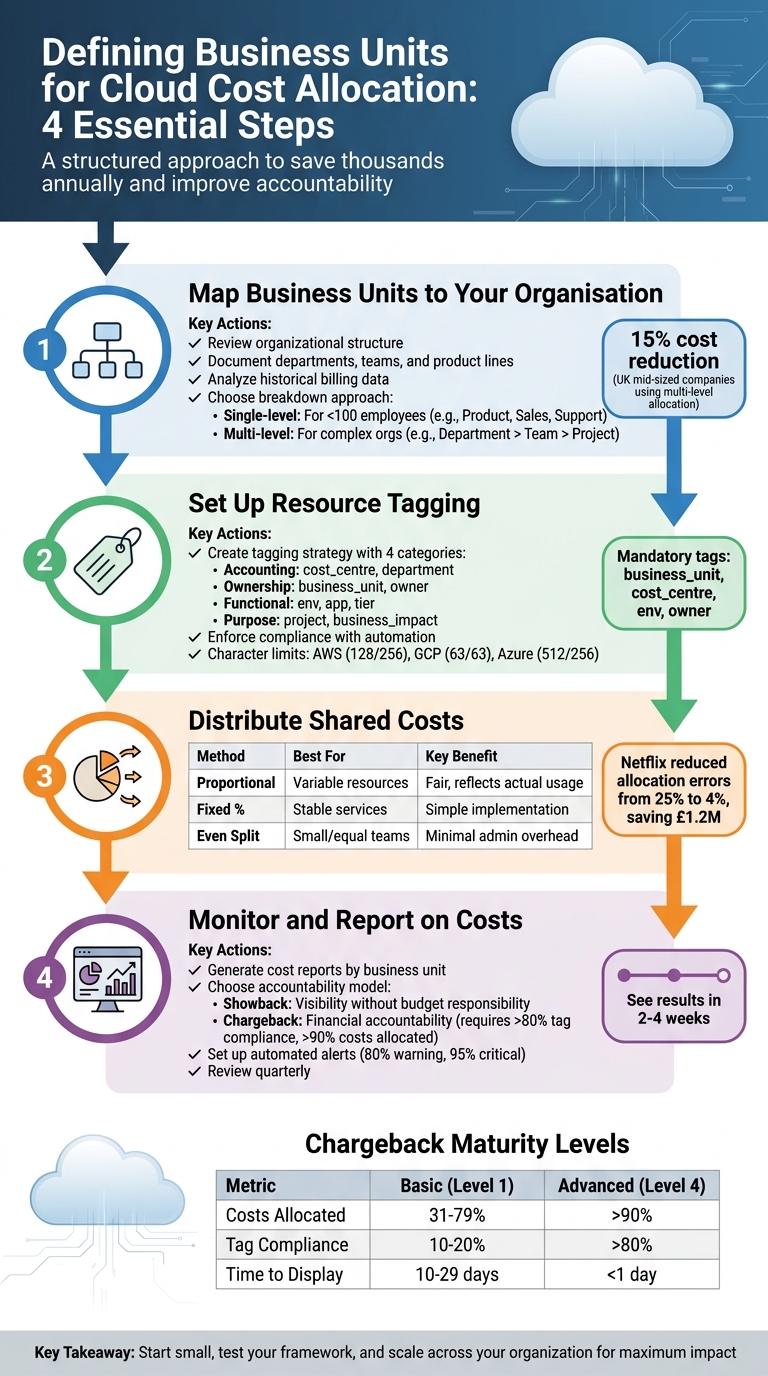 {4-Step Cloud Cost Allocation Framework for Business Units}
:::
{4-Step Cloud Cost Allocation Framework for Business Units}
:::
Step 1: Map Business Units to Your Organisation
Review Your Organisational Structure
Start by documenting your organisational chart. Include all departments, teams, and product lines that manage cloud resources and budgets. The aim here is to pinpoint exactly which groups hold control over these resources and financial decisions.
Talk to department heads and finance teams to uncover any informal or ad-hoc groups that might be using cloud resources unnoticed. For example, a retail company might find a flash sales
team operating independently and consuming significant compute power during high-demand periods like Black Friday [2][4].
Dive into historical billing data and access logs to spot usage trends and confirm which teams are responsible for specific cloud resources. Compare this data with your financial reporting structure to ensure consistency. If your profit and loss (P&L) statements categorise costs by department, your business units should align with that structure [1][2]. This comprehensive mapping is essential for choosing the right cost allocation strategy.
Choose Single or Multi-Level Breakdown
Once your organisational structure is mapped, decide between a single-level or multi-level breakdown. Your organisation's size and complexity will guide this decision.
A single-level approach is ideal for smaller companies (fewer than 100 employees) or those with flat hierarchies. In this case, you might allocate costs to just a few units - such as Product, Sales, and Support - keeping the tagging process simple and reducing administrative work.
For larger, more complex organisations, a multi-level breakdown provides the detail needed for precise accountability. Take the example of a London-based bank that structures costs as Department > Team > Project (e.g., Finance > Treasury Team > Forex Trading App). This approach allows for detailed tracking, such as identifying £200,000 in annual cloud costs tied to a specific sub-unit [3][4].
While single-level setups are easier to implement, they can hide inefficiencies. Multi-level structures, on the other hand, offer detailed insights but require more effort in tagging and management. Research shows that mid-sized UK companies can cut cloud costs by around 15% using multi-level allocation, as it helps identify wasteful spending by individual teams [1][2]. Start with 3–5 high-level units, test your setup against sample billing data, and adjust based on the level of detail you need [5].
Need help optimizing your cloud costs?
Get expert advice on how to reduce your cloud expenses without sacrificing performance.
Strategies for Cloud Cost Allocation and Chargeback
Step 2: Set Up Resource Tagging
Connect your mapped business units to a strong tagging system to ensure costs are accurately tracked and assigned.
Create a Tagging Strategy
Focus on four main tagging categories - accounting, ownership, functional, and purpose - to assign costs effectively.
- Accounting tags: Tie resources directly to financial systems. For instance, use keys like
cost_centreordepartmentwith values such asCC-001,Finance, orMarketing. - Ownership tags: Identify who is responsible for resources. Examples include using
business_unitwith values likeEngineeringorProduct-XYZ, and anownerkey for the team lead's name. - Functional tags: Define the technical environment. Use keys like
env(e.g.,productionorstaging),app(e.g.,catalogue-search), ortier(e.g.,web-server). - Purpose tags: Highlight the business context. Keys like
project(e.g.,migration-2026) orbusiness_impact(e.g.,highorcritical) can provide clarity.
Make certain tags mandatory - such as business_unit, cost_centre, env, and owner - to ensure consistency. Stick to a uniform naming convention across all platforms. For example, if you use business_unit in one cloud provider, avoid abbreviations like bu elsewhere. Also, avoid storing sensitive data like passwords or personal information in tags, as they are visible in logs and reports [6].
Keep in mind the character limits for tag keys and values across platforms: AWS allows 128 characters for keys and 256 for values, Google Cloud limits both to 63 characters, and Azure permits up to 512 for keys and 256 for values. Plan your naming conventions to accommodate these limits and ensure compatibility across all platforms.
Enforce Tagging Compliance
Once your tagging strategy is defined, focus on enforcing compliance to maintain cost tracking accuracy and data integrity.
Automation plays a big role here. Use cloud policies to block untagged resource deployments. For example, AWS offers Service Control Policies and Tag Policies, while Azure Policy and Google Cloud's Organisation Policy Service offer similar capabilities for their environments.
For existing resources, set up automated remediation measures. Conduct regular scans to spot resources missing required tags. Based on contextual clues like resource groups or naming patterns, either apply corrections directly or alert the responsible teams. Give teams a short window to update missing tags before applying default values.
To ensure consistent tagging during deployments, incorporate mandatory tag parameters into your infrastructure-as-code templates. Maintain clear internal documentation, complete with examples and a tagging decision tree, to help developers apply tags correctly. Regular audits will catch any lapses early, ensuring cost allocation remains accurate. Proper tagging is the foundation of effective cloud cost management and ensures the accountability framework from Step 1 delivers actionable results.
Step 3: Distribute Shared Costs
To manage costs for centralised services - like VPN gateways, shared databases, or enterprise logging tools - it's important to allocate expenses fairly. A clear, structured approach ensures accountability and reduces disputes.
Methods for Shared Cost Allocation
There are three main ways to distribute shared costs: proportional allocation, fixed percentage splits, and even distribution. Each method works best in specific situations.
Proportional allocation assigns costs based on measurable usage metrics like vCPU hours, storage usage, or data transfer. This approach reflects actual consumption and rewards efficiency. For example, if a shared database cluster costs £10,000 per month and Business Unit A uses 40% of compute hours, 30% of storage, and 50% of I/O operations, you can apply a weighted formula to divide the costs. Tools like AWS Cost Explorer and Azure Cost Management simplify this process using tagged resources. Netflix, for instance, used proportional allocation in Q1 2023 to assign AWS networking costs across 10 business units, cutting allocation errors from 25% to 4% and saving £1.2 million in mischarges.
Fixed percentage splits are ideal for predictable, indirect costs, such as enterprise licensing or management overhead. Costs are divided based on agreed percentages, avoiding disputes over hard-to-measure usage. For example, a £5,000 annual logging tool could be split as 40% to Sales (£2,000), 40% to Engineering (£2,000), and 20% to Finance (£1,000). Dropbox used this method in 2022 to allocate Google Cloud storage costs evenly across five teams, improving budget accuracy by £500,000. These rules were documented in Confluence for transparency.
Even distribution works when services are either uniformly beneficial or usage tracking would require excessive effort. Costs are divided equally among all business units. For example, in H2 2024, the BBC evenly distributed Azure shared services like Active Directory across 15 units, cutting administrative overhead by 60% (£300,000 saved) by automating the process with Azure Policy.
Here’s a quick summary of the methods:
| Allocation Method | Best For | Pros | Cons |
|---|---|---|---|
| Proportional (Usage-based) | Variable resources (e.g., compute, storage) | Fair, reflects actual usage | Requires accurate metrics |
| Fixed Percentage | Stable shared services (e.g., licensing) | Simple to implement | Ignores usage differences |
| Even Distribution | Small/equal teams | Minimal admin overhead | Unfair for uneven usage |
Document Allocation Rules
After choosing an allocation method, document the process to ensure consistency and transparency. Clearly outline the formulas - for instance, Shared DB costs = (BU vCPU usage / Total vCPU) × Total DB cost
- and store them in accessible tools like Confluence or Google Docs. Include details like responsible owners, review schedules (quarterly is common), approval workflows, and change logs with timestamps in DD/MM/YYYY format.
Version-control these documents and use tools like RACI matrices (Responsible, Accountable, Consulted, Informed) to clarify roles. Cloud-native tools such as AWS Budgets can automate alerts for unexpected variances. For example, set triggers to review allocations if usage shifts by more than 20%. Regular bi-annual audits and workshops can help refine the process over time.
Step 4: Monitor and Report on Costs
Once you've allocated shared costs, the next step is to monitor spending at the business unit level. This process turns raw data into actionable insights, helping you identify areas for improvement and maintain financial control. By building on your cost allocation framework, you can implement reporting practices that provide clarity and drive better decision-making.
Generate Cost Reports by Business Unit
Use your tagging and allocation rules to organise cloud cost data into detailed reports. Tools like AWS Cost Categories offer a rule-based system that maps costs to your internal structure, which then appears as a column in Cost and Usage Reports (CUR) [7]. This allows you to segment and analyse spending by department, product line, or team - without spending hours wrestling with spreadsheets.
Cloud platforms such as AWS, Azure, and Google Cloud offer built-in tools like AWS Cost Explorer, Azure Cost Management, and Google Cloud’s Cost Table. These tools let you filter data by tags, services, and time periods. Automate monthly reports to break down each business unit’s total spend by service type (e.g., compute, storage, networking) and environment (e.g., production, development, testing). Export these reports as CSV or PDF files and distribute them on the first working day of each month.
For a more dynamic view, create dashboards that track real-time cost trends. Include metrics like month-over-month changes, budget variance (actual vs. planned spend), and key cost drivers. These dashboards help leaders quickly identify anomalies, such as unexpected spikes in data transfer costs, and take action before the month ends. This approach also validates your earlier mapping and tagging efforts, ensuring costs are accurately tracked.
Use Showback and Chargeback Models
Showback and chargeback models add another layer of accountability to cost tracking.
Showback: This model provides visibility into cloud spending without transferring budget responsibility. Business units receive reports showing their costs but aren’t held financially accountable. It’s a good starting point for organisations new to cost allocation or for teams without direct budget control, as it raises awareness without adding pressure.
Chargeback: Unlike showback, chargeback makes business units financially responsible by deducting cloud costs from their budgets. This creates a strong incentive for efficiency, as overspending directly affects a team’s resources. However, chargeback requires mature processes, including accurate tagging, clear allocation rules, and reliable reporting, to avoid conflicts.
The table below highlights the maturity levels needed for successful chargeback implementation:
| KPI for Chargeback Success | Level 1 (Basic) | Level 4 (Advanced) |
|---|---|---|
| % of Costs Allocated | 31–79% | >90% |
| % Tag Compliant | 10–20% | >80% |
| Allocation Accuracy | 7–15 tag revisions | 0–1 tag revisions |
| Transparency (Time to display) | 10–29 days | <1 day |
Start with showback to build trust and fine-tune your processes. When tagging compliance exceeds 80% and allocation accuracy stabilises, transition to chargeback for teams ready to manage their budgets. Communicate the timeline for this shift at least two months in advance to give teams time to adapt.
Tools for Monitoring and Optimisation
While native tools provide a solid foundation, third-party platforms offer enhanced visibility and cross-cloud insights. Look for features like:
- Anomaly detection: Alerts for spending patterns that deviate from historical norms.
- Rightsising recommendations: Identifies underused resources to cut costs.
- Reserved instance planning: Suggests long-term commitments for predictable workloads.
Set up automated alerts to notify leaders when spending exceeds thresholds, such as 80% of the monthly budget for a warning and 95% for a critical alert. Integrate these alerts with collaboration tools like Slack or Microsoft Teams for immediate action.
To go further, consider external expertise. For example, Hokstad Consulting offers cloud cost engineering services, claiming to reduce expenses by 30–50% through detailed audits and tailored strategies. Their flexible options, including a no savings, no fee
model, allow organisations to access expert support without upfront costs.
Finally, review cost reports quarterly to ensure your allocation strategies remain aligned with business goals. Host workshops with finance, engineering, and business unit leaders to discuss trends, refine rules, and set future targets. This collaborative effort ensures continuous improvement and keeps everyone accountable.
Common Challenges and How to Address Them
Even with a well-thought-out plan, putting cloud cost allocation into action can be tricky. Issues like inconsistent tagging, poor coordination between teams, and technical constraints often crop up. While these challenges can be anticipated, they require careful handling. This is where the mapping and tagging strategies discussed earlier become crucial.
Overcoming Implementation Challenges
Strong mapping and tagging can prevent many problems, but some hurdles are harder to avoid.
Take inconsistent tagging, for example. Variations in naming conventions, typos, or missing tags can throw off your allocation accuracy. To combat this, enforce mandatory tags through platform policies and conduct regular audits to catch and fix untagged resources quickly.
Multi-cloud environments bring their own set of complications. Each platform has different rules and limits for tagging. For instance, AWS allows tag keys up to 128 characters, Azure extends this to 512 characters, and some platforms treat tags as case-sensitive while others don’t. To tackle this, create a shared resource documenting these differences and develop tagging templates tailored to the strictest limits. This ensures your tags remain functional across all platforms.
Another common issue is resistance from teams, often due to concerns about unfair cost penalties. To address this, involve stakeholders from the start. Organise workshops to explain how cost allocation can uncover inefficiencies and justify budgets. As Antoine Senkoff from CACI points out:
In 2026, demonstrable control over cloud cost is essential for audit readiness, regulatory compliance and maintaining public trust[8].
By framing cost allocation as a governance tool that highlights waste and supports financial planning, rather than assigning blame, you can ease these concerns.
Best Practices for Success
To tackle these challenges effectively, consider the following practices.
Regular reviews: Schedule sessions with finance and engineering teams to review spending, identify tagging issues, and fine-tune allocation rules. Use a set agenda and share relevant reports beforehand to keep these meetings efficient and productive.
Flexible allocation models: Different situations call for different approaches. For example, proportional allocation might work best for shared databases, while an even split could suit foundational networking. Regularly revisit and adjust your methods based on feedback, such as changes in a business unit’s revenue contribution.
Open communication: Go beyond sending out reports. Create opportunities for discussion, whether through meetings or collaborative reviews. Start with a showback approach to build trust, then move to a chargeback model once tagging compliance is high and teams understand their cost drivers. This gradual transition reduces friction and encourages accountability.
These practices, combined with the monitoring and reporting strategies outlined earlier, can help maintain a strong and effective cost allocation system.
Conclusion and Next Steps
Defining business units for cloud cost allocation is a practical way to establish financial accountability. By aligning business units with your organisational structure, adopting consistent resource tagging, ensuring fair distribution of shared costs, and setting up regular monitoring, you can achieve the transparency needed to support informed scaling decisions.
Key Takeaways
These four steps work together to link IT expenditure directly to business value. Begin by evaluating your organisational structure to decide whether a single-level or multi-level breakdown works best. Follow this by creating a tagging strategy, complete with enforcement policies. Then, define clear rules for allocating shared costs - methods like proportional distribution or activity-based costing are great starting points. Finally, use showback reports for visibility or chargeback models for direct accountability to regularly assess and refine your approach.
To get started, consider hosting a resource inventory workshop to identify essential tags (e.g., 'business-unit:marketing', 'department:engineering'). Begin with a pilot programme in one department before scaling across the organisation. Many teams see results within 2–4 weeks. Regular reviews of allocation rules and the use of automation tools like Terraform for tagging can help maintain efficiency and control over time.
How Hokstad Consulting Can Help
Expert guidance can make a significant difference, particularly for organisations managing multi-cloud environments, high volumes of shared services, or over 100 business units. Mistakes in these areas can lead to annual losses exceeding £50,000. For instance, in 2024, a UK financial services firm partnered with Hokstad Consulting to implement account-based allocation for each business unit. This revealed a 25% overspend in one division, enabling them to reallocate resources and save £120,000 annually.
Hokstad Consulting provides services such as cloud cost engineering, DevOps transformation, and strategic migration. They can help you define tailored business units, enforce tagging compliance, allocate shared costs effectively, and set up monitoring dashboards. Their flexible engagement options include retainer-based support or a no-savings, no-fee model for cost reduction projects, ensuring measurable results while optimising cloud environments.
FAQs
Should we use a single-level or multi-level business unit structure?
The choice largely hinges on how complex your organisation is and what it requires. A multi-level structure is ideal for larger organisations as it allows for detailed cost tracking across various departments or projects. This approach aligns well with models like usage-based or service-based chargebacks. On the other hand, a single-level structure is more straightforward and might be better suited to smaller organisations. If precise cost management is a priority, opting for a multi-level structure is usually the better option.
What are the minimum mandatory tags to allocate costs reliably?
The two essential tags for dependable cloud cost allocation are owner and cost_centre. These tags help standardise metadata for cloud resources, making it easier to track and allocate expenses accurately. By implementing proper tagging, organisations can achieve greater transparency, accountability, and accurate cost distribution across different teams and projects. This approach aligns with the recommendations in Hokstad Consulting's guide on cloud cost allocation policies.
How do we allocate shared cloud services fairly between teams?
To ensure fair distribution of shared cloud services, it's crucial to establish clear cost allocation policies that promote both transparency and accountability. Start by implementing tagging rules to standardise metadata, such as owner and cost centre, and automate these rules to ensure precise tracking. Keep an eye on spending trends through regular reviews, and explore chargeback models - whether usage-based or hybrid - to better reflect actual resource consumption. Leveraging automation and real-time allocation can help maintain fairness while minimising unnecessary spending.