
If access stays inside one company, SSO is often enough. If access crosses into another company or cloud, federation is usually the right fit.
I’d boil the whole topic down like this: SSO is about one sign-in across apps you control, while federated identity is about trusting sign-ins from another organisation. They can use the same standards - such as SAML, OpenID Connect, and OAuth 2.0 - but they solve different access problems.
Here’s the short version:
- SSO helps staff sign in once and use several internal apps
- Federated identity lets users access external services with their home work account
- SSO stays inside one trust boundary
- Federation crosses trust boundaries
- SSO is simpler to run
- Federation needs partner trust, policy alignment, and access rules on both sides
For most teams, the choice comes down to three checks:
- Who owns the user account?
- Is access internal or cross-company?
- Who removes access when someone leaves?
A common setup is to use SSO for employees and federation for suppliers, contractors, partners, and multi-cloud access. That cuts extra accounts, lowers password sprawl, and keeps sign-in policy in one place.
::: @figure 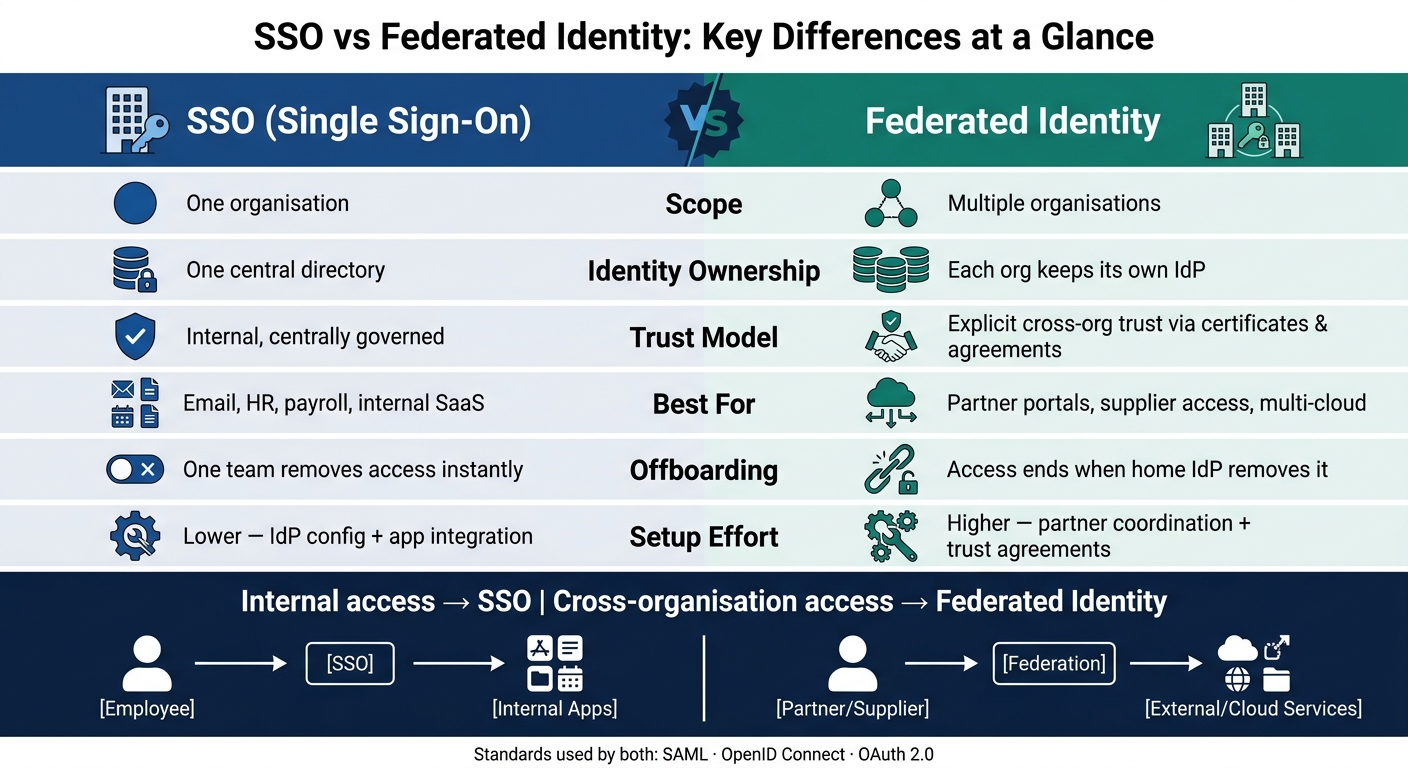 {SSO vs Federated Identity: Key Differences at a Glance}
:::
{SSO vs Federated Identity: Key Differences at a Glance}
:::
Single Sign-On (SSO) vs. Federation
Quick Comparison
| Check | SSO | Federated identity |
|---|---|---|
| Scope | One organisation | More than one organisation |
| User accounts | Usually one internal directory | Each organisation keeps its own directory |
| Trust | Internal app trust | Trust between separate organisations |
| Best for | Email, HR, payroll, internal SaaS | Partner portals, supplier access, cloud platforms |
| Offboarding | One internal team removes access | Access often ends when the home IdP removes it |
| Setup effort | Lower | Higher |
From a user point of view, both can feel similar: sign in once, then get access. But under the hood, the control model is different. That difference matters for security checks, MFA, audits, and leaver handling.
If I were choosing, I’d use one simple rule: internal access points to SSO; shared access across organisations points to federation.
Single sign-on in cloud IAM
SSO is a centralised sign-in model. One authenticated session can be used across many apps inside the same trust domain. Instead of each app managing its own passwords, the app trusts a token issued by the IdP. That cuts password sprawl and gives IT one place to apply access policy.[9][3] The catch is simple: that trust stays inside one organisation.
How SSO works within one organisation
When a user opens an app, the app sends them to the IdP. If there is no active session, the IdP signs the user in and issues a signed SAML assertion or OpenID Connect token. After that, other apps can reuse the same session, so the user does not need to enter their credentials again. It works well for internal access, but it does not deal with access across separate organisations.
In many UK organisations, Microsoft Entra ID sits at the centre of SSO. Staff accounts are synchronised from on-premises Active Directory through Entra Connect, and third-party SaaS tools such as Salesforce, Workday, and ServiceNow are set up to trust it as the IdP. Conditional access at the IdP, such as blocking unmanaged devices or sign-ins from risky locations, then applies across connected apps.
Its limit is the trust boundary
SSO works best when all users belong to one organisation, their accounts sit in one directory, and one security team controls policy. In that setup, onboarding and offboarding are fairly direct: create or disable one directory account, and access changes across every connected system at once. For UK firms in regulated sectors such as financial services or healthcare, that kind of centralised and auditable control maps closely to compliance duties.[10]
The problem shows up when a supplier or external partner needs access with their own corporate credentials. Internal SSO cannot handle that on its own. Each organisation runs its own IdP, MFA setup, and risk posture. So while SSO centralises authentication inside one security domain, it does not extend trust into another organisation. That is where federated identity comes in.
Federated identity in multi-organisation and multi-cloud environments
Federated identity means one organisation trusts another organisation’s identity provider, so people can use their existing sign-in details to access external services without getting a separate local account. That trust is what changes the sign-in process.
How federation works with IdPs, service providers, and standards
When a user tries to open an external system - such as a partner portal, a cloud platform, or a SaaS tool - that system acts as the service provider (SP) and sends the user to their home organisation’s identity provider (IdP). The IdP signs the user in using its own checks, then sends a signed token or assertion back to the SP. The SP checks that signature, reads the claims, and allows access. It does not verify the password itself.
Different standards fit different jobs:
- SAML works well for browser-based enterprise federation.
- OIDC fits modern apps and APIs.
- OAuth 2.0 is used for delegated access.
In multi-cloud estates, a central corporate IdP can issue identities that several cloud services trust, which keeps policy in one place. The same setup appears any time one organisation needs to trust another organisation’s identities.
Where federated identity is used in practice
Federation matters when people from different organisations need to use the same systems - supplier portals, joint ventures, outsourced teams, and public-sector services where outside organisations need controlled access. Each organisation keeps control of its own identities while still allowing cross-domain access. That cuts down on account sprawl and makes onboarding and offboarding easier.
In the public sector, GOV.UK Verify was built as a federated digital identity infrastructure, with accredited private companies acting as identity providers and citizens using a verified digital identity from one of those providers to access multiple government services.[8][6] As the OECD noted, the federated approach gave citizens a choice of identity provider while enabling consistent access across public-sector services.[8]
Federated identity vs. SSO: a direct comparison
The main difference is scope: SSO centralises access inside one organisation, while federated identity extends trust across organisations.[17][2][5] Once you get past the basic mechanics, the comparison comes down to three things: scope, control, and day-to-day effort.
Scope, identity ownership, and trust boundaries
SSO works inside a single administrative domain. Federated identity works across domains through explicit trust. In that setup, Organisation A’s IdP issues signed assertions that Organisation B accepts, while identity ownership stays with the home organisation.[1][13][15]
Put simply, SSO is about one organisation managing access to its own systems. Federation is about one organisation trusting another organisation’s identity checks without taking over that identity itself.
The contrast is easiest to see side by side:
| Dimension | SSO | Federated identity |
|---|---|---|
| Domain scope | Single organisation | Cross-domain, multi-organisation |
| Identity ownership | One central directory | Each organisation keeps its own IdP |
| Trust model | Internal, centrally governed | Explicit, based on metadata, certificates and agreements |
| Common use case | Employee access to internal apps | Partner portals, supplier access, multi-cloud |
User experience, security, and compliance
From the user’s point of view, the experience can look almost the same. SSO gives employees one sign-on for internal tools. Federation extends that same ease to partner portals and external SaaS tools, so someone signed in through their employer can open an external service without setting up a separate account.[7][4][16]
But the security model is where things split. With SSO, MFA, conditional access, and leaver removal sit under one organisation’s control. With federation, those controls are spread across organisations and depend on formal trust arrangements.[1][7][13][15]
For UK compliance teams working to ISO 27001 or the NHS DSPT, that matters a lot. Federation needs formal trust agreements, clear minimum assurance levels, and written expectations for how fast a partner removes access when someone leaves.[11][15]
Complexity, cloud fit, and remote-work fit
SSO is usually the simpler setup. In most cases, it needs IdP configuration, app integration, and policy setup.[12][7][14] Federation adds extra work because partner co-ordination has to continue as the relationship changes over time.[1][13][15][16]
For remote staff using managed devices, SSO on its own will often cover internal access just fine. Federation becomes much more important when contractors, suppliers, or joint-venture partners need access. Creating local accounts for every external user gets messy fast, while federation lets revocation at the home IdP cut off access across connected services straight away.[13][15]
This also fits well with multi-cloud environments. UK organisations running AWS, Azure, and GCP can use one central IdP and federate it across all three, keeping identity policy in one place without tying themselves too tightly to a single cloud provider.[12][7][14]
In practice, that’s the line that matters: if access stays inside one trust domain, SSO may be enough. If it crosses into another, federation moves from nice-to-have to required.
Using both together and choosing the right approach
In practice, this isn’t about picking one and ignoring the other. It’s about knowing where each one belongs. Most organisations use SSO for internal access and federation for external access. Federation deals with trusted identities from outside your organisation. SSO deals with the sign-in experience once that trust is in place.
When SSO alone is enough
SSO on its own works well when your organisation has one identity directory, mostly internal users, and a small SaaS estate where IT controls every account. Think of a UK retailer giving staff access to ERP, payroll, and dashboards through one corporate login. If all users are employees and all apps sit in one tenant, that setup is often enough.[1][4][20]
The main upside is simple: staff sign in once, IT keeps access under one roof, and there’s no need to extend trust outside the business.
When federated identity is needed
Things change the moment people from other organisations need access. Suppliers, contractors, and partners usually shouldn’t have separate local accounts in your systems. That leads to credential sprawl and turns offboarding into a manual chore.
With federation, a subcontractor signs in through their own employer’s IdP, and your system accepts the signed assertion. When the contract ends, access can be removed as soon as their home organisation takes it away.[18][19][21]
This matters even more in multi-cloud estates. Federation lets identity policy stay central instead of forcing teams to set up separate accounts on each platform. That’s why it often becomes the default choice for external collaboration and multi-cloud access.
Conclusion: the key difference is domain scope and trust
SSO makes access easier inside one organisation. Federated identity lets that trust stretch across organisations. Put simply, SSO fits one organisational boundary, while federated identity fits many organisations and cloud platforms without weakening governance or compliance.
FAQs
Can SSO and federated identity be used together?
Yes. SSO and federated identity are built to work together.
Your central identity provider signs users in, and federation protocols such as SAML or OIDC let them move across cloud platforms and applications after a single login.
That means you can apply the same security rules across your setup, such as mandatory multi-factor authentication, while cutting down the need for separate credentials.
How do I know if federation is necessary?
Federation makes sense when your organisation needs simpler access across several platforms while keeping control in one place.
It’s especially useful when you:
- manage identities across SaaS and on-premises applications
- need to onboard external partners without changing their systems
- support mergers and acquisitions
- secure workload identities such as CI/CD pipelines without long-lived credentials
At its core, federation helps different systems trust each other without forcing everyone into the same setup. That can save a lot of friction, especially when teams, tools, and partner networks start to grow.
Who controls access when users leave?
When someone leaves an organisation, their access should be handled through formal joiner, mover and leaver (JML) procedures. In most cases, HR or the HRIS acts as the source of truth and kicks off the offboarding process that removes access rights.
For security and compliance, de-provisioning should be automated. That helps remove orphaned accounts and stops access drift before it turns into a problem. Access should be revoked immediately once it’s no longer needed.