
Manual hybrid DR is expensive because you pay for idle kit, staff time, test work, and longer outages at the same time. I’d sum it up like this: automation cuts cost by reducing downtime, lowering hands-on recovery work, shrinking test effort, and avoiding always-on spare capacity.
If you want the short version, here it is:
- Downtime is often the biggest cost. The article points to figures such as £9,000 per minute for large firms and more than £230,000 per hour for many mid-sized and large businesses.
- Manual recovery adds labour cost. Out-of-hours callouts, overtime, and handoffs across cloud and on-site systems all add up.
- Testing is cheaper with automation. Instead of large, disruptive exercises a few times a year, teams can run scheduled checks more often with less effort.
- Cloud DR can cut fixed spend. Rather than paying for idle standby capacity all year, you can spin resources up for testing or failover, then scale them back down.
- Code-based DR setup helps stop drift. When recovery steps and environments are defined in code, there is less room for mismatch between production and DR.
- The best starting points are backups, replication, failover orchestration, restore checks, and regular DR tests.
- ROI is easiest to track with a few numbers: actual RTO, actual RPO, downtime cost per hour, recovery labour hours, test effort, and DR infrastructure spend.
::: @figure 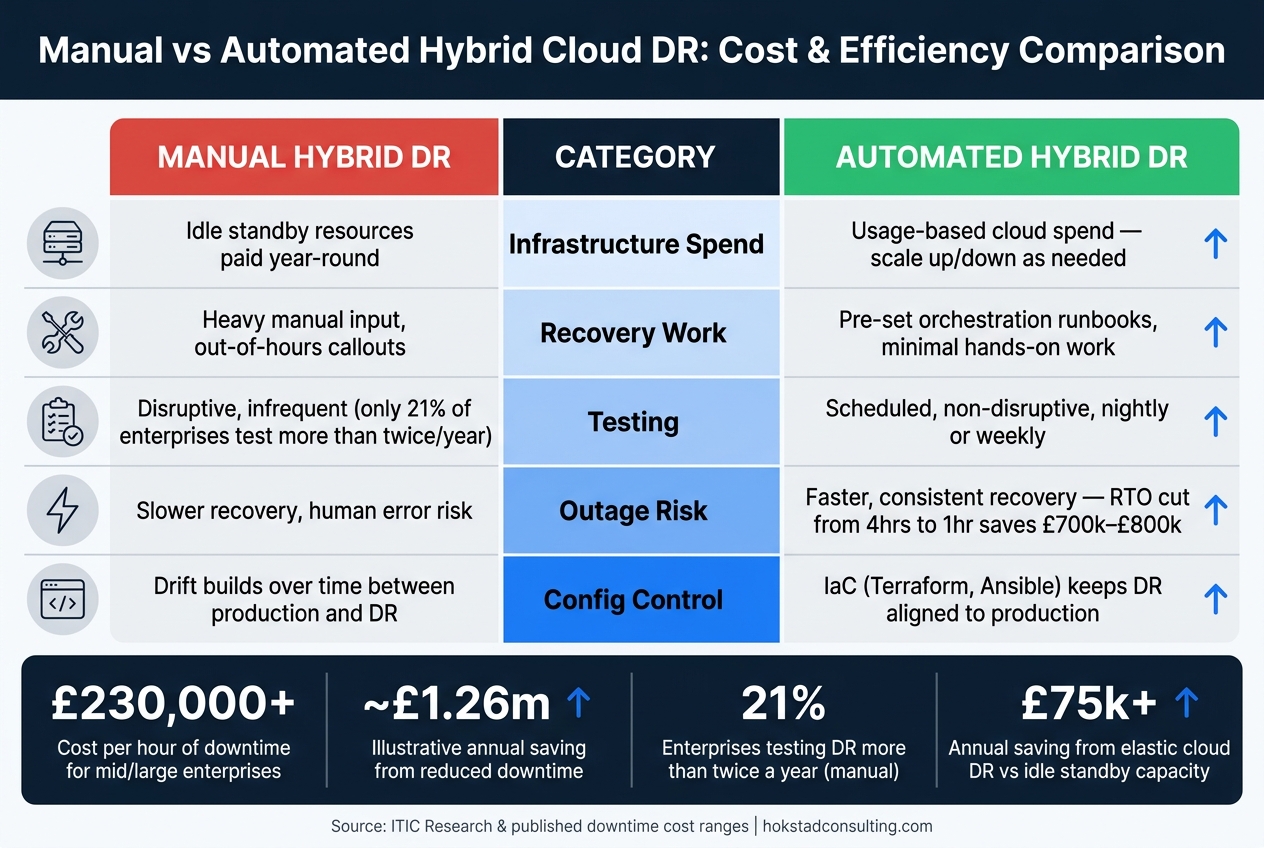 {Manual vs Automated Hybrid Cloud DR: Cost Comparison}
:::
{Manual vs Automated Hybrid Cloud DR: Cost Comparison}
:::
Hybrid Cloud Disaster Recovery in AWS | Amazon Web Services
Quick comparison
| Area | Manual hybrid DR | Automated hybrid DR |
|---|---|---|
| Infrastructure spend | Idle standby resources | Usage-based cloud spend |
| Recovery work | Heavy manual input | Pre-set workflows with less hands-on work |
| Testing | Disruptive and infrequent | Scheduled and lower-effort |
| Outage risk | More delay and human error | Faster, more consistent recovery |
| Config control | Drift builds over time | IaC keeps DR closer to production |
So if I strip the article down to one point, it’s this: automating hybrid cloud disaster recovery can save money before, during, and after an outage.
How automation changes the disaster recovery cost model
The next cost saving comes from when money is spent during recovery, not just how much work recovery takes. In a manual hybrid cloud DR setup, you often carry fixed standby costs whether you need them or not. Automation shifts that model to usage-based spend: resources scale up for failover or testing, then scale back down afterwards.[7][1]
How automated failover, failback and orchestration cut labour costs
When failover or failback is handled by hand, several specialists often have to jump in at odd hours and co-ordinate every step. Automated orchestration removes much of that back-and-forth with pre-validated, dependency-aware runbooks that carry out tasks in the right order.
That changes the engineer’s role. Instead of spending hours chasing handovers and ticking off steps, teams can watch the workflow and step in only if something goes off script. Because the process is repeatable, the same team can cover more systems without adding headcount.
There’s another gain here too: orchestration engines can run several recovery tasks at the same time. They can promote databases to primary, update DNS, reconfigure load balancers and run application health checks in parallel. That shortens recovery time and cuts downtime exposure.[5][1][2]
Labour savings matter, but testing is where many firms feel the cost pain most.
How non-disruptive testing lowers the cost of proving readiness
Traditional DR exercises usually need planned maintenance windows, large teams and, in some cases, a bit of nerve because production risk is still on the table. That helps explain why only 21% of enterprise organisations test their disaster recovery plans more than twice a year[10]. The result? Plans drift between exercises.
Automated testing changes that. By using snapshot or sandbox environments, teams can run exercises nightly or weekly without disrupting live services. Results are logged automatically, so proving readiness takes less time and less manual effort.[8][10]
The last area of savings comes from keeping the recovery setup in step with production.
How repeatable workflows reduce human error and configuration drift
DR often breaks down because the recovery environment no longer matches production. Automation tackles that with Infrastructure as Code (IaC). DR environments are defined in version-controlled templates such as Terraform, Ansible and Kubernetes manifests, then applied the same way across both production and DR sites.
In plain terms, the setup lives in code, not in someone’s memory or a late-night manual fix. Every change goes through the same review and deployment process, which stops one-off edits from quietly damaging the recovery path. That means fewer failed recovery attempts, less emergency rework and lower service-credit risk. Hokstad Consulting reduces configuration drift through automated deployments and policy enforcement.[1][6][9][11]
Need help optimizing your cloud costs?
Get expert advice on how to reduce your cloud expenses without sacrificing performance.
Where the savings come from in practice
Automation cuts costs in three main areas: downtime, testing work and infrastructure.
You see the effect most clearly in recovery speed, test effort and infrastructure spend.
Lower downtime costs through faster RTO and tighter RPO
ITIC research shows that more than 90% of mid-sized and large enterprises put the cost of downtime at over £230,000 per hour.[20][21] In UK retail, that number can climb fast during peak periods like Black Friday and the Christmas run-up, when lost sales, idle staff time and SLA penalties all hit at once.[13][14][18]
For a mid-sized UK retailer, cutting RTO from four hours to one can protect around £700,000–£800,000 in revenue and productivity during a single major outage.[12][8][3]
RPO matters just as much. If you cut the data-loss window from four hours to 30 minutes with automated replication and continuous backup, there is simply less transactional data to clean up after the outage. That means fewer lost orders, fewer customer refunds and less manual re-keying, which helps keep the post-incident backlog under control.[8][16]
The same automation also lowers the cost of showing that the recovery plan works.
Reduced testing and recovery overhead
Manual DR tests in hybrid environments often mean days of planning, a lot of cross-team coordination and out-of-hours work. In many cases, outside consultants are brought in too.
Automation changes that. Teams can run tests more often with far less disruption, and the process stays repeatable from one exercise to the next. Instead of pulling together a big group for a weekend maintenance window, a small operations team can check automated test reports and step in only where exceptions appear.[13][18][10]
That cuts overtime, reduces consultant spend and limits disruption from testing, which makes frequent exercises far more practical for smaller teams.
Savings by category: a cost-benefit breakdown
These savings tend to fall into a small set of repeatable cost buckets.
The table below links the main savings categories to the operational results they improve, along with sample annual figures for a mid-sized UK organisation. These are indicative estimates based on published downtime cost ranges and common reductions linked to automation. Your own numbers will vary depending on revenue per hour, staffing costs and infrastructure spend.[12][13][14][15][18][10][19]
| Savings category | Operational outcome improved | Illustrative annual saving (GBP) |
|---|---|---|
| Downtime | Higher availability and revenue protection during peak trading | ~£1.26m |
| Labour (recovery) | Faster recovery with less manual intervention | ~£12,600 |
| Testing labour | Fewer consultant days and internal hours per test cycle | ~£11,600 |
| Testing impact on operations | Less planned outage and operational backlog | ~£60k |
| Infrastructure footprint | Lower idle DR capacity via elastic cloud provisioning | ~£75k |
What to automate first to get measurable savings
Once you've mapped out where the savings sit, the next step is simple: decide what to automate first. The best place to start is with the controls that eat up the most manual work and give you the fastest recovery wins.
Start with backups, replication and failover orchestration
The clearest starting point is automated, policy-based backups and continuous replication across both on-premises and cloud workloads. Manual backup management tends to pile on extra scheduling, scripting and out-of-hours incident response work. Bringing that into one automated toolset can strip out dozens of person-hours each month from routine operations alone.[1][23]
For Tier-1 workloads, use near-real-time replication. For lower-priority systems, daily backups with automatic retries and automated monitoring are often the right fit.[23][24]
Once replication is steady, move to failover orchestration. This is where time savings can stack up fast. Automated runbooks can cut incident-handling time by a large margin.[22][5][24] Automated failback also helps by removing improvised recovery coordination and reducing service disruption.
Add restore validation and regular DR testing
After backup and failover are automated, the next job is proving they work.
Automated restore checks close the gap between a backup that completed and a workload that can actually be recovered. That usually means restoring data or full workloads into an isolated environment on a set schedule, running integrity checks, and generating reports without turning it into a big manual exercise every quarter.
Scheduled, non-disruptive DR tests with automatic reporting mean teams can spend their time reviewing exceptions instead of running every step by hand. AWS reports that automated restore testing on set schedules:
verifies backup integrity, streamlines compliance reporting and frees up valuable personnel - all while building certainty their protection strategy will deliver when needed.[25]
For UK organisations in regulated sectors, that can also cut audit prep work by a large margin.[25][27]
Prerequisites to set before automating
Before you automate anything, set the recovery targets and map the dependencies the workflow needs to follow.
- Define RTO and RPO for each workload tier. Without that, there's no clear way to decide which workloads need continuous replication and which can rely on daily backups.[28][12][30][31]
- Document application dependencies. That includes databases, message queues, identity services and external APIs, so orchestration brings systems up in the right order instead of falling over halfway through recovery.[29][31]
- Check hybrid network connectivity. VPNs, Direct Connect, ExpressRoute, routing and DNS all need to work cleanly between primary, DR and test environments.[12][5][29]
You also need consistent policies for backup frequency, retention, encryption and testing cadence across cloud and on-premises environments.[12][5][29][31] Without that, teams can end up automating low-value systems first or leaving gaps in high-value ones, which means wasted spend either way.[24][26]
How to measure ROI and when to get outside support
Metrics that link resilience to cost
Once the savings are in view, the next job is to prove them with hard numbers. The simplest way to show the value of DR automation is to track a small set of metrics before and after rollout, then turn the change into pounds: actual RTO, actual RPO, downtime cost per hour, recovery labour hours, DR test effort and idle DR spend.
Start with actual RTO and RPO for each workload tier, not target figures.[34][35][36][38] Targets look tidy on paper. Actual results show what happens when things go wrong. Pair that with downtime cost per hour, including lost revenue, lost staff output, and SLA or regulatory penalties.[35][36] Every hour cut from recovery time has a direct £ value. Automation shortens incident resolution and reduces customer-facing outage costs.[37]
| Metric | What to measure | What it proves |
|---|---|---|
| RTO (actual vs target) | Recovery time per workload tier | Downtime exposure in £/hour |
| RPO (actual vs target) | Data loss per incident | Re-entry labour and regulatory risk |
| Recovery labour hours | Staff time per incident and per test | Where automation cuts hands-on work |
| DR test effort | Tests per year, hours per test | Overhead reduction from non-disruptive testing |
| Infrastructure DR spend | Idle capacity, licences, secondary site costs | Where cloud-based DR reduces fixed costs |
When hybrid DR automation delivers the best returns
These metrics matter most in places where manual recovery costs a lot and failure costs even more. Returns tend to be highest when DR is still labour-heavy and uptime demands are strict. Online retailers, financial services firms, healthcare providers and public sector services with statutory obligations all fit that pattern. In those settings, even a short outage can mean lost revenue, SLA penalties and regulatory scrutiny at the same time.[1][17][4]
Organisations running a full secondary data centre just for DR often find that moving to pay-as-you-go cloud DR cuts both capital and operating spend.[32][33]
Conclusion: the financial case for automated hybrid DR
If the figures stack up, the case is pretty simple. Automation cuts the cost of outages through faster RTO, tighter RPO, lower testing overhead and fewer failures caused by configuration drift. Each of those gains can be measured in pounds before and after rollout.
For organisations that are not sure where to begin, outside support can help avoid wasted spend. Hokstad Consulting helps businesses build hybrid DR workflows aligned to business risk, with measurable reductions in infrastructure spend and recovery labour.
FAQs
How quickly can DR automation pay for itself?
DR automation can pay for itself fast. Why? Because downtime is expensive - often more than £240,000 per hour - and automated recovery cuts a lot of the manual work that slows teams down and leads to mistakes.
It can also trim costs in a few clear ways:
- swapping large upfront hardware spend for pay-as-you-go cloud use
- moving data into lower-cost storage tiers
- scaling resources up only for test drills or actual failover events
That means you’re not paying for full recovery capacity all the time. You use what you need, when you need it.
Which workloads should be automated first?
Automate workloads based on business impact, not technical priority alone. The starting point is a Business Impact Analysis (BIA), which groups assets into Tier 0, Tier 1, Tier 2 and Tier 3.
Put Tier 0 and Tier 1 at the front of the queue. These assets need the fastest recovery and the strongest data protection.
For Tier 2 and Tier 3, simpler backup-and-restore methods are often enough and usually more cost-effective.
What are the main risks before automating hybrid DR?
Before you automate hybrid disaster recovery, it helps to be clear-eyed about the risks. Some are technical. Others are operational. And a few only show up when something goes wrong.
On the technical side, teams often run into API differences between cloud platforms, network reliability issues, data synchronisation problems, replication lag, split-brain scenarios, and configuration mismatches. That can sound abstract at first. But during failover, those gaps can turn into delays, broken services, or data that doesn’t line up the way it should.
Costs can trip people up too. Hidden charges often come from egress fees, overprovisioning, and cross-region replication. What looks fine on paper can get expensive once traffic starts moving between platforms or regions.
There’s also the compliance side to deal with. UK GDPR and data sovereignty rules can add extra overhead, especially when data moves across locations and providers. If the setup isn’t documented well, or if procedures vary from one team to another, manual steps tend to creep back in. And when failover is under pressure, those manual steps make human error much more likely.