
If you want the short answer: for most UK firms, cloud SSO with directory sync is the simplest starting point, OIDC is the right pick for workloads, and a unified IAM platform makes sense once you have a mixed estate. That choice matters because weak access control sits behind 80% of breaches, and the average breach cost is about £3.4 million.
I’d boil the article down like this:
- Directory sync + cloud SSO is usually the easiest route for user access
- Full on-prem federation gives tighter legacy control, but remote sign-in depends on your on-site identity service
- Cloud-native federation works best for pipelines and service access, with short-lived tokens instead of long-term secrets
- Unified hybrid IAM gives one policy layer across AWS, Azure, GCP and SaaS, but the central hub must stay up
- The main decision points are security, resilience, admin load, governance, and compliance
If your staff work remotely, the biggest question is simple: what breaks sign-in when on-prem systems fail? In this comparison, the models that keep sign-in in the cloud tend to hold up better than the ones that send every login back on-site.
Quick comparison
| Model | Best fit | Main upside | Main drawback |
|---|---|---|---|
| Directory Sync + Cloud SSO | SMEs and SaaS-led teams | Simple user sign-in | Revocation can lag |
| Full Federation (On-Prem IdP) | Legacy or strict control needs | On-prem rules apply at once | Remote access fails if the IdP or link is down |
| Cloud-Native Federation | DevOps, CI/CD, workloads | Short-lived access with no static secrets | Claims must be locked down tightly |
| Unified Hybrid IAM | Mixed hybrid and multi-cloud estates | One policy layer across platforms | Central hub can become a single failure point |
So if I were framing the article in one line, it would be this: pick the model that cuts risk and admin work for your current setup, not the one with the most features.
::: @figure 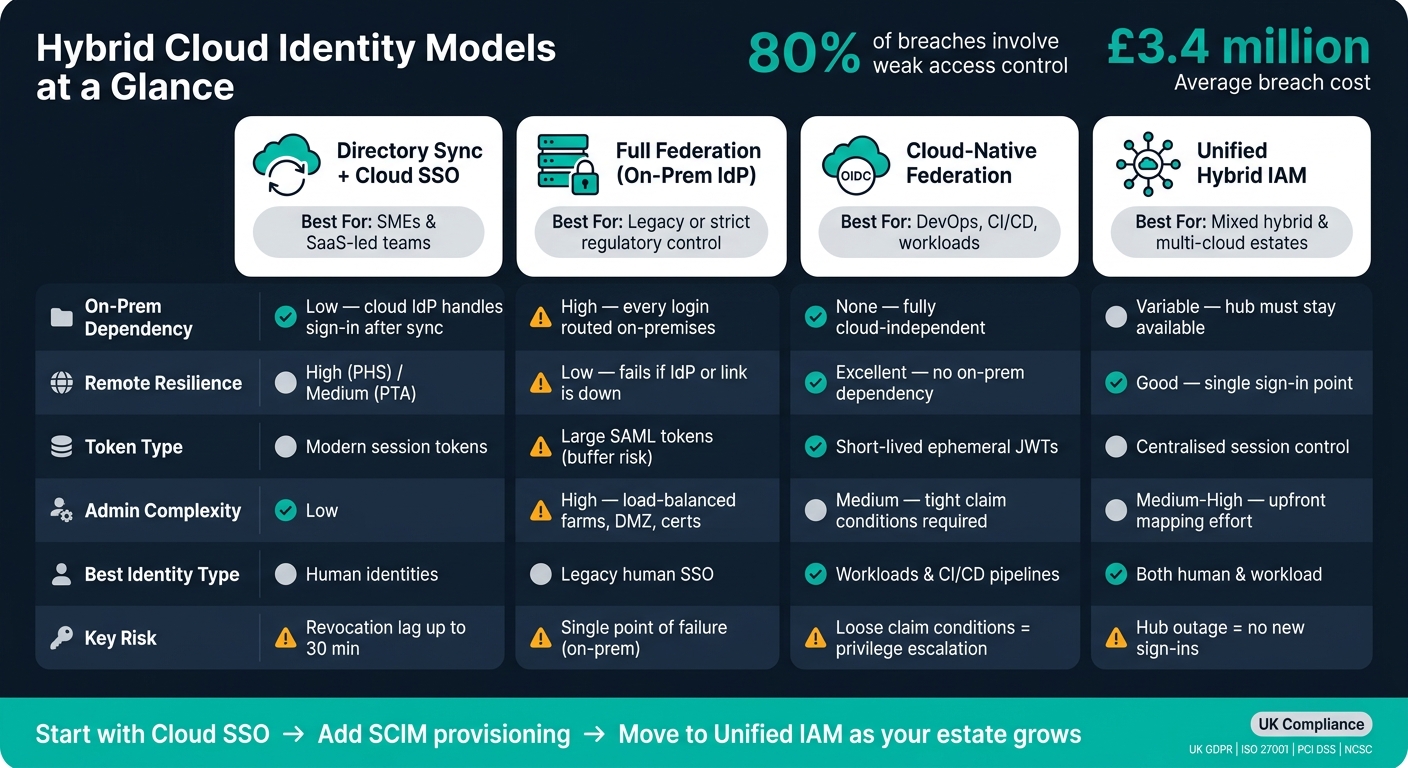 {Hybrid Cloud Identity Models: Security, Resilience & Complexity Compared}
:::
{Hybrid Cloud Identity Models: Security, Resilience & Complexity Compared}
:::
Secrets Without Secrets: Federated Identity for Cloud-Native Authentication Across AWS & Azure
1. Directory Synchronisation with Cloud SSO
Directory synchronisation uses a sync engine to copy users and groups from on-premises AD into the cloud [4][5]. After that, sign-in can happen in the cloud or be passed to on-premises agents, depending on the setup. That’s the key difference from full federation: sync copies identities into the cloud, while federation sends claims from an external IdP without mirroring the directory [5].
The big trade-off comes down to resilience. The more your cloud sign-in flow leans on on-premises authentication, the more remote access inherits the same weak spots.
Security and access control fit
The main security question is simple: who handles authentication after sync?
With PHS, the cloud can authenticate users directly from a stored hash. With PTA, each sign-in is forwarded to on-premises agents, which means those agents need to stay up and reachable [5]. That changes the risk picture quite a bit.
It also helps to keep the sync scope tight. Attribute filtering can stop sensitive identifiers from being copied into the cloud [5]. And there’s a bigger concern in the background: if attackers gain domain admin, they can go after Entra Connect and use that foothold to keep access inside cloud accounts [8].
Remote access resilience
This matters most when people are logging in away from the office. For remote teams, the sync method has a direct effect on uptime.
PHS keeps working even if on-premises AD is offline. PTA does not. If the agents fail, sign-ins fail too. There’s also a timing issue to watch: sync delays can mean revocations are not reflected for up to 30 minutes [6].
Operational and governance overhead
A central identity source makes governance easier across cloud estates. Teams can run one access review across AWS, Azure and GCP instead of juggling each platform on its own [1]. That can save a lot of admin effort, especially when staff, apps and reviews are spread across several environments.
Over time, though, a different problem tends to creep in: access-policy sprawl. Conditional access exceptions and old policies pile up, and before long the security model starts to feel brittle and hard to predict [7].
Sync also gives teams a way to support legacy apps while still keeping one identity source for audits across cloud estates. That matters when access reviews involve distributed teams and more than one cloud environment [1].
| Auth method | On-prem dependency | Remote resilience | Complexity |
|---|---|---|---|
| Password Hash Sync (PHS) | Only during the sync process | High - works if on-premises AD is offline | Low |
| Pass-Through Auth (PTA) | Every login | Medium - requires live agents | Medium |
| Full Federation (AD FS) | Every login | Low - IdP must be fully available | High |
When sync starts to feel too restrictive, the next step is full federation with an on-premises IdP.
2. Full Federation with On-Premises Identity Providers
If directory synchronisation copies identities into the cloud, full federation keeps sign-in on-premises and sends only claims to the cloud. In this model, a cloud sign-in request is redirected to an on-premises IdP such as AD FS, which checks the user and returns a token to the cloud. For remote staff, every sign-in relies on the federation service.
Security fit
Full federation makes sense when you need smart cards, certificate-based authentication, third-party MFA, or legacy sAMAccountName sign-in instead of UPN-based sign-in [9]. It also means on-premises account states, such as disabled accounts, lockouts, expired passwords, or sign-in hour limits, apply straight away [9].
One part needs extra care: MFA trust. The federatedIdpMfaBehavior setting controls whether the cloud accepts on-premises MFA or asks the user again [10]. If this is set up badly, you can open the door to bypass attacks.
Remote access resilience
The big drawback is resilience. If AD FS goes down, or the network path breaks, remote users lose access to cloud services until the service comes back [9]. That’s why many teams use federation with PHS as a fallback [9]. But that only helps if the on-premises control plane is built for high availability.
Operational and DevOps overhead
Running full federation is far from light-touch. It needs load-balanced farms across internal and DMZ networks, plus steady maintenance and fault-finding [9]. Hybrid setups also have to track federation latency, sign-in success and failure rates, and sync lag as separate operational issues [3].
In a hub-and-spoke hybrid setup, the cloud identity layer works as the main hub, while the on-premises IdP sits as a federated spoke for legacy apps [1][3]. That can work well, but it still means hands-on management on both sides.
This extra effort is worth it when you have strict residency rules, legacy sign-in needs, or a hard requirement to keep credential handling on-premises. If those limits don’t apply, the next model moves federation into the cloud and cuts much of the operational burden.
3. Cloud-Native Federated Identity for Hybrid and Multi-Cloud Workloads
Where on-premises federation keeps sign-in control in one central place, cloud-native federation pushes trust and provisioning closer to the workloads themselves. In plain terms, trust sits in the cloud instead of depending on an on-premises federation service. For workload authentication across clouds, OIDC is the main protocol, while SAML 2.0 is still XML-based and harder to work with [2][11].
Provisioning also changes in a big way. With SCIM, provisioning is automated instead of relying on manual scripts, and updates move through almost at once rather than waiting for the 30–60 minute sync delay that often comes with directory synchronisation [1][3].
Security and zero-trust fit
In zero-trust setups, claim conditions need to be tight. If those conditions are too loose, a breach in one cloud can spill into privileged roles in another [11].
The same idea shows up in CI/CD pipelines. With GitHub Actions OIDC federation, credentials should be pinned to specific environments, not just repositories. That helps cut the risk of branch-based privilege escalation [11].
This isn’t just a design choice on paper. It affects day-to-day operations too.
Operational and DevOps overhead
OIDC uses JSON/REST and JWTs, which makes it simpler to handle than SAML 2.0 [2]. Pair that with SCIM-driven provisioning, and teams can cut back on manual admin work across hybrid estates [1].
SCIM also speeds up deprovisioning and cuts manual access management across hybrid estates.
As point tools start to fall away, the move towards unified hybrid IAM platforms becomes much easier to see.
4. Unified Hybrid IAM Platforms
Unified hybrid IAM platforms aim to handle identity, policy and provisioning in one place. You’ll often see this called an Identity Fabric. In plain terms, it’s a distributed layer that sits across on-premises systems, SaaS apps and public cloud workloads, then applies the same policy across all of them without changing application code.
For remote teams, that matters a lot. Fewer control points mean fewer places for identity policy to drift. Instead of treating identity as something handled inside each workload, this model turns it into an estate-wide control plane.
Most setups use a hub-and-spoke model. A central IdP such as Microsoft Entra ID or Okta issues SAML or OIDC tokens that AWS, Azure and GCP trust for access. That design becomes most useful when people need the same sign-in and access rules across clouds and on-premises systems. It also avoids being locked into a single access path per workload, which is a common limit with sync or standalone federation.
Security and zero-trust fit
Unified platforms fit zero trust well because they swap long-lived static credentials for short-lived, ephemeral tokens issued through OIDC or SAML. That change cuts dependence on static credentials and supports continuous verification.
The main day-to-day risk sits in attribute mapping. AWS JSON policies, Azure RBAC and GCP IAM bindings all use different schemas, so the transformation rules inside the IdP have to be exact. If they’re off, access drift follows. And that’s where things can get messy fast.[1][2]
Remote access resilience
Centralising identity also creates a single point of failure. For distributed teams, that’s a big deal, because no new sign-ins can begin if the hub goes down.
The usual safety net is simple: keep separate break-glass admin accounts, protect them with MFA, and store them outside federation for emergency access. If the main identity hub fails, those accounts give teams a way back in without scrambling.
Operational and DevOps overhead
Once resilience is handled, governance at scale becomes the next job. Unified platforms cut identity sprawl by a large margin. They also make joiner, mover and leaver changes easier to automate, which reduces manual tickets and keeps access in step as roles shift.
What’s left is mostly upfront work. Teams need to map groups to cloud-native roles properly, then keep those mappings in shape as cloud estates change over time. That part isn’t flashy, but it’s where many deployments either stay tidy or slowly drift apart.
Cost and compliance impact
For UK organisations, compliance pressure makes this hard to ignore. UK GDPR requires data minimisation, so broad wildcard roles should be avoided. ISO 27001 expects automated provisioning and regular access reviews. PCI DSS requires strong authentication for privileged accounts.
Data residency matters too. The IdP and any federation brokers should process identity data within the UK or in jurisdictions covered by adequacy decisions, in line with NCSC principles.
| Regulation | Control Objective | Technical Implementation in Unified IAM |
|---|---|---|
| UK GDPR | Data minimisation | Fine-grained RBAC/ABAC; avoid broad *:* roles |
| ISO 27001 | Access management | Automated provisioning and regular access reviews |
| PCI DSS | Strong authentication | Enforce phishing-resistant MFA for privileged accounts |
| NCSC Principles | Identity and data residency | Centralised IdP with UK-based data storage |
Where certificates sit underneath federation, automate rotation. Manual renewal adds outage risk that’s easy to avoid.
Trade-Offs, Pros and Cons
No single federated identity model wins across the board. Each one makes a different bet about where the main risk sits: availability, complexity, or control. For distributed teams, that matters a lot.
The main test is simple: what happens when networks wobble, certificates expire, or on-premises services go down? That’s where the differences stop being theoretical and start affecting sign-ins, support queues, and day-to-day work.
| Dimension | Directory Sync (Cloud SSO) | Full Federation (On-Premises IdP) | Cloud-Native / Multi-Cloud | Unified Hybrid IAM |
|---|---|---|---|---|
| MFA & Conditional Access | Cloud-managed, risk-based policies | Often limited to the on-prem policy engine | Advanced device checks; native FIDO2/biometrics | Centralised hub enforcement |
| Token & Session Handling | Modern session management | Large SAML tokens can hit buffer limits | Short-lived, ephemeral tokens | Centralised session control |
| On-Prem Dependency | Low - cloud IdP handles sign-in once identities are synced | High - remote access fails if the on-prem IdP or link is unavailable | None - fully independent of on-premises sign-in | Variable - the hub must stay available |
| Certificate & Trust Management | Cloud-managed | Manual certificate rotation is a common outage risk | Automatic key and metadata rotation | Centralised trust relationships |
| Auditability | Centralised cloud logs | Logs split across systems | Unified cross-cloud logging | One audit trail |
| UX on Unreliable Networks | Good - cloud-native performance | Poor - multiple redirects add latency | Excellent for mobile and remote users | Good - one sign-in point |
| Human and workload identities | Strong for humans; moderate for workloads | Strong for legacy human SSO; weak for workloads | Strong for both; well suited to CI/CD | Strong for both with careful claim mapping |
The biggest fault line is resilience. Some models keep working in the cloud even if something breaks on-prem. Others do not.
Full federation is the least resilient option because every cloud login depends on the on-premises IdP and its certificates. If your cloud sign-in path still leans on on-premises AD FS, you’ve got a brittle setup, and certificate outages are common [12]. PHS avoids that dependency.
There’s also a clear split in where each model shines:
- Cloud-native federation is strongest for workloads
- Full federation is strongest for legacy control
- Unified IAM is strongest for governance
For CI/CD and other automated workloads, OIDC is the best fit. Short-lived, ephemeral tokens replace static secrets. That makes workload identity federation a strong match for hybrid DevOps setups, where scripts, pipelines, and services need access without dragging long-term credentials around.
The Unified Hybrid IAM model stands out when governance matters just as much as access. A central cloud IdP gives you a single source of truth, steady MFA enforcement across environments, and clearer visibility through centralised logs.
But there’s a catch. Claim mapping has to be right. If attributes are mapped badly, a broad group can end up with more privileges than it should have. That’s the sort of quiet mistake that looks harmless at first, then causes trouble later.
The recommendation that follows turns these trade-offs into a practical choice.
Recommendation and Conclusion
Pick the model that fits your current estate. The safest move, in most cases, is the one that solves the biggest access problem without adding extra admin work you don’t need.
| Scenario | Recommended Approach | Key Benefit |
|---|---|---|
| Simpler remote access (SMEs, SaaS-led teams) | Directory Synchronisation + Cloud SSO | Unified login |
| Stricter legacy or regulatory control | Full On-Premises Federation | On-premises control remains the source of truth; supports legacy Windows authentication |
| DevOps and CI/CD pipelines | Cloud-Native Federation (OIDC) | Short-lived workload access |
| Mixed hybrid and multi-cloud estates | Unified Hybrid IAM Platform | Consistent policy across AWS, Azure, GCP, and SaaS |
The pattern is simple: match your estate to the least disruptive option.
If your team is still early in its setup, cloud SSO is often the right place to begin. As your setup matures, move to SCIM-based provisioning and then to unified policy control.
For hybrid DevOps teams, start with OIDC. For mixed estates, shift towards unified hybrid IAM.
FAQs
Which identity model is best for remote staff?
For remote staff in hybrid cloud environments, a federated identity model is usually the best fit.
With a central Identity Provider acting as the single source of truth, users get smooth single sign-on across cloud and on-premises apps. That means fewer passwords to juggle, less friction during sign-in, and a simpler day-to-day experience for people working from different places.
It also brings security controls into one place. Policies such as MFA can be managed centrally, and access management becomes much easier for distributed teams.
When should we move from cloud SSO to unified IAM?
Move from cloud SSO to unified IAM when your set-up grows across multiple cloud providers, on-premises apps, and SaaS platforms, and basic SSO stops giving you steady control.
The warning signs are usually hard to miss. Policy enforcement starts to drift from one system to another. Visibility gets patchy. Identities pile up across tools. Old privileges stick around long after they should've been removed. Day-to-day admin work becomes messy and time-consuming. And compliance demands start pushing you towards centralised governance and automated access reviews.
At that point, SSO alone often isn't enough. It helps people sign in, but it doesn't give you one place to govern access across the whole estate.
How do we avoid sign-in failures in a hybrid setup?
Use a centralised identity provider as the single source of truth, and keep trust relationships consistent across each cloud environment.
It also pays to check the basics on a regular basis. Look for clock drift, expired certificates, and metadata mismatches. Small sync issues can snowball into sign-in failures fast.
Set up automated monitoring to catch permission drift and inconsistent attribute mappings before they turn into access problems. And keep an emergency break-glass admin account in each cloud environment, just in case the federation trust chain fails.