
Hybrid cloud storage bills often grow for four simple reasons: too much data, data in the wrong place, too many transfers, and the wrong pricing tier.
If I wanted to cut spend fast, I’d start here:
- Build one monthly cost baseline across cloud and on-site storage
- Move data to lower-cost tiers based on age, access, and restore needs
- Cut transfer and egress charges by keeping data near the workloads that use it
- Delete old snapshots, stale versions, and orphaned storage
- Use tags, budgets, and automation so costs do not drift back up
The article makes one point very clear: headline £/TB pricing is only part of the bill. API calls, egress, duplicate copies, and snapshot sprawl can add up fast. In one case, API charges alone reached £6,000–£7,000 per month for a 300 TB backup setup. It also notes that egress and API fees can make up 10–15% of the total cloud bill.
A simple way to think about it:
| Cost area | What to check | What to do |
|---|---|---|
| Stored data | Old backups, unused versions, duplicate files | Delete, deduplicate, set retention |
| Data location | Cloud region, on-site vs cloud placement | Keep data close to the app or restore point |
| Access pattern | Hot, warm, cold, frozen data | Match each dataset to the lowest-cost tier |
| Pricing model | Tier rules, minimum storage terms, request fees | Review billing details before moving data |
My takeaway: the lowest bill usually comes from better placement, less movement, and tighter clean-up, not from chasing one cheap storage class.
Below, I’d use the checklist to find waste first, then fix tiering, architecture, and monthly controls in that order.
::: @figure 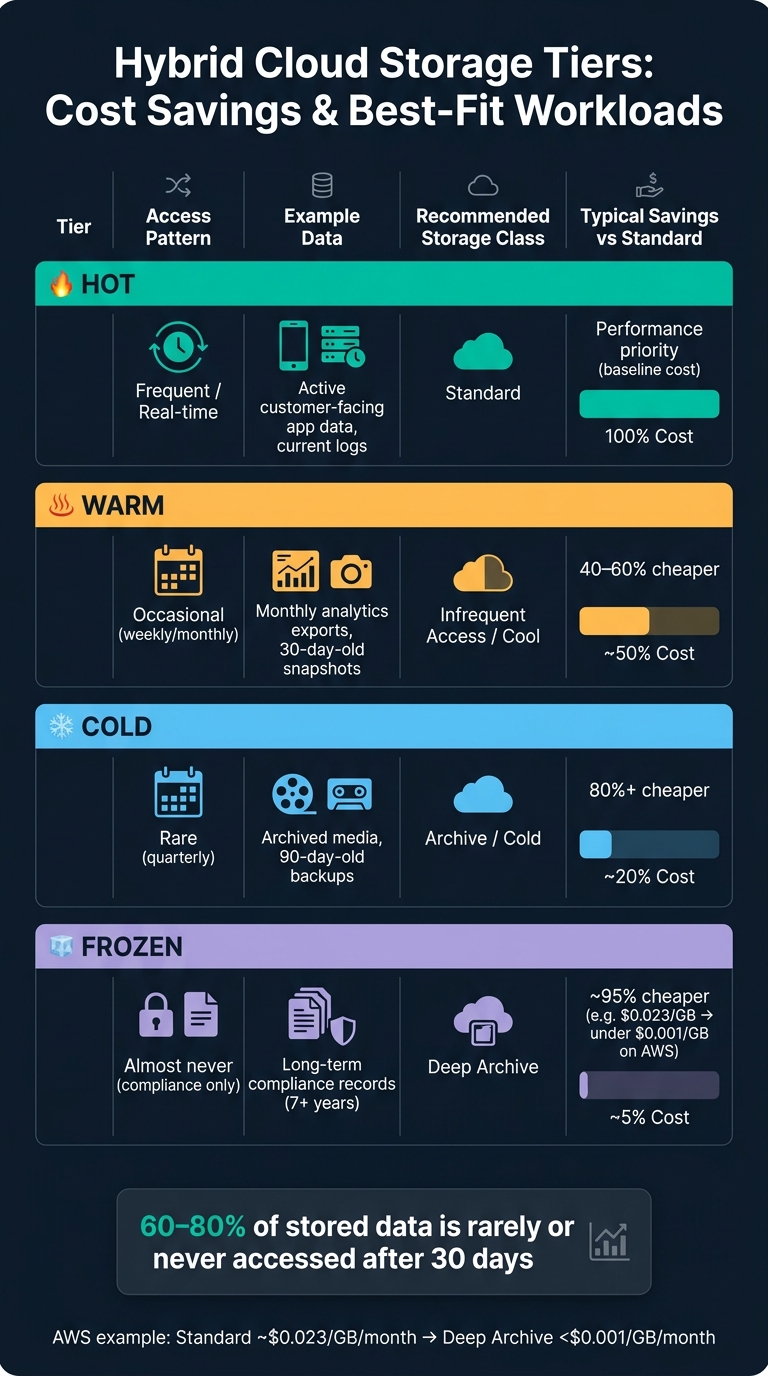 {Hybrid Cloud Storage Tiers: Cost Savings & Best-Fit Workloads}
:::
{Hybrid Cloud Storage Tiers: Cost Savings & Best-Fit Workloads}
:::
The Shocking Truth About Hybrid Cloud Costs 💀
1. Cost baseline checklist: map every storage cost before making changes
Before you change tiers or tweak policies, map what you're already spending. Put together one monthly baseline that covers direct cloud spend, allocated on-premises costs, and shared infrastructure overheads. Then convert everything into GB-month and TB transferred so you can compare data volume, location, access patterns, and storage tier on like-for-like terms.
List every storage location and enable cost reporting
Start with a full audit of where data sits, then switch on native cost and usage reporting for each location:
- Cloud accounts and regions
- Object storage
- Block storage
- Backups and snapshots
- On-premises arrays and repositories
Track the metrics that expose waste
Review these metrics every month: total TB by tier, spend by environment, egress volume and cost per workload, snapshot age and growth, and retention against policy [2][4].
Tag every resource. Aim for more than 90% tagging coverage [2], less than 5% unallocated spend [2], and flag egress when it goes above 30% of cloud spend [5].
That baseline gives you a clear view of which datasets cost the most, so you can prioritise them before applying lifecycle rules.
2. Data lifecycle checklist: place each dataset on the lowest-cost tier that fits the workload
Put each dataset on the cheapest storage tier that still does the job. That means looking at how often the data is used, how fast it needs to be restored, and what the business would lose if it was slow to reach. Your baseline helps here. It shows which datasets are sitting on the wrong tier and costing more than they should.
Classify data by access pattern and business value
Sort data into hot, warm, cold, or frozen. Then place it on the lowest-cost tier that still meets performance and recovery needs. The savings can be huge. On AWS, moving data from standard storage to deep archive can cut storage cost by about 95% per GB per month, from roughly $0.023/GB to under $0.001/GB [6].
| Data Type | Example | Recommended Tier | Typical savings |
|---|---|---|---|
| Hot | Active customer-facing app data, current logs | Standard | Performance priority |
| Warm | Monthly analytics exports, 30-day-old snapshots | Infrequent Access / Cool | 40–60% |
| Cold | Archived media, 90-day-old backups | Archive / Cold | 80%+ |
| Frozen | Long-term compliance records (7+ years) | Deep Archive | ~95% |
Recent backups, around 0–30 days old, are often best kept on-premises. The reason is simple: fast recovery and zero egress. Long-term compliance records, on the other hand, are usually a strong fit for deep archive.
Automate lifecycle rules, retention and clean-up
Set lifecycle rules by dataset, not with one blanket schedule for everything. Data access often drops fast after the first 30 days, and an estimated 60–80% of stored data is rarely or never touched after that point [6][7]. So it makes sense to move data down the cost ladder as it ages.
A simple pattern looks like this:
- Move logs to cooler tiers after 7–14 days
- Move backups after about 7 days
- Move uploads after 30–60 days
- Move archives after 180 days
There are also two quiet cost leaks that are worth fixing straight away. Delete incomplete multipart uploads after 7 days. Expire non-current object versions after 30–90 days so version stacking doesn't quietly pile up storage charges [6][7]. You should also automate deletion of EBS or managed disk snapshots that no longer have an associated parent volume [6].
Watch out for minimum storage duration rules too. If you delete data early, you can still be charged for the full term. That's money going out for no good reason, and your baseline should make that easy to spot.
Once tiering is in place, the next step is to look at data movement and duplication.
3. Architecture checklist: cut transfer, performance and duplication costs
Once data sits on the right tier, the next job is to cut the cost of moving it and storing it.
The price of a storage tier is only one part of the bill. In practice, where data lives, how it moves, and which storage type you pick can cost more than raw capacity.
Egress is one of those costs that sneaks up on teams. It comes from architecture decisions, not from a neat line item someone chose to buy.
Keep data close to the workloads that use it
Every cross-boundary transfer - whether that's on-premises to cloud or between regions - can trigger charges. The plainest way to cut those charges is to keep compute and storage in the same place whenever practical.
If an application runs in one region but keeps pulling data from another, the meter can keep ticking. That’s why cross-region replication should only run when it directly supports a recovery target or a compliance requirement.
Right-size storage performance and reduce duplicated data
After transfer costs, the next place to cut waste is storage type.
Match the storage type to the workload. Sounds obvious, but plenty of teams still pay for more performance than they need.
| Storage Type | Typical Cost Level | Performance | Best-Fit Workloads |
|---|---|---|---|
| Block Storage | High | Very low latency / high IOPS | Databases, boot volumes, transactional apps |
| File Storage | Moderate | Moderate latency / shared access | Home directories, shared apps, media assets |
| Object Storage | Low | Higher latency / high throughput | Backups, archives, logs, unstructured data |
A simple rule of thumb helps here:
- Use block storage when speed and low latency matter most
- Use file storage when teams or systems need shared access
- Use object storage for large volumes of data such as backups, archives and logs
Then look at duplication. If the same data exists in multiple places for no clear reason, you're paying the same bill more than once. Deduplicate where possible, and size volumes to current usage rather than worst-case demand.
4. Governance and automation checklist: keep savings consistent each month
Once tiers, transfers and duplication are under control, governance is what keeps those savings from slipping away. It stops spend from drifting over time: give each resource an owner, automate the default settings, and review spend every month.
Set ownership, budgets and clean-up rules
Every storage resource should have a clear owner. Apply tags at provisioning, set budget alerts before teams go over, and use chargeback so people can see the cost of what they spin up.
Retention windows also need clear rules. Snapshots should be pruned automatically, because unchecked snapshots have a habit of turning into avoidable spend without much warning.
Here’s the ownership model in plain terms:
| Activity | DevOps / Engineering | Platform / Cloud Ops | Finance / FinOps |
|---|---|---|---|
| Resource Tagging | Primary - apply at provisioning | Enforce via policy | Audit allocation accuracy |
| Budget Setting | Consult on team needs | Configure alerts | Set thresholds and approve |
| Lifecycle Policies | Define RTO/RPO requirements | Automate tiering rules | Review ROI of storage tiers |
| Orphaned Disk Clean-up | Validate before deletion | Automate removal | Track savings achieved |
| Monthly Reviews | Participant | Lead on technical data | Lead on financial data |
Use immutable storage (Object Lock) for critical backups. For non-critical data, keep lifecycle rules switched on [1].
Use automation and periodic reviews to hold costs down
Once ownership is clear, the next step is to bake those rules into the setup process so new resources inherit them by default.
Define storage defaults in infrastructure as code. Tags, tier selection, and retention rules should go out with every new resource. Scheduled archival jobs and automated clean-up scripts also help catch the mess that manual reviews tend to miss.
Monthly reviews should track:
Conclusion: the quickest path to lower hybrid cloud storage spend
Begin with a full cost baseline. Then cut what you don’t own, trim oversized volumes and remove duplicate copies. Once you can see where the money is going, move each dataset to the lowest-cost tier that still fits the workload.
Set up automated tiering so the storage class lines up with access patterns without anyone having to manage it by hand. After that, reduce transfer and duplication costs in the architecture itself.
Enforced retention often delivers one of the best payoffs for cost reduction. Then make those savings stick with clear ownership, budgets and automation - savings that can show up again month after month.
For help with cloud cost engineering, lifecycle automation or a hybrid storage review, Hokstad Consulting can help.
FAQs
Where should I start cutting hybrid cloud storage costs?
Start with an audit of your current environment to spot waste: unused resources, over-provisioned capacity, and outdated backups. Hokstad Consulting recommends reviewing billing data and resource tags to see where costs are slipping away.
Then put automated data lifecycle policies in place to move infrequently accessed data to lower-cost tiers, trim inter-region data egress fees, and cut duplicate data through compression and deduplication.
How do I choose the right storage tier for each dataset?
Classify each dataset by how often people use it, how fast it needs to be, and how quickly it must be brought back after a problem. Then match it to the right tier: Hot for data you use all the time, Cool/Cold for data you dip into now and then, and Archive for records that mostly sit untouched for years.
Tiering shouldn’t be a one-and-done call. Set automated lifecycle policies so older data shifts to lower-cost tiers over time, and make sure you account for retrieval charges and data egress costs.
Which hidden charges can inflate storage bills?
Several hidden charges can push hybrid cloud storage bills higher than expected, including:
- API request charges for read, write and metadata operations
- Data egress fees for transfers out of the cloud or between regions
- Early deletion penalties and retrieval costs for cold or archive tiers
Data scanning or analytics charges can add to the total too. On top of that, extra processing fees from gateways and load balancers can trigger bill spikes that are hard to see coming.