
Managing cloud costs across AWS, Azure, and Google Cloud is challenging for UK organisations. Each provider uses different billing formats, pricing terms, and schedules, making it hard to get a clear view of overall spending. This complexity grows with multi-currency transactions, regional pricing, and inconsistent tagging rules, leaving finance teams struggling with manual reconciliation and errors.
To simplify this, you can integrate multi-cloud billing with financial systems. Here's how:
- Consolidate Billing Data: Export data from AWS, Azure, and Google Cloud into a centralised system (e.g., S3, BigQuery). Use formats like Parquet for efficiency.
- Standardise Costs: Map cloud-specific fields to a unified structure using frameworks like FOCUS.
- Automate Currency Conversion: Convert all costs to GBP using daily exchange rates for accurate reporting.
- Tag Resources Consistently: Apply tagging rules (CostCentre, Project, etc.) across all platforms to track costs by business units.
- Implement Showback/Chargeback Models: Use dashboards or ERP integrations to allocate costs to departments, improving accountability.
- Integrate with Financial Tools: Link billing data to ERP systems using APIs or middleware for seamless reporting.
- Optimise Regularly: Conduct quarterly reviews to cut waste, adjust budgets, and align spending with business goals.
This approach eliminates manual errors, improves cost visibility, and supports better budgeting and forecasting. For tailored solutions, Hokstad Consulting specialises in helping UK businesses streamline multi-cloud cost management.
Sponsored Session: Multi-cloud Cost Management Platform with FOCUS - BaHung Nguyen, Hitachi
Need help optimizing your cloud costs?
Get expert advice on how to reduce your cloud expenses without sacrificing performance.
Multi-Cloud Billing Challenges
::: @figure 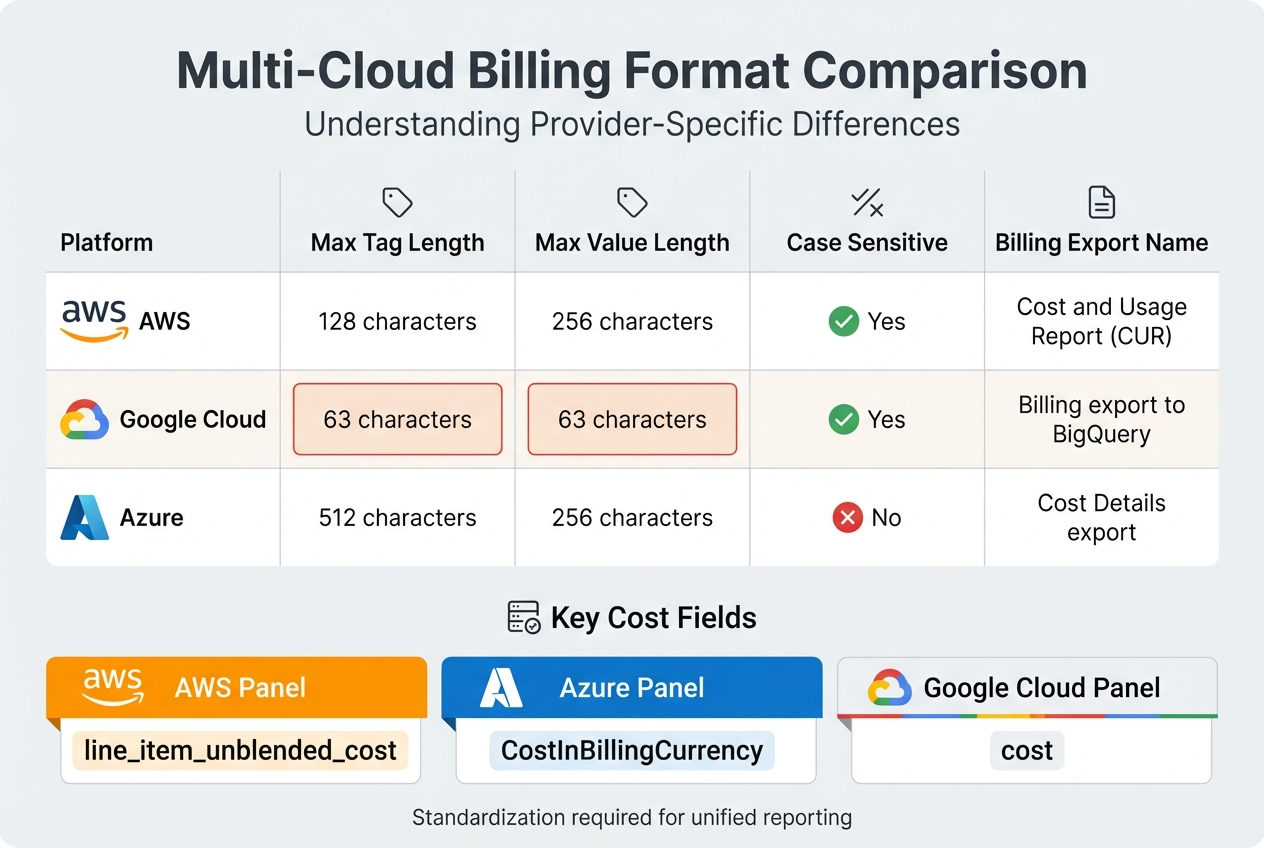 {Multi-Cloud Billing Format Comparison: AWS vs Azure vs Google Cloud}
:::
{Multi-Cloud Billing Format Comparison: AWS vs Azure vs Google Cloud}
:::
Different Billing Formats from Each Provider
Each cloud provider structures its billing data differently, which can make cost tracking a real headache. For instance, AWS uses the Cost and Usage Report (CUR), Google Cloud relies on billing export to BigQuery, and Azure provides Cost Details exports. These formats require unique queries to extract the right data. For example, AWS uses line_item_unblended_cost, while Azure uses CostInBillingCurrency, and Google Cloud simply refers to cost [1].
Tagging rules also vary widely between providers. AWS allows tag keys up to 128 characters, whereas Google Cloud limits both keys and values to 63 characters. Azure, on the other hand, permits tag keys up to 512 characters but doesn’t consider case sensitivity. Here's a quick comparison:
| Platform | Max Tag Length | Max Value Length | Case Sensitive | Billing Export Name |
|---|---|---|---|---|
| AWS | 128 | 256 | Yes | Cost and Usage Report (CUR) |
| Google Cloud | 63 | 63 | Yes | Billing export to BigQuery |
| Azure | 512 | 256 | No | Cost Details export |
On top of these structural differences, currency and regional pricing variations add another layer of complexity.
Currency and Regional Pricing Differences
For UK businesses, managing costs across multiple currencies can be a real challenge. Exchange rate fluctuations and regional pricing differences - like those between London and Frankfurt - can make cost comparisons and forecasting tricky. Without automated currency conversion tools, keeping track of these variables can feel like an uphill battle.
These financial and geographical inconsistencies further complicate efforts to get a clear picture of overall spending.
Fragmented Cost Visibility
Fragmented billing data is another major roadblock. When billing information is siloed across providers, it becomes difficult to allocate costs accurately or predict future expenses. Without consolidated data, mapping expenditures to specific business units or using historical trends to inform future budgets becomes nearly impossible. This highlights the importance of having a unified cost data model to deliver clear, actionable insights for financial planning and integration.
Creating a Unified Cost Data Model
Collecting Billing Data from All Cloud Providers
The first step in building a unified cost data model is gathering billing data directly from each cloud provider’s native export system. For AWS, set up Cost and Usage Reports (CUR) to export directly to an S3 bucket. Azure users should configure Cost Details exports through either the Enterprise Agreement (EA) or Microsoft Customer Agreement (MCA) portals. Google Cloud requires billing data to be exported to BigQuery, providing structured access to the cost information.
To keep things organised, centralise this data using unique directory paths, such as subscriptions/{id} for Azure or projects/{id} for Google Cloud [3]. This approach helps avoid conflicts, minimises duplication, and simplifies troubleshooting. Save the data in Parquet format with Snappy compression, which ensures faster ingestion and reduces storage costs [3].
Standardising Data for Financial Systems
After collecting raw billing data, the next step is to convert the varied formats into a unified structure. The FinOps Open Cost and Usage Specification (FOCUS) provides a framework to standardise these formats by mapping provider-specific fields to shared columns. For example, Azure’s CostInBillingCurrency is mapped to BilledCost in FOCUS, and SubscriptionId becomes SubAccountId.
FOCUS will remove the complexity and overhead involved when trying to normalize various billing taxonomies making it immensely beneficial across all companies and across all industries.- Tracy Woo, Principal Analyst [4]
For Azure data, ensure all amortised dataset rows are retained. Filter cost entries related to Reservations and Savings Plans to include only 'Purchase' or 'Refund' types [2]. This step avoids double-counting and ensures financial reports are accurate. With organisations wasting around 32% of their cloud budgets due to lack of visibility, this standardisation process is critical for managing expenses effectively.
This unified structure also sets the stage for automating currency conversion and precise cost allocation.
Automating Currency Conversion and Cost Allocation
For businesses in the UK operating across multiple regions, automated currency conversion is a must for accurate financial reporting. Multi-cloud environments often deal with invoices in USD, EUR, and GBP simultaneously, making manual conversion both time-consuming and prone to errors. To streamline this, configure your data pipeline to update exchange rates daily and convert all costs into GBP.
Once your data is standardised, cost allocation becomes significantly easier. Account-based allocation offers a straightforward method by separating costs based on linked accounts. For more detailed tracking, tagging-based allocation can be used, though it requires consistent governance to be effective. Without proper allocation practices, unallocated costs can account for up to 40% of total spend in multi-cloud setups, underscoring the importance of this step.
Aligning Cloud Costs with Business Structure
Once you've standardised your cloud cost data, the next step is to align it with your business structure. This ensures you gain actionable financial insights that are relevant to your organisation.
Tagging Strategies for Cost Tracking
Tagging is a powerful way to link cloud spending directly to your business structure. Start by setting up mandatory tag categories like CostCentre, Project, Environment, Owner, and Application. These tags help tie resources to specific business units, simplifying cost tracking and improving accuracy.
For instance, use business tags to define ownership (e.g. Marketing, Sales) and operational tags to detail workloads (e.g. Production, Staging). A practical example comes from a UK fintech firm that tagged resources with 'department:finance' and 'cost-centre:CC123'. This approach provided detailed reporting and cut unallocated costs by 25% [5][8].
To maintain consistency, enforce strict naming conventions such as camelCase or snake_case. When working across platforms like AWS, Azure, and Google Cloud, design your tagging system to fit the strictest provider's limits - Google Cloud, for example, allows a maximum of 63 characters. Tools like Terraform can help enforce these standards during deployment, and CI/CD pipelines can block resources lacking the required tags. Without proper tagging, up to 35% of cloud costs might remain unattributed [5][6].
Setting Up Showback and Chargeback Models
Showback and chargeback models are essential for aligning costs with internal accountability. Showback involves reporting costs to departments without financial transfer, often through dashboards. For example, a development team might see a monthly spend of £50,000. Chargeback, on the other hand, goes further by billing departments based on actual or prorated costs, often integrated with ERP systems like SAP. Gartner reports that chargeback can reduce overspending by as much as 20% [8][9].
To implement these models, map cloud tags to business units and cost centres. Aggregate data using tools like AWS Cost Explorer or Azure Cost Management, and convert all currencies to GBP using monthly rates from the European Central Bank. Reports can then be generated using BI tools like Tableau, formatted to UK standards (e.g. DD/MM/YYYY). One UK retailer successfully allocated £120,000 in Azure costs to individual stores using product tags [5][7]. Organisations with well-established chargeback systems often achieve 20–35% cost reductions through better accountability.
Dynamic Cost Mapping for Better Insights
Dynamic cost mapping takes cost alignment a step further by automating reallocations based on updated tags or usage patterns. For instance, once a 'project:migration' is completed, associated costs can be shifted elsewhere, ensuring financial reports stay aligned with current priorities. Tools like AWS Lambda or Azure Functions can automate daily updates to mappings, helping identify savings such as £10,000 from unused resources [6][8].
To implement this, define YAML mapping rules, version them in Git, and integrate them with tools like Kubernetes. For example, a UK e-commerce company used consistent tagging (e.g. 'bu:marketing', 'campaign:summer2025') across AWS and GCP, implemented showback for £200,000 in monthly visibility, and applied dynamic mapping to handle seasonal peaks. This approach cut costs by 18% while ensuring spending aligned with financial goals, such as achieving an ROI of over 200% [7][9]. Regular audits - quarterly, for example - can help ensure mappings remain relevant, especially during organisational changes like mergers or new product launches.
Connecting Multi-Cloud Billing to Financial Systems
After aligning your costs effectively, the next step is to link your billing data with financial systems. This means connecting your cloud billing platforms to ERP or accounting software to ensure a seamless and accurate data exchange.
Selecting Integration Tools and APIs
When it comes to integration, you’ll need to decide between using adapters (like CloudZero's Bucket or Stream Adaptors) and middleware tools (such as Azure Data Factory). For instance, Stream Adaptors can send JSON requests of up to 5MB directly to a REST API, making them versatile and easier to implement across different cloud platforms [11].
Security is critical here. Make sure the tools you choose only require read-only access through IAM roles or SAS tokens. This helps safeguard your financial data [10]. If you need to customise data formats (e.g., converting to Parquet or FOCUS), middleware like Azure Data Factory can handle ETL standardisation [12]. Keep in mind that data synchronisation speeds differ: SaaS provider data typically updates within 10 minutes, whereas AWS Cost and Usage Reports (CUR) can take up to 12 hours for the initial sync [10].
Once you’ve chosen your tools, it’s essential to validate the data thoroughly to ensure accuracy.
Validating Data Accuracy and Consistency
Cloud billing data operates under eventual consistency, meaning updates may not appear immediately. To stay on top of changes, fetch month-to-date data daily to capture updates, credits, or re-rated SKUs [14]. Use unique fingerprint IDs created from unchanging fields (like SKU, product, and unit type) to avoid duplicate records. Additionally, leverage metadata tables with fields like last_export_time for efficient incremental data loading [12][14].
When setting up integrations, it’s crucial to confirm that global discounts and their start dates are mapped correctly. This prevents pricing profiles from breaking and ensures accurate financial reporting [13].
With validated data in place, you can move forward to design custom financial reports tailored to your organisation’s needs.
Building Custom Financial Reports
Once your systems are integrated, you can start generating reports by cost centre, project, or business unit. Convert all amounts to GBP using monthly exchange rates and format dates in the UK standard, DD/MM/YYYY.
Finance teams often need reports showing spending trends, budget variances, and cost allocations by department. Tools like Tableau or Power BI are excellent for creating visual dashboards that simplify complex multi-cloud data. Regularly validating these reports against your source billing data - perhaps monthly - ensures accuracy and builds confidence in your integration processes.
For organisations in the UK seeking tailored assistance with multi-cloud billing integration, consulting firms like Hokstad Consulting (https://hokstadconsulting.com) can provide expert advice and support.
Governance and Cost Control Methods
Once multi-cloud billing is integrated with financial systems, maintaining control over costs and ensuring financial alignment becomes a matter of strong governance. Without clear policies and automated systems in place, even the most advanced integrations can lead to overspending and inefficiencies.
Building Governance Frameworks
The foundation of effective governance lies in establishing clear policies for cost allocation, approvals, audits, and compliance. This involves creating a centralised repository of policies that includes tagging standards, budget limits, and reporting schedules for all cloud providers [5][15]. Role-based access controls (RBAC) are also essential, ensuring that finance teams, DevOps engineers, and business unit leaders all have clearly defined responsibilities.
To ensure consistency, align all data with a unified cost model. Conduct quarterly audits across cloud providers to identify and address any discrepancies. For example, a UK retailer achieved a 15% reduction in untracked spending simply by enforcing mandatory tagging across their cloud environments [5][15].
Documenting processes is equally important. Use a central repository to detail every step - from exporting billing data to final financial reconciliation. This should include roles, timelines, and checklists for regular reviews to streamline governance.
Using Automated Cost Controls
Manually monitoring costs in multi-cloud environments is impractical. Instead, automated controls powered by machine learning can identify anomalies and prevent financial inefficiencies before they escalate. These tools can detect unusual spending patterns, such as a sudden 30% increase in costs, and flag them for review [15].
Set up auto-scaling policies and budget alerts using platforms like Azure Cost Management or Google Cloud Billing Budgets. These should be directly tied to governance policies so that exceeding a budget threshold triggers automatic actions, such as blocking further spending and sending alerts via Slack or Teams to the relevant team members. Start by piloting these controls on high-spend accounts, using 90 days of historical data to inform tiered budget alerts (e.g., warnings at 80% and hard stops at 100%). A UK firm saved £250,000 annually by implementing machine-learning tools to automatically pause non-compliant workloads [15].
These automated systems not only help maintain cost control but also pave the way for aligning expenditures with broader business goals.
Aligning with Financial Objectives
With standardised and automated controls in place, the next step is to align cloud spending with key business metrics such as profitability and return on investment. Without this alignment, isolated decisions can lead to costs increasing by as much as 20–30% [9]. Metrics like cost-to-revenue ratio, forecast accuracy (targeting less than 5% variance), and unit economics (e.g., cost per transaction in pounds sterling) are particularly useful.
Tag hierarchies should reflect your organisational structure, starting with business units, then projects, and finally environments. Use APIs to integrate normalised data with your ERP system for automated accruals. Conduct regular reviews to tie spending variances to quarterly objectives. This approach has helped UK firms improve financial reporting accuracy by 40% [5][9].
For businesses seeking tailored solutions, Hokstad Consulting offers cloud cost engineering services, focusing on automated controls and governance frameworks for hybrid and multi-cloud environments. Learn more at Hokstad Consulting.
Forecasting and Continuous Optimisation
Connecting multi-cloud billing systems to financial tools lays the groundwork for precise cost forecasting and improved budget control. However, without proactive forecasting and ongoing adjustments, even well-connected systems can lead to overspending and missed savings.
Using Historical Data for Cost Forecasting
To create reliable forecasts, collect at least 12 months of historical multi-cloud data. This should include monthly spending, usage metrics, cost per resource, seasonal trends, and growth rates [5]. Store this data in a centralised platform - like a data warehouse or business intelligence tool - for easy analysis and trend tracking.
For predictable workloads, time-series analysis works well, while regression models can link spending to variables like revenue, user numbers, or transaction volumes. Machine learning models are especially useful for uncovering complex patterns in dynamic cloud setups [5]. Tools for this include native solutions like AWS Cost Explorer and Azure Cost Management, third-party platforms, or custom BI dashboards.
Aim for forecast accuracy within ±10% over three months and ±15% over six months [5]. Compare actual spending against forecasts monthly by calculating variance percentages and documenting the root causes, whether they stem from business changes (e.g., new projects), technical updates (e.g., architecture adjustments), or external factors (e.g., vendor price changes). For example, if your annual cloud spend is £500,000 for 1 million transactions, the baseline cost is £0.50 per transaction. Aiming for a 15% efficiency gain would bring this figure down to £0.425 per transaction [5].
Monitoring for Cost Efficiency
Use baseline metrics like cost per transaction, user, or revenue pound to measure business value [9]. Track key efficiency indicators such as:
- Cost per compute hour
- Storage cost per GB
- Data transfer cost per GB
- Cloud costs as a percentage of the overall IT budget
Additionally, monitor waste metrics like unused reserved instances, idle resources, and overprovisioned capacity, as these can drive up costs unnecessarily [5].
Set up automated alerts for budget thresholds (e.g., 75%, 90%, 100%), anomalies, resource overages, and expiring commitments [5]. Route these alerts to the appropriate teams - finance for budget notifications, technical teams for resource alerts, and cloud architects for anomalies.
Document all metrics on a centralised dashboard accessible to both finance and technical teams. Assign ownership for each KPI and track cost trends monthly and quarterly to spot issues early [5]. Once efficiency metrics are in place, shift focus to regular optimisation cycles.
Scheduling Regular Optimisation Cycles
Plan quarterly optimisation cycles, supplemented by monthly reviews and on-demand assessments after major infrastructure changes [5]. A typical quarterly optimisation process should include:
- Cost analysis: Compare actual spending against forecasts and investigate variances.
- Resource audit: Identify unused, underutilised, or oversized resources.
- Pricing review: Look for new discounts, reserved instance options, or savings plans.
- Architecture review: Check if the current infrastructure meets business needs and cost goals.
- Action planning: Rank optimisation opportunities by potential savings and effort required.
- Implementation and tracking: Apply changes and monitor their impact [5].
Monthly reviews can focus on quick wins, like shutting down unused instances or refining auto-scaling policies. Document findings, decisions, and results in a centralised tool like Notion or Confluence. Assign clear responsibilities for each stage, with a project manager ensuring timelines and approvals are met.
Share forecasts and optimisation results with executive leadership to align cloud spending with broader financial goals [5]. Prioritise recommendations based on return on investment and complexity. For instance, adopting reserved instances might save £75,000 annually, with a three-month payback period and minimal technical risk.
Hokstad Consulting offers tailored cloud cost management services, combining historical data analysis with automated controls. Visit Hokstad Consulting to learn more about how they can help achieve your financial goals.
Conclusion
Connecting multi-cloud billing with financial systems reshapes how UK businesses manage cloud costs. By following established practices, organisations gain the clarity needed to make smarter financial decisions. This integration eliminates data silos and ensures cloud expenses align with business structures through effective tagging and chargeback models.
The operational advantages are clear. Automating manual processes like consolidation and reconciliation saves UK businesses a significant amount of time [16]. This shift enables finance teams to focus on strategic tasks, such as analysis and planning, rather than being bogged down by administrative work. The result? Faster financial closes and more precise reporting.
However, this integration isn’t a one-and-done effort. It demands ongoing governance, automated controls, and regular fine-tuning to maintain accuracy and efficiency. Analysing historical data plays a key role in forecasting, allowing businesses to predict spending trends and adjust budgets as needed. As discussed, this approach supports better cost allocation, sharper forecasting, and improved financial reporting.
Consistent optimisation and strong governance ensure financial outcomes align with overall business goals. For UK organisations navigating the complexities of multi-cloud environments, a combination of proper integration, continuous monitoring, and strategic adjustments can deliver tangible results. Whether it's tracking costs per transaction, identifying waste, or running quarterly optimisation reviews, the focus remains on aligning cloud investments with financial priorities while maximising value.
Hokstad Consulting offers expertise in cloud cost engineering, helping UK businesses implement these strategies effectively. Visit Hokstad Consulting to discover bespoke solutions for managing your multi-cloud finances.
FAQs
What’s the quickest way to unify AWS, Azure and GCP billing data?
The quickest way to bring together billing data from AWS, Azure, and GCP is by using a centralised multi-cloud cost management tool. These tools work by aggregating and normalising billing information in real-time, ensuring consistency across formats, currencies (like converting USD to GBP), and metrics. When combined with a data warehouse, this setup allows for centralised analysis and reporting across all providers, making financial insights and decision-making much more efficient.
How do we stop double-counting with Reservations and Savings Plans?
To prevent double-counting when working with Reservations and Savings Plans, it's crucial to allocate costs based on actual usage and commitments. Start by separating costs for reservations and Savings Plans, assigning them to the appropriate workloads or services. Implement detailed tagging to keep track of resources and reduce the risk of overlap. Additionally, make use of cost management tools to reconcile your data, ensuring accurate financial reporting and avoiding duplicated expenses.
How can finance automate GBP conversion for multi-currency cloud invoices?
To simplify GBP conversion for cloud invoices in multiple currencies, consider using multi-cloud billing tools that offer multi-currency support. These tools can standardise costs across different currencies, allowing for automatic GBP reporting by leveraging real-time exchange rates.
Set up your billing system to pull current rates through APIs or built-in features. This ensures precise conversions from currencies like USD or EUR to GBP. The result? Streamlined financial reporting with consistent and up-to-date data.