
If you run Kubernetes in more than one cluster, your biggest risks are usually trust, routing, and visibility - not just connectivity.
I’d boil this article down to four checks:
- Pick the right topology first: gateway-based meshes route traffic through East-West gateways, while direct pod-to-pod overlays cut out that hop but change your network and security model.
- Keep identity strict: use one root CA, one trust model, and mesh-wide mTLS in
STRICTmode. Istio workload certs expire every 24 hours, so rotation must work every day. - Plan failover before you need it: locality rules alone are not enough; you also need outlier detection or traffic may not switch clusters during a fault.
- Watch cost and visibility: cross-region traffic can add surprise spend, and split monitoring makes faults harder to trace across clusters.
If I were using this as a change gate, I’d check:
- ports 15443, 15012, and 15017
- DNS for local and remote services
- endpoint discovery in Envoy
- matching root CA fingerprints across clusters
- deny-by-default access rules
- gateway and sidecar capacity for failover spikes
- one shared view for metrics, logs, and traces
Here’s the short version: a multi-cluster mesh works when network paths, service identity, traffic rules, and team ownership all line up. If one part is weak, the rest of the setup gets harder to run, secure, and debug.
The article below walks through that checklist in a clear order: topology, trust, traffic, and then governance.
::: @figure 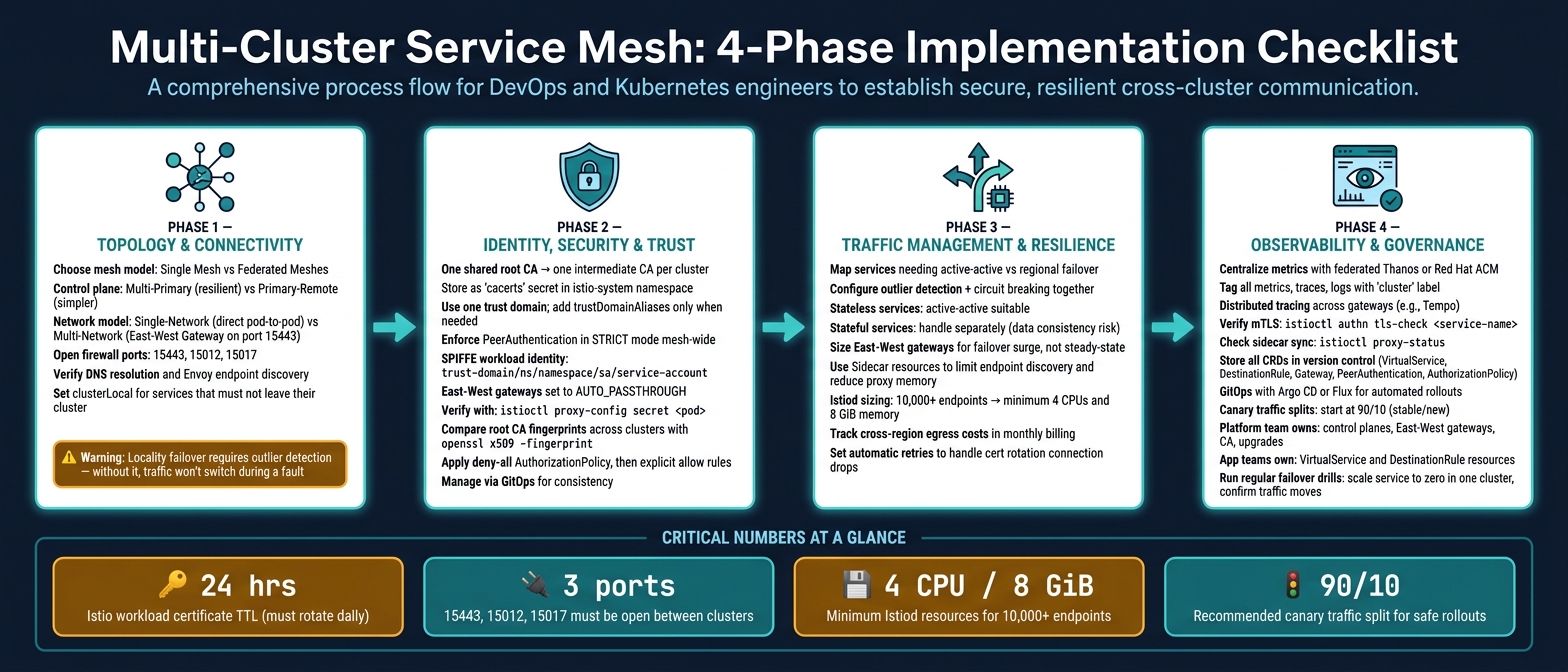 {Multi-Cluster Service Mesh: 4-Phase Implementation Checklist}
:::
{Multi-Cluster Service Mesh: 4-Phase Implementation Checklist}
:::
Multi-Cluster Service Mesh with Istio | Kubernetes Tutorial for Beginners
Need help optimizing your cloud costs?
Get expert advice on how to reduce your cloud expenses without sacrificing performance.
1. Cluster topology and connectivity checklist
With topology locked in, check how your clusters talk to each other before you get into identity and policy.
Choose a deployment model and name services consistently
Start by choosing between one mesh across many clusters or federated meshes with separate admin domains. That choice comes down to a few practical points: how much isolation you want, how much extra work your team can handle, and whether clusters need shared SPIFFE identities.
Inside a single mesh, you’ll also need to pick either multi-primary or primary-remote control planes. Multi-primary gives you more resilience, but it also uses more resources. Primary-remote is simpler to run, though control sits in one place.
It also helps to be strict with naming. Keep the namespace, service name, port number and port name aligned across clusters so Istio sees them as one shared service. And before you try any cross-cluster traffic, make sure remote secrets for reading endpoints from remote API servers are generated and applied the right way [6][7].
Check networking, DNS and gateway paths
Your network model affects almost everything that follows. In a single-network setup, pods can reach each other directly across clusters, but you need non-overlapping IP ranges. In a multi-network setup, inter-cluster traffic goes through East-West gateways with SNI-based TLS passthrough on port 15443. That setup supports overlapping IP ranges and can work across separate admin boundaries [6][9].
Before traffic goes anywhere near live use, check three things:
- Firewall rules: confirm ports 15443, 15012 and 15017 are open between clusters [7].
- DNS resolution: run
nslookup <service>.<namespace>.svc.cluster.localfrom inside a pod. A local service should resolve to the local ClusterIP. A remote-only service should resolve to the East-West Gateway IP. - Endpoint discovery: run
istioctl proxy-config endpoints <pod-name> --cluster <outbound-service-fqdn>and confirm Envoy can see both local pod IPs and the remote gateway IP as valid endpoints.
For private clusters spread across regions, make sure control-plane access is enabled between those regions.
Don’t send live traffic until DNS, ports and endpoint discovery all work as expected.
Set locality and failover rules before traffic goes live
Decide early which services must stay inside one cluster and which ones can be shared. If a service must never leave its cluster, set MeshConfig.serviceSettings.settings.clusterLocal: true for those hosts [7]. For services shared across clusters, use topology.kubernetes.io/region, topology.kubernetes.io/zone and topology.istio.io/subzone to steer locality-aware routing [7].
There’s one catch here: locality-aware routing by itself isn’t enough. You also need outlier detection in the destination rule, because locality failover only starts when outlier detection marks local endpoints as unhealthy. If you skip that step, traffic won’t move on its own to another region during a partial outage [7].
Pick the simplest topology that still hits your resilience, isolation and cost goals.
Once connectivity and failover are steady, move on to identity, trust and policy.
2. Identity, security and trust checklist
With connectivity and failover in place, the next job is simpler to say than to do: every service needs to prove who it is, and anything that can't prove it shouldn't get through.
Set up a consistent CA and trust-domain model
Cross-cluster security starts with one shared root CA. Use a single root CA and one intermediate CA per cluster, with each intermediate signed by that root. Store each intermediate CA, the full certificate chain, and the private key as a Kubernetes secret called cacerts in the istio-system namespace [9][10].
Use one trust domain if you can. Only add trustDomainAliases when clusters already run with different domains [12].
Your CA approach should match how your team runs day to day:
- External CA such as
cert-manageror Vault: automated rotation, hardware-backed keys, and enterprise PKI integration - but with more operational work and licence cost [12]. - Mesh-native CA such as Istiod self-signed: simpler to set up and free of outside dependencies - but rotation is manual, which makes mistakes more likely, and keys sit in Kubernetes secrets [12].
Automate intermediate CA rotation with cert-manager or Vault. Istio workload certificates expire after 24 hours by default, so rotation has to work every time and it needs proper testing [12].
Once trust anchors and domains are set, move on to mTLS and workload identity checks.
Enforce mTLS and verify workload identity
Apply mesh-wide PeerAuthentication in STRICT mode on every cluster. PERMISSIVE mode can help during migration, but it shouldn't stay in production. If certificates are invalid, it can allow a silent fallback to plaintext [12].
Workload identities use the SPIFFE format. When you refer to remote principals, use the full trust-domain/ns/namespace/sa/service-account path [11]. Set East-West gateways to AUTO_PASSTHROUGH so the destination workload, not the gateway, validates the source identity [11].
To check that this is all doing what it should, run istioctl proxy-config secret <pod>. Confirm that the issuer matches the right intermediate CA and that the SAN includes the expected SPIFFE ID. Then compare root CA fingerprints across clusters with openssl x509 -fingerprint - they must match exactly [12]. It's also worth keeping an eye on Istiod logs for SDS errors. Those often show failed certificate pushes or rotation issues before they turn into an outage [12].
With identity in place, the next step is to lock access down.
Apply deny-by-default policies and isolate environments
Use AuthorizationPolicy for identity-based control, and NetworkPolicy as the network backstop [11].
Start with a deny-all AuthorizationPolicy in each namespace, then add explicit allow rules. Use Sidecar resources to limit proxy discovery and cut the blast radius if something goes wrong [4]. Manage both AuthorizationPolicy and NetworkPolicy through GitOps so policy stays consistent and auditable across clusters [4]. Review East-West gateway access logs for source identities you didn't expect to see [11].
Next, tune routing and capacity around actual traffic patterns and failover demand.
3. Traffic management, resilience and cost checklist
With trust and policy sorted, the next step is traffic: where it goes, how it fails over, and what it costs to keep that setup running.
Design routing and failover around real service dependencies
Use the locality rules from section 1 as a practical check here. Map the services that actually need active-active deployment and keep the rest regional. Not every service needs active-active.
Set up outlier detection and circuit breaking together. Outlier detection removes unhealthy endpoints on its own, while circuit breaking stops failures from rippling through the mesh [13][5]. Then test failover properly. Traffic should move to the nearest healthy cluster, because a bad priority setting can add latency and trigger surprise egress charges [13].
Cross-cluster failover is usually a good fit for stateless services. Stateful workloads are a different story. They bring added difficulty around data consistency, so handle them as a separate case and plan for them directly [5][8].
The next check is simple: can your routing rules cope with a traffic spike without burning spare capacity for no good reason?
Plan capacity for gateways, sidecars and failover surges
Once the routing rules are locked in, size gateways and proxies for failover traffic, not day-to-day averages.
East-West gateways handle cross-cluster mTLS traffic, so plan for surge conditions rather than steady-state throughput [8][4].
Use Sidecar resources to limit endpoint discovery and cut proxy memory use. For the Istiod control plane, resource demand scales with the total endpoint count across all clusters. Meshes with more than 10,000 endpoints usually need at least 4 CPUs and 8 GiB of memory [4].
For ingress gateways, a good starting point is dedicated gateways per team for isolation. Move to shared gateways only if you're comfortable with shared failure risk and more contention. East-West gateways should also be sized and autoscaled so capacity can grow on its own during failover [8][4].
After that, check what it costs in CPU, memory and egress to keep the whole thing running.
Measure overhead and factor egress cost into routing decisions
Track Istiod, sidecar and gateway baselines in Prometheus. Then set resource requests and limits with care so you don't over-provision [5]. Cross-region egress charges can stack up fast and often slip under the radar, so track inter-cluster traffic against your monthly bill.
Certificate rotation drops active connections. With the default 24-hour workload certificate TTL, that can happen often enough to matter, so set automatic retries to stop application disruption [14].
Prefer active-active for critical stateless services. For lower-cost workloads, regional failover is usually the better call.
4. Observability, operations and governance checklist
With traffic management and cost controls in place, the last layer is making sure the whole mesh stays visible, controlled, and owned by the right teams over time.
Build one observability view across all clusters
Once traffic is stable, visibility needs to be centralised across every cluster.
Split-up visibility is a common multi-cluster failure point. Pull metrics from every cluster into one central store with federated Thanos components or Red Hat Advanced Cluster Management [15]. Tag every metric, trace, and log with cluster so you can filter and connect events across cluster boundaries [16].
Distributed tracing also matters here. Tools such as Tempo help you follow requests as they move across gateways [15][5]. On the mesh side, run istioctl authn tls-check <service-name> to verify mTLS at each cluster boundary [3], and use istioctl proxy-status to check that sidecars are in sync with the control plane [3].
Use versioned configuration and staged rollouts
Once you can see the mesh clearly, configuration should move through versioned change control.
Store every VirtualService, DestinationRule, Gateway, PeerAuthentication, and AuthorizationPolicy in version control. A GitOps workflow with Argo CD or Flux gives you an auditable, consistent, automated deployment process across all clusters [10].
Roll out changes in stages, starting with a low-risk cluster before moving further. For traffic shifts, begin with a cautious split. A 90/10 canary between stable and new versions is a sensible place to start [2]. Then back it up with outlier detection, which can eject unhealthy endpoints on its own if error thresholds are breached [2].
Document upgrades, failure drills and team ownership
The final piece is clear ownership and regular recovery practice.
The platform team should own control planes, east-west gateways, CA configuration, and upgrades. Application teams should own VirtualService and DestinationRule resources [10][4].
For upgrades, use a phased path: validate on a single cluster first, then move to primary-remote, and after that to multi-primary [4]. Failover drills should also happen on a regular schedule. For example, scale one service to zero replicas in one cluster and confirm that traffic moves cleanly to the remote cluster [1][2].
Conclusion: A practical checklist for secure, resilient multi-cluster meshes
A multi-cluster service mesh works best when architecture, operations and governance move in step. If you get the topology right but skip identity trust, or lock security down while observability stays split across clusters, you're still leaving room for serious production issues. The upside comes from treating these parts as one system, not as separate checks.
Start with topology and connectivity. Then secure identity and trust. After that, set routing and failover based on service dependencies. Finish with shared observability and GitOps-managed configuration.
That order matters. It only holds up when identity, not IP, becomes the anchor for policy. Identity-based policy keeps working as workloads shift across nodes, regions and clusters.
The aim is one mesh-wide operating model: consistent networking, identity, routing and governance across clusters.
When used together, these controls make the mesh a manageable platform instead of just a set of linked clusters.
For teams lining up multi-cluster operations, security and cost control, Hokstad Consulting supports DevOps transformation, cloud cost engineering and automation.
FAQs
Which multi-cluster mesh topology should I choose?
Choose based on control plane design, network connectivity, and day-to-day effort.
Multi-primary works best for high availability and resilience because each cluster runs on its own. If one cluster has a problem, the others can keep going.
Primary-remote is easier to run, which makes it a good fit when you want less operational overhead. The trade-off is lower resilience, since the remote cluster depends on the primary control plane.
For networking, use a single-network setup when clusters can connect to each other directly. If they can’t, use a multi-network setup with gateways so traffic can move between clusters.
Why is a shared root CA so important?
A shared root CA matters because it gives every cluster the same trust anchor.
That means services in different clusters can verify each other’s identity and communicate securely, without extra friction.
How do I test failover before production?
Test failover with controlled failure drills and traffic checks. Start by deploying sample services such as HelloWorld and Sleep across clusters. This lets you confirm that cross-cluster load balancing is working as expected before you break anything on purpose.
Once that baseline is in place, simulate outages by shutting down or disconnecting services or whole clusters. You can also test network partitions, control plane failures, and service disruptions. While each test is running, keep sending requests so you can see whether traffic moves cleanly to healthy clusters or services.
A simple flow looks like this:
- Deploy
HelloWorldandSleepacross clusters - Confirm requests are being shared across clusters
- Trigger a planned failure, such as a service shutdown or cluster disconnect
- Keep traffic running during the event
- Check that requests are rerouted to healthy targets without major disruption
The goal is simple: make sure failover works under pressure, not just on paper.