
Reserved Instances (RIs) can cut cloud costs by 30% to 72%, but they require careful planning, especially in environments with mixed workloads. This guide explains how to maximise savings while avoiding common pitfalls like overcommitting or paying for unused capacity.
Key Takeaways:
- RIs work best for stable, predictable workloads, such as databases running 24/7.
- Mixed workloads, combining steady and fluctuating demands, need a hybrid strategy:
- Use RIs for stable workloads.
- Add Savings Plans for moderately predictable usage.
- Keep 20–40% on-demand capacity for spikes or testing.
- Analyse 90 days of usage data to identify baseline demand and avoid overcommitting.
- Monitor key metrics like RI Utilisation (85%+) and RI Coverage (70%+) to ensure cost efficiency.
- Review and adjust RI commitments quarterly to align with evolving workloads.
Striking the right balance between reserved and on-demand capacity is crucial. A layered approach ensures savings while maintaining flexibility for unforeseen changes.
Reserved Instances: Core Concepts and Benefits
What Are Reserved Instances?
Reserved Instances (RIs) don't involve reserving a physical server. Instead, they offer a billing discount. As Satendra Rawat explained back in April 2026:
A Reserved Instance isn't a reservation. There's no specific instance that gets 'reserved' for you. What you're actually buying is a discount - a credit that AWS applies to your bill, hour by hour.[6]
By committing to a specific instance configuration for one or three years, you unlock lower hourly rates. The savings can be substantial: Standard RIs can reduce costs by up to 75% compared to on-demand rates, while Convertible RIs provide a maximum discount of about 54% [4]. Payment options include:
- All upfront: Offers the biggest discount.
- Partial upfront: Balances savings with a smaller initial cost.
- No upfront: Avoids a large initial payment but offers lower savings.
For workloads running consistently, a 12-month term often pays off within seven to nine months [2].
| RI Type | Max Discount | Flexibility | Resell Option |
|---|---|---|---|
| Standard RI | Up to 75% [4] | Limited – fixed instance family | Yes, via AWS Marketplace [6] |
| Convertible RI | Up to 54% [4] | Moderate – can change family/OS | No [6] |
Regional RIs add flexibility by covering different instance sizes within the same family, thanks to normalisation units. Zonal RIs, on the other hand, lock discounts to a specific Availability Zone and guarantee capacity - ideal for workloads sensitive to latency or requiring fixed resources [4].
This foundation helps explain why mixed workload environments demand a customised RI strategy.
Why Mixed Workloads Need a Different Approach
The RI discount model shines for steady workloads, but mixed environments introduce complexity. When your infrastructure includes stable services, scaling containerised applications, and unpredictable bursty jobs, a one-size-fits-all commitment doesn't work. The risks? Overspending or RI stranding
- paying for unused reserved capacity.
Frank Song, a software engineer and writer, aptly noted:
A commitment becomes more dangerous when it assumes more about the future than your organisation can reliably predict.[3]
For mixed workloads, a hybrid strategy works best:
- Use RIs for stable, predictable workloads.
- Add Savings Plans for shifting but somewhat predictable demand.
- Keep 20–40% on-demand capacity for spikes, testing, and flexibility.
Experts often recommend aiming for 60–80% RI coverage for stable baselines, avoiding the risks of overcommitting to 100% [6]. This balanced approach ensures cost efficiency without sacrificing adaptability.
Reserved Instances vs Savings Plans vs On-Demand | Cloud Pricing Explained
Mapping Workload Patterns Before You Commit
Jumping into Reserved Instances (RIs) without first analysing your workload patterns can lead to unnecessary expenses. Frank Song, Technology Writer at Cloud Infra Insights, sums it up perfectly:
The worst buying mistake is not 'choosing the wrong discount instrument.' It is committing before you have defined which part of your usage is truly durable.[3]
To avoid this pitfall, use AWS Cost Explorer to gather 30–90 days of production data and establish your baseline usage. This analysis helps pinpoint your core floor - the minimum hourly compute consistently running. Typically, this is measured at the 10th percentile (P10) of usage and serves as the foundation for your RI commitments [13].
Identifying Workload Types
Most infrastructure workloads fall into one of four categories, each aligning with a specific pricing model:
| Workload Type | Characteristics | Best Pricing Model |
|---|---|---|
| Steady | Runs 24/7, predictable capacity, stateful, often AZ-pinned | Reserved Instance (Standard) |
| Variable | Repeating daily or weekly patterns with fluctuating volume | Savings Plan or Reserved Instance (baseline) |
| Bursty | Sudden, unpredictable spikes; short-term experiments | On-Demand |
| Interruptible | Stateless, fault-tolerant tasks like batch processing or ML training | Spot Instances |
For example, a 24/7 production database fits the steady category and works best with a Standard RI. On the other hand, a web app that scales during business hours should reserve only its baseline, covering any additional demand with on-demand capacity.
Once you've sorted workloads into categories, you can dive deeper into their specific traits to refine your RI strategy.
Key Workload Attributes to Consider
After categorising workloads, focus on the following attributes to determine the best RI approach:
-
Predictability: Workloads with consistent, repeating patterns are ideal for RIs. However, if the configuration might change - such as switching to a new instance family, operating system, or container-based setup - Standard RIs could become restrictive.
Satendra Rawat of ColoredCow highlights this risk:
An extra 10% discount on family-locked options relies on unchanged architecture.
[6] Statefulness and AZ Pinning: Workloads like large databases or GPU-intensive tasks tied to a specific Availability Zone benefit from Zonal RIs, which ensure capacity. For more flexible applications, Regional RIs with normalisation units are better suited.
Operating System and Tenancy: Standard RIs often lock you into a specific operating system and tenancy (shared or dedicated hardware). If changes are likely within the next 12 months, a Compute Savings Plan may offer greater flexibility.
For tailored advice on optimising RI usage and managing cloud costs, Hokstad Consulting provides expert strategies.
Choosing the Right Mix of Reserved and On-Demand Capacity
::: @figure 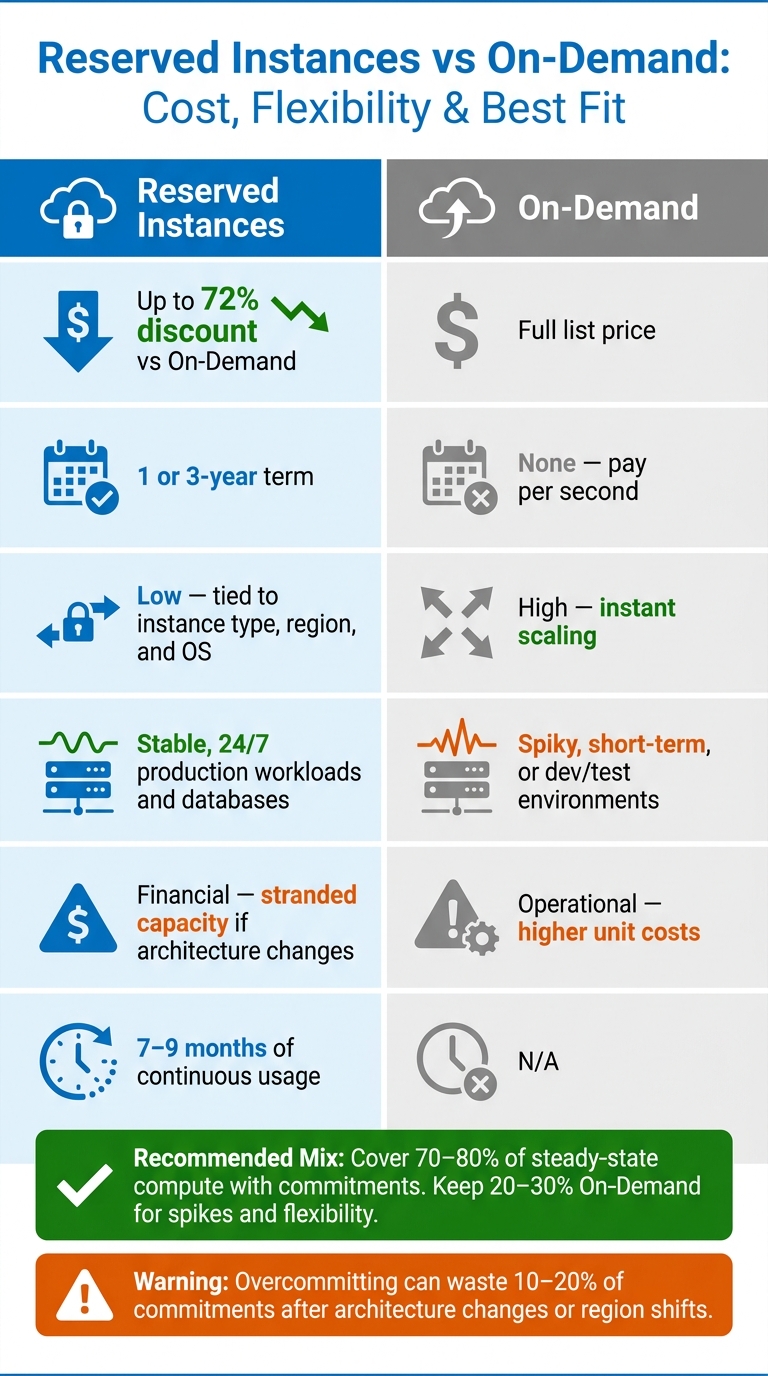 {Reserved Instances vs On-Demand: Cost, Flexibility & Best Fit}
:::
{Reserved Instances vs On-Demand: Cost, Flexibility & Best Fit}
:::
Once you've analysed your workload patterns, the next step is finding the right balance between committed and flexible capacity. Overcommitting can lock you into unnecessary costs, while undercommitting risks overspending on flexibility. Striking this balance is key to developing an effective layered commitment strategy.
Balancing Reserved and On-Demand Instances
A good rule of thumb is to cover 70–80% of your steady-state compute spend with commitments, leaving the rest for on-demand usage [13]. This approach accounts for fluctuations, unexpected changes, and potential growth, reducing the risk of idle Reserved Instances (RIs).
To achieve this balance, consider a layered commitment strategy:
- Layer 1: Allocate 50–60% of your steady demand to Compute Savings Plans. These plans provide flexibility across instance families and services like Fargate and Lambda.
- Layer 2: Assign another 10–15% to EC2 Instance Savings Plans or Standard RIs for predictable, stable workloads.
- Layer 3: Keep the remaining 20–30% for On-Demand capacity (or Spot Instances for fault-tolerant tasks) to handle demand spikes or unpredictable workloads.
This method ensures cost savings for predictable workloads while maintaining the flexibility needed for unexpected surges.
A real-world example highlights the effectiveness of this approach. In February 2026, an Israeli B2B SaaS company restructured its £142,000 monthly AWS spend using this layered model. By increasing RI coverage from 30% to 76%, they saved approximately £16,000 per month and improved RI/Savings Plan utilisation from 72% to 97% [13].
Treating On-Demand as the safety net for the top 10 to 20 percent of load is correct; treating it as the default for everything is the 35 percent overspend.- Bableen Kaur, Author, Zop.Dev [10]
For larger workloads - those accounting for more than 70% of your infrastructure - experts recommend capping RI coverage at 60% rather than 70–80%. This approach preserves flexibility to adapt as your architecture evolves [2].
Direct Comparison: Reserved Instances and On-Demand
The trade-off between Reserved Instances and On-Demand capacity boils down to cost versus flexibility. RIs offer significant savings in exchange for commitment, while On-Demand provides the freedom to scale but at a premium.
| Attribute | Reserved Instances | On-Demand |
|---|---|---|
| Cost | Up to 72% discount vs On-Demand [13] | Full list price |
| Commitment | 1 or 3-year term [15] | None - pay per second |
| Flexibility | Low; tied to instance type, region, and OS [11] | High; instant scaling |
| Best Fit | Stable, 24/7 production workloads and databases [2] | Spiky, short-term, or dev/test environments [14] |
| Primary Risk | Financial - stranded capacity if architecture changes [8] | Operational - higher unit costs [1] |
For most RIs, the break-even point is between 7 and 9 months of continuous usage [2]. If a workload is unlikely to run consistently beyond this period, On-Demand pricing may be the better choice. Reserve RIs only for workloads expected to remain unchanged for at least 12 months.
Locking into the wrong level of commitment can create costly cloud waste, while ignoring commitments entirely can leave significant discounts on the table.- LeanOps Team [1]
If you're unsure how to tailor this balance to your business needs, Hokstad Consulting offers expert advice on reducing cloud infrastructure costs.
Sizing and Placement: Aligning Reservations to Demand
Right-Sizing Your Reservations
One common mistake when sizing reservations is committing based on your average usage rather than your minimum consistent usage. Why? Because average usage includes peaks that should ideally be handled by on-demand capacity. This approach often results in paying for unused reservations during quieter times, like nights, weekends, or seasonal downturns.
A better strategy is to commit at the P10 level - the 10th percentile of your hourly usage. This represents the baseline your workload rarely falls below, ensuring nearly full utilisation of every reservation purchased [13]. For those willing to trade a bit of efficiency for broader coverage, committing at P75 typically achieves about 95% utilisation [12].
Commit to the floor you can prove, layer terms above it, and keep a slice on demand. Coverage is not the goal. Net savings is.- Redress Compliance [7]
Before making a purchase, analyse at least 90 days of hourly usage data to identify this stable baseline [13]. In industries with pronounced seasonal fluctuations, such as retail or finance, extending the analysis to 6–12 months can help avoid overcommitting during unusually busy periods [2]. Also, make sure to right-size your instances before committing. Locking in reservations on oversized instances can lock inefficiencies into place for the entire term.
The amount of headroom you leave should depend on the workload’s share of your total capacity. If the workload is small (less than 30% of your capacity), covering 70–80% with reserved instances is generally safe. For larger workloads (30–70% of capacity), it’s better to limit reserved instance coverage to 60–70% to avoid over-commitment if your architecture changes [2].
Once you’ve determined the right reservation quantities, the next step is to place these commitments strategically to maximise their value.
Placement Strategies for Reserved Instances
Accurate placement of reservations is just as important as sizing them correctly. After determining your baseline usage, allocate reserved instances to the most stable parts of your environment. This ensures that your commitments align with reliable workloads, helping to maximise the value of each reservation.
Focus on assigning reservations to core components such as production databases, key servers, and persistent development environments. Avoid applying them to volatile services or workloads that are likely to change rapidly [2].
For regional placement, prioritise regional reserved instances whenever possible. These automatically apply across all Availability Zones within a region, giving you flexibility if workloads shift between zones. Reserve zonal RIs only when you need capacity guarantees in a specific Availability Zone - for example, for a stateful database or latency-sensitive GPU workload tied to one zone [16].
For workloads with uncertain patterns, start by reserving 20–30% of stable capacity. Monitor utilisation over three months, then expand as needed. This approach reduces the risk of stranded capacity if your architecture evolves or workloads migrate to a different region [2].
RI stranding, paying for committed capacity you cannot use, is the second-biggest source of cloud waste after idle resources.- Amanpreet Kaur, Cloud-Cost Engine Specialist [8]
Finally, centralise reservation purchasing under a single team or FinOps function. When individual teams make independent purchases across multiple accounts, it increases the chances of overlapping commitments or coverage gaps. A unified purchasing strategy ensures reservations are allocated where they bring the most value across your entire infrastructure.
Monitoring Usage and Planning for Renewals
Tracking and Adjusting Utilisation
Once reservations are aligned with your baseline demand, the next step is to monitor their usage consistently. This helps avoid wasting capacity and ensures you're maximising savings. Two critical metrics to focus on are RI Utilisation and RI Coverage.
| Metric | What It Measures | Target |
|---|---|---|
| RI Utilisation | Percentage of purchased RI hours actually used | 85% or higher [9] |
| RI Coverage | Percentage of total eligible instance hours covered by a discount | 70% or higher for steady-state workloads [9] |
If utilisation drops below 70%, it suggests over-commitment and wasted capacity, while gaps in coverage indicate missed opportunities for savings. Tools like AWS Cost Explorer can help you review up to 38 months of historical data. Additionally, configure AWS Budgets alerts to notify you if utilisation or coverage falls below 80% [17]. For deeper insights, use AWS Cost and Usage Report (CUR) with Amazon Athena to spot orphaned
RIs - reservations that no longer match running instances due to changes in your architecture [9].
If your utilization is less than 100%, it means you've paid for RI capacity that wasn't matched by running instances, leading to 'idle' or 'wasted' RI hours.- AWS re:Post [18]
Make it a habit to review your usage quarterly. These reviews help you assess coverage and identify underperforming RIs that might need modification or could be sold on the AWS Reserved Instance Marketplace [5]. Keeping utilisation metrics strong ensures you're well-prepared for renewal decisions.
Making Renewal Decisions
Renewals without proper reviews can lead to mismatches with your current workloads. To avoid this, use your RI Utilisation and Coverage targets as a guide for renewal timing. Perform a 30-day audit and set calendar reminders 90 days before expiry to review usage and calculate break-even scenarios [12].
To determine the break-even point, use this formula: (1 – RI Discount Rate) × RI Term. For example, a one-year No Upfront RI with a 29% discount breaks even at around 8.5 months. If you don’t reach that point, consider switching to On-Demand pricing instead [9].
Planned changes to your architecture can also impact the effectiveness of your current RIs. For instance, migrating workloads from x86 to Graviton (ARM) instances would make your Standard RIs ineffective, as they don’t provide discounts for the new instance type [8][12]. In such cases, letting the commitment expire or transitioning to a Compute Savings Plan might be a smarter choice.
The discount is real, but so is the lock. Commit to what you can prove runs every hour, and let everything uncertain stay flexible.- Fredrik Filipsson, Co-Founder and Group CEO, Redress Compliance [7]
To avoid reverting to On-Demand pricing unnoticed, set alerts 90 days before your RIs expire. This gives you enough time to make thoughtful, informed decisions rather than reacting at the last minute [5].
For tailored advice on optimising your reserved instance strategies and cloud infrastructure, Hokstad Consulting offers expert guidance.
Conclusion: Steps to Better Reserved Instance Utilisation
Maximising the efficiency of Reserved Instances (RIs) for varied workloads demands a consistent and strategic approach: focus on proven continuous workloads while keeping capacity adaptable for unexpected changes.
Start with a 90-day usage analysis to identify your baseline - this is the most dependable measure for making long-term commitments. A tiered strategy works best: commit to 3-year terms for your stable baseline, use 1-year terms for anticipated growth, and leave room for spikes with flexible capacity. Without this balance, you risk overspending by 18–35% due to a one-size-fits-all compute model [10].
After analysing your workloads, reserve extra capacity to handle future changes, but ensure you always maintain 20–40% headroom. Overcommitting in pursuit of maximum coverage often results in 10–20% of commitments being wasted after architecture changes or region shifts [7]. Fredrik Filipsson, Co-Founder and Group CEO of Redress Compliance, summarises this approach perfectly:
Commit to the floor you can prove, layer terms above it, and keep a slice on demand. Coverage is not the goal. Net savings is.[7]
To avoid surprises, implement a structured renewal calendar. Letting RIs expire unexpectedly could increase your cloud bill by as much as 40–50% overnight [10]. Set reminders at 90, 60, and 30 days before expiry to reassess and adjust your commitments based on current usage patterns.
If you need help applying these strategies, Hokstad Consulting offers tailored solutions to optimise your cloud costs based on your specific workload and infrastructure needs.
FAQs
How do I calculate my true baseline before buying RIs?
To get started with Reserved Instances (RIs), it's crucial to establish a baseline. Analyse 30–90 days of stable production usage to get a clear picture of your needs. Use tools like AWS Cost Explorer to pinpoint your always-on floor - the minimum capacity that's consistently running around the clock. Avoid depending on averages, as they can be misleading.
Once you have your baseline, aim to cover 60–80% of it with RIs. This provides a balance between cost savings and the flexibility to adjust for changes. For workloads that are less predictable, consider starting with a smaller commitment - around 20–40%. After three months, review your usage and perform a break-even analysis to confirm you're getting the expected cost savings.
When should I use a Savings Plan instead of an RI?
Savings Plans offer a flexible way to manage costs for workloads that frequently change, whether that's resizing, switching instance families, or moving across regions. They automatically apply discounts based on your agreed hourly spend, making them a great fit for dynamic and unpredictable environments.
On the other hand, Reserved Instances are designed for workloads that remain steady over time. By committing to a specific configuration for one to three years, you can take advantage of significant cost reductions, making them ideal for consistent, long-term needs.
What should I do if my RI utilisation drops suddenly?
A sudden decrease in Reserved Instance (RI) utilisation can result in paying for capacity you’re not using, which means unnecessary expenses. To address this, pinpoint the cause - this could be due to reduced workloads, instances being terminated, or adjustments in your architecture. If the decline appears to be long-term, it might be worth exploring more flexible alternatives like Compute Savings Plans. Hokstad Consulting can assist by analysing your usage and developing a strategy to manage costs effectively.