
If your cloud tags are messy, your cost reports will be messy too. I’d boil this article down to one point: if you want clean showback and chargeback in GBP (£), you need a small tag set, fixed values, automatic checks, and regular reviews.
Here’s the short version:
- I’d keep the required tag set to 4–6 fields
- I’d make department and cost centre mandatory at resource creation
- I’d standardise keys and values so reports don’t split costs by typo or casing
- I’d apply tags through IaC, policy, and inheritance, not by hand
- I’d audit coverage often and aim for 95% of spend tagged
- I’d map tags to finance codes before using them for chargeback
- I’d bring in outside help if the estate is large, multi-cloud, or tag compliance is poor
A few numbers stand out. The article says 30% to 50% of cloud spend often has no clear owner, and cost reports only start to become dependable once tag compliance gets past 80%. It also notes that shared services can account for 15–30% of spend, so tags alone won’t solve every allocation problem.
Here’s a quick comparison of what the seven practices are meant to do:
| Practice | What I’d focus on | Why it matters |
|---|---|---|
| Taxonomy | Small fixed tag schema | Keeps reporting clean |
| Mandatory tags | Block untagged resources | Stops allocation gaps at source |
| Naming rules | Lowercase, fixed values | Prevents split reporting |
| Automation | IaC, policy, inheritance | Cuts manual tagging errors |
| Audits | Coverage, typos, drift | Finds gaps before month-end |
| Finance alignment | Match ERP/GL codes | Makes chargeback usable |
| Specialist support | Large or messy estates | Helps fix drift at scale |
So, if I were reading this for one answer, it would be this: tagging works for cost allocation only when it is simple, enforced, and tied to finance data from the start.
AWS re:Invent 2020: Cost allocation best practices
Need help optimizing your cloud costs?
Get expert advice on how to reduce your cloud expenses without sacrificing performance.
Why tagging matters for departmental cloud cost allocation
Poor tagging leaves cloud spend floating around with no owner. In many organisations, 30% to 50% of cloud spend can't be tied to a team, product, or cost centre [7]. When costs jump, that creates a clear accountability gap.
What happens next is messy:
- chargebacks get disputed
- cost anomalies appear with no obvious owner
- naming drifts, which splits reporting and turns one environment into multiple line items in every report
The department tag is the starting point. It shows which business unit owns the spend and ties each chargeback and showback report back to a finance-approved cost centre in GBP (£).
When tags are used the same way across the estate, month-end showback becomes easier to run. Quarterly reviews are less of a scramble. Annual budgeting is also more dependable.
That’s why the next seven practices focus on allocation tags that are complete, consistent, and ready for finance use.
Start with a department-led taxonomy, then enforce it everywhere.
1. Define a department-focused tagging taxonomy
A taxonomy is a fixed list of tag keys and allowed values. Build it around finance reporting, not engineering habits.
Keep the mandatory set to 4–6 tags. Every resource should carry them [2][6]. That limit matters more than it might seem. Roughly 70% of cloud tagging implementations fail within six months, most often because the schema is too hard to apply in a consistent way [2].
These tag keys are the base of a department-focused taxonomy:
| Tag Key | Purpose | Example Values |
|---|---|---|
cost-center |
Links spend to finance codes for chargeback and showback |
CC-1001, CC-4200
|
business-unit |
Tracks costs by business unit |
marketing, engineering, retail
|
environment |
Separates production from non-production spend |
prod, staging, dev
|
team |
Identifies the owning squad or budget holder |
platform, payments, data-eng
|
service |
Associates costs with an application or initiative |
checkout-api, data-pipeline
|
owner |
Responsible contact (use a team alias, not an individual name) | [email protected] |
Match cost-center to your chart of accounts or ERP codes [11][8]. When those line up, cloud spend drops into finance reports with a lot less friction.
Use a fixed allowlist for each tag instead of free-text input [2][1]. Set casing and allowed values before rollout so reports group data cleanly [6][8]. If you skip that step, one tag can split into messy variants like prod and Prod, and that throws off cost allocation reports [2][1].
Stick to lowercase keys and values, and keep tag values stable for at least 12 months [2][8][10].
Once the schema is fixed, make it mandatory at creation.
2. Enforce mandatory department and cost centre tags
Once the taxonomy is set, make department and cost-centre mandatory when a resource is created. Then mirror that rule in policy and infrastructure as code, so untagged resources never make it into production.
Each major cloud platform gives you a native way to enforce this:
| Feature | AWS | Azure | Google Cloud (GCP) |
|---|---|---|---|
| Primary Enforcement Tool | Service Control Policies (SCPs) | Azure Policy | Organisation Policy |
| Blocking Control |
Denywith Null Condition |
DenyEffect |
Deny/ Custom Constraint |
On AWS, use SCPs with a Null condition to block resource creation when department or cost-centre tags are missing [15][16]. On Azure, use Azure Policy Deny to stop non-compliant resources and Modify to handle controlled remediation [2][17]. On Google Cloud (GCP), use Organisation Policy constraints, then catch any gaps with CI/CD validation [7][2].
If your team uses Infrastructure as Code, add tag checks in the pipeline too. Terraform’s default_tags block for AWS and GCP providers can make every resource inherit the department tag automatically, which cuts down on manual input [12][13]. Policy-as-code tools such as HashiCorp Sentinel or Open Policy Agent (OPA) can fail a build if the plan includes untagged resources.
A good place to start is with the services that drive the biggest bills:
- EC2 instances
- RDS instances
- S3 buckets
- EKS clusters
That approach keeps the scope tight while still hitting the areas that matter most. Tagging the top 50 most expensive resources can cover around 80% of total spend [13].
Once enforcement is live, review coverage and clear exceptions before month-end reporting.
3. Standardise tag values and naming conventions
Once tagging is enforced, the next problem is messy values. Enforcement keeps untagged resources out, but it won't stop badly tagged ones. And that's where reports start to fall apart. A small difference in casing or a shortened label can split what should be one reporting bucket into several line items.
Use lowercase, full words, and one delimiter style across the board. Ban shortcuts like dept, env, prd, and prod. Write production, not prod. Write department, not dept. Cost centre values also need to match finance records exactly. If they don't, month-end departmental reports can drift out of line.
A controlled allowlist helps stop value drift. If tag values must come from an approved list stored in one central place, such as a JSON allowlist in the infrastructure repo, spelling-based splits in departmental reports disappear. Pair that with IaC validation blocks in Terraform, and deployments using unapproved values can be rejected before they go live.
Don't cram more than one dimension into a single tag. For example, department: payments-prod-us-east looks tidy at first glance, but it turns filtering into a mess. You can't break out department and region on their own, which damages department-level reporting. Keep each tag to one piece of information.
| Formatting Element | Recommended Standard | Common Mistakes to Avoid |
|---|---|---|
| Casing | Always lowercase | MixedCase, CamelCase, ALL CAPS |
| Delimiters | Hyphens or underscores, used consistently | Mixing underscores, spaces, or camelCase |
| Values | Full words (production) |
Abbreviations (prod, prd, live) |
| Tag keys | Singular nouns (team) |
Plurals (teams) or verbs |
| Dimensions | One value per tag | Concatenated values (dept-env-region) |
Tag fixes are not retroactive [2][14]. If a resource carries the wrong value for two weeks, that past spend stays unattributed even after you fix the tag. That leaves a permanent gap in departmental reporting. Next, measure how much spend still lacks valid tags.
4. Automate tag application and inheritance
Once your tag schema and required fields are set, apply them at the source. Manual tagging falls apart in larger estates. And without automated checks, 40% to 60% of resources can end up untagged or tagged in inconsistent ways [3][13].
The safest move is to build tags into your provisioning templates. In Terraform, a default_tags block at the provider level applies a base set of tags automatically to every resource managed by that configuration. That can include tags like environment, cost-center, and department [12][3].
AWS can inherit default tags from provider settings. Azure usually handles this through policy-based inheritance instead. Use Azure Policy to append tags or inherit them from the resource group down to child resources [12][17].
You should also catch problems before anything goes live. Tools like Checkov or tflint in CI/CD can block resources with missing tags before deployment [2][3]. A sensible way to roll this out is to start in audit mode first, see where gaps show up, and then move to deny mode once tag coverage is steady [2][3].
Automation cuts down manual mistakes. Audits pick up what slips through.
5. Audit and remediate tagging coverage
Automation helps keep new resources in line. Audits show you what slipped through across the existing estate.
Aim to cover at least 95% of cloud spend with all mandatory tags. Once coverage drops below 80%, departmental reporting starts to lose trust [6][2].
A good audit does more than check whether a tag is present. It should also check whether the value matches your approved source data. For example, a department tag set to Prod can still break reporting if your allowlist only accepts prod. Use the AWS Resource Groups Tagging API, Azure Resource Graph, or GCP Cloud Asset Inventory to compare live tags with your approved taxonomy, then flag typos, wrong casing, and values that sit outside the allowlist.
When you spot untagged or orphaned resources, track down the owner, let them know, apply a temporary unassigned tag, and retire the resource if nobody claims it after 30 days.
Some spend won’t fit neatly into a tagged owner bucket. Put that into a shared-infrastructure or unallocated cost centre so it stays in view. When the unallocated total is visible in reports, people tend to fix the tagging gaps a lot faster.
Check this on a set schedule:
| Audit Check | What to Verify | Frequency |
|---|---|---|
| Compliance | Missing mandatory keys (department, owner, environment) |
Daily/Weekly |
| Standardisation | Case-sensitivity, typos, allowlist adherence | Weekly |
| Coverage | % of spend tagged vs. untagged | Monthly (pre-billing) |
| Propagation | Tags on child resources (EBS volumes, snapshots, NICs) | Weekly |
| Hygiene | Duplicate keys, empty values, obsolete legacy tags | Quarterly |
Use the results to clear exceptions before month-end close and pass them into finance reporting.
6. Align tagging with FinOps and financial reporting
Once your tagging is consistent, the next step is to connect it to finance. In plain terms, your tag values should match the ERP and general ledger codes that finance already works with. So if org:cost-centre is meant to map to IT, it should match 456-it exactly. That way, chargeback and journal entries don’t need manual cleanup later [11][8].
This is where tagging stops being just an ops habit and starts helping finance do its job.
Showback and chargeback also play different roles. Start with showback so you can check that the numbers make sense. Then move to chargeback once tag compliance is above 90% [5]. That order matters. If you jump into chargeback too early, you’re asking finance to work from patchy data.
Tag values also need to stay steady through annual planning and reforecasting. If teams keep changing values halfway through the year, budget tracking gets messy fast. A quarterly review helps keep tags lined up with current budgets without turning the process into a constant admin task [11].
Some cloud costs won’t be tagged at source. Shared services like networking and security often make up 15–30% of total cloud spend, so those costs should be allocated in proportion to direct spend [11]. That allocation model is what links raw tagging data to department-level reporting.
Use mappings like these to keep department reports and finance codes in sync:
| Tag Key | Finance Mapping | Example Values |
|---|---|---|
org:cost-centre |
General Ledger / Cost Centre Code |
123-finance, 456-it
|
org:business-unit |
Line of Business / Department |
marketing, retail
|
org:project-id |
Internal Project Budget |
mobile-app-v2, erp-migration
|
7. Use specialist support for complex tagging environments
When tag data needs to feed finance reporting, outside support can help keep the model accurate as things grow. At that point, tagging stops being a simple documentation job. It becomes an engineering control.
This kind of support is most useful when you're dealing with large multi-cloud estates, when compliance has dropped below 50%, or when you're moving into chargeback [5][9].
At that scale, fixing tag issues by hand can turn into a slog. Large remediation work is often faster with automation than manual review [4].
Specialists can use automated guardrails to improve tagging compliance fast [4][5]. They also deal with provider rules that teams often miss, like AWS case-sensitive tags, Azure resource-group inheritance, and GCP lowercase label rules [2][9].
You can see the gap more clearly when strong and weak tag setups are placed side by side.
| Complexity Factor | Internal Management | Specialist Support Recommended |
|---|---|---|
| Cloud Providers | Single cloud | Multi-cloud (AWS, Azure, GCP) |
| Resource Volume | Hundreds of resources | Thousands of dynamic resources |
| Tagging Compliance | >80% compliance | <50% compliance or high drift |
| Financial Model | Showback only | Full chargeback with high accuracy |
| Enforcement | Manual checks | Automated policy-as-code and SCPs |
Strong versus weak tag structures: a comparison
::: @figure 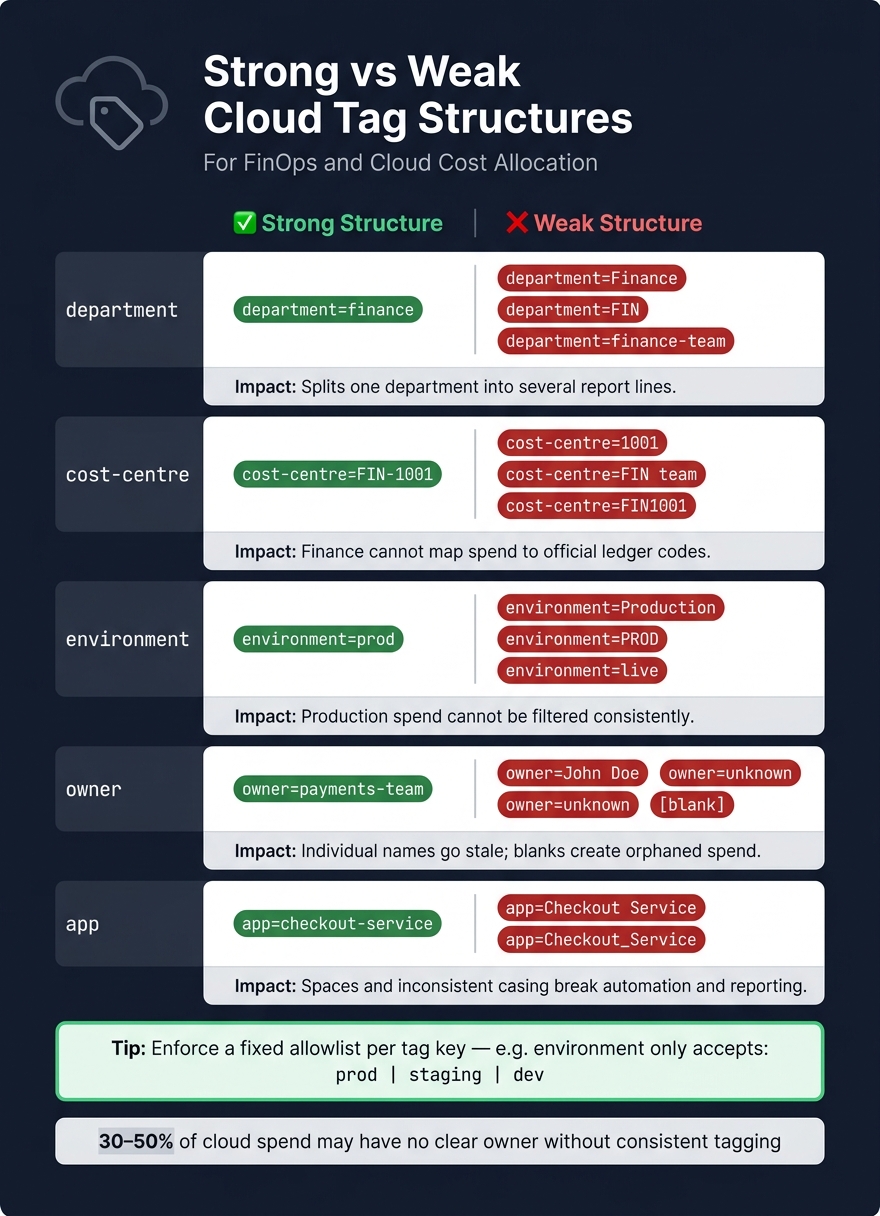 {Cloud Tagging Best Practices: Strong vs Weak Tag Structures for Cost Allocation}
:::
{Cloud Tagging Best Practices: Strong vs Weak Tag Structures for Cost Allocation}
:::
This comparison makes it easy to see how messy tags throw departmental allocation off course. Even after standardisation, things can drift. And when they do, reporting starts to split spend into places it never should.
| Tag Dimension | Strong Structure | Weak Structure | Impact |
|---|---|---|---|
| Department | department=finance |
department=Finance, department=FIN, department=finance-team
|
Splits one department into several report lines. |
| Cost centre | cost-centre=FIN-1001 |
cost-centre=1001, cost-centre=FIN team, cost-centre=FIN1001
|
Finance cannot map spend to official ledger codes. |
| Environment | environment=prod |
environment=Production, environment=PROD, environment=live
|
Production spend cannot be filtered consistently. |
| Owner | owner=payments-team |
owner=John Doe, owner=unknown, [blank]
|
Individual names go stale; blanks create orphaned spend. |
| App | app=checkout-service |
app=Checkout Service, app=Checkout_Service
|
Spaces and inconsistent casing break automation and reporting. |
The pattern is pretty clear. A strong tag structure uses one agreed format for each field. A weak structure lets teams improvise, and that’s where the trouble starts.
Take department as an example. If one team uses finance, another uses Finance, and someone else types FIN, your reports won’t treat those as the same thing. One department suddenly turns into several lines on a dashboard.
The same issue hits cost-centre even harder. If tags don’t match official ledger codes, Finance can’t line cloud spend up with the books. That makes chargebacks messy and budget tracking harder than it needs to be.
environment tags cause their own kind of headache. If production is tagged as prod, Production, PROD, or live, filtering for live spend becomes a guessing game. That’s bad news when you’re trying to track where the money is going.
owner tags often look fine at first, then fall apart over time. Personal names go out of date when people move roles or leave. Blank values are worse - they create orphaned spend buckets that no department owns and no budget can absorb.
app tags can break things in quieter ways. A small change like checkout-service versus Checkout Service or Checkout_Service may not look like much, but it can throw off automation, scripts, and reporting logic.
The fix is simple: keep every tag key tied to a clear allowlist. For environment, that means only prod, staging, or dev - nothing else.
What to check in monthly and quarterly tag reviews
Tag compliance drifts over time. Monthly checks help you catch spend errors. Quarterly checks help you spot schema drift before it turns into a reporting mess.
Once audit coverage is in place, split reviews into two cadences: monthly for spend accuracy, quarterly for taxonomy control.
Monthly reviews should zero in on spend allocation. The main job is to find untagged resources and invalid values that are skewing the current bill. A good rule of thumb is to fix the top 20 untagged or mis-tagged resources by spend first, because in most cloud accounts, those alone make up 60–80% of the total bill [2].
If less than 95% of spend carries every mandatory tag, treat it as a defect that needs fixing, not a metric to talk around.
Quarterly reviews do a different job. They catch outdated department names, schema drift when tags no longer line up with current business units, and broken inheritance on short-lived resources such as Auto Scaling Groups and ECS tasks.
Assign an owner to each check. If no one owns the fix, it tends to sit there.
| Issue | Frequency | Reporting Risk | Owner |
|---|---|---|---|
| Untagged resources | Monthly | High - unallocated spend | Platform Team |
| Invalid cost centre codes | Monthly | High - chargeback fails | Finance / FinOps |
| Tag inheritance failures (ASGs, ECS) | Monthly | Medium - lost inheritance | Platform Team |
| Outdated department names | Quarterly | Medium - split reporting | Finance / FinOps |
| Schema drift | Quarterly | Medium - schema drift | Platform Team / FinOps |
Ownership matters. Platform teams fix propagation gaps and enforce policy. Finance checks cost centre codes against the master data. Department leads are accountable for making sure their teams apply tags properly from the start, and for flagging changes when team names or structures shift.
Conclusion
Accurate cost allocation comes down to seven habits working in sync: clear taxonomy, mandatory tags, standard values, automation, audits, reporting alignment, and specialist help. When one piece slips, the whole setup starts to wobble. That’s when departmental spend stops mapping cleanly to the cost centres finance depends on.
Teams that get this right tend to spot waste sooner and cut cloud spend with more control. The same discipline needs to carry into monthly spend checks and quarterly taxonomy reviews. That steady rhythm is what protects chargeback accuracy over time, not just clean tagging.
In more complex estates, specialist support can speed up remediation and help keep departmental allocation on track. Hokstad Consulting can help design and enforce tagging controls when cloud environments have grown beyond simple in-house management.
FAQs
Which tags matter most for cost allocation?
For cost allocation to work, keep your tag set small. Four to six required tags is usually enough. If you try to tag everything under the sun, things get messy fast.
The core tags to use are:
- environment
- team or owner
- cost centre
- project or service
That gives you enough detail to split spend in a useful way without turning tagging into a chore.
Accuracy matters too. So don’t leave tag values open-ended. Set up a clear allowlist of approved values and enforce it when resources are created. That way, you avoid reporting issues caused by things like spelling differences, random abbreviations, or people making up values on the fly.
How do we handle shared cloud costs?
Shared cloud costs need more than basic tagging. Some charges - like centralised networking, security tooling, or support fees - don’t map neatly to a single resource.
A simple way to handle this is to assign those costs to a shared-infrastructure cost centre. Then split them using a set formula, such as a proportional share based on CPU or memory usage.
Write down the allocation rules in clear terms. That helps keep financial reporting consistent and gives people confidence in how the numbers were worked out.
When should we move from showback to chargeback?
Move from showback to chargeback when your organisation needs clear financial accounting and automatic cost recovery for specific business units or cost centres.
Start with showback to build cost awareness without direct financial impact. Once tagging is consistent, ownership is clear, and costs line up with finance systems, chargeback can support more careful cloud use and formal internal billing.