
Tagging cloud resources is essential for cost allocation and accountability. Without it, tracking which teams or projects drive cloud expenses becomes nearly impossible. A strong tagging strategy can improve cost visibility by up to 60% and reduce overall cloud expenses by as much as 35%. Here's what you need to know:
- What tagging is: Assign key-value pairs (e.g.,
Environment: Production) to cloud resources for organisation and cost tracking. - Why it matters: Tags turn vague cloud bills into actionable data, helping you pinpoint spending by team, project, or application.
- How to start: Focus on 4–6 mandatory tags like
CostCenter,Environment, andOwner. Automate tagging through Infrastructure as Code (IaC) tools like Terraform to ensure consistency. - Enforcement: Use tools like AWS Service Control Policies or Azure Policy to block untagged resources, starting with an audit mode.
- Common pitfalls: Avoid overly complex schemas and inconsistent tags (e.g.,
Productionvsprod), which can lead to fragmented reports and higher costs.
Key takeaway: Start small, automate tagging, and enforce compliance for better cost management and accountability.
::: @figure 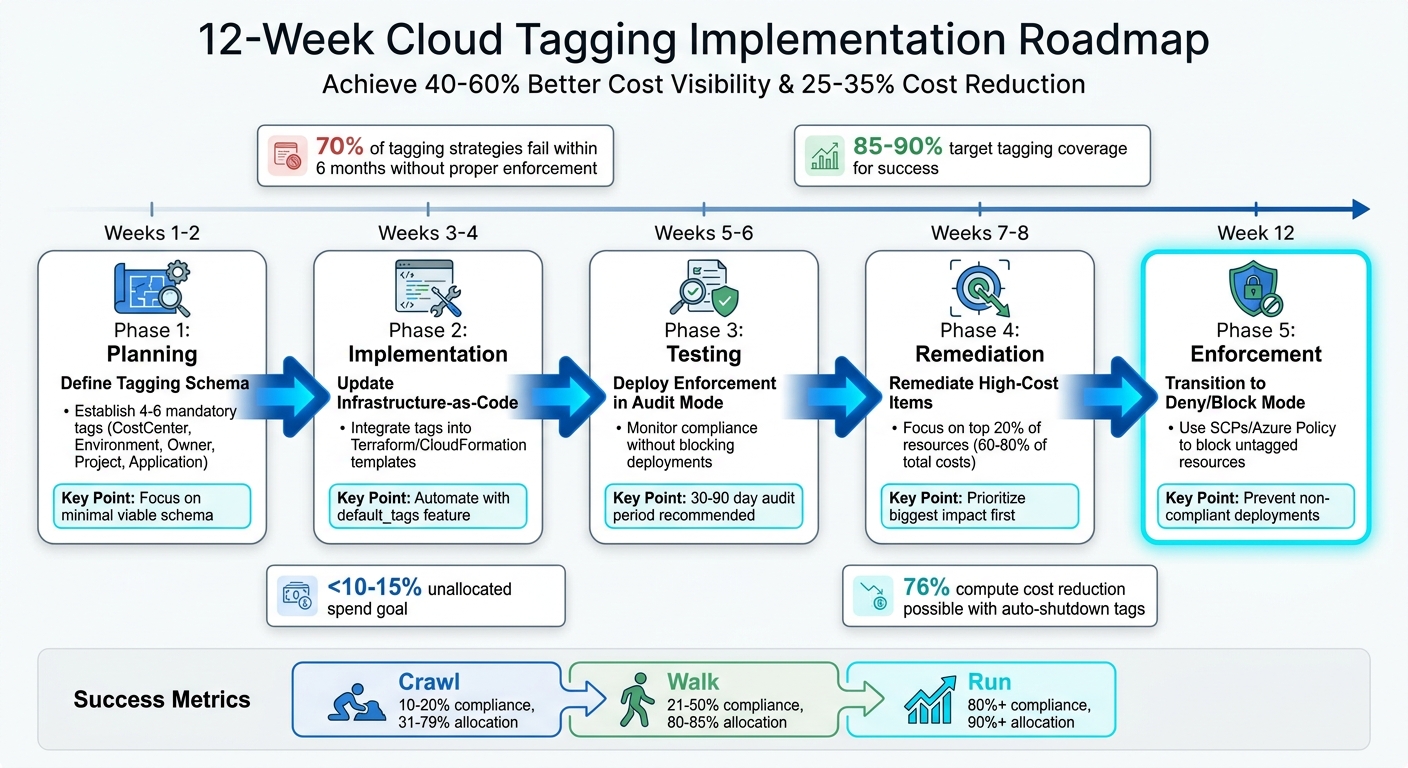 {12-Week Cloud Tagging Implementation Roadmap for CTOs}
:::
{12-Week Cloud Tagging Implementation Roadmap for CTOs}
:::
Building a Consistent Tagging Strategy
Core Components of a Tagging Strategy
A well-thought-out tagging strategy is essential for accurate cost allocation - something every CTO needs to prioritise. The foundation of this strategy is a Minimum Viable Schema, which includes 4–6 mandatory tags that strike a balance between visibility and ease of implementation. Commonly used keys include Environment, Owner, Project, Cost Centre, and Application[3][6][4]. Keeping the scope limited ensures smooth deployment while maintaining compliance across the organisation.
It's also crucial to follow naming conventions that align with the strictest rules across providers. For example, stick to a 63-character limit, use lowercase letters, numbers, underscores, and hyphens. This avoids compatibility issues, especially in multi-cloud setups where AWS and GCP are case-sensitive, but Azure is not.
For the Owner tag, it’s best to use team distribution lists like [email protected] to ensure the tag remains valid even when team members change[3]. Shared resources, such as databases or VPCs, should be tagged with a shared-infrastructure
cost centre. Costs for these resources can then be distributed using a predefined formula, such as based on CPU or memory usage, rather than assigning them to a single owner[3].
| Tag Key | Purpose | Example Values |
|---|---|---|
env |
Identifies deployment stage |
prod, staging, dev, sandbox
|
owner |
Identifies responsible team |
platform-team, data-eng-list
|
project |
Maps to business initiatives |
checkout-v2, customer-portal
|
cost-center |
Financial code for chargebacks |
CC-1001, CC-2002
|
managed-by |
Identifies automation tool |
terraform, cloudformation, manual
|
This structured approach lays a solid groundwork for automating tag enforcement in cloud environments.
Automating Tag Enforcement
Manual tagging isn’t practical for scaling operations. Instead, integrate tags directly into your Infrastructure as Code (IaC) templates. Tools like Terraform’s default_tags feature and CloudFormation parameters ensure that every resource is automatically tagged during deployment[5][9]. This removes the burden on developers to remember tagging requirements for individual resources.
To enforce compliance, you can use Policy-as-Code solutions such as HashiCorp Sentinel, Open Policy Agent (OPA), or Terraform validation blocks. These tools can block deployments that don’t meet tagging requirements in your CI/CD pipeline, stopping issues before they hit production[5][7]. Additionally, cloud providers offer built-in enforcement options like AWS Service Control Policies (SCPs), Azure Policy, and GCP Organisation Policies. These can outright reject resource creation if mandatory tags are missing or invalid[8][10].
When introducing enforcement policies, start with audit mode for 30–90 days. This allows you to identify non-compliant resources without disrupting deployments[3][7]. During this period, teams can bring existing resources into compliance while ensuring new deployments meet the standards. Once compliance levels are satisfactory, switch to deny mode to enforce policies strictly.
Need help optimizing your cloud costs?
Get expert advice on how to reduce your cloud expenses without sacrificing performance.
Required Tags for Cost Allocation
Mandatory Tags for Accountability
Once you’ve established a consistent tagging strategy, the next step is to define mandatory tags. These tags are essential for accurate cost allocation and accountability. Aim for 4–6 mandatory tags - enough to provide clarity without creating unnecessary complexity. Too many tags can lead to administrative headaches and messy data.
Here’s what each mandatory tag does:
-
CostCenter: Links expenses to internal accounting codes, enabling financial chargebacks (e.g.,CC-1234). -
Environment: Differentiates deployment stages likeprod,staging,dev, orsandbox. -
Owner: Specifies the responsible team using group emails rather than individual names (e.g.,[email protected]). -
Project: Ties resources to specific business initiatives, such ascheckout-serviceorproject-phoenix. -
Application: Groups resources based on their functional purpose, likecustomer-portalororder-service.
Using these tags effectively can improve cost visibility and even cut expenses by up to 35% [2]. However, these benefits depend on proper implementation. For instance, in AWS, tags must be manually activated in the Billing and Cost Management console before they show up in cost reports. Keep in mind, this activation isn’t retroactive [1][2].
To avoid fragmented reporting, use a strict allowlist for tag values. For example, standardise the Environment tag with values like prod, staging, dev, or sandbox. This prevents inconsistencies such as production, PROD, or prd, which can clutter and complicate cost reports.
Once you’ve implemented these key tags, you can explore optional tags to gain more detailed insights.
Optional Tags for Deeper Insights
While mandatory tags cover the basics, optional tags can add extra layers of context. These aren’t necessary for every resource but can be incredibly useful for specific scenarios, such as security, lifecycle management, or operational tracking.
Here are some examples:
-
Compliance: Tracks regulatory frameworks likeHIPAA,PCI-DSS, orGDPR, helping you monitor compliance-related costs. -
DataClassification: Categorises resources by sensitivity (e.g.,Public,Internal,Confidential), aiding in security audits and governance. -
AutoShutdownandExpirationDate: Help optimise costs by automating cleanup or shutdown of unused resources. For instance, auto-shutting down non-production resources can cut compute costs by up to 76% [2]. -
ManagedBy: Indicates whether resources were created manually or through automation tools liketerraformorcloudformation. This makes it easier to identify infrastructure that could benefit from automation.
Start with mandatory tags, then gradually introduce optional ones based on your organisation’s needs. Overloading your tagging system from the beginning can lead to confusion and inefficiency.
| Tag Category | Tag Name | Purpose | Example Values |
|---|---|---|---|
| Mandatory | CostCenter |
Financial chargeback/allocation | CC-1234, CC-5678 |
| Mandatory | Environment |
Deployment stage | prod, staging, dev, sandbox |
| Mandatory | Owner |
Responsible team/contact | [email protected] |
| Mandatory | Project |
Business initiative/product | checkout-service, project-phoenix |
| Mandatory | Application |
Groups resources by functional purpose | customer-portal, order-service |
| Optional | Compliance |
Regulatory requirements | HIPAA, PCI-DSS, GDPR |
| Optional | DataClassification |
Sensitivity level | Public, Internal, Confidential |
| Optional | AutoShutdown |
Cost optimisation trigger | true, false |
| Optional | ExpirationDate |
Resource lifecycle/cleanup | 31/12/2026 |
| Optional | ManagedBy |
Automation tool used | terraform, cloudformation, manual |
Solving Common Tagging Problems
Common Tagging Issues
Even with the best strategies, tagging implementation often runs into hurdles. One of the biggest challenges is overly complex tagging schemas. Many organisations start with an overwhelming 15–20 mandatory tags, which can create friction and lead to low compliance rates [2][3][4]. A simpler approach - focusing on 4–6 essential tags - tends to strike a better balance between usability and effectiveness.
Another frequent misstep is treating tagging as a manual documentation task rather than an automated process. Without automation, tagging becomes error-prone, especially for dynamic resources where tags might not propagate correctly. This can lead to gaps in cost tracking and fragmented data, making it harder to generate accurate reports or hold teams accountable.
The consequences of poor tagging are significant. Mismanaged tagging can result in 40% higher waste rates in cloud environments compared to those with effective tagging systems [10]. Missing or inconsistent tags not only obscure spending patterns but also make it difficult to track costs or assign responsibility effectively.
Practical Solutions for Tagging Issues
To overcome these tagging challenges, organisations need a mix of policy enforcement, gradual implementation, and automation.
Enforce mandatory tags: Use tools like AWS Service Control Policies (SCPs) or Azure Policy to block the creation of resources without required tags [10][3]. Start by testing these policies in sandbox environments to ensure they don’t disrupt critical services like Auto Scaling Groups that might not support request tags.
Roll out changes gradually: Begin with an
Audit
mode to identify gaps in tagging without interfering with deployments. After 30 days, switch toEnforcement
mode, giving teams enough time to adjust [10][3]. For those using Infrastructure as Code, Terraform'sdefault_tagsfeature can automatically apply tags across resources, reducing manual effort [10].Standardise tagging conventions: Use lowercase for all tag keys and values to avoid issues with case sensitivity across providers like AWS and GCP [10][3]. For example, inconsistent use of
Environmentandenvironmentcan lead to fragmented cost data.Automate remediation: Tools like AWS Config and Lambda can flag resources that don’t comply with tagging policies. These workflows can apply default tags like
needs-review
or send notifications (e.g., via Slack) to resource owners, giving them a chance to fix issues before further action is taken [10][2][4].
For shared resources, such as NAT Gateways that don’t have a single owner, use proportional allocation rules. These rules can split costs based on metrics like the percentage of compute spend within each account [2][3]. This ensures fair distribution of expenses and maintains accountability.
Using Tags with Cloud Cost Management Tools
Using AWS Cost Explorer for Tag-Based Cost Allocation
Tags are the backbone of transparent cost allocation in AWS. To get started, activate Cost Allocation Tags via the Billing and Cost Management console. Once activated, these tags will appear as filters in Cost Explorer within 24 hours [11].
AWS provides two types of tags: AWS-generated tags (like aws:createdBy) and user-defined tags (which start with user:). Both can be used for cost allocation, but keep in mind that tags only track costs from the moment they're activated - they won’t apply retroactively [11].
For items that can’t be tagged directly, such as Savings Plans or Reserved Instance fees, AWS Cost Categories offer a useful workaround. You can group accounts or opt for amortised cost views in Cost Explorer to better understand these expenses [1]. When rolling out cost allocation, it’s smart to begin with a showback
phase. This means providing cost visibility without directly impacting budgets. Run this phase for 2–3 quarters to build confidence in the accuracy of your data before moving to chargeback
, where costs are directly deducted from budgets [4]. A well-structured cost allocation programme should aim for over 95% tag coverage and more than 90% allocation accuracy [4].
If you're working with multiple cloud platforms, extending these practices across providers is just as important.
Tagging Strategies for Multi-Cloud Environments
When managing costs across multiple clouds, it’s crucial to adapt your tagging strategy to the requirements of each platform. Start by creating a tagging schema that works across AWS, Azure, and Google Cloud. To avoid fragmented data, standardise all tag keys and values in lowercase [1].
Design your schema with the strictest tag limitations in mind, especially those of AWS and Google Cloud. Stick to lowercase letters, numbers, underscores, and hyphens to ensure compatibility across platforms [1].
Mark Radonic from ServiceNow highlights the importance of governance in tagging:
Your tag strategy should not only contain tag definitions but also define how to include governance and enforcement of the strategy.- Mark Radonic, ServiceNow [11]
Finally, avoid using sensitive information like internal project names or personal data in plain-text tags. This ensures compliance and protects your organisation from potential security risks [11] [12].
Measuring Success and Maintaining Your Tagging Strategy
Key Metrics to Track
To gauge the effectiveness of your tagging strategy, one of the most important metrics to monitor is tagging coverage - the percentage of resources tagged with mandatory labels. A good target is 85% to 90% coverage [14]. Alongside this, keep an eye on unallocated spend, which refers to the portion of your cloud expenses that can't be traced back to specific cost centres due to missing or incorrect tags. Ideally, this should stay under 10% to 15% [14][16].
Without proper tagging, many organisations find that 30% to 50% of their cloud costs remain unattributed to any business function [16]. This lack of accountability can result in missed opportunities to manage and optimise budgets. Beyond tagging coverage, tracking unit cost metrics, like the cost per active user or cost per transaction, offers a more detailed view of efficiency compared to simply monitoring total spend [1].
Another key area to focus on is orphaned resources, such as those tagged with departed-employee
or with expired temporary
tags. These often represent easy wins for cost savings [14][15]. Research indicates that organisations excelling in cost allocation tend to use nearly twice as many optimisation strategies to cut cloud expenses [13].
Regular audits are essential to ensure these metrics align with your cost allocation objectives.
Regular Audits and Strategy Updates
Maintaining tagging accuracy requires consistent audits, as resource additions and team changes can lead to tagging drift [14]. Start by auditing high-impact resources, as the top 20% usually account for 80% of spending. Prioritising these resources can deliver the quickest return on your efforts [14].
To encourage compliance, introduce weekly worst offender
reports that identify teams or accounts with the lowest tagging accuracy. This approach leverages peer accountability to drive improvements [18][14]. Standardise tag formatting - for example, enforcing lowercase syntax for all keys and values - to avoid discrepancies like Environment:Production
versus environment:production
[17][14]. Allow teams a short cleanup period to fix tagging errors before resorting to automated corrections [15].
Measure your progress against FinOps maturity levels to ensure your tagging strategy evolves effectively. At the Crawl
stage, you might see 10% to 20% tag compliance and 31% to 79% cost allocation. Moving to the Walk
stage, compliance improves to 21% to 50%, with allocation reaching 80% to 85%. Organisations at the Run
stage achieve over 80% compliance and greater than 90% allocation accuracy, along with near-instant cost transparency [18]. These benchmarks confirm that disciplined tagging practices directly enhance both cost visibility and accountability.
Cloud Cost Tagging That Actually Saves Money
Conclusion: Achieving Financial Clarity with Tagging
Using tagging effectively can turn cost allocation into a precise process. A well-thought-out tagging strategy can enhance cost visibility by 40% to 60% and cut overall expenses by 25% to 35% through improved accountability [2]. However, about 70% of tagging strategies fail within six months, often due to inconsistent values and weak enforcement [3].
The key to avoiding these pitfalls is automation [3]. Start by focusing on your 20 most expensive resources, which typically make up 60% to 80% of your total costs [3]. Follow a structured 12-week rollout plan:
- Weeks 1–2: Define your tagging schema.
- Weeks 3–4: Update your infrastructure-as-code.
- Weeks 5–6: Deploy enforcement in audit mode.
- Weeks 7–8: Remediate high-cost items.
- By Week 12: Transition to deny/block mode.
This method ensures consistent oversight across your cloud expenses.
To avoid fragmented reports caused by tag inconsistencies, like Production
versus prd
, standardise tag values using explicit allowlists [3]. Publishing tag compliance dashboards can also encourage improvement through peer comparisons [3]. Strengthen your enforcement by moving from detection (alerts for missing tags) to prevention (blocking non-compliant resource creation using Service Control Policies) [2].
Simple automation can also make a big difference. For instance, using tags like ScheduledStop to shut down non-production environments during off-hours can slash compute costs by up to 76% [2].
FAQs
How do we tag existing resources without breaking production?
To manage resource tagging effectively and safely, begin with an audit of assets that are either untagged or incorrectly tagged. Tools like Terraform or AWS Config can help streamline this process by enabling bulk updates to tags during maintenance windows, reducing any impact on production systems. To maintain consistency, use scripts designed to detect and correct tag drift. It's also crucial to establish strict tagging policies for newly created resources, ensuring consistent practices and preventing the creation of untagged assets moving forward.
What should we do about costs that can’t be tagged (e.g., Reserved Instances or Savings Plans)?
When dealing with costs that can’t be tagged, like Reserved Instances or Savings Plans, you’ll need to get creative. Consider strategies such as cost allocation models, account-based methods, or proportional sharing to distribute these expenses fairly. Make sure to document these methods in a well-defined cost allocation policy. This helps ensure clarity, transparency, and accountability in how costs are managed.
How do we allocate shared infrastructure costs fairly across teams?
To fairly distribute shared infrastructure costs, it's essential to implement a solid tagging strategy with consistent metadata. Tags like owner and cost_centre help maintain clarity and accountability. Automating the tagging process using tools such as Infrastructure as Code (IaC) or built-in cloud policies minimises mistakes and ensures standards are met. Establishing clear guidelines for tagging and cost allocation, along with conducting regular audits, helps maintain fairness and avoids potential conflicts.