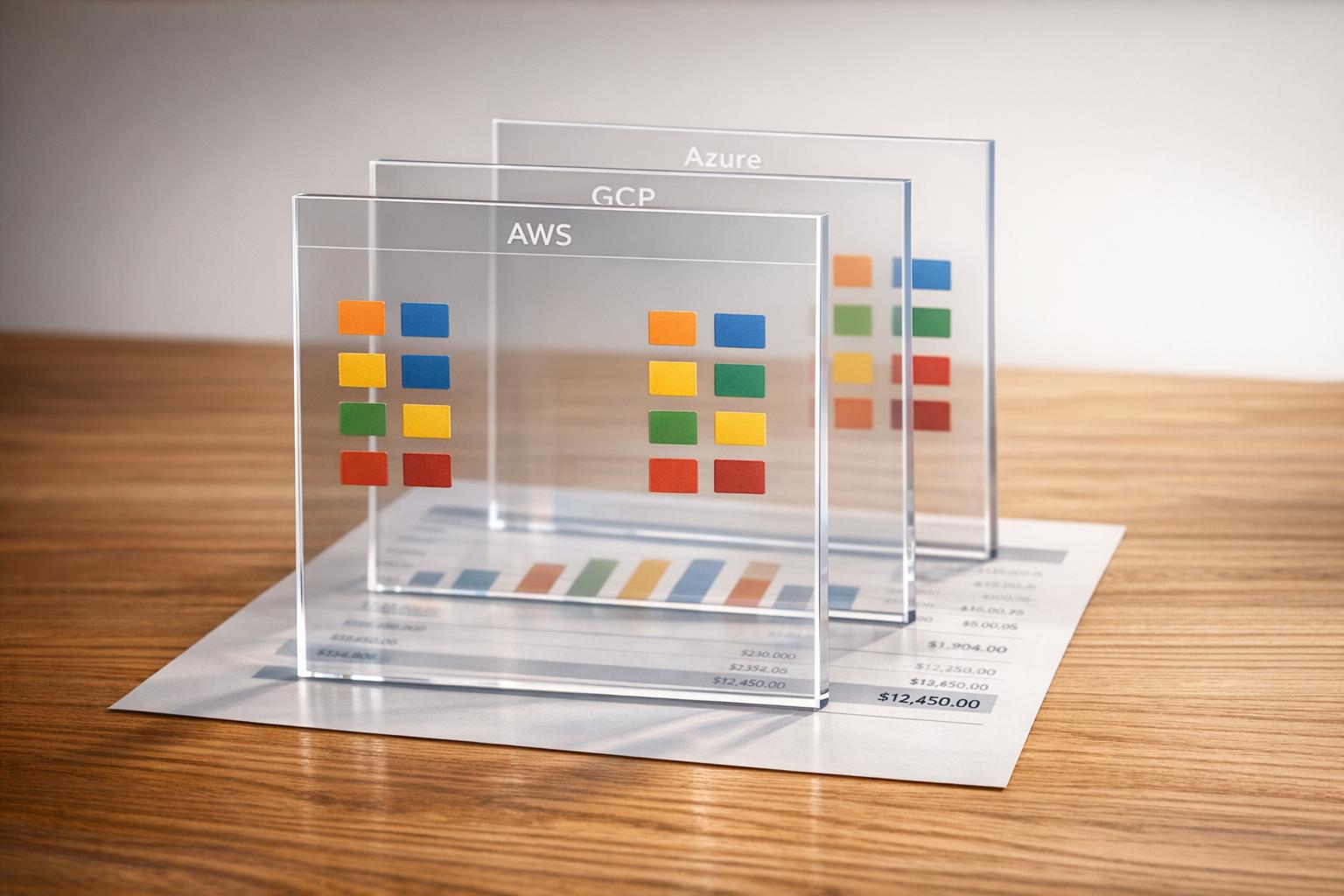
Managing cloud costs across AWS, Azure, and GCP can be chaotic without proper tagging. Unclear ownership, inconsistent naming, and untagged resources inflate bills and disrupt financial tracking. Here's what you need to know:
- 82% of businesses overspend on cloud services, with 54% of waste due to poor cost visibility.
- Effective tagging can reduce waste by up to 40% and save 10–15% of cloud costs.
- Key tags like
environment,owner, andcost-centreare critical for tracking costs and improving accountability. - Consistency across platforms is essential, as providers have different rules for tags.
- Tools like AWS Service Control Policies, Azure Policy, and FinOps platforms can enforce and automate compliance.
Key Takeaways:
- Create a tagging policy aligned with your business.
- Standardise tag names across all platforms.
- Use 4–8 tags per resource to keep it simple.
- Enable cost allocation tags in billing consoles.
- Leverage FinOps platforms for centralised tagging management.
- Link tags to cost centres for better accountability.
- Monitor tag compliance with dashboards.
- Embed tags in Infrastructure as Code templates.
- Apply virtual tags to untagged legacy resources.
- Conduct regular tag audits to maintain accuracy.
::: @figure 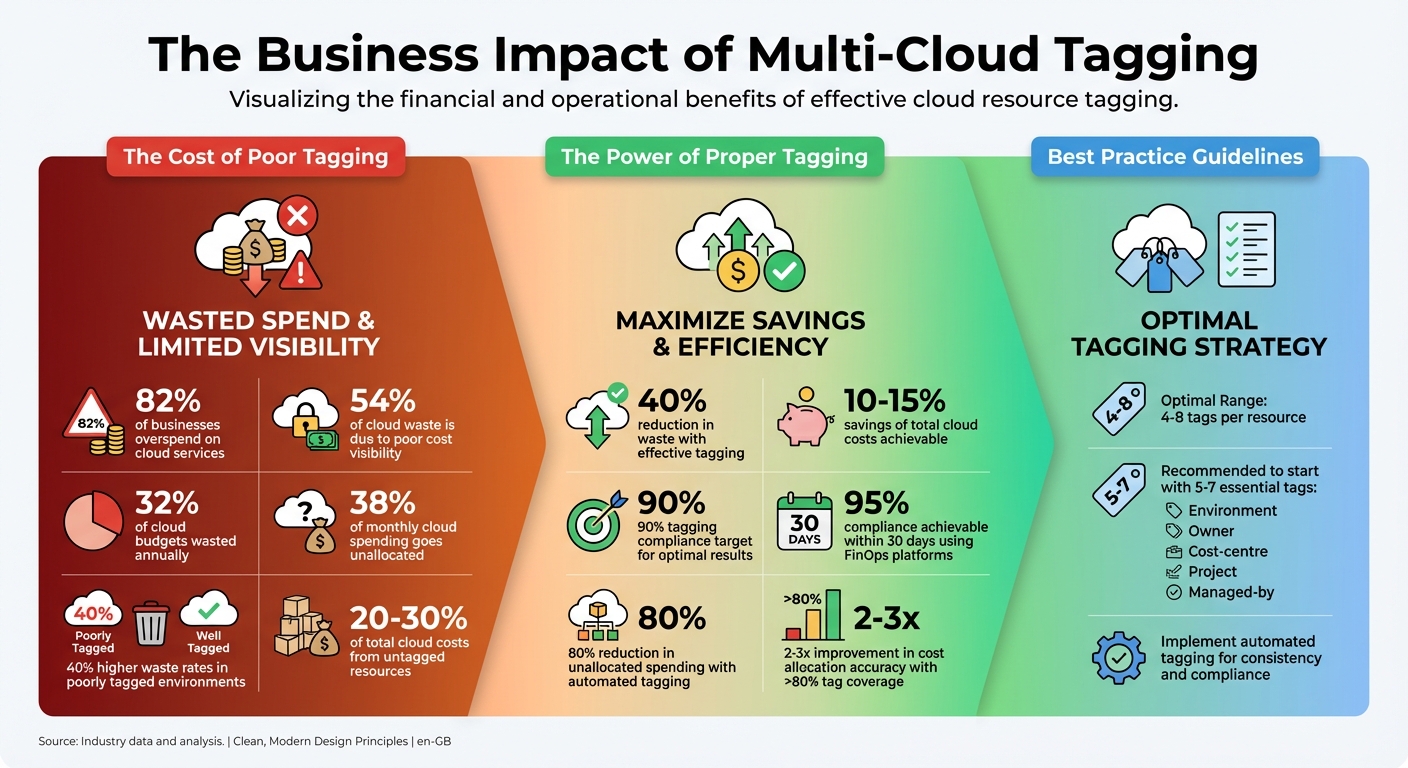 {Multi-Cloud Tagging Impact: Cost Savings and Compliance Statistics}
:::
{Multi-Cloud Tagging Impact: Cost Savings and Compliance Statistics}
:::
1. Create a Business-Aligned Tagging Policy
Aligning Tags with Business Needs and Cost Allocation
Your tagging policy should reflect how your business operates. This means structuring tags in a way that makes financial sense - grouping costs by departments, projects, or customers instead of relying on technical labels that don't align with financial reporting. For instance, focus on key cost centres like marketing, product development, or customer support, and establish tags based on these areas. One financial services company managed to cut unallocated costs from 23% to under 5% within six months by conducting monthly reviews and combining account-based allocation with usage-based tagging for shared services. A good starting point is implementing 5–7 essential tags, such as environment, owner, cost-center, project, and managed-by. This approach avoids overwhelming teams while ensuring clarity from the outset [1]. Additionally, maintaining consistent tagging practices across all your cloud providers is crucial for effective cost management.
Maintaining Consistency Across Multi-Cloud Platforms
Each cloud provider has unique rules for handling tags, which can complicate managing resources across platforms like AWS, Azure, and Google Cloud. For example, AWS allows tag keys up to 128 characters and is case-sensitive, Google Cloud limits keys to 63 characters, and Azure allows up to 512 characters but treats tags as case-insensitive. To avoid confusion, standardise your tags by using lowercase for all keys and values, and use hyphens as separators (e.g., cost-center instead of CostCenter or Cost_Center). This simple step ensures accurate cost tracking and reporting, no matter which platform you're using [1]. Such consistency also makes it easier to scale your tagging policy as your cloud usage grows.
Simplifying Implementation and Management
Leverage cloud-native tools to enforce tagging policies and ensure compliance. Tools like AWS Service Control Policies (SCPs) or Azure Policy can help block the creation of untagged resources. For example, AWS introduced a feature in late 2025 that validates Terraform and CloudFormation deployments against tag policies before resources are created (this requires Terraform AWS Provider v6.22.0 or later). Meanwhile, Azure offers tag inheritance, which automatically copies tags to child resources [1]. These tools make it easier to implement and maintain your tagging strategy without adding unnecessary complexity.
Supporting Scalability for Large Cloud Environments
A well-thought-out tagging policy not only simplifies ongoing management but also scales effectively with large cloud deployments. To measure the success of your tagging policy, track tagging compliance as a percentage of your total cloud costs. For example, a correctly tagged £50 database instance can have a greater financial impact than 100 compliant £0.10 test snapshots. This metric ensures that your tagging efforts are aligned with your overall cost management goals and helps maintain accurate reporting as your cloud usage expands.
Need help optimizing your cloud costs?
Get expert advice on how to reduce your cloud expenses without sacrificing performance.
2. Use Consistent Tag Names Across Cloud Providers
Consistency Across Multi-Cloud Environments
When tag names differ across teams or platforms, it leads to fragmented reports and incomplete financial insights. For example, one team might label resources as Env:Prod, while another uses environment:production. This inconsistency splits your financial data into unconnected segments, making it impossible to answer basic questions like, What’s our total production environment spend this month?
or Which department owns this resource?
The fix is simple: adopt a standardised tag naming convention across all cloud platforms. Stick to lowercase for keys and values, and separate words with hyphens (e.g., cost-centre instead of CostCenter or Cost_Center). This method ensures universal compatibility, especially since Google Cloud Platform enforces lowercase letters, numbers, underscores, and hyphens in its labels. By aligning with GCP's stricter rules, you guarantee consistency across all providers [1]. This standardisation is the foundation for better cost tracking and financial clarity.
Business Alignment and Cost Allocation Accuracy
Consistent tags don’t just simplify reporting - they’re vital for accurate cost allocation. A well-organised tagging system helps identify unused resources, assign ownership, and link expenses to specific projects or departments. Without this clarity, finance teams struggle to manage chargebacks or detect areas for cost optimisation. Environments with inconsistent or missing tags often experience higher levels of waste, as untagged resources remain unaccounted for. Clear, consistent tagging answers essential questions like who owns a resource, what project it supports, and which cost centre is responsible for it.
Ease of Implementation and Ongoing Management
Standardising naming conventions is just the first step. Automating compliance ensures that consistency is maintained across platforms. Tools like AWS Service Control Policies (SCPs) and Azure Policy can block untagged resources at deployment. Similarly, Terraform’s default_tags feature allows for automatic tagging across all resources [1]. These measures make it easier to enforce tagging rules, streamline cost reporting, and keep your cloud environment organised.
3. Keep Tags Between 4 and 8 per Resource
Ease of Implementation and Ongoing Management
Requiring too many tags can create unnecessary complications. It can reduce compliance rates, disrupt automation processes, and discourage teams from fully adopting tagging practices. This often turns a practical strategy into an inefficient and costly one.
Start with a concise list of tags like environment, owner, cost-centre, project, and managed-by [1]. These tags address the essential questions finance teams need answered without overwhelming your engineering teams. Poorly tagged cloud environments experience 40% higher waste rates compared to well-managed ones [1]. By keeping the tagging structure simple, you promote operational efficiency and maintain financial clarity.
Business Alignment and Cost Allocation Accuracy
An overly detailed tagging strategy can lead to chaos. Unstructured or excessive tags create a flood of irrelevant metadata, making data difficult to query and unreliable [5]. This tag churn
fragments data, disrupts automation, and ultimately undermines cost allocation accuracy. Finance teams lose trust in the data, which makes accountability harder to enforce.
By aiming for 90% compliance, organisations can save 10–15% by ensuring accountability [1]. A streamlined tag set helps prevent clutter, ensuring that every pound spent can be traced back to a specific project, owner, or cost centre. This clarity is essential for accurate financial oversight and operational efficiency.
Scalability for Large-Scale Cloud Setups
A well-thought-out tag set simplifies management and scales effectively across different cloud platforms. While AWS and Azure allow up to 50 tags per resource and Google Cloud supports 64 labels, reaching these limits often signals poor governance rather than effective reporting. A smaller, consistent tag set avoids operational headaches and ensures compatibility across multi-cloud environments. Managing dozens of tags becomes unnecessarily complex, especially with platform-specific naming rules and character limits [6].
Instead of striving for perfection, target a 90% compliance rate. Some resources, like NAT Gateway data transfers or CloudWatch metrics, cannot be tagged [1]. Measure compliance by cost weight - focusing on the cost of compliant resources relative to total cloud spend. After all, one untagged high-cost instance has a far greater impact than several properly tagged low-cost resources.
4. Enable Cost Allocation Tags in Each Provider
Business Alignment and Cost Allocation Accuracy
To ensure accurate financial reporting, tags need to be activated as cost allocation tags within each provider's billing console. Without this step, your finance team won't have the detailed breakdown required to allocate costs effectively. A 2026 audit of 67 accounts and projects revealed that 38% of a £2.1 million monthly cloud spend went unallocated. Organisations with tagging compliance rates of 90% or more achieved savings of 10–15%, while 54% of cloud budget waste was linked to poor cost visibility [1]. Activating these tags is essential to gaining the financial clarity needed for better decision-making.
Consistency Across Multi-Cloud Environments
Each cloud provider has its own approach to cost allocation tags. On AWS, you must enable specific tags in the Billing Console under Cost Allocation Tags
for them to appear in tools like Cost Explorer or detailed billing reports. Azure requires activation through its Cost Management interface, whereas Google Cloud includes labels in billing exports automatically, provided the appropriate IAM permissions are in place. To keep things consistent, use the standardised tag set defined earlier. Stick to lowercase for keys and values, use hyphens as separators, and avoid special characters that might cause compatibility issues with provider APIs [1].
Ease of Implementation and Ongoing Management
Simplify tagging compliance by leveraging the native tools offered by each provider. AWS allows the use of Service Control Policies (SCPs) to block untagged resource creation, while Azure Policy can enforce compliance by using Deny
effects to block non-compliant resources or Modify
effects to correct tagging issues automatically. In late 2025, AWS introduced Required Tags for IaC
, a feature that validates Terraform and CloudFormation deployments against tag policies before resources are created, reducing compliance risks upfront. Azure also streamlines tagging by enabling policies to inherit tags from resource groups to individual resources automatically [1].
Scalability for Large-Scale Cloud Setups
When managing a large cloud environment, measure tagging compliance by cost weight rather than resource count. A single untagged high-cost instance can have a far greater financial impact than numerous low-cost micro-instances. Poor tagging practices often result in 40% higher waste rates compared to well-tagged environments. As your cloud usage grows, automation becomes essential. Use default tags in Terraform provider configurations to ensure all resources inherit mandatory tags. For resources that bypass these safeguards, set up automated scripts or Lambda functions to flag non-compliant items, giving teams a 48-hour correction window before escalating the issue [1].
5. Manage Tags Through a FinOps Platform
Business Alignment and Cost Allocation Accuracy
Using a FinOps platform transforms tagging from a simple organisational tool into a key financial strategy. These platforms can automatically identify resources that lose tags due to manual updates or script errors, ensuring a higher level of accuracy in your tagging process [7]. Some tagging engines have reached over 95% compliance within just 30 days, cutting unallocated cloud spending by 80% [7]. What makes these platforms stand out is their ability to measure compliance based on cost weight rather than the number of resources. This means your finance team gains a clear view of where every pound of cloud expenditure is going, linking it back to the correct cost centre.
Consistency Across Multi-Cloud Environments
As cloud environments grow, managing tags manually becomes impractical. FinOps platforms simplify this by offering a centralised system where you can set tagging standards once and apply them consistently across all environments. This is particularly valuable for multi-cloud setups. These platforms often use AI to suggest the best tag keys and values, making it easier to clean up older environments [7]. By doing this, they eliminate inconsistencies that can arise when different teams interpret tagging policies differently across providers like AWS, Azure, and Google Cloud.
Tagging isn't just a housekeeping task - it's the bedrock of any effective FinOps strategy, especially when you're juggling resources across AWS, Azure, and GCP.- Cloudgov FinOps SME [7]
Ease of Implementation and Ongoing Management
Automated workflows make it possible to tag or quarantine non-compliant resources as soon as they're identified [7]. Teams can access self-service tagging health reports through tools like Slack or email, enabling DevOps to monitor compliance without constant oversight [7]. To maximise efficiency, focus on addressing the Top 10 untagged resources by cost
, as this yields the greatest impact [1]. Aim for 90% tagging compliance - while 100% is unrealistic due to untaggable costs like NAT Gateway data transfer fees, 90% is a practical and effective target [1]. Automation like this ensures that cost management scales seamlessly as your cloud usage grows.
Scalability for Large-Scale Cloud Setups
When working with expansive cloud environments, measuring tagging compliance by cost weight is essential. This method - calculating the cost of compliant resources as a percentage of total cloud spending - helps you prioritise the resources that significantly affect your budget [1]. Features like tag inheritance simplify the process further by automatically applying tags from higher-level resource groups or subscriptions to individual resources. This reduces the need for manual tagging across thousands of assets [1]. Hokstad Consulting provides services to help organisations develop tagging strategies and implement FinOps platforms, ensuring better cost visibility and precise allocation. Their approach fits neatly into a broader multi-cloud cost management strategy, making it easier to maintain control as your infrastructure grows.
6. Link Tags to Cost Centres and Business Units
Business Alignment and Cost Allocation Accuracy
Once you’ve established standardised naming conventions and automated compliance, linking tags to cost centres takes cost accountability to the next level. Why is this so important? Well, 38% of monthly cloud spending often goes unallocated simply because there’s no proper tagging for ownership or cost centres [1]. By using a cost-center tag with values such as cc-marketing or cc-eng-01, you can track every pound spent and tie it directly to the team responsible [1].
Here’s the kicker: 32% of cloud budgets are wasted annually, and over half of that waste stems from poor cost visibility [1]. Assigning cost centre tags ensures every team is held accountable for their slice of the budget.
Consistency Across Multi-Cloud Environments
To avoid headaches caused by inconsistent tagging across platforms like AWS, Azure, and Google Cloud, stick to a standard format - lowercase with hyphen separators. Enforcing mandatory tags, such as cost-center, is crucial. Use provider policies to block resources that don’t comply [1][2].
For example, AWS Service Control Policies (SCPs) and Azure’s Policy Deny
effects can prevent untagged resources from being created [1]. Azure even allows policies to automatically apply cost-center tags from resource groups to all related resources, ensuring full coverage for each business unit [1]. This automation eliminates the need for manual tagging, even when you’re managing thousands of resources.
Ease of Implementation and Ongoing Management
To keep things manageable, focus on 5–7 essential tags, such as cost-center, environment, owner, and project. Track compliance by analysing cost weight and use automated workflows - like AWS Lambda or Terraform’s default_tags - to flag resources that don’t meet tagging requirements [1][2]. This lets you zero in on the 20% of resources that typically account for 80% of costs [3].
It’s also smart to configure your deployment pipelines to fail early if tags don’t meet your framework. For instance, Terraform’s default_tags or AWS’s Required Tags for IaC
feature (introduced in November 2025) can validate tags before deployment [1]. Hokstad Consulting offers expertise in setting up these workflows, helping businesses scale their tagging policies alongside growing infrastructure.
Scalability for Large-Scale Cloud Setups
For larger organisations, scalability is key. Different allocation models work better depending on your structure:
- Account-based allocation: Ideal for smaller organisations with clear departmental boundaries. It’s simple to implement and delivers accurate results with minimal effort [4][3].
- Business unit-based allocation: Best for organisations using AWS Organisations or Azure Management Groups. This approach requires moderate effort but achieves high accuracy [4].
- Tag-based allocation: Offers the most granular tracking, making it perfect for complex, shared infrastructures. However, it does require more upfront effort [4][3].
For legacy or untaggable resources, FinOps platforms can apply virtual tagging. This overlays business metadata without altering the original cloud metadata [3]. To keep everything consistent, maintain a single, version-controlled tag dictionary. This should define approved keys, allowed values (like finance codes), and casing rules [2]. This ensures accurate cost allocation and smooth scalability, even in intricate multi-cloud setups.
7. Monitor Tag Coverage with Dashboards
Business Alignment and Cost Allocation Accuracy
When you lack clear visibility into your tagging, cloud spending can spiral into unallocated territory. In fact, as much as 30–50% of cloud costs can go unaccounted for if tag coverage isn't closely monitored [9]. Dashboards play a crucial role here, tracking which resources are tagged and which are not. This helps uncover gaps that make accurate chargeback nearly impossible. For instance, imagine a dashboard revealing £50,000 in untagged spending across AWS accounts. Without tagging, it's a guessing game to assign these costs to the right team [8].
It's not just about overall tag coverage; measuring individual tags is equally important. A dashboard might show 85% coverage for the cost-centre tag but only 60% for owner, exposing specific weaknesses that an aggregate figure could hide. Organisations that push their tag coverage past 80% see a 2–3x improvement in cost allocation accuracy [9]. This precision ensures that every pound is correctly attributed, setting the stage for more effective chargeback models and tackling the challenges posed by multi-cloud environments.
Consistency Across Multi-Cloud Environments
Once tagging standards are in place, keeping tabs on their effectiveness across different cloud providers becomes essential. Multi-cloud setups bring their own set of challenges. For example, AWS supports 50 case-sensitive tags, Azure organises tags at the resource-group level, and GCP enforces lowercase-only labels [8]. FinOps dashboards can bridge these gaps by providing a unified view of tagging coverage across all platforms.
Take this scenario: your dashboard shows 85% tag coverage in AWS but only 70% in Azure. Or perhaps it highlights £100,000 in unallocated GCP labels. These insights are invaluable, allowing you to spot cross-cloud patterns without having to juggle separate tools for each provider [8]. This unified visibility simplifies the process of maintaining consistent tagging across diverse environments.
Ease of Implementation and Ongoing Management
Setting up and managing tag coverage dashboards is simpler than it sounds. Begin by enabling cost allocation tags in tools like AWS Cost Explorer or Azure Cost Management, then integrate them with a FinOps platform for automated reporting [8]. Configure your dashboards to highlight key metrics - aim for over 90% tag coverage and set alerts for when coverage dips below 80% [9]. Weekly reviews and the use of Infrastructure as Code templates can help enforce tagging from the moment of deployment [8].
Most enterprises kick off with tag coverage in the 40–60% range but can reach over 90% with consistent dashboard monitoring [8]. Treat this as an ongoing operational metric, not a one-time task. Run comprehensive coverage reports every quarter, automate alerts for any drops, and regularly review gaps at the team level to keep up with the growth of your infrastructure [8]. By sticking to this routine, you'll improve both cost reporting and chargeback accuracy while strengthening your overall tagging strategy.
8. Add Tags to Infrastructure as Code Templates
Business Alignment and Cost Allocation Accuracy
By embedding essential tags directly into your Infrastructure as Code (IaC) templates, tagging becomes a seamless, automatic part of your workflow. Whether you're using Terraform modules, CloudFormation stacks, or Pulumi programmes, including mandatory tags like cost-centre, owner, and environment removes the guesswork of manual tagging. Why does this matter? Because poorly tagged cloud environments are prone to 40% higher waste rates. For organisations spending £1 million a month, achieving over 90% tagging compliance can save around £100,000–£150,000 monthly by improving accountability [1].
Modern IaC workflows have taken this a step further. For example, AWS introduced Required Tags for IaC
in November 2025. This feature blocks deployments that don’t include mandatory tags, ensuring that untagged resources never make it to production [1].
Inconsistent naming is the silent killer of tagging strategies. When one team uses Env:Prod and another uses environment:production, your cost reports fracture into useless fragments.- Cloud Cost Cutter [1]
Consistency Across Multi-Cloud Environments
IaC templates also bring consistency to tagging, especially in multi-cloud setups where each platform has its own rules. For instance, AWS allows 128-character case-sensitive keys, Azure supports 512-character case-insensitive keys, and Google Cloud limits labels to 63 lowercase characters [11]. These differences can wreak havoc on your tagging strategy. IaC templates solve this by applying provider-specific transformations. For example, a template might define Environment=Production for AWS but convert it automatically to environment=production for Google Cloud.
Each cloud provider also offers different enforcement tools. AWS uses Tag Policies and Service Control Policies, Azure relies on Azure Policy, and Google Cloud employs Organisation Policy [1]. By configuring these enforcement mechanisms within your IaC, you ensure that every resource - no matter the platform - follows the same tagging rules from the start. This consistency lays the groundwork for managing tagging at scale.
Scalability for Large-Scale Cloud Setups
As your infrastructure grows, manual tagging becomes impossible to manage. This is where IaC templates shine. They enforce consistent tagging automatically, scaling effortlessly as your environment expands. For example, Terraform validation blocks can restrict tag values to a predefined list - ensuring Environment only accepts dev
, staging
, or prod
. This prevents inconsistencies that can distort cost reports [11].
When measuring compliance, focus on cost weight rather than resource count. A single untagged, high-cost instance (like a p4d.24xlarge) can wreak far more havoc on your budget than 100 untagged micro-instances [1]. With IaC templates, these costly oversights are caught before they happen, shifting your governance approach from reactive fixes to proactive prevention.
9. Apply Virtual Tags to Fix Past Mistakes
Business Alignment and Cost Allocation Accuracy
Virtual tags offer a smart solution for dealing with legacy resources in mature cloud setups, especially when those resources lack proper tags. Instead of painstakingly updating thousands of resources manually, virtual tags attach metadata directly to your billing data. This allows you to assign costs to the right cost centres without altering the underlying infrastructure. It’s a practical way to complete your multi-cloud cost reporting framework.
For best results, aim for at least 90% compliance with native tagging before using virtual tags to fill in the gaps. This approach often leads to savings of around 10–15% and helps clarify unallocated spending, which can account for as much as 38% of monthly cloud costs in large-scale environments [1]. To measure success, use the cost-weighted accuracy formula: (Cost of Compliant Resources / Total Cloud Cost) × 100. Focus your virtual tagging efforts on the Top 10
untagged resources by cost to maximise impact [1].
Consistency Across Multi-Cloud Environments
Beyond cost allocation, virtual tags bring consistency to your reporting across different cloud platforms. They overcome the limitations of native tagging by creating a unified taxonomy for billing data. This ensures that key attributes like cost-centre
are consistently reported, whether you're using AWS, Azure, or Google Cloud - even if native tags are missing or inconsistently applied.
Scalability for Large-Scale Cloud Setups
Virtual tags also shine when it comes to scalability. Because they operate on billing data, they can handle large-scale environments with ease. They’re particularly useful for resources that can’t be tagged natively, such as NAT Gateway data transfer, CloudWatch metrics, and certain usage-based charges. Since achieving 100% native tagging compliance is nearly impossible due to tagging restrictions in some cloud services, virtual tags fill the gap by automatically assigning costs to shared services and provider-specific charges. You can even set up automated alerts for resources flagged as unassigned
or needs-review
, ensuring teams address these within 48 hours [1].
10. Run Regular Tag Audits with Hokstad Consulting
Business Alignment and Cost Allocation Accuracy
Regular audits are the backbone of a reliable multi-cloud cost reporting system. Without them, untagged resources can account for a staggering 20–30% of total cloud costs. This creates gaps in your cost tracking, making it hard to allocate expenses accurately across departments or projects [8][9]. With Hokstad Consulting, audits produce detailed reports that pinpoint unallocated spending and spotlight high-cost resources for immediate action. For example, in one hybrid cloud setup, an audit uncovered 25% of costs as unallocated. By realigning tags to match cost centres and environments, allocation errors dropped by 40% [9][10].
Metrics like tag coverage percentage (aiming for over 95%) and cost allocation accuracy (keeping variance under 5% post-audit) help you track improvements. These regular reviews ensure your chargeback processes remain precise and efficient [8][11].
Consistency Across Multi-Cloud Environments
Maintaining consistency in tagging across different cloud platforms is no small feat. Hokstad Consulting audits your tags against a unified taxonomy, addressing the quirks of each provider. For instance, while AWS allows up to 50 tags, GCP enforces lowercase hyphens, which can lead to inconsistent naming. By standardising conventions like cost-centre:finance across AWS, Azure, and GCP, these audits eliminate fragmentation and ensure your FinOps reports stay clear and cohesive [2][8].
The process also identifies outdated conventions and inactive tags that disrupt attribution. Using a central tag dictionary, non-compliant tags are corrected, preventing future errors in reporting [8][9].
Ease of Implementation and Ongoing Management
Tag audits don't have to be a headache. They can seamlessly integrate into Infrastructure as Code (IaC) templates and FinOps platforms, making enforcement automatic with tools like AWS Service Control Policies or Azure Policy [12][13]. Hokstad Consulting also provides automation scripts to highlight resources marked as unassigned
or needs-review
. Starting with baseline reports and scheduling quarterly reviews, this approach ensures effective governance without overburdening your team. It’s a scalable way to keep tagging practices in check from day one and beyond.
CLOUD FINOPS - 5 MISTAKES to AVOID in CLOUD TAGGING STRATEGY in your ORGANIZATION | AWS Videos
Conclusion
Tagging plays a key role in achieving clear cost visibility and maintaining financial control in multi-cloud environments. It provides answers to essential questions like who owns a resource, which project it supports, and which cost centre should account for the spend. Without this clarity, it becomes challenging to track where money is being spent. Poor tagging practices can lead to unnecessary waste and make cost allocation harder to manage [1].
To avoid these pitfalls, establish a standard tagging framework with 5–7 essential tags, such as environment, owner, cost-centre, and project. Focus on tagging resources that have the biggest impact on your spending. Enforcing tagging rules from the start - like preventing the deployment of resources without tags - can help maintain compliance levels above 90% and reduce costs by 10–15% through better accountability [1].
However, tags can become outdated due to manual errors, automation gaps, or shifts in organisational structure. Regular audits, supported by automated tools that flag or correct non-compliant tags, are crucial for keeping your tagging system reliable and actionable [1].
If your tagging strategy feels disorganised or you're finding it difficult to maintain consistency across platforms like AWS, Azure, and GCP, Hokstad Consulting can assist. Their cloud cost engineering services focus on reducing expenses by 30–50% through improved cost visibility and control. Whether you need a comprehensive audit, automated tagging enforcement, or ongoing support, their expertise ensures your tagging practices deliver tangible results.
FAQs
Which tags should we mandate first for chargeback?
To ensure accurate chargeback processes, it's essential to prioritise resource tags that allow for detailed cost allocation. Tags like environment, application, owner, and project play a key role in tracking and managing expenses effectively across multi-cloud setups. These tags not only simplify cost reporting but also improve financial clarity and accountability.
How can we enforce tags across AWS, Azure, and GCP without slowing deployments?
Automating policy enforcement can save time and ensure consistency. Cloud-native tools like AWS Service Control Policies, Azure Policy, and GCP Organisation Policies are excellent for preventing untagged resources from slipping through the cracks.
By embedding tagging policies directly into Infrastructure as Code (IaC) tools, such as Terraform, you can make sure compliance is baked into the deployment process. Additionally, policy-as-code tools like Open Policy Agent help enforce tagging standards across multiple cloud environments. The best part? They do this without slowing down your deployment workflows.
What should we do about costs that can’t be tagged or old untagged resources?
Regular audits are essential for dealing with untaggable or old untagged costs. These reviews help pinpoint resources that may have slipped through the cracks. Using automated tools can make this process much easier, allowing you to identify and allocate these costs more efficiently.
At the same time, implementing showback strategies can be a game-changer. By reporting untagged costs, you can raise awareness across teams, leading to better resource management and clearer cost visibility.