
CDN geolocation can help UK firms cut latency, keep data in the right place, and protect conversions - but only if I use it with limits in mind. A delay of just 100 ms can cut e-commerce conversions by 7%, while city-level IP geolocation can be wrong 15–25% of the time. So the right move is simple: I should use geolocation for broad control, not as a perfect source of truth.
Here’s the short version:
- Use country-level routing for data residency, legal rules, pricing, and default language
- Use region-level routing for failover, origin steering, and load distribution
- Treat city-level routing as a hint for low-latency use cases only
- Trust CDN-set headers, not client-set headers, for routing decisions
- Keep cache variants tight so localisation does not damage cache hit rate
- Measure TTFB, cache hit ratio, and misroutes by PoP and country
- Put rules in this order: compliance first, availability next, performance after that, cost last
What I take from this guide is clear: geolocation works best when I pair it with latency checks, clean cache-key rules, short DNS TTLs, and a fallback for unknown locations. If the chosen PoP is not the lowest-latency option more than 15% of the time, the routing logic needs work.
This guide explains how to use those signals, where they fail, and how to keep routing, caching, and localisation under control without adding risk.
Implementing Geographic Restrictions with AWS: Securing Your Resources | AWS Events
Need help optimizing your cloud costs?
Get expert advice on how to reduce your cloud expenses without sacrificing performance.
What CDN geolocation data is and how accurate it is
::: @figure 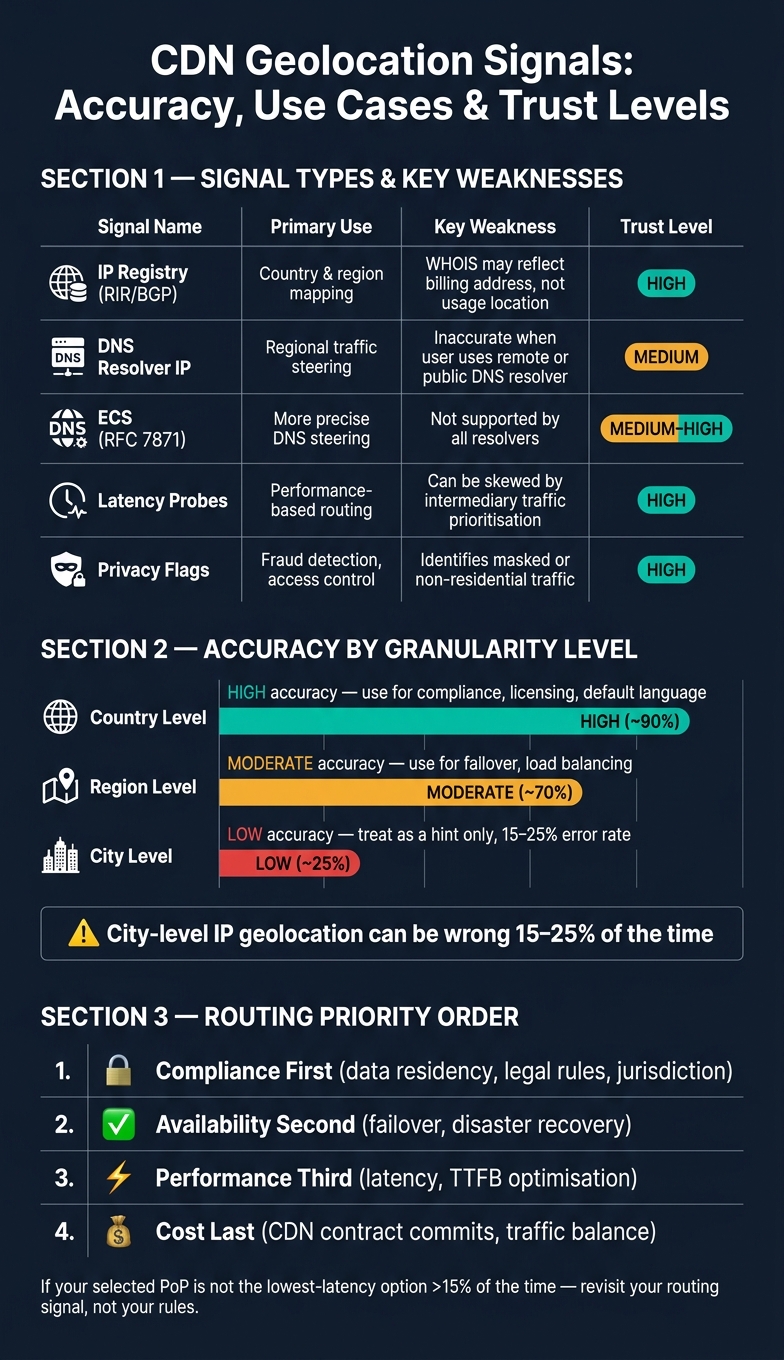 {CDN Geolocation Routing: Signal Types, Accuracy & Trust Levels}
:::
{CDN Geolocation Routing: Signal Types, Accuracy & Trust Levels}
:::
CDN geolocation works by inferring a user's location from IP and network signals. It’s an estimate, not a hard fact. What matters in practice isn’t where a user is on paper, but whether the signal is reliable enough to route traffic without causing trouble. That’s why routing decisions need to line up with signal quality.
Core geolocation signals used by CDNs
Most CDNs don’t lean on a single input. They combine a few signals and compare them.
IP-based mapping is the starting point. CDNs match the request IP against RIR, BGP and WHOIS data to infer country, region or city [5].
GeoDNS resolver signals add a common wrinkle. In a GeoDNS setup, the CDN often sees the IP of the recursive resolver - usually an ISP resolver or a public service such as 8.8.8.8 - instead of the end user’s actual IP [4][6]. EDNS Client Subnet (ECS), defined in RFC 7871, helps by passing along a shortened version of the user’s IP to the authoritative server. That can improve precision, but not all corporate or private resolvers support it [6][7].
Latency triangulation looks at round-trip time from several known edge locations to estimate physical proximity [5]. It works well as a second check, though intermediaries can skew results if they treat probe traffic differently from normal user traffic [1].
Privacy and masking flags cover Tor exit nodes, known VPN ranges, iCloud Private Relay and data centre IP blocks. These flags tell the CDN that the location signal may be weak or intentionally hidden [5].
| Signal | Primary use | Key weakness |
|---|---|---|
| IP registry (RIR/BGP) | Country and region mapping | WHOIS may reflect billing address, not usage location [5] |
| DNS resolver IP | Regional traffic steering | Inaccurate when the user uses a remote or public DNS resolver [6][9] |
| ECS (RFC 7871) | More precise DNS steering | Not supported by all resolvers [6] |
| Latency probes | Performance-based routing | Can be skewed by intermediary traffic prioritisation [1] |
| Privacy flags | Fraud detection, access control | Identifies masked or non-residential traffic [5] |
The source of the signal matters. Its failure modes matter even more.
Accuracy limits and common failure modes
Accuracy drops fast below country level, and city targeting is where things often start to fall apart [5][8].
Mobile networks are the biggest source of error. Carriers often route traffic through central gateways, so a user can appear to be in another city or even another country [8]. Roaming adds another layer of mess. A mobile user on a roaming agreement may be geolocated to their home country, not the place where they’re standing [6]. Corporate VPNs create much the same issue, with traffic tunnelled through a central proxy that makes users appear to be in the proxy’s location instead of their physical office [9].
A sensible rule of thumb is simple:
- Use country-level data for compliance, licensing and default language.
- Treat city-level data as a hint, not a rule.
If your chosen edge node is not the lowest-latency option more than 15% of the time, the routing signal is probably stale or the method needs another look [1].
Those limits shape whether routing should follow country, region or language.
How CDNs route traffic by location
Signal accuracy is only half the story. The next part is what the CDN does with those signals: which server gets the request, how traffic is shifted, and what happens when part of the network starts struggling.
Edge selection, DNS routing and origin steering
GeoDNS points users towards a region. Anycast, by contrast, sends traffic to the nearest reachable PoP from a network point of view [4][6].
That sounds neat on paper, but there’s a catch: the network-nearest PoP isn’t always the fastest one. Peering arrangements and congestion can get in the way, so a PoP that looks farther away may still respond sooner.
Once traffic lands inside the PoP, the CDN spreads requests based on health, capacity and content type [4][9]. And when the CDN needs to fetch from origin, it will often use an origin shield. That’s a regional node that gathers cache misses before they hit origin, which helps cut repeat load [9].
Anycast will usually fail over faster. GeoDNS is tied to DNS TTLs and resolver caching, which can slow changes down [4][9]. For active failover, short TTLs are common - often around 30–60 seconds - but pushing them much lower doesn’t always help. Some recursive resolvers clamp the value anyway, and lower TTLs can add query load without giving you better agility [3][11][12].
When to route by country, region or language
| Granularity | Best Use Case | Primary Trade-off |
|---|---|---|
| Country | Legal/compliance, pricing, data residency | Higher latency for geographically large countries |
| Region | Resilience, origin load balancing, disaster recovery | Moderate cache fragmentation |
| City | Gaming, real-time streaming, low-RTT applications | High operational complexity |
| Language | UX personalisation, A/B testing | Significant cache hit rate reduction |
Country-level routing is the best default when you need policy enforcement or pricing that changes by jurisdiction. Anycast on its own can’t guarantee data residency, because BGP chooses the network path - not your policy rules. And for strict UK data residency, DNS-layer routing can be shaky when resolver location doesn’t line up with the user’s location. In that case, load balancer routing with explicit deny-by-default rules is safer [6][12].
Region-level routing works well for resilience and origin load balancing. If one PoP starts to degrade, regional steering can move traffic to a healthy cluster without forcing users through a full failover event. Language-based routing is better handled at the application layer, where stable rules help keep the user experience consistent [6][4][9].
A sensible way to set this up is as a filter chain: compliance first, availability second, performance third, cost last [10]. Get that order wrong - say, chasing lower latency before checking data residency rules - and you can end up with compliance risk that’s messy to fix later.
Those routing rules form the policy layer; the next step is keeping localisation and cache variants under control.
How to localise content and cache variants without harming cache hit rate
Once routing is in place, keep localisation at the cache layer so you don't split traffic across the edge more than you need to.
Every extra cache-key dimension - country, language or region - turns one hot object into several colder ones and puts more pressure on the origin. The fix is simple in principle: normalise edge values before cache-key generation. In practice, that means turning messy raw header values into a small, predictable set of buckets so the CDN only has to manage a limited number of variants.
Design cache keys for location-aware delivery
The default cache key is {protocol}://{host}{path}?{query_string}. You can add a header like CloudFront-Viewer-Country or CF-IPCountry to that key, but the hard part is knowing when to leave it out [3]. If you're serving a product image or a CSS file, location doesn't matter. Add it anyway, and you just chop up the cache for no reason. Save location-aware keys for content that does change by place: pricing pages, legal notices and localised marketing copy.
Query string hygiene matters too. Parameters such as utm_source or fbclid don't change what the user sees, but if they sit inside the cache key, each campaign URL creates a separate cache entry. Use an allowlist for the parameters that do affect content, and strip the rest before caching [3][13]. And if your regional audience is small, don't go down to city level unless you have to. A broader normalised variant is usually the better call.
Match localisation to content type
Not every asset deserves the same level of variation. JavaScript and CSS bundles should use versioned, content-hashed filenames such as main.a1b2c3.js, paired with a one-year TTL; Netflix uses versioned URLs for its global bitrate ladders in much the same way [3]. HTML and API responses need a different setup, with short TTLs and stale-while-revalidate.
| Content Type | Localisation Model | Best-Fit Use Case |
|---|---|---|
| Static assets (JS, CSS) | Versioned URLs | Global, no localisation needed |
| Marketing pages | Full-page variants (normalised) | Country-level copy, promotions |
| Pricing / language | Edge compute (e.g., Workers) | Country or region-based content |
| Legal / compliance notices | Redirects or LB-layer pinning | Jurisdiction-specific content |
| User account pages | Client-side or private cache | Authenticated, session-specific data |
Keep localised content consistent across edge locations
A hard purge removes cached content at once. That sounds tidy, but it can trigger a thundering herd and send a cache hit ratio from 98% straight down to 0% [3]. A soft purge - or stale-while-revalidate - works more smoothly. It marks content as stale instead of deleting it, which keeps responses fast while the cache refills and stops the origin from taking a beating.
For TTLs, a sensible starting point is one year for hashed static assets, five minutes to one hour for HTML pages, and zero for anything user-specific [3]. Infrastructure-as-code setups can cut rollback time to under 90 seconds [14]. It's also worth watching cache hit ratios per PoP, not just at a global level. If Frankfurt is sitting at 94% while Singapore is at 62%, that's usually a sign of inconsistent Vary headers or a regional origin health issue, not a traffic quirk [14].
From here, the job is to keep those variants lined up across PoPs and deployments. Next, verify that geolocation rules are trusted, measured and rolled out safely.
How to trust geolocation signals, measure results and improve over time
Trust CDN geolocation headers and reject untrusted client input
After you localise content at the edge, check the location signal behind each decision. Start with CDN geolocation headers and treat client input as untrusted.
CDN-injected headers such as CF-IPCountry or X-Akamai-Edgescape are added after the TCP/TLS handshake ends at the edge. That makes them the most reliable signal available for this job [7][6]. By contrast, client-supplied headers such as X-Forwarded-For should not drive security-sensitive logic or compliance-led routing, because they can be spoofed [12][10].
Only accept geolocation headers from CDN IP ranges, and strip or ignore everything else [12]. That one step closes off a common weak spot.
It also helps to remember where GeoDNS can go wrong. GeoDNS looks at the resolver IP, not the user IP. So if someone is on a VPN, or using Google's 8.8.8.8 without EDNS Client Subnet (ECS) support, the resolver IP may point to the wrong region [11][6]. In plain terms, the map can be off even when the request itself is fine.
| Signal Source | Trust Level | Recommended Use | Risk Factor |
|---|---|---|---|
| CDN-Injected Header | High | Routing logic, localisation | Minimal if IP-restricted |
| EDNS Client Subnet | Medium–High | Improving GeoDNS accuracy | Privacy-focused truncation |
| Resolver IP | Medium | Coarse regional routing | VPN/proxy misalignment |
| Client-Supplied Header | Low | Debugging only | High - spoofing risk |
| BGP Anycast Path | High | Network-layer load balancing | BGP leaks/hijacks |
Once you trust the signal, the next step is simple: check whether the routing is helping users and reducing pressure on origin.
Measure regional performance, origin offload and traffic balance
When routing goes live, you need hard numbers. Otherwise, you're guessing.
The main metrics to watch are TTFB by region, p95 edge RTT, cache hit ratio by country and PoP, error rate by location, redirect accuracy, and traffic balance. A sensible target is under 250 ms TTFB for EU users, above 90% cache hit ratio for static assets, and under 5% misrouted requests [10][2]. You can inspect x-served-by or x-cache to verify which region handled the response [12].
Traffic balance often gets missed, but it can hit cost and reliability at the same time. If one PoP takes too much of the load, you can end up pushing past CDN contract commits and putting too much strain on a single edge location. Try to keep traffic within 10% of your contract commit per provider [10].
Real User Monitoring adds another useful check. If the chosen node is not the lowest-latency option more than 15% of the time, your routing signal is probably stale and needs a refresh [1]. That's usually the moment to revisit the data, not to keep piling on more rules.
Refine rules with controlled rollout and governance
Roll out new geolocation rules in a small region first, then check latency and traffic share before expanding [10]. It is a safer way to spot issues early, without changing everything in one go.
Keep active DNS TTLs between 30 and 120 seconds. Higher values slow failover, while lower ones are often ignored [12][10].
Set rule order with a clear priority: compliance first, then availability, performance, and cost [10]. Manage CDN configuration as code, so pull requests can run latency-budget tests before merge [2]. Review policies every month as geolocation mappings shift fast [1].
Conclusion: Build geolocation rules that improve performance without adding risk
The practical rule is simple: use the least precise location signal that still meets the policy. Use Anycast for performance-first routing when network path matters more than geography.
Set traffic rules in a clear order: compliance first, then availability, then performance, then cost. Every policy also needs a global fallback rule for unknown locations. Without that fallback, requests can end up in the wrong region.
This only works if cache variants stay under control. Limit variation to what actually changes between regions, and use consistent hashing so the same asset stays on the same edge path.
Measure what matters: p95 TTFB, cache-hit ratio by PoP tier, and routing accuracy. If your selected node is not the lowest-latency option more than 15% of the time, the signal needs attention, not more rules piled on top of it [1].
With those checks in place, geolocation stays a control rather than a source of risk.
Geolocation is a strong tool when it is used with care and measured properly. Problems start when the precision is wrong, fallbacks are missing, or results aren't being tracked.
FAQs
When should I use country, region or city routing?
Use country or region routing mainly for compliance and legal needs, such as data residency or regional licensing. Think of it as a policy layer, not a performance layer.
City-level routing needs a light touch. Geolocation data often isn’t precise enough to give steady latency gains, so it can miss the mark.
For general performance, stick with Anycast. If performance is critical, pair GeoDNS for regional policy control with Anycast inside those regions.
How do I stop geolocation from hurting cache hit rate?
Geolocation routing can hurt cache hit rate. Why? Because it spreads traffic across too many edge nodes, so each node ends up caching the same content on its own.
A better approach is a metadata-only edge strategy. Keep large static assets on regional mega-POPs, and store only the specific content you need at the localised edge. That way, you avoid filling lots of small caches with duplicate files.
In multi-CDN setups, an active-active model also helps keep caches warm across providers instead of leaving one side cold until traffic shifts.
What should I measure to know if CDN geolocation is working?
Measure both routing accuracy and the user experience across regions.
Look at a few simple checks:
- DNS resolution consistency
- The actual connection endpoint
- Response headers that show the serving region
- p90 TTFB from RUM or synthetic probes
This gives you two views at once. First, you can see whether traffic is being sent where you expect. Second, you can see whether people are getting the speed they should get in each region.
If latency doesn’t line up with geographic expectations, dig into resolver-mapping issues. A user in Manchester, for example, shouldn’t be hitting an edge location much farther away without a good reason.
These checks help confirm that your CDN is meeting latency targets and compliance requirements.