
Vertical scaling is about upgrading a single server's resources (CPU, memory, or storage) to handle more workload, offering simplicity but with limits. While it suits consistent workloads and monolithic applications, it comes with challenges like hardware ceilings, downtime, and rising costs that may not match performance gains. Here's the quick takeaway:
-
Benefits:
- Works well for steady workloads.
- Simplifies operations (no need for load balancers or distributed systems).
- Quick resource upgrades boost performance.
-
Challenges:
- Hardware limits restrict scalability.
- Downtime during upgrades.
- Costs can spiral due to licensing fees, overprovisioning, and diminishing returns on performance.
-
Optimisation Tips:
- Right-size instances: Match resources to actual needs to save costs.
- Use vertical auto-scaling: Dynamically adjust resources for real-time demand.
- Hybrid scaling: Combine vertical and horizontal scaling for flexibility and redundancy.
- Regular audits: Identify cost-saving opportunities through tools like AWS Compute Optimiser.
Vertical scaling is a practical choice for predictable workloads and small teams, but balancing cost and performance requires careful planning and regular adjustments. For UK businesses navigating cloud infrastructure, the right strategy can help manage costs while maintaining reliability.
::: @figure 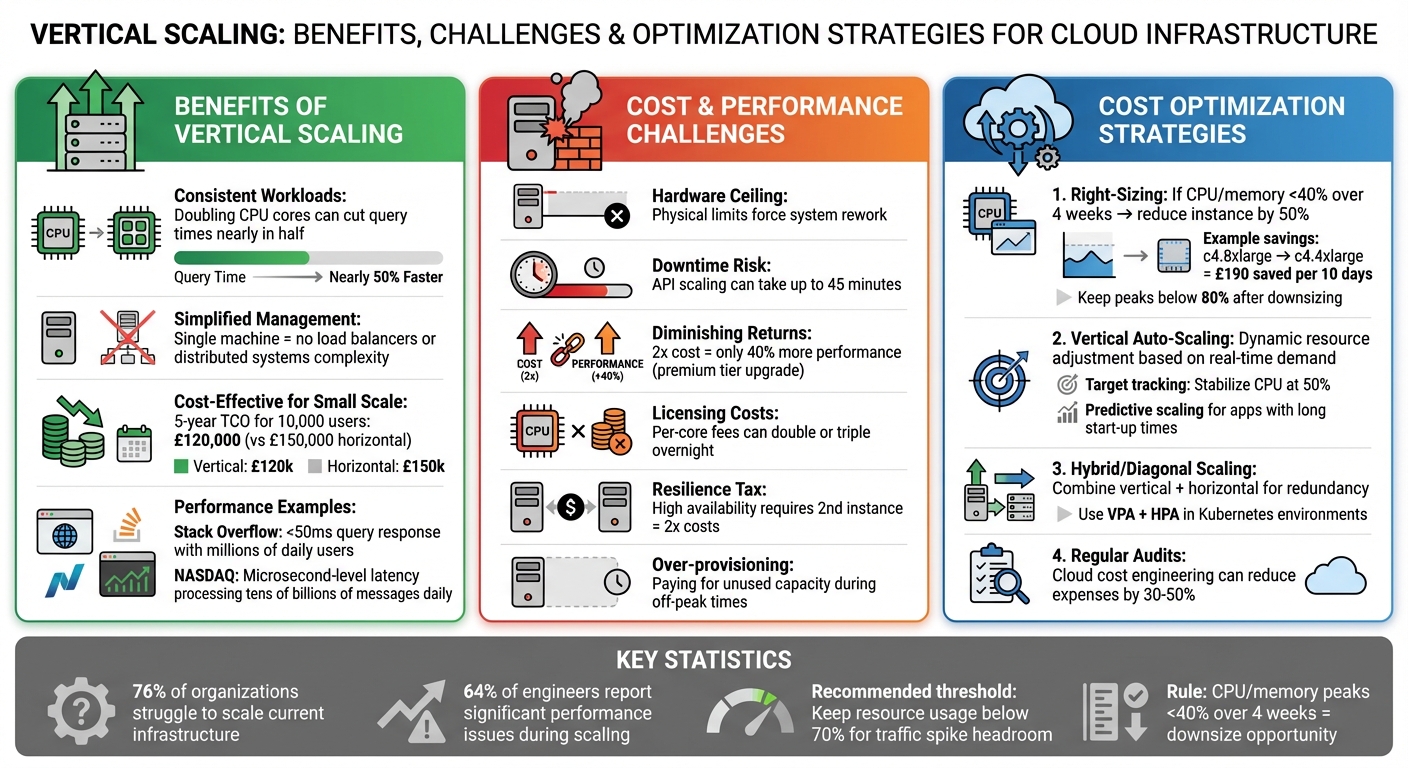 {Vertical Scaling Cost vs Performance Trade-offs: Benefits, Challenges and Optimization Strategies}
:::
{Vertical Scaling Cost vs Performance Trade-offs: Benefits, Challenges and Optimization Strategies}
:::
Horizontal Vs. Vertical Scaling: Which One Is Right For Your AWS Setup?
Challenges of Vertical Scaling: Cost vs Performance Trade-offs
Vertical scaling might seem straightforward, but it comes with some tough hurdles. The main sticking points are hitting hardware limits and rising costs that don't always deliver matching performance improvements.
Performance Limitations of Vertical Scaling
One of the biggest issues with vertical scaling is that hardware upgrades eventually hit a ceiling. When that happens, the only option is to rework your system - often pushing you towards horizontal scaling instead.
Another challenge is downtime. Unlike horizontal scaling, where you can add servers without interrupting services, vertical scaling usually involves a restart. For instance, scaling API Management instances can take up to 45 minutes, leaving your system vulnerable during sudden traffic spikes [7].
Then there's the risk of putting all your eggs in one basket. A single-instance failure could take down your entire workload. To mitigate this, many organisations deploy a backup instance, but this effectively doubles costs - a phenomenon sometimes called the resilience tax
[6].
And even if you invest in higher resource tiers, the returns diminish quickly. Doubling your spending doesn’t necessarily double performance, especially when bottlenecks like disk I/O or network bandwidth come into play. These constraints often lead to steep cost increases without proportional benefits.
The Cost Escalation Problem
Costs don’t just increase - they can spiral. Moving to premium instances often brings a steep price hike. For example, upgrading from a mid-tier to a high-tier instance might cost twice as much but only give you about 40% more performance.
Licensing fees add another layer of complexity. Enterprise software like Windows Server, SQL Server, and Oracle databases often charges based on core count. This means upgrading to a larger instance can double or even triple your licensing costs overnight. To meet Service Level Objectives (SLOs) for high availability, you might also need to deploy a second large instance in a separate Availability Zone. Toyez, a full-stack engineer, highlights this issue:
Provisioned IOPS can dominate the bill on stateful services, andeven if a single large box is 'enough,' your SLO may force a second one[6].
Another common problem is overprovisioning. Companies often allocate resources for peak loads, leaving them with unused capacity during quieter times. Li-Or Amir from Flexera points out:
In general, vertical scaling can cost more... When resources aren't right sized correctly - or at all - costs can skyrocket[4].
This means you're often paying for capacity that sits idle, and scaling down to save costs usually involves disruptive downtime. It's a tough balancing act that makes vertical scaling less appealing for many organisations.
Benefits of Vertical Scaling: When It Works Best
Vertical scaling delivers quick performance improvements without the intricacies of managing distributed systems.
Performance Gains for Consistent Workloads
For workloads with steady and predictable resource needs, vertical scaling shines. Simply upgrading server resources - like doubling CPU cores - can significantly improve performance, sometimes cutting query times nearly in half [10]. Take Stack Overflow, for instance. It handles millions of daily users with finely tuned, vertically scaled databases, ensuring query responses stay under 50 milliseconds. Similarly, NASDAQ relies on specialised servers to process tens of billions of messages daily, achieving microsecond-level latency [10]. Since all communication happens within a single machine, vertical scaling also minimises latency.
For organisations serving around 10,000 users, vertical scaling can be more cost-effective in the long run. Over five years, the Total Cost of Ownership (TCO) for vertical scaling is estimated at £120,000, compared to £150,000 for horizontal scaling [10]. These performance advantages make vertical scaling a practical choice for many scenarios.
Simplified Management and Efficiency
Vertical scaling doesn’t just boost performance - it also simplifies operations. By consolidating resources on a single machine, businesses can avoid the complexity of load balancers, intricate health checks, or synchronising data across multiple servers. As Sneha Naik, Frontend Developer II at CloudThat, notes:
For startups and small applications finding product-market fit, vertical scaling offers the fastest path forward.[8]
Modern cloud platforms make scaling up remarkably easy, often allowing instance resizing with just a click [2][11]. For legacy and monolithic applications, vertical scaling sidesteps the need for expensive code rewrites [8][9][10]. It also reduces coordination overhead by maintaining a single process space, kernel scheduler, and cache hierarchy [6].
However, keeping an eye on resource usage is essential. If CPU usage regularly exceeds 70% or memory usage stays above 80%, it might be time to upgrade [10]. Vertical scaling can serve as a cost-effective starting point, with horizontal scaling added later if sudden traffic surges demand it [11][12].
Strategies to Optimise Vertical Scaling Costs and Performance
Managing the balance between cost and performance in vertical scaling demands careful planning and regular adjustments. The strategies below can help organisations keep expenses in check while ensuring their applications remain efficient and responsive.
Right-Sizing Instances
Right-sizing is all about aligning instance types and sizes with actual workload requirements to cut unnecessary costs [5]. A common pitfall is the 'lift and shift' approach, which involves migrating workloads without tailoring instance configurations, leading to wasted resources. To avoid this, it's essential to analyse performance data over at least two weeks - ideally a month - to account for peak demand.
A useful rule of thumb: if peak CPU and memory usage stay below 40% over a four-week period, you can likely reduce the instance size by half [13]. For instance, switching from a c4.8xlarge EC2 instance to a c4.4xlarge could save around £190 every 10 days [13]. When downsizing, leave a safety margin - make sure CPU and memory peaks stay below 80% of the new instance's capacity [14].
As AWS puts it:
Right sizing is the process of matching instance types and sizes to your workload performance and capacity requirements at the lowest possible cost.[5]
Using Vertical Auto-Scaling
Vertical auto-scaling adjusts resources dynamically based on real-time demand, helping to avoid over-provisioning. The key is to use metrics that accurately reflect workload health. For example, in video transcoding tasks, queue depth often serves as a better trigger for scaling events than CPU usage [24,12].
Since vertical scaling often involves restarting instances to change their class, automating this process through APIs or SDKs can save time and reduce manual effort. Features like target tracking - used to stabilise metrics such as CPU usage at 50% - and predictive scaling, which prepares resources ahead of time for applications with lengthy start-up times, can further optimise performance and cost [16]. Storage scaling is also possible; tools like EBS Elastic Volumes let you increase capacity or adjust IOPS without downtime, avoiding the need to over-provision storage in advance [16]. When auto-scaling alone doesn't meet demands, combining it with other strategies can address its limitations.
Hybrid Approaches: Diagonal Scaling
Diagonal scaling blends vertical and horizontal scaling to tackle demand spikes while keeping costs manageable [1]. This approach reduces the risk of a single point of failure associated with vertical scaling by spreading workloads across multiple nodes, ensuring each node has the capacity for resource-heavy tasks. In containerised setups like Kubernetes, diagonal scaling leverages both the Vertical Pod Autoscaler (VPA) to optimise individual replicas and the Horizontal Pod Autoscaler (HPA) to adjust the number of replicas. This combination offers the simplicity of vertical scaling alongside the redundancy benefits of horizontal scaling [1]. It also paves the way for continuous cost monitoring and expert fine-tuning.
Cloud Cost Audits and Expert Support
With cloud expenses rising, regular cost audits are essential to maintain efficiency. Tools like AWS Compute Optimiser can help identify right-sizing opportunities for stable workloads [15]. However, interpreting these insights and implementing changes often requires specialist knowledge. Firms like Hokstad Consulting focus on cloud cost engineering, offering services that can cut cloud expenses by 30–50%. Their No Savings, No Fee
model ensures organisations only pay if measurable savings are achieved, with fees capped at a percentage of the savings. This approach provides expert guidance on right-sizing, auto-scaling configurations, and hybrid scaling strategies, all without upfront risk.
Conclusion: Making Informed Decisions on Vertical Scaling
Vertical scaling offers a way to enhance performance, but it requires a careful balance between costs and capabilities. As Microsoft Azure puts it:
The goal of cost optimising scaling is to scale up and out at the last responsible moment and to scale down and in as soon as it's practical[2].
This advice underscores the importance of using data to guide scaling decisions.
Statistics reveal that 76% of organisations struggle to scale their current infrastructure, while 64% of engineers report significant performance issues during scaling [10]. Additionally, high-end upgrades often lead to steep costs with only marginal performance improvements [17][2]. This makes it crucial to evaluate metrics like cost per transaction or resource usage to ensure efficient scaling [2].
Scaling isn’t a one-time fix - it’s an ongoing process. As Amazon EKS Best Practices notes:
Continually adjusting an application's resource requirements is more important than getting them right the first time[3].
Regularly monitoring CPU, RAM, and IOPS data is vital. Scaling should be based on critical thresholds rather than pre-emptively over-provisioning resources [2]. This aligns with earlier discussions on strategies like right-sizing, auto-scaling, and hybrid approaches.
For organisations grappling with cloud costs, expert guidance can be a game-changer. Professionals can uncover hidden expenses, such as per-core licensing fees (which can rise by 10–15%), provisioned IOPS, and resilience-related costs for high availability [10][6]. They also ensure that scaling changes are tested in isolation before being rolled out to production, protecting application reliability [3].
When right-sizing, auto-scaling, or using hybrid strategies, aim to keep resource usage below 70%. This provides enough headroom to handle sudden traffic spikes [10]. By combining well-thought-out strategies with regular audits and professional support, organisations can effectively balance performance needs with budget limitations.
For additional assistance, Hokstad Consulting offers expertise in cloud cost engineering and DevOps transformation, helping businesses optimise their vertical scaling strategies.
FAQs
When should I choose vertical scaling over horizontal scaling?
Choose vertical scaling when your workload is steady, manageable, or needs a straightforward upgrade. This approach focuses on boosting the capacity of a single server by adding resources like more CPU power, additional RAM, or increased storage. It works well for monolithic applications, such as databases or older systems, which aren't built to run across multiple servers. Vertical scaling is also a good option when you need to minimise downtime during upgrades or if your application isn't suited for distributed environments.
How can I reduce downtime when scaling up an instance?
To reduce downtime when scaling up an instance, focus on strategies that ensure a smooth transition. One effective approach is gradual vertical scaling, which maintains availability throughout the process. You can also take advantage of cloud elasticity features, such as dynamic scaling tools like target-tracking or predictive scaling. These mechanisms automate the process and adapt to changing demands without requiring manual adjustments. By implementing these methods, your application remains responsive and accessible during scaling activities.
What hidden costs make vertical scaling more expensive than it looks?
When it comes to vertical scaling, the hidden costs can quickly add up. Hardware upgrades often come with hefty price tags, especially as you move to more powerful systems. Then there are data transfer fees, which can sneak up on you if you're not monitoring usage closely. Regional pricing differences can also play a role, as the same resources might cost more depending on where they're hosted. And let's not forget storage retrieval charges, which can pile up when accessing archived or less frequently used data.
These factors can make scaling far pricier than you might expect. To keep costs under control, it's essential to dig into the pricing structures of your providers and look for ways to optimise your resource usage. Careful planning and regular cost analysis can go a long way in avoiding unpleasant surprises.