
Managing cloud costs effectively is no longer optional - it’s a financial and compliance requirement for UK businesses. Misclassified expenses, poor cost visibility, and manual reporting can lead to audit risks and financial inaccuracies. This guide explains how to align cloud spending with financial regulations like IFRS, UK GAAP, and sector-specific rules such as DORA and NIS2.
Here’s a quick summary of the 5 steps to achieve compliance and better cost management:
- Map Financial Rules to Cloud Costs: Understand how IFRS or UK GAAP impacts cost classification (e.g., CapEx vs OpEx).
- Standardise Tagging and Accounts: Use consistent tags (e.g.,
cost_centre,owner) and structured accounts for cost traceability. - Adopt FinOps-Based Allocation: Start with showback reporting, then move to chargeback for accurate cost attribution.
- Automate Reporting and Controls: Use tools to export, normalise, and reconcile billing data, ensuring audit-ready reports.
- Establish Governance: Form a Cloud Centre of Excellence (CCoE) to oversee policies, tagging, and continuous improvement.
These steps help UK businesses stay audit-ready, meet compliance standards, and reduce waste in cloud spending.
::: @figure 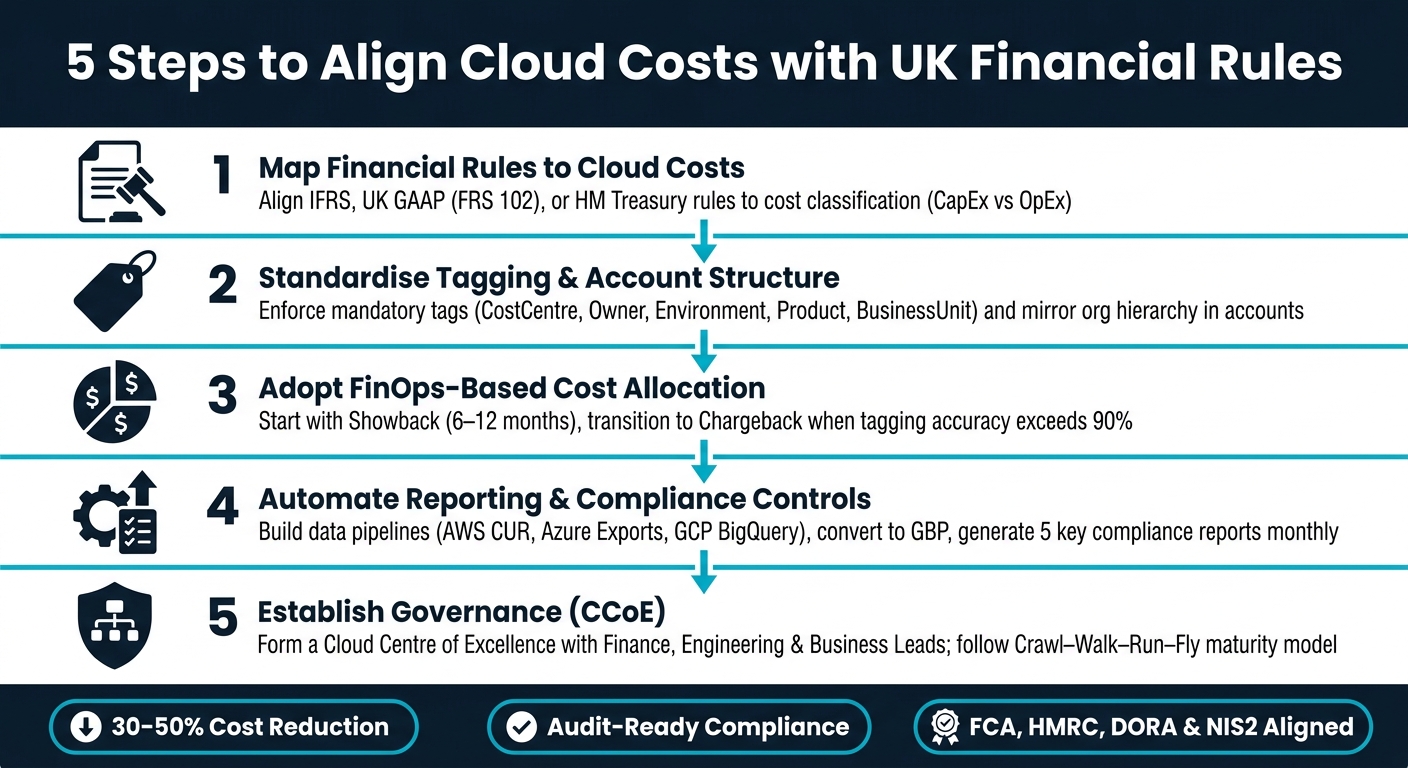 {5 Steps to Align Cloud Costs with UK Financial Rules}
:::
{5 Steps to Align Cloud Costs with UK Financial Rules}
:::
Cloud Cost Management: Top-Down FinOps & Context Explained (Deep Dive)
Step 1: Map Financial Rules to Cloud Cost Requirements
To report cloud costs accurately, you first need to align them with the financial rules relevant to your organisation. Skipping this step often leads to incomplete reporting, which can frustrate auditors and budget holders.
Financial Reporting Frameworks at a Glance
In the UK, businesses typically report under either IFRS or UK GAAP (FRS 102), which directly impacts how cloud costs are classified. For example, IFRS (specifically IAS 38) generally treats SaaS subscriptions as operating expenditure (OpEx) because you're paying for access to a service rather than acquiring an asset. However, classification as capital expenditure (CapEx) is possible if your organisation has control over the software, such as the contractual right to host it on-premises or exclusive usage rights.
For organisations reporting under UK GAAP, it's worth noting that the FRS 102 Periodic Review 2024 comes into effect on 1 January 2026 [4]. If your organisation uses this framework, ensure your cloud cost classifications remain compliant. Public sector bodies face additional considerations under HM Treasury's guidance, which requires costs to be categorised as either Departmental Expenditure Limits (DEL) or Annually Managed Expenditure (AME), and further divided into Programme (front-line services) and Administration (overhead) budgets [3].
The budgeting system is based on accruals accounting rather than cash accounting, consistent with both national accounts and departmental accounts.- HM Treasury [3]
This distinction is critical because cloud providers typically bill on a cash basis, while financial statements must reflect costs on an accruals basis - recording expenses in the period they were incurred, not when invoices are received [3].
Once you've identified the applicable reporting framework, formalise these guidelines in a cloud cost policy.
Creating a Cloud Cost Policy
After determining the right framework, the next step is to document your cloud cost policy. This policy should detail how costs are classified (OpEx vs CapEx), specify which cloud cost types fall into each category, and outline the level of reporting granularity required. It should also include the format finance teams need for reconciliation and audit purposes.
Here’s an example of how accounting treatments align with common cloud cost types under IFRS:
| Cost Type | Accounting Treatment | Condition |
|---|---|---|
| SaaS Subscription | Expense (OpEx) | Standard service access |
| Implementation (Distinct) | Capitalise (CapEx) | Creates an intangible asset the entity controls |
| Implementation (Non-distinct) | Expense (OpEx) | Expensed over the term of the cloud contract |
| Training / Data Conversion | Expense (OpEx) | Always expensed as incurred |
Your policy must also include a tagging schema. Tags are crucial for cost attribution, so enforce tags like cost-centre, project-code, environment, owner, and data-risk on every cloud resource [1][5]. Without these, allocating costs to the correct budget line becomes nearly impossible.
This policy sets the foundation for creating a Cloud Financial Control Matrix, which links financial rules to operational controls.
Building a Cloud Financial Control Matrix
The Cloud Financial Control Matrix translates your cloud cost policy into actionable controls and audit evidence. Think of it as the link between financial requirements and the operational capabilities of your cloud platform.
| Financial Rule | Cloud Requirement | Operational Control | Audit Evidence |
|---|---|---|---|
| FCA Handbook / PRA Rulebook | Cost traceability & oversight | Mandatory cost-centre and owner tags |
Tagging compliance report |
| HMRC Making Tax Digital | Digital record-keeping | Automated billing export to GBP (£) | Monthly reconciliation log |
| UK GDPR | Data residency compliance | Policy-as-Code to restrict regions | Resource location audit |
| Internal Budget Policy | Spend limitation | Tiered automated approval workflows | Budget vs. actual variance report |
| DORA / NIS2 | Concentration risk monitoring | Multi-cloud cost aggregation & tagging | Vendor spend distribution report |
A key practice here is automating evidence generation. Configure your cloud tools to produce monthly compliance reports - covering tagging coverage, budget variances, and resource location audits - so you're always audit-ready rather than scrambling to prepare under tight deadlines [1]. As one FinOps advisory firm highlights:
Chargeback without data quality is just an argument with a spreadsheet.- Out.Cloud FinOps Advisory [1]
If you're working with a specialist like Hokstad Consulting, building this matrix early in your cloud cost management process ensures that governance requirements are integrated from the start. This approach avoids the higher costs and complexity of retrofitting controls later.
Step 2: Standardise Tagging and Account Structure for Compliance
To maintain compliance with UK financial reporting standards, it's essential to trace every cloud resource back to its budget, team, and purpose. Achieving this requires consistent tagging and a clear account structure.
Defining a UK-Focused Tagging Standard
Tags play a crucial role in attributing cloud costs accurately. Without them, assigning expenses to the correct cost centre or project code becomes a guessing game. To ensure clarity, every resource should include these five essential tags:
| Tag Key | Purpose | Example Values |
|---|---|---|
| CostCentre | Links to your General Ledger | CC-1001, CC-2002 |
| BusinessUnit | Identifies organisational ownership | Engineering, Finance, Marketing |
| Product | Connects spend to a service or project | checkout-api, data-pipeline |
| Environment | Differentiates lifecycle stages | prod, staging, dev, sandbox |
| Owner | Assigns accountability | [email protected] |
For UK-specific requirements, additional tags may be necessary. For example:
- HMRC R&D Tax Credit claims: Use
ProjectandActivityTypetags to separate eligible R&D workloads from routine operations. - UK GDPR compliance: Add
DataClassificationandRegiontags to confirm personal data remains within the UK or EEA. - FCA resilience rules: Include a
Criticalitytag to flag infrastructure requiring disaster recovery audits [7].
To maintain consistency, enforce lowercase, hyphenated tag values (e.g., checkout-service instead of Checkout Service). This approach works across all major cloud providers, as AWS and GCP are case-sensitive, while Azure is not [6].
Once you've established a reliable tagging schema, the next step is to ensure these standards are consistently applied and integrated into your account structure.
Enforcing Tagging and Account Structure Practices
It's far more effective to enforce tagging at the time of resource creation than to rely on retrospective audits, which are often incomplete and time-consuming.
Most cloud providers allow you to enforce mandatory tagging policies during deployment. This ensures that untagged resources don’t end up in your billing data, preserving the integrity of cost reporting [7].
While tagging helps provide granular cost visibility, a well-structured account system ensures these costs are organised effectively across your organisation.
To complement tagging enforcement, set up budget alerts at thresholds like 50%, 75%, and 90% of your budget. These alerts act as helpful guardrails, guiding teams to stay on track without disrupting operations [1].
Structuring Accounts for Clarity and Compliance
While tags clarify the purpose of individual resources, a well-organised account structure defines how those resources fit within your organisation. Dividing business units, environments, and regulated workloads into separate accounts (or subscriptions/projects, depending on your cloud provider) simplifies cost reporting and ensures compliance.
To meet regulatory requirements and maintain audit readiness, align your account structure with your financial control matrix. A common method is to mirror your organisational hierarchy: set up one account per business unit at the top level, with sub-accounts for production, staging, and development environments. Regulated workloads, such as those handling personal data under UK GDPR or systems subject to FCA oversight, should reside in dedicated accounts. This makes it easier to generate isolated cost and compliance reports for auditors.
In Azure, you can enhance cost attribution further by combining tags with a standardised resource group naming convention. For instance, using a format like rg-{project}-{environment}-{region} (e.g., rg-checkout-prod-uksouth) allows you to quickly identify the project, lifecycle stage, and region associated with a resource group - without needing to examine individual records [6].
Step 3: Set Up FinOps-Based Cost Allocation and Chargeback
Once your tagging and account structure are in place, the next challenge is translating raw cloud invoices into something your finance team can actually use. This means creating a cost allocation model that's reliable, consistent, and aligns with how your organisation manages budgets. It also supports the compliance framework you've already established.
Cost Allocation Models: Showback vs Chargeback
Many organisations start with showback, where teams can view their spending without any financial consequences. Chargeback, on the other hand, takes it a step further by formally debiting costs from the consuming team's budget or profit and loss (P&L) statement, positioning IT as an internal service provider.
Showback is an informational cost allocation model where teams see their cloud costs without budget impact.- FinOps Foundation [9]
Choosing the right model depends on your organisation's current stage. Research by McKinsey shows that organisations using chargeback experience 15–20% less cloud waste compared to those sticking with showback [9]. However, only 34% of organisations have fully implemented chargeback, even though 82% use some form of cost allocation [9].
| Dimension | Showback | Chargeback |
|---|---|---|
| Money movement | None; informational only | Costs move to team budget or P&L [11] |
| Tagging requirement | 60–80% coverage acceptable | 90%+ accuracy required [13] |
| Organisational friction | Low | High; teams may resist new costs [11] |
| Complexity | Low; simple dashboarding | High; requires ERP/General Ledger integration [11] |
| Maturity phase | Crawl/Walk | Walk/Run [11] |
For most UK businesses, a practical approach is to start with showback for 6–12 months to build trust in the data, then transition to chargeback once tagging accuracy exceeds 90% [13]. Many organisations eventually adopt a hybrid model: chargeback for direct costs like compute and storage, and showback for shared services such as networking and security [13].
Once you've defined your allocation model, it's important to ensure it can withstand audit scrutiny.
Building an Auditable Allocation Model
Start by directly attributing costs using tags and account structures, then allocate shared costs proportionally - for example, by CPU-hours or revenue contribution [15]. Use amortised costs to distribute shared discounts fairly [8][11].
To make the model auditable, consider these two steps. First, if you're planning to move to chargeback, run a shadow chargeback period. This involves issuing mock invoices for 3–6 months before enforcing actual charges, allowing you to identify disputes early and build confidence in the data [13]. Second, establish a 10-business-day dispute window so teams can challenge allocations, reducing potential conflicts [11].
Chargeback without data quality is just an argument with a spreadsheet. Start with showback, fix the data, then move to chargeback when the numbers are defensible.- Out.Cloud Cost Governance Practice [1]
These steps help bridge the gap between improving data quality and producing reliable financial reports.
For UK businesses in regulated industries such as banking, insurance, and financial services, auditability is non-negotiable. Regulations like DORA and NIS2 require firms to demonstrate governance over outsourced services, including cost traceability for cloud workloads [1]. If your organisation operates internationally, cross-border chargebacks may also need a tax review to address transfer pricing risks and VAT reverse-charge mechanics [10].
Producing UK-Friendly Cost Reports
Once your allocation model is audit-ready, the next step is to generate cost reports tailored to UK financial systems. Since cloud providers typically bill in US dollars, you'll need to convert all costs to GBP. Use a consistent exchange rate - such as the Bank of England's monthly average - and document it in every report. This is crucial to separate currency fluctuations from usage-driven cost changes, maintaining the credibility of your FinOps programme [12].
Reports should use DD/MM/YYYY date formatting and align with your organisation's financial calendar rather than the default billing cycle of your cloud provider. To make the data accessible to finance teams, map cloud costs to familiar financial categories, such as IT Towers (e.g., Infrastructure, Security) and Business Capabilities (e.g., Customer Acquisition) [14].
Finally, reconcile three key timestamps in every report: usage time (when the resource was used), posting time (when the provider billed it), and invoice period (the billing cycle) [15]. Misaligning these timestamps is a common reason why cloud cost reports fail finance reviews.
Step 4: Automate Cost Reporting and Compliance Controls
Once you’ve nailed down a solid allocation model, the next step is to make your reporting process repeatable and audit-friendly. The goal? Eliminate manual tasks and ensure your finance team gets consistent, accurate data every time. Automation is key here, as it reduces human error and streamlines the entire workflow.
Automating the Cloud-to-Finance Workflow
Building on the allocation model from Step 3, the backbone of an automated cloud finance workflow is a data pipeline. This pipeline moves billing data from your cloud provider to your finance systems. Start by exporting raw billing data (e.g., AWS CUR, Azure Cost Exports, GCP BigQuery billing) to a central storage location like AWS S3 or Azure Data Lake Gen2. From there, use tools such as Azure Data Factory or AWS Glue to process and normalise the data before forwarding it.
A critical step in this process is reconciling cloud exports with actual invoices. This helps uncover fees, discounts, taxes, or timing differences that might otherwise go unnoticed.
A variance is not automatically bad. It can be a fee, discount, tax-related difference, marketplace charge or timing difference. The point is that it becomes visible and reviewable.- Sascha Bajonczak [17]
Keep your mapping tables version-controlled in Git repositories. These tables should link cloud account IDs and resource tags to your chart of accounts and UK cost centres. This ensures that changes, such as team restructures or new project codes, are tracked and auditable. To simplify the process across multiple cloud providers, adopt the FOCUS (FinOps Open Cost & Usage Specification) standard (v1.3) [18][19].
The opinionated part: do not try to solve chargeback with a spreadsheet at the end of the month. Build a cost allocation model into your landing zone, enforce the tags that matter, export raw cost data, then make every manual correction explicit and reviewable.- SBajonczak, Azure FinOps Toolkit [16]
For organisations operating in the UK, automate GBP conversion using the Bank of England’s monthly average exchange rate. Also, implement Role-Based Access Control (RBAC) to ensure finance teams view high-level cost data, while technical leads only access costs tied to their applications. This approach keeps sensitive financial data secure and aligns with GDPR requirements.
This automated workflow lays the groundwork for generating essential compliance reports.
Key Reports for Financial Compliance
Not all reports hold equal importance for your finance team. Below is a breakdown of the five most crucial report types for financial compliance in the UK:
| Report Type | Key Metrics | Financial Purpose |
|---|---|---|
| Cost by Cost Centre | Tagged spend, owner, business unit | Departmental budget accountability |
| OPEX/CAPEX Breakdown | Service type, resource lifecycle | Statutory accounting and tax treatment |
| Variance to Budget | Actual vs. forecasted spend, % variance | Financial planning and risk management |
| Anomaly Report | Spend spikes, root cause, remediation status | Fraud prevention and technical governance |
| Shared Cost Summary | Platform overhead, allocation % per team | Fair distribution of central services |
Each of these reports should be generated on a regular schedule - monthly as a minimum, but weekly for high-spend environments. Make sure they align with your organisation’s financial calendar, not just your cloud provider’s billing cycle.
With these reports in place, the next step is to establish controls to prevent and detect issues before they impact your finances.
Monitoring and Control Mechanisms
While automated reporting tells you what happened, monitoring and controls help you catch problems before they escalate. Combining preventive controls and detective controls is the most effective approach.
For preventive measures, use cloud-native tools like AWS Config Rules or Azure Policy to block the creation of resources missing mandatory tags (e.g., cost_centre, owner, or project) [2][20]. When implementing new policies, start in Audit
mode to identify gaps without disrupting workflows. Once teams are familiar with the changes, switch to Deny
mode [17]. Additionally, tools like AWS Instance Scheduler or Azure Start/Stop VMs can automatically shut down non-production workloads outside business hours, cutting costs by up to 65% [2].
Detective controls, on the other hand, involve setting up tiered budget alerts at 50%, 75%, 90%, and 100% of spend thresholds. For example:
- Route 50% alerts to team leads.
- Escalate 90% alerts to directors, requiring a mitigation plan.
- At 100%, trigger automated enforcement, such as blocking new resource provisioning [21].
Pair these alerts with machine learning-based anomaly detection to flag unusual spending patterns - like a sudden spike in database costs - within hours, not weeks [2][21].
For sectors like banking and financial services, where regulations such as DORA and NIS2 demand strict governance over outsourced services, automation can also generate evidence packs to ensure immediate audit readiness.
Step 5: Build Governance and a Continuous Improvement Process
Once you've set up automated reporting and embedded FinOps practices, the next step is ensuring these processes remain effective over time. This is where governance plays a critical role. Even with automation, robust governance helps maintain compliance and prevents processes from veering off course.
Creating a Cloud Centre of Excellence (CCoE)
One effective way to establish governance for cloud cost compliance is by forming a Cloud Centre of Excellence (CCoE). This cross-functional team takes ownership of the rules and ensures accountability. The group should include members from:
- Finance: Responsible for budgets, forecasting, and allocating shared costs.
- Engineering: Focused on tagging, automation, and managing resource ownership.
- Product or Business Leads: Ensuring cloud spending aligns with business goals.
Without a structured team like this, responsibilities can easily become unclear. A good practice is to hold weekly operational reviews for engineering teams to address issues like anomalies or quick wins. Additionally, schedule monthly executive reviews to align on budgets and long-term strategy [24][25][26]. This governance setup supports the artefacts and processes described below.
Governance Artefacts and Processes to Put in Place
To keep operations consistent, your CCoE should document key artefacts, such as:
- A cloud cost policy.
- A RACI matrix that defines tagging and spending responsibilities.
- A change management process integrated into architectural decisions.
A baseline tagging strategy is essential. For instance, enforce a minimum tag set like cost_centre, application, environment, and owner_email during resource creation using deny policies [27]. If resources lack the required tags, it signals a failure in governance. Ensure your FinOps tools generate monthly compliance reports that meet regulatory requirements from bodies like the FCA or HMRC. These reports should directly connect to the automated controls developed earlier in Step 4 [1].
Advancing Cloud Financial Management
Governance isn’t a one-time task - it needs to adapt and grow. The Crawl-Walk-Run-Fly model offers a clear path for improving cloud financial management:
| Maturity Phase | Timeframe | Focus | Key Activities |
|---|---|---|---|
| Crawl | 0–6 months | Visibility | Enable cost explorer tools, define tagging rules, set up anomaly alerts [20]. |
| Walk | 6–18 months | Optimisation | Introduce showback models, right-size resources, and purchase Savings Plans [20]. |
| Run | 18+ months | Culture | Focus on unit economics (e.g., cost per user or API call), automate policies, and treat cost as a KPI [20]. |
| Fly | Continuous | Audit-ready | Generate ongoing evidence, automate remediation, and establish multi-cloud governance [1]. |
Moving from the Walk phase to the Run phase can lead to a 20–30% reduction in cloud spend compared to unmanaged environments [26]. At the Run stage, the focus shifts to unit economics - measuring costs at a granular level, such as per customer or per transaction - connecting cloud investments directly to business outcomes. This continuous improvement approach not only controls costs but also ensures compliance with UK financial regulations.
Leadership does not ignore FinOps reporting because cloud cost is unimportant. Leadership ignores FinOps reporting when the reporting stack fails to answer three recurring questions: what changed, who owns it, and what should happen next.- Frank Song, Software Engineer and Technology Writer [22]
For organisations in regulated industries like financial services, healthcare, or the public sector, reaching the Fly phase is especially critical. As Wayne Horkan, Author and Architect, puts it:
In regulated financial services, cost is not merely a financial concern. It is an architectural control.- Wayne Horkan [23]
At this advanced stage, cloud cost governance evolves from being a tool for efficiency to a necessity for regulatory compliance.
Conclusion: Five Steps to Align Cloud Costs With Financial Rules
Keeping cloud costs in line with financial regulations is not a one-off task - it’s an ongoing effort. This guide has outlined a five-step strategy: aligning policies, standardising tagging, automating controls, and establishing continuous governance. Together, these steps create a cohesive, audit-ready framework.
This approach is crucial for meeting standards such as FCA guidelines, HMRC requirements, and regulations like DORA and NIS2. As FinOps becomes more integral to audits, the importance of cost transparency cannot be overstated:
If you cannot attribute a cloud cost to an owner, a project, and an approval, you do not have cost visibility. You have cost monitoring. Those are different things.[1]
One key recommendation is to automate tagging enforcement to ensure compliance. By implementing deny policies in platforms like AWS or Azure, you can block untagged resources at the deployment stage. This makes compliance a built-in feature rather than an afterthought [1].
For organisations ready to adopt this structured approach, Hokstad Consulting provides expert support. Whether you’re just starting out or need to refine your processes, they can help cut costs by 30–50%, establish auditable cost structures, and ensure your infrastructure aligns with financial and regulatory standards.
FAQs
How do I determine if cloud spend is OpEx or CapEx under IFRS or UK GAAP?
When determining how to classify cloud spending under IFRS or UK GAAP, the key is to evaluate whether the arrangement grants control over a specific, identified asset. Most cloud service agreements are considered service-based, meaning their costs are generally treated as operating expenses (OpEx) and recorded as they occur.
In contrast, capital expenditure (CapEx) might apply, but only if the arrangement meets the criteria for a lease under IFRS 16 or qualifies as an intangible asset under IAS 38. For implementation costs, it’s essential to examine whether the related services are distinct and whether the organisation has control over the software access.
Which tags should be mandatory to make cloud costs audit-ready in the UK?
To keep cloud costs audit-ready in the UK, it's crucial to standardise tagging so it aligns with your finance ledger's dimensions. The must-have tags include:
- Cost centre: Helps track expenses against specific departments or units.
- Owner: Identifies who is responsible for the resource.
- Project or application: Links costs to specific initiatives or software.
- Environment: Differentiates between production, development, testing, etc.
Aiming for at least 95% tagging accuracy ensures you can properly assign and monitor spending. To make this process more efficient, leverage cloud-native governance tools. These tools can automate tagging, block untagged resources from being created, and maintain detailed audit trails. This approach not only simplifies cost allocation but also ensures you're meeting regulatory compliance requirements.
When should we move from showback to chargeback without causing disputes?
Transitioning from a showback to a chargeback model requires careful preparation to avoid unnecessary conflicts. Start by ensuring tagging compliance is above 90%, as this is crucial for accurate cost tracking. Operate your showback model consistently for 2–6 months to stabilise operations and identify potential issues. Additionally, develop a finance-approved cost allocation method for shared infrastructure to ensure fairness and transparency.
Before moving forward, confirm that finance systems are equipped to manage budget deductions seamlessly. It's also essential to establish a formal dispute resolution process to address any concerns that may arise. Finally, secure explicit support from the CFO to provide the chargeback model with the necessary authority and legitimacy.