Cloud-native tools simplify FinOps compliance by ensuring cloud spending is transparent, allocated, and aligned with business goals. Using services from AWS, Azure, and Google Cloud, organisations can automate cost governance, enforce policies, and prepare for audits. Key takeaways include:
- Cost Allocation: Use tagging (
environment,team,cost-centre) to track expenses by team or project. Start with Showback (visibility) and move to Chargeback (direct cost assignment). - Governance: Tools like AWS SCPs, Azure Policy, and GCP Organisation Policies block non-compliant resources from being created. Begin with
Audit
mode, then enforce stricter controls. - Auditability: Ensure compliance with layered reporting - billing data, business mapping, and executive insights. Use standards like FOCUS for multi-cloud setups.
- Automation: Integrate cost controls into CI/CD pipelines and automate alerts at spending thresholds (e.g., 80%, 100%).
Cloud providers offer built-in tools for these needs:
- AWS: Cost Explorer, Budgets, Billing Conductor, and Anomaly Detection.
- Azure: Cost Management, Policy, Reservations, and Savings Plans.
- Google Cloud: FinOps Hub, BigQuery Export, and Cost Anomaly Detection.
Proper tagging, ownership assignment, and automated enforcement can reduce cloud expenses by 20–35% within a year. These practices shift cost accountability to engineering teams, improving transparency and efficiency.
Key Components of FinOps Compliance
Cost Allocation and Budgeting
Getting cost allocation right is a cornerstone of managing cloud spending effectively. By using a consistent tagging strategy - requiring tags like Environment, Team, CostCenter, and Project - organisations can tie expenses to the teams responsible for them. This approach supports models like Showback, which provides visibility into spending, and Chargeback, which directly assigns costs to teams. Many companies start with Showback and transition to Chargeback as their FinOps practices evolve [6][1][2].
Budgeting can be streamlined by automating processes. For instance, setting monthly spending limits with alerts triggered at 80% and 100% thresholds ensures better control [3][7].
Visibility isn't a dashboard - it's discipline. And it starts with a tag.- Cloudaware [2]
Once cost allocation and budgeting are in place, governance mechanisms ensure these allocations are consistently enforced.
Governance and Policy Enforcement
FinOps governance ensures that every resource is tracked and compliant from the moment it is created.
Cloud-native policy tools play a critical role here. Examples include AWS Service Control Policies (SCPs), Azure Policy, and GCP Organisation Policies, which can be configured to block the creation of resources without required tags or those outside approved regions or SKU types [8][4][9]. A phased rollout is key: start in Audit or Warning mode to gauge the impact on workflows, then move to Deny mode once teams are ready [8][9][10].
It’s important to differentiate between guardrails, which guide behaviour (e.g., budget alerts at 75%), and gates, which block non-compliant actions. Both have their place, but relying too heavily on gates early on can disrupt workflows and frustrate engineering teams.
If you cannot attribute a cloud cost to an owner, a project, and an approval, you do not have cost visibility. You have cost monitoring. Those are different things.- Out.Cloud FinOps Advisory [4]
Auditability and Reporting
After establishing allocation and governance, auditability ensures compliance is verifiable. This is especially critical in regulated sectors like banking, healthcare, and telecoms, where demonstrating control over cloud costs is often a mandatory audit requirement [4].
Effective reporting operates across three layers:
- Source layer: Captures raw billing data, such as AWS Cost and Usage Reports or GCP BigQuery exports.
- Modelling layer: Maps costs to business units and applies shared-cost policies.
- Decision layer: Provides stable, governed figures for leadership review [14].
This layered approach ensures that while engineers work with granular data for day-to-day decisions, executives receive stable, high-level insights suitable for strategic planning.
For organisations using multiple cloud providers, adopting the FinOps Open Cost and Usage Specification (FOCUS) is becoming essential. FOCUS offers a standardised, vendor-neutral schema for billing data, simplifying cross-cloud comparisons and audit processes [12][13]. Pairing this with machine learning-powered anomaly detection can flag unexpected spending spikes early, reducing the risk of costly surprises [6].
Need help optimizing your cloud costs?
Get expert advice on how to reduce your cloud expenses without sacrificing performance.
Cloud Cost Allocation Model that Actually Works!
Cloud Provider Services for FinOps Compliance
::: @figure 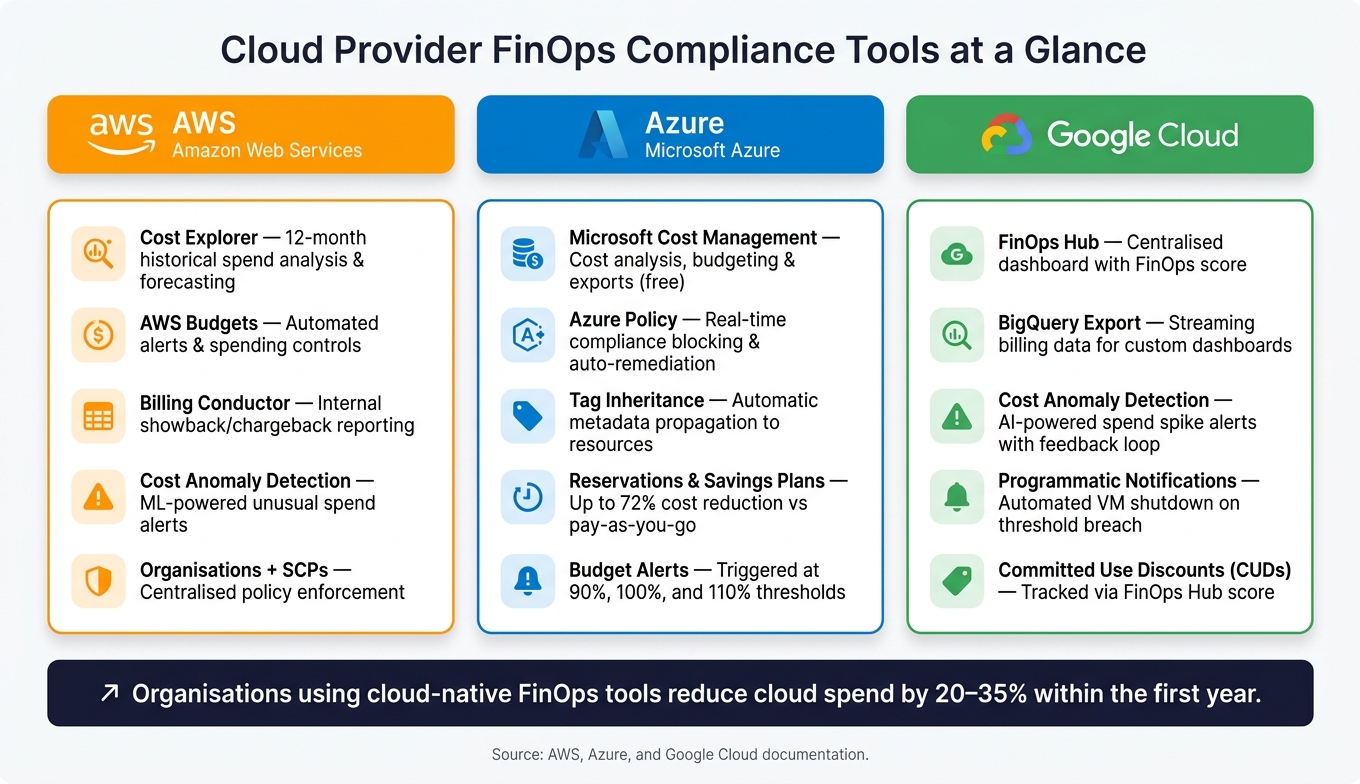 {AWS vs Azure vs Google Cloud: FinOps Compliance Tools Compared}
:::
{AWS vs Azure vs Google Cloud: FinOps Compliance Tools Compared}
:::
Major cloud providers offer built-in tools to help organisations maintain FinOps compliance. These tools focus on cost allocation, governance, and auditability, turning theoretical frameworks into actionable, automated processes.
AWS: Cost Management and Governance Tools
AWS provides a suite of tools designed for cost transparency and automated enforcement. AWS Cost Explorer is a key feature, offering up to 12 months of historical spending data and projections for the next year. This makes it a reliable tool for analysing trends and maintaining audit trails [16]. Another essential tool, AWS Budgets, enables automated actions such as applying an IAM policy to block new resource provisioning once a specific spending limit is reached [18].
For organisations with multiple accounts, AWS Organisations combined with Service Control Policies (SCPs) offers centralised control, like restricting resource creation to approved regions [15][17]. AWS Cost Anomaly Detection uses machine learning to identify unusual spending patterns and generates alerts when thresholds are exceeded [17]. Meanwhile, AWS Billing Conductor simplifies internal billing by supporting showback and chargeback workflows, allowing tailored reports for different business units [16].
| Service | FinOps Function |
|---|---|
| Cost Explorer | Historical spend analysis and 12‑month forecasting [16] |
| AWS Budgets | Alerts and automated spending controls [18] |
| Billing Conductor | Internal showback/chargeback reporting [16] |
| Cost Anomaly Detection | Alerts for unusual spend patterns [17] |
| Organisations + SCPs | Centralised policy enforcement [15] |
AWS’s tools are complemented by Azure’s strong cost management and compliance capabilities.
Azure: Cost Management and Policy Controls
Microsoft Cost Management provides cost analysis, budgeting, and automated data exports, all at no additional cost [19]. This tool has proven effective in practice. For instance, BP's Microsoft Platform Chief Architect, John Maio, shared that the company managed to cut cloud costs by 40%, even as their total usage nearly doubled [21].
We've used Microsoft Cost Management to help cut our cloud costs by 40 percent. Even though our total usage has close to doubled, our total spending is still well below what it used to be.- John Maio, Microsoft Platform Chief Architect, BP [21]
Azure Policy ensures compliance by blocking non-compliant resources in real time and automating remediation processes [20]. Cost attribution is enhanced through tag inheritance, which automatically applies metadata from subscriptions to individual resources, making allocation data more complete [23]. A practical budgeting strategy involves setting alerts at 90%, 100%, and 110% of the budget to monitor spending effectively [24]. Additionally, Azure Reservations and Savings Plans can reduce costs by up to 72% compared to pay-as-you-go pricing [22][23].
Google Cloud also offers its own tailored solutions for FinOps compliance.
Google Cloud: Billing and Governance Features
Google Cloud’s FinOps Hub acts as a centralised dashboard, bringing together savings opportunities, idle resource tracking, and a FinOps score. This score reflects how well teams are adhering to cost management principles, factoring in elements like spend monitoring frequency, label usage, and adoption of committed use discounts (CUDs) [25].
Programmatic Notifications enable automated actions, such as shutting down non-essential virtual machines when spending thresholds are exceeded [26][28]. For advanced analysis, BigQuery Export streams detailed billing data into a queryable dataset, making it easier to create custom dashboards and share insights across teams [27]. Finally, Cost Anomaly Detection uses AI to flag unexpected spending spikes and includes a feedback loop for teams to mark whether a spike was anticipated, improving the tool’s accuracy over time [29].
Best Practices for Implementing FinOps Compliance
FinOps compliance isn't just about tools - it's about how you integrate them into your workflows. Success comes from aligning compliance efforts with FinOps principles, starting from the code level and extending to team accountability.
Standardising Tagging and Resource Organisation
Tags are the backbone of any FinOps practice. Without proper tagging, cost data becomes meaningless noise. For instance, a 2026 study of a multi-cloud environment revealed that 38% of a £2.1 million monthly spend was unallocated due to poor tagging practices [30].
Instead of creating an overly complex tagging system, start small with a minimum viable taxonomy of five to seven mandatory keys. Here's an example:
| Tag Key | Purpose | Example Values |
|---|---|---|
environment |
Deployment stage |
production, staging
|
owner |
Responsible team or email |
platform-team, [email protected]
|
cost-center |
Financial attribution |
cc-1234, eng-ops
|
service |
Application or microservice |
checkout-api, auth-service
|
managed-by |
Provisioning method |
terraform, manual
|
Tip: Always use lowercase-kebab-case for tag keys (e.g., cost-center). AWS is case-sensitive, while GCP only accepts lowercase. Inconsistent casing can fragment your reports across providers [30][32].
Tagging is not a nice-to-have governance checkbox. It is the load-bearing foundation of every FinOps practice.- Ravi Kanani, LeanOps [31]
To ensure compliance from the start, enforce tagging directly in Infrastructure as Code (IaC) modules. Begin with an Audit
mode to identify gaps, then transition to a Deny-by-Default
policy for untagged resources [30][32].
Assigning Ownership and Accountability
Tagging helps identify resources, but assigning ownership ensures someone is accountable for the costs. These two steps go hand in hand but require different approaches.
Role-Based Access Control (RBAC) is a practical way to manage this. Finance teams can monitor budgets at the cost-centre level, while engineering leads get detailed views of costs specific to their applications. Avoid giving everyone the same access - it only creates confusion and weakens accountability [2]. For better clarity, convert raw spending data into unit economic metrics like cost per transaction
or cost per active user.
This makes cloud costs more understandable for engineers who don't typically deal with invoices [2].
For shared infrastructure (like NAT Gateways or Kubernetes clusters), assign these costs to a shared-infrastructure cost centre. Then, distribute the expenses proportionally using an agreed formula. This ensures shared costs don't disappear into an unallocated bucket [32][33].
Automating Policy Enforcement
Relying on manual audits means you're always playing catch-up with spending. The most efficient teams integrate cost governance directly into their CI/CD pipelines, adopting a FinOps as Code (FaC) approach.
Start by embedding cost policies into your CI/CD workflows. Begin with simple cost estimates in pull requests, then add advisory warnings, and finally enforce hard-deny gates to block changes that breach policies [34][36].
FinOps as Code applies the same principles that transformed infrastructure management - version control, automation, peer review, and continuous enforcement - to cloud financial management.- Cloud Cost Cutter [34]
On the cloud-native side, tools like AWS Service Control Policies (SCPs) can block high-cost resources (e.g., p4d.24xlarge instances) in non-production environments [37]. Similarly, Azure Policy can auto-remediate non-compliant resources, while GCP's Cloud Run with Pub/Sub enables event-driven responses to budget alerts, such as shutting down non-critical workloads when thresholds are exceeded [35].
Organisations that achieve over 90% tag coverage through automation identify waste 30% faster and cut cloud spend by 20–40% compared to those relying on manual processes [31].
Conclusion
Cloud-native services offer a comprehensive toolkit to establish a solid FinOps compliance framework. With features like real-time visibility, automated policy enforcement, detailed cost allocation, and built-in optimisation mechanisms, these tools can make a significant difference. The secret lies in using them proactively rather than waiting to address issues as they arise. When properly integrated, compliance shifts from being a reactive chore to a forward-thinking strategy.
Key Takeaways
The guide highlights three interconnected pillars essential for FinOps success: cost allocation, governance, and auditability. Each relies on the other. For instance, without accurate tagging or governance processes, cost allocation becomes ineffective, and expenses can spiral out of control.
Consider this: DevOps teams can waste anywhere from 20% to 40% of cloud spend by making unchecked decisions before invoices land [5]. In 2025, global losses from idle resources and over-provisioned instances reached a staggering $44.5 billion [38]. These numbers underscore the potential savings that disciplined FinOps practices can unlock.
To tackle this, focus on the following:
- Enforce tagging at the point of resource provisioning.
- Integrate cost gates into your CI/CD pipelines.
- Assign clear ownership for cloud resources.
- Automate scheduling for non-production environments.
By implementing structured FinOps programmes, organisations can reduce their monthly cloud expenses by 20–35% within the first year [11].
How Hokstad Consulting Can Help
Turning these strategies into actionable results often requires expert guidance. FinOps compliance isn't just a technical challenge; it's a cross-functional effort involving engineering, finance, and product teams working towards shared cost objectives. Many businesses struggle to move beyond basic visibility, leaving significant opportunities for optimisation untapped.
Hokstad Consulting specialises in bridging this gap. Their cloud cost engineering services aim to cut cloud expenses by 30–50%, addressing everything from tagging strategies and policy-as-code implementation to CI/CD cost gates and managing commitment discounts. For companies venturing into AI workloads - where GPU expenses can be unpredictable - they offer tailored AI strategy and infrastructure support.
With flexible engagement options, including a no savings, no fee model, Hokstad Consulting makes it easy to get started without financial risk.
FAQs
What’s the minimum set of tags we must enforce for accurate cost allocation?
For precise cost allocation, make sure to apply a core set of tags like owner, environment, application, and cost centre. These tags play a key role in ensuring expenses are properly attributed, responsibilities are clear, and governance is maintained. This approach simplifies tracking and managing costs across all your cloud resources.
How do we roll out cloud cost policies without breaking engineering workflows?
To integrate cloud cost policies seamlessly into workflows, it's crucial to embed them directly into development processes. This can be achieved by leveraging tools like CI/CD pipelines and adopting a policy-as-code approach. Begin with advisory policies that offer cost-related feedback. Over time, you can transition to more stringent measures like warnings and enforcement, ensuring a gradual adjustment.
Incorporate tagging requirements and utilise cost estimation tools to promote accountability and clarity. Before rolling out policies widely, test them in sandbox environments. This step helps avoid disruptions, keeps productivity intact, and encourages a mindset of cost-consciousness among teams.
How can we produce audit-ready, multi-cloud cost reports using FOCUS?
To generate detailed, audit-ready cost reports across multiple cloud providers using FOCUS, follow these steps:
Export billing data: Start by exporting billing information from your cloud providers, such as AWS, Azure, or Google Cloud, ensuring it aligns with the FOCUS schema format.
Standardise the data: Use tools like the FOCUS Converter to transform the exported data into a consistent format. This step ensures all the data is standardised and ready for analysis.
Aggregate and validate: Combine the data from different providers and validate it to ensure compliance and clarity. This process enables you to create accurate reports and perform side-by-side cost comparisons across all your cloud services.
By following these steps, you’ll have transparent and reliable cost reports that meet audit requirements.