
Managing cloud costs can be overwhelming, especially with hidden expenses like idle resources or underused instances. Cloud cost auditing tools help businesses manage these challenges by offering insights into spending, identifying inefficiencies, and providing solutions to cut unnecessary costs. Key features to look for include:
- Detailed Reporting: Break down expenses by service, region, and more for actionable insights.
- Cloud Integrations: Automatically sync billing data across AWS, Azure, and GCP for consistency.
- Anomaly Detection: Spot unusual spending patterns with AI-driven alerts to prevent surprises.
- Scalability: Handle growing data volumes and multi-account setups as your business expands.
- Custom Policies: Enforce tagging standards and ensure compliance with regulations like GDPR.
These tools save time, reduce errors, and help businesses maintain control over their cloud expenses. In 2025, companies like Upstart and Lyft saved millions by using such features. Whether you're managing a hybrid setup or multiple accounts, the right tool ensures efficient cost management and supports your growth.
::: @figure 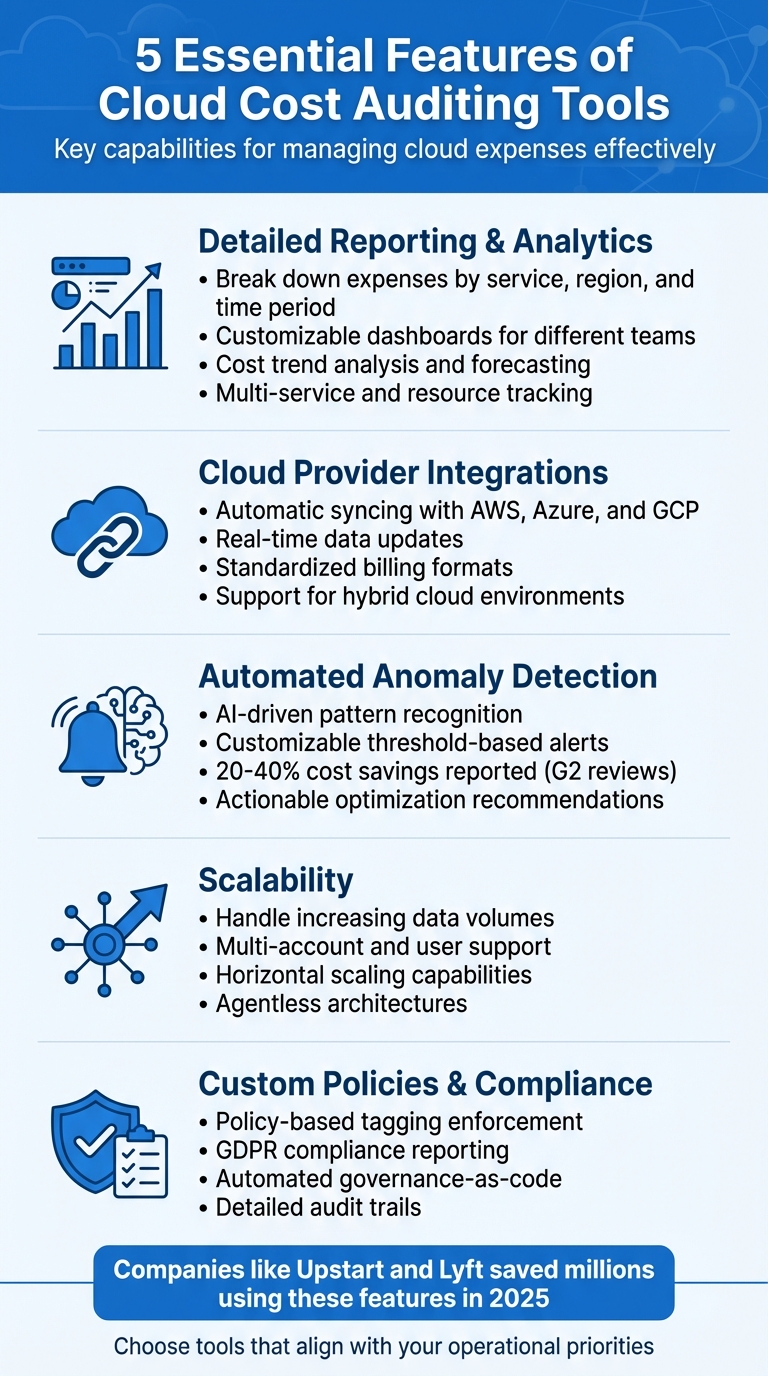 {5 Essential Features of Cloud Cost Auditing Tools}
:::
{5 Essential Features of Cloud Cost Auditing Tools}
:::
How To Choose Your Cloud Cost Optimization Platform
1. Detailed Reporting and Analytics
Having the right tools for reporting and analytics can turn overwhelming cloud spending data into insights you can actually use. Without proper visibility, it’s hard to know which services, teams, or projects are driving up costs. A strong auditing tool should give you detailed reports, breaking down expenses by service, region, and time period. This level of detail helps you make smarter, data-driven decisions.
Customisable Dashboards and Reports
Generic dashboards often fall short of meeting the specific needs of SMBs. For instance, your finance team might need monthly summaries for budgeting, while your engineering team could require detailed breakdowns of resource usage. Customisable dashboards let you tailor the data to suit each audience. Tools that allow filtering by tags, departments, or projects - and let you save these configurations - ensure that every team sees only the data that’s relevant to them.
Cost Trend Analysis and Forecasting
Looking at historical data isn’t just about reviewing past spending - it’s also key to predicting future costs. Advanced tools use predictive forecasting to analyse usage patterns and seasonal trends, giving you accurate projections and even setting off alerts when spending threatens to go over budget [7][8]. For complex environments like Kubernetes, tools with hourly granularity make it possible to track specific costs back to individual pods or actions [6].
Multi-Service and Resource Tracking
Cloud costs come from a wide range of sources, including compute instances, storage, data transfer, and databases. To manage this effectively, your tools need to normalise data across providers like AWS, Azure, and GCP. By unifying terms like compute
and egress
into a single dashboard, you eliminate the hassle of manually comparing different pricing models. This consistency is especially important for hybrid or multi-cloud setups, giving you a clear, consolidated view of your spending. Plus, tools that integrate directly with major cloud providers make management even easier.
2. Integrations with Major Cloud Providers
Connecting effortlessly with AWS, Azure, and Google Cloud is crucial. Without such integration, you'd be stuck manually exporting data and piecing together reports - a process prone to errors. The right tool links directly to your cloud accounts, pulling billing data automatically and presenting it in a clear, standardised format.
One common hurdle for SMBs is navigating the different billing formats used by various providers. A reliable tool simplifies this by standardising those formats, ensuring consistency across platforms [8]. This not only saves hours of manual work but also reduces the chances of misinterpreting your expenses.
Real-Time Data Syncing
Delays in billing updates can undermine effective cost management. With real-time syncing, your auditing tool stays up-to-date, reflecting your current spending without requiring manual exports or waiting through lengthy refresh cycles. This immediacy is especially helpful for catching sudden spikes in costs or verifying the impact of recent optimisations.
While keeping data current is critical, integration must also account for hybrid environments to ensure a comprehensive view of your infrastructure.
Support for Hybrid Cloud Environments
Many SMBs rely on hybrid setups that blend public cloud services with private infrastructure or on-premises resources. Your auditing tool should handle this complexity seamlessly, eliminating the need to switch between multiple dashboards. A platform that consolidates costs across all environments makes management far simpler.
Hokstad Consulting focuses on these integrations to streamline cloud cost management effectively.
3. Automated Anomaly Detection and Alerts
With real-time data integration, automated anomaly detection ensures swift action when issues arise. Manually monitoring cloud spending just isn’t practical anymore. Instead, automated systems continuously scan your cloud infrastructure, spotting anomalies before they turn into costly surprises. Immediate alerts mean you won’t find out about unexpected overruns only when the monthly bill lands.
These tools use machine learning to learn usual spending patterns, reducing the likelihood of false alarms compared to basic threshold-based monitoring[1].
AI-Driven Anomaly Detection
AI-powered tools analyse both historical and live data to identify anomalies that simpler systems might overlook. For example, ML-context anomaly detection works well in Kubernetes environments, while CloudHealth uses AI to flag unusual patterns and enforce governance policies automatically[1][4]. These capabilities are particularly effective at detecting issues like idle resources or misconfigured services that can quietly inflate costs. Solutions like CloudZero and Finout offer dashboards tailored to different user roles, making it easier to spot anomalies. Some users have reported cutting waste by as much as 30% thanks to these quick insights[1][3]. These tools can monitor various dimensions, such as per-service, per-tag, or per-deployment usage, offering a comprehensive view of potential issues[1][2].
Customisable Threshold-Based Alerts
Alongside AI-driven detection, threshold-based alerts provide a simpler way to stay on top of budgets. You can set spending limits - whether for daily usage, specific services, or individual projects - and receive alerts when these thresholds are breached. Platforms like Datadog and Apptio Cloudability allow you to configure alerts for both actual and forecasted spending, often integrating directly with AWS billing APIs for real-time updates[1][5]. These alerts can be tiered - triggering notifications at 50%, 75%, 90%, and 100% of your set budget. Critical notifications (e.g., costs exceeding £5,000) can be escalated to senior management, while smaller issues (e.g., under £500) might go to operational teams for immediate action. Alerts can easily integrate into existing workflows through tools like email, Slack, or automated actions like resource scaling. Expert reviews frequently highlight CloudHealth’s trend reporting and budget guardrails as especially helpful for small and medium-sized businesses (SMBs), enabling teams to resolve issues within hours[1][4].
These alerts naturally lead to actionable steps for optimisation.
Actionable Optimisation Recommendations
Alerts are only as useful as the actions they inspire. For example, they might recommend rightsizing instances, shutting down idle resources, or purchasing reserved instances. ManageEngine CloudSpend automates the shutdown of non-essential environments, while Kubecost provides pod-level rightsizing for Kubernetes, complete with impact analysis[2][3]. Similarly, CloudZero delivers insights into cost-per-deployment and idle resource cleanup. CloudHealth suggests tracking reserved instances, and Tanzu CloudHealth even uses AI chatbots to break down costs in detail[1][2]. According to G2 reviews, these features have helped some SMBs save 20–40% by eliminating unnecessary resource usage[1][2].
For SMBs looking to keep costs under control, integrating these detection tools and recommendations is a game-changer. At Hokstad Consulting, we specialise in helping businesses implement these systems, ensuring anomalies are addressed quickly and operational efficiency stays high.
4. Scalability to Support Business Growth
As your business grows, scalability becomes a critical factor in maintaining effective cost management. A tool that works well for a small operation might struggle to handle the demands of thousands of accounts and millions of data entries. Without scalability, you risk losing the visibility you need at the most crucial times.
Handling Increasing Data Volumes
Cloud environments produce an overwhelming amount of billing data, and a scalable tool must process this efficiently without slowing down. Horizontal scaling - adding servers - is often better suited for distributed cloud setups compared to vertical scaling. Tools that use serverless backends, such as Google BigQuery, are capable of managing billions of line items across multiple providers with ease.
To ensure your tool can handle spikes in usage, test for latency under peak conditions. Simulate heavy month-end reporting or sudden usage surges to verify that the tool can process data in near real-time, ideally generating hourly reports. Pay attention to throughput, response times, and the number of concurrent users it can support. Tools with agentless architectures are particularly advantageous, as they can scale across complex environments without requiring software installations on every resource. To manage costs, consider tools that offer retention policies for storing historical data.
Multi-Account and User Support
As businesses grow, managing multiple accounts across departments, projects, or clients becomes the norm. Your auditing tool should handle this complexity efficiently without requiring a large team to manage it. ProGlove, a company specialising in wearable scanning solutions, provides an excellent example. They manage around 6,000 AWS tenant accounts with just three platform team members by relying on extreme automation. Julius Blank from ProGlove explained:
Managing thousands of AWS accounts with three people might sound impossible. But with the right architectural choices... the team size stays constant, and efficiency grows with every account added[10].
Look for tools with a multi-tenant architecture and robust role-based access control (RBAC). Platforms like Ternary and CloudHealth include features such as FlexOrgs, enabling custom groups to restrict data access[9]. Additionally, tools that integrate with AWS Organisations, Service Control Policies, and CloudFormation StackSets can help automate account management. Pricing models should also scale with your business. For example, Economize offers tiered pricing, starting with a free plan for businesses spending up to £83,000/month, while Vantage provides a free tier for tracked spending up to £2,100/month[11].
5. Custom Policies and Compliance Features
As data volumes grow, maintaining control over cloud costs becomes increasingly challenging, making effective governance a necessity.
Without proper governance and consistent tagging, cloud expenses can spiral out of control. A reliable cloud cost auditing tool should enforce tailored policies and ensure compliance with regulations - especially critical for UK businesses navigating GDPR and data residency obligations.
Policy-Based Tagging and Governance
Tagging is key to accurate cost allocation, yet inconsistent practices can lead to fragmented data. Centralising tagging and enforcing policies can significantly enhance cost management. To streamline this, create a centralised tagging dictionary that defines approved keys and values - for instance, using CC-Engineering rather than various alternatives like Eng, Engineering, or ENGR [12]. Modern tools often require specific tag keys, such as CostCenter or Project, and validate values using regular expressions. For example, AWS requires manual activation of tags, while Azure can automatically inherit them [7][12][15].
Governance-as-code is transforming tagging standards, replacing manual processes with automated enforcement. Mike Fuller from the FinOps Foundation explains:
Governance isn't the audit log. It's the runtime[13].
Some tools now detect cost policy violations within pull requests, pinpointing the exact file and line number for engineers to address - eliminating the need to wait for the monthly bill [14][15]. When introducing new automated policies, consider a 'warning mode' for 1–3 months before fully enforcing them [15].
In addition to tagging, advanced tools provide resource lifecycle policies to automate cost controls. For instance, automated stop/start
schedules can shut down non-production instances after 19:00, and rules can identify and remove orphaned resources like unattached storage volumes [7][8].
Compliance Reporting
For UK businesses, adhering to GDPR and managing data residency are non-negotiable. The right auditing tool should include compliance reporting to monitor where data is stored and processed. While major cloud providers offer compliance monitoring, an effective tool consolidates insights across multiple platforms [15].
Look for solutions that generate detailed audit trails, documenting policy enforcement, resource configurations, and access patterns. This type of documentation is invaluable during regulatory audits and can help avoid penalties. Some advanced platforms even map Kubernetes pod and namespace requests to actual costs, enabling automated cluster rightsizing without compromising Service Level Objectives [13].
Conclusion
The right cloud cost auditing tool can make a huge difference in managing cloud expenses for SMBs. The five key features discussed - detailed reporting and analytics, integrations with major cloud providers, automated anomaly detection, scalability, and custom policies with compliance features - are essential for keeping costs under control. Detailed reporting helps pinpoint where your money is going, real-time integrations ensure accurate data across platforms like AWS, Azure, or hybrid setups, automated alerts catch costly anomalies early, and scalability ensures the tool adapts as your business grows. Together, these features help protect your budget and maintain operational efficiency.
For businesses in the UK, compliance features are especially important. A good tool enforces consistent tagging, automates policy checks, and simplifies documentation during audits or regulatory reviews.
When selecting a tool, focus on those that align with your operational priorities. Whether it’s multi-cloud management, precise cost allocation, or automated rightsizing, choosing a solution tailored to your needs will deliver better results. This targeted approach ensures the tool evolves alongside your business.
The right choice doesn’t just save money - it improves visibility and supports long-term growth.
For expert advice, get in touch with Hokstad Consulting.
FAQs
How do I prove a cloud cost auditing tool will save us money?
This tool is all about making your spending smarter. It helps by spotting waste, fine-tuning how resources are used, and stopping unnecessary overspending before it happens. How? Through real-time monitoring, anomaly detection, and detailed reporting, the tool uncovers hidden inefficiencies like unused resources or unexpected cost surges.
To really show its impact, compare costs from before and after you started using the tool. Highlight the drop in waste - like cutting down on idle resources - and any noticeable reduction in sudden cost increases. This kind of data not only proves better budget control but also showcases the financial benefits in a clear, measurable way.
What access permissions are needed to connect AWS, Azure and GCP safely?
To link AWS, Azure, and GCP securely, it's essential to correctly configure Identity and Access Management (IAM), implement robust security policies, and establish strong governance practices. These measures help mitigate risks such as configuration drift and privilege sprawl. While all three cloud providers offer secure platforms, their effectiveness depends on proper setup. Prioritise best practices for access controls and conduct regular audits to ensure ongoing security.
How do I enforce tagging and GDPR compliance without slowing teams down?
Using the right tools and policies, you can streamline tagging and ensure GDPR compliance without sacrificing efficiency. Automated tagging plays a key role in maintaining consistent resource labelling, which helps minimise errors and makes cost allocation more accurate.
When it comes to GDPR compliance, automation can handle tasks like monitoring policies, managing data, and pinpointing unused resources. By incorporating regular audits and setting up automated alerts through cloud-native tools, you can enforce both compliance and tagging standards seamlessly - keeping workflows running smoothly while staying aligned with regulations.