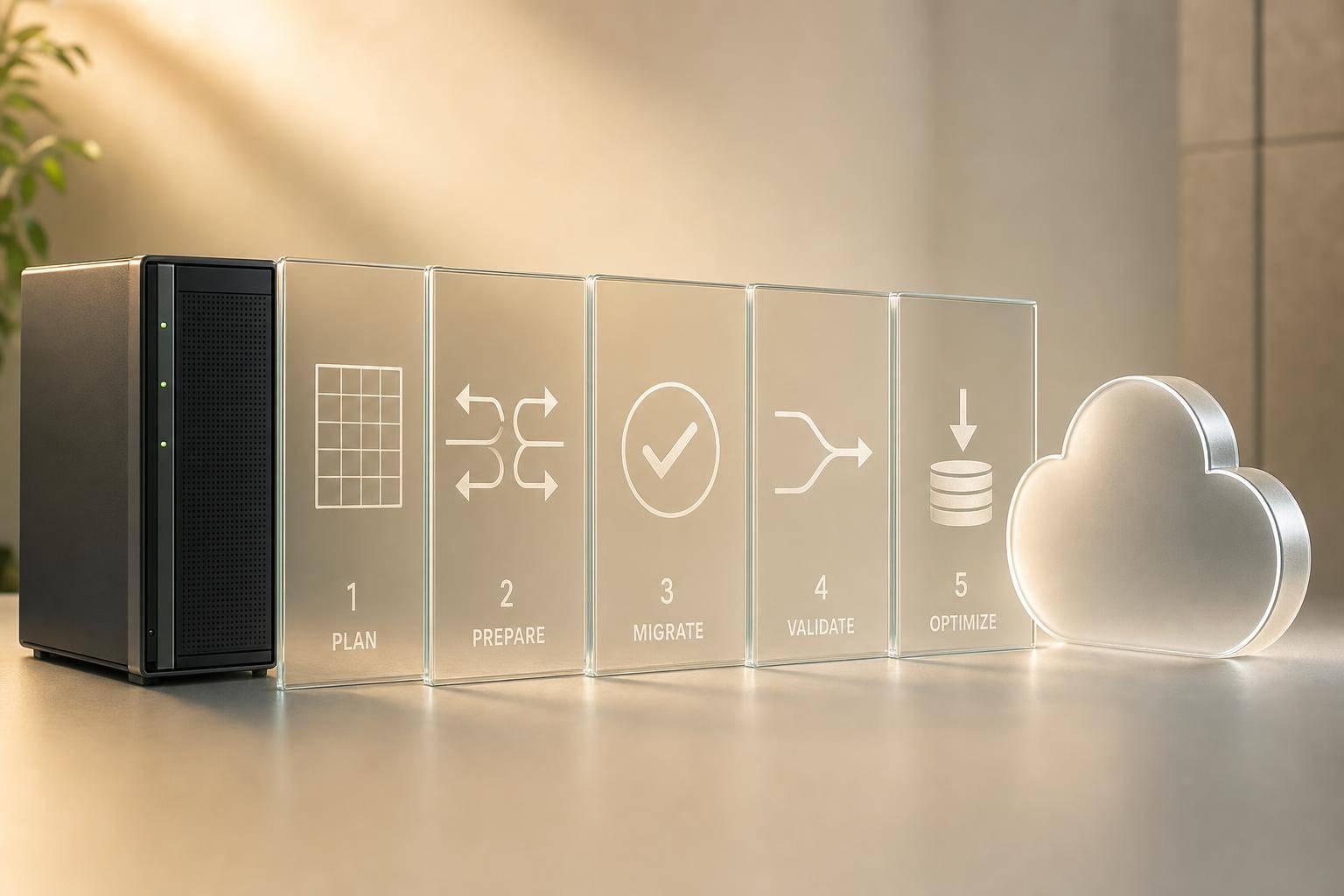
If I had to sum this up in one line: hybrid cloud data migration works when I plan the data first, move it with checks, keep one clear source of truth, and track cost and performance after cutover.
This is not just about copying data from one place to another. It is about deciding:
- what stays on-premises
- what moves to public cloud
- what syncs between both
- how much downtime I can accept
- how I protect data under UK GDPR
- how I stop spend, lag, and data drift after go-live
The article makes one point very clear: most migration problems start before the move. Poor scope, unclear ownership, weak rollback steps, and no plan for post-cutover sync are the main risks.
A few points stand out straight away:
- Hybrid cloud is not the same as multi-cloud
- Many UK firms use hybrid setups to balance cloud scale with tighter control over regulated data
- The UK hybrid cloud segment is forecast to grow at around 19.4% CAGR through 2031
- The main migration patterns are bulk transfer, phased cutover, CDC/replication, and data flow redesign
- The key measures are RTO, RPO, latency, and monthly cloud spend in £
- After migration, the hard part is often keeping data aligned across environments without conflict
If I were explaining the article in plain English, I’d put it like this:
- Map the data before touching anything
- Pick the right move method for each dataset
- Test data quality, performance, and rollback before cutover
- Set one system of record for each data domain
- Lock down access, encryption, and audit trails
- Review spend, egress, storage, and compute once live
A short comparison helps clear up a common point of confusion:
| Term | What it means | On-premises involved? | Main reason firms use it |
|---|---|---|---|
| Hybrid cloud | Mix of on-premises/private cloud and public cloud | Yes | Control, compliance, legacy links |
| Multi-cloud | Use of more than one public cloud provider | Not always | Resilience and lower lock-in |
What I like about the piece is that it treats hybrid cloud as a data control problem as much as a hosting problem. Where the data lives, who owns it, how fast it changes, and how it is checked matter more than the move itself.
So the short version is simple: plan, move, secure, and tune. That is the whole job in four steps, and the rest is detail.
::: @figure 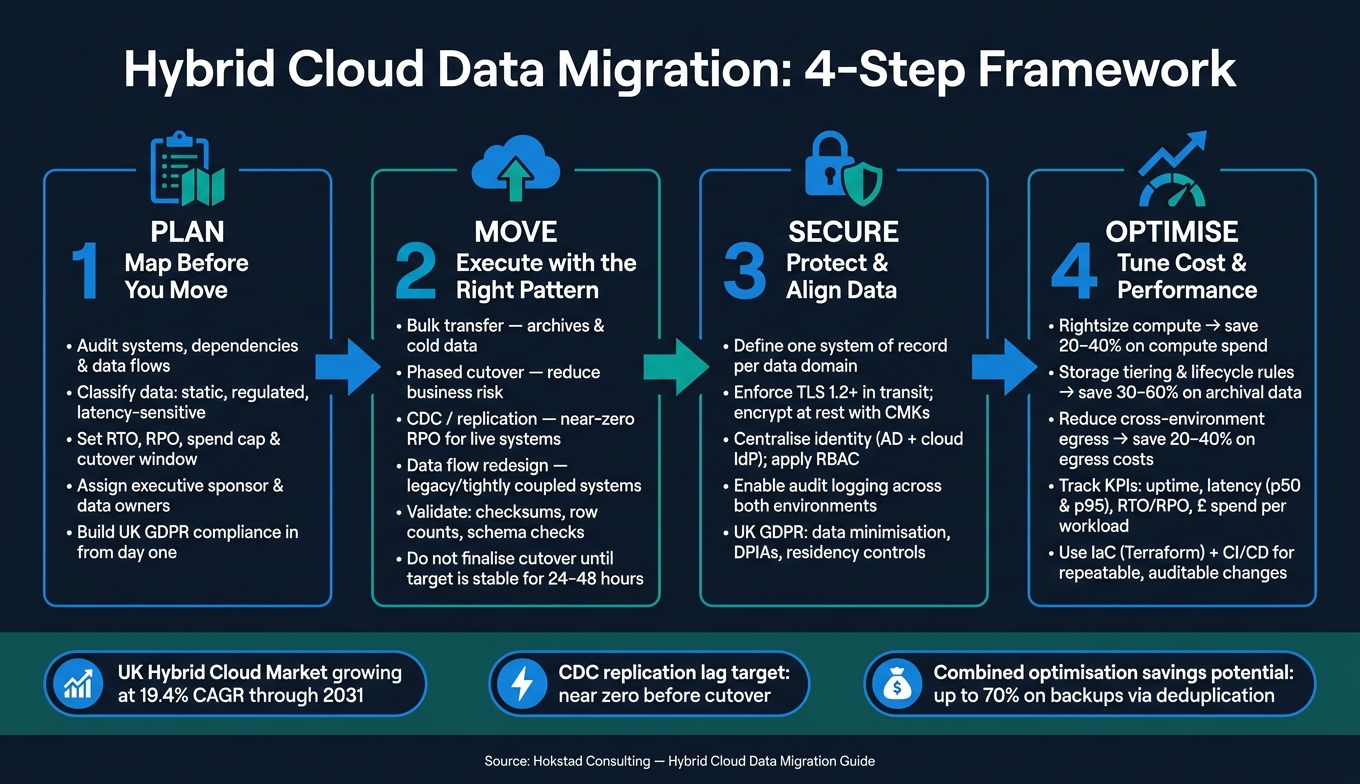 {Hybrid Cloud Data Migration: 4-Step Framework}
:::
{Hybrid Cloud Data Migration: 4-Step Framework}
:::
AWS re:Invent 2022 - How to simplify your hybrid cloud migration strategy with AWS (HYB311)
1. Build a Migration Strategy Before Moving Any Data
Plan the migration before you move anything. First, get clear on what data you have, where it sits, who owns it, and what happens if the move goes off track.
Audit systems, dependencies and data flows
Start with a full inventory. List your databases, file stores, applications, integrations, identity systems, backup jobs, and data pipelines. For each one, note the owner, business criticality, data volume in GB or TB, and how often the data changes. Then map the dependencies: which systems talk to each other, which ones are sensitive to latency, and which datasets are regulated or central to the business.
That gives you the basis for a dependency matrix. Match each dataset to the pattern it follows: local system of record, cloud copy, or bidirectional sync. Then give each workload a plain decision: move, replicate, refactor, or retain.
Data classification makes this much easier. Label datasets as static, frequently changing, regulated, latency-sensitive, or system-of-record, then link each class to a migration path. Customer records and financial data, for example, may need to remain in a UK-controlled environment or use replication with strict access controls. Historical logs or cold archives, by contrast, are often a good fit for bulk migration to cloud storage.[1][5][6]
Use the dependency matrix to decide what stays local, what gets replicated, and what can move in bulk.
Set migration objectives, KPIs and governance
Set targets that match hybrid data movement: RTO, RPO, spend, performance, and cutover window. Set a target Recovery Time Objective (RTO) - the maximum tolerable downtime before serious business impact - and a Recovery Point Objective (RPO) - the maximum acceptable data loss measured in time.[3][7] Alongside those, set a monthly cloud spend cap, a performance baseline, and a defined cutover window.
Ownership matters here. Assign an executive sponsor, migration lead, security and compliance approver, application owners, and operations staff. Be clear about who signs off scope changes, who authorises the cutover, and who can trigger a rollback if validation fails.
Build UK GDPR into the plan from day one. Map where personal data will be stored, processed, and replicated, including backups. Check that data residency, processor agreements, and Data Protection Impact Assessments (DPIAs) are in place before migration starts.[2][4][8]
Choose the right migration model
The best model depends on how fast the data changes, how much downtime you can accept, and how much day-to-day complexity your team can handle.
| Migration Model | Best suited for | Trade-off |
|---|---|---|
| Bulk transfer | Large, low-change datasets such as archives or cold storage | Simple and fast, but risky if data changes quickly |
| Phased cutover | Reducing business risk by moving one system at a time | Controlled, but extends the parallel-running period |
| Continuous replication / CDC | Live systems needing minimal downtime and near-zero RPO | Low data loss, but higher tooling and operational overhead |
| Redesign of data flows | Legacy or tightly coupled systems that cannot be lifted and shifted | Maximum long-term benefit, but slow and costly upfront |
A common way to start is with a pilot. Move low-criticality or read-only data first. That lets you test tooling, performance, and governance controls before you touch anything mission-critical.
Once you choose the model, it shapes the rest of the plan: transfer tooling, cutover timing, and rollback design.
2. Execute the Migration with the Right Technical Pattern
Execution is where the plan meets reality. The job here is simple in principle, but not easy in practice: move the right data, check every step, and keep a clear way back if something goes wrong. Use the migration model picked earlier as the default pattern for each workload, then pair it with a strict plan for validation, cutover and rollback.
Bulk transfer, backup and restore, and staged cutover
Bulk transfer is a good fit for archives, older warehouse data and datasets that do not change often. The process is fairly direct: export from the source, transfer through an encrypted channel - or use a physical transfer appliance for multi-terabyte volumes - restore at the target, and validate the result. Backup and restore also fits well when there is already a strong backup regime in place, especially for file shares, VM images and slower-changing databases. Cutovers should be scheduled in approved maintenance windows to keep business disruption as low as possible.
During migration, disable non-essential triggers and foreign key checks, then turn them back on at cutover. That helps avoid load-order problems. Before sign-off, validate with checksum checks, row counts, schema comparison and sample business queries. The point is to confirm business correctness, not just that the transfer completed.
Start with low-risk datasets, then move up to transactional systems. Rehearse each phase in a pre-production setup that mirrors the hybrid topology before anything touches production. Do not finish cutover until the target has run at target load and stayed stable for 24–48 hours.
CDC and near-real-time replication
Use CDC when downtime is tight and the source needs to stay live. For live transactional systems that cannot handle long outages, Change Data Capture (CDC) is the right approach. CDC reads source transaction logs and applies inserts, updates and deletes to the target in near real time. That keeps both environments closely aligned while the source keeps running.
Sequence matters here. Start with a full baseline load, or use backup and restore, to establish parity. Then enable CDC to stream ongoing changes. Run source and target in parallel, watch replication lag continuously, and do not cut over until lag is near zero and the target remains stable at target load.
Schema changes need care during this stage. Apply them to both source and target before changing CDC mappings. If you change data types mid-stream without doing that, you can end up with dropped fields or pipeline failures. Keep the target read-only until cutover. Bidirectional writes need conflict rules, and without them, things can get messy fast.
Test performance, integrity and rollback readiness
Validation should sit inside the migration pattern from the start, not be tacked on at the end. Before cutover, the minimum bar is clear:
- schema checks passed
- row counts matched within an agreed tolerance
- checksum sampling completed
- critical business queries validated on the target
For UK businesses, that also means time-sensitive processes such as end-of-day reconciliation in GBP, payroll runs and any HMRC reporting tied to a fixed schedule.
Performance testing should match how people in the UK will use the system. Measure median and 95th-percentile latency for key transactions from representative UK user locations. Also check that hybrid network links - such as VPNs or private connections - can handle peak load. Set alert thresholds before cutover, not after.
The rollback plan must be written down, rehearsed and tied to objective triggers, not gut feel. Abort cutover if validation fails, lag climbs, or critical queries drift apart. Spell out the maximum time allowed for rollback, the exact steps to revert - such as switching DNS, restoring write access to the source and re-enabling batch jobs - and how data written to the new environment during the observation period will be dealt with.
A practical cutover gate means all of the following are true before you flip the switch:
- replication lag is near zero
- schema and data checks have passed
- business-critical queries have been validated
- support teams have been briefed
- rollback steps have been rehearsed with documented evidence
Once rollback has been proven, the next step is keeping both environments in sync and secure.
Need help optimizing your cloud costs?
Get expert advice on how to reduce your cloud expenses without sacrificing performance.
3. Keep Data Integrated, Synced and Secure Across Environments
After cutover, the job changes. It’s no longer about moving data from A to B. It’s about keeping data accurate, aligned and protected across several connected environments. After cutover and rollback, the focus moves from migration to steady-state control. The main danger here is source-of-truth drift between environments. That means you need clear decisions on where data lives, how it moves, and who is allowed to touch it.
Define systems of record and synchronisation rules
Start by deciding which environment is the authority for each data domain. Choose one system of record (SoR) per domain - customer records, orders, payments, product catalogue - and treat every other system as a consumer or read replica. That stops hybrid setups from turning into a mess of unmanaged copies. If you skip this step, conflicting writes can build up quietly until reconciliation turns into a major piece of work.
In many UK organisations, core finance and ERP data often remains on-premises or in a private cloud because of control and compliance needs. At the same time, customer interaction data and analytics may sit in the public cloud. A simple way to manage this is with a data domain catalogue: a short document that lists each domain, its authority source, the data owner, and the SLA for how up to date downstream copies need to be.
Once the SoR is set, pick the synchronisation pattern that matches the freshness need for each domain. Each option comes with its own latency, cost and operational overhead.
| Pattern | Latency | Complexity | Cost profile | Use for |
|---|---|---|---|---|
| ETL/ELT | Hours | Low–Medium | Low–Medium | Reporting, regulatory submissions, data warehouse loads |
| CDC | Seconds–Minutes | Medium–High | Medium–High | Operational replicas, keeping cloud analytics in sync with on-premises databases |
| Event streaming | Near real time | High | Variable | Fraud detection, real-time pricing, event-driven microservices |
| API-based access | Low per call | Medium | Costs scale with request volume | SaaS sources, shared SoR serving many consumers |
For most hybrid environments, the sensible answer is a mix. Use ELT for historical analytics, CDC for operational replication, and streaming only where sub-minute latency changes a business result.
Handle consistency, conflicts and operational resilience
Strong consistency across environments is rarely practical. Most organisations end up using eventual consistency for cross-environment data, while keeping strong consistency inside the SoR database itself.
Use bidirectional sync only when you need it, and write conflict handling into the data contract. For those domains, set plain rules - for example, the most recent timestamp wins, or the SoR takes priority over edge systems - and record them in your data governance policy. Idempotent operations and sequence numbers help stop duplicate writes from causing silent data corruption.
Run reconciliation every hour or overnight, and send exceptions to a data steward. For resilience, backup and disaster recovery must cover both environments, not just one side of the estate. The SoR model you choose should match your needs for control, elasticity and locality:
| Model | Pros | Cons | Operational Impact |
|---|---|---|---|
| On-premises SoR | High control; easier regulatory alignment; leverages existing investment | Limited elasticity; complex to expose securely to cloud; DR must be deliberately designed | Operations teams manage hardware and patching; cloud acts as consumer via ETL, CDC or APIs |
| Cloud SoR | Elastic scaling; rich managed services; faster innovation | Egress costs; dependency on provider availability; residency must be explicitly configured | Strong emphasis on cloud-native monitoring, IAM and cost observability; on-premises holds cached subsets |
| Split SoR | Data locality; resilience to regional failures; supports local operations during network partitions | Highest complexity; frequent reconciliation needed; data lineage becomes difficult | Requires mature governance, well-defined data contracts, and detailed incident runbooks |
Apply security, access control and UK compliance requirements
Security across hybrid environments needs to match on both sides. If a control exists on-premises but not in the cloud - or the other way round - you’ve got a gap.
Encryption in transit means enforcing TLS 1.2 or higher on all connections between on-premises and cloud, including VPNs, private links and API calls, with strict certificate management and mutual TLS where the architecture supports it. Encryption at rest means enabling volume- or disk-level encryption on databases, storage accounts, object stores and backup media, using customer-managed keys stored in hardware security modules (HSMs) or a cloud key management service. Both practices align with National Cyber Security Centre (NCSC) guidance and support the requirement under UK GDPR for appropriate technical measures to protect personal data.[2]
For identity and access management, centralise identity where you can by linking on-premises directories such as Active Directory with cloud identity providers. That gives you single sign-on and steady authentication policies across both environments. Access should follow least-privilege rules: users and services get only the permissions their role needs. Define role-based access control (RBAC) per data domain - for example, read-only customer analytics, PII administration, backup operator - and apply those roles the same way everywhere. UK GDPR also requires data minimisation. If read-only access through a secure API does the job, don’t copy personal data into every environment just because it’s convenient.
Audit logging needs to be active across both on-premises and cloud, showing who accessed what, when and from where. It also helps to add automated checks for misconfigurations - such as unencrypted storage or internet-exposed databases - into your CI/CD pipelines, so security drift is caught before production.
Once these controls are stable, move to cost, performance and operational tuning.
4. Optimise Cost, Performance and Operations After Migration
With data synced and secured, the next job is to prove the hybrid estate works well in production. Migration is not the finish line. It’s the start of steady improvement. What matters now is simple: is the new setup cheaper, faster and more resilient than the old one?[10][13]
Reduce hybrid cloud costs without harming performance
In a hybrid cloud estate, the main cost drivers are storage, compute, data transfer between environments, managed services, and support or licensing tiers.[10] A sensible starting point is to review your monthly cloud bill, spot the top three to five services by spend, and compare them with the performance targets set out in your migration business case.
Compute rightsizing is often the fastest way to cut waste. If average CPU utilisation is below 30%, there’s a good chance you’re paying for capacity that sits idle. Cutting instance sizes and turning on autoscaling can trim compute spend by 20–40%, as long as you test the change under load before rolling it into production.[9][13]
Storage tiering is another strong lever. Moving data that’s rarely touched - such as old backups, compliance archives, and old logs - into lower-cost tiers can reduce storage costs for those datasets by 30–60%.[12] Lifecycle rules help here. They move data between hot, warm, and archive tiers automatically, so teams don’t have to manage it by hand.
Egress charges and network appliance fees can pile up fast when apps make frequent synchronous calls across the boundary. One way to cut that bill is to move high-frequency integrations to asynchronous, event-driven flows and local caching. That reduces traffic moving back and forth between cloud and on-premises environments.[9][11]
| Cost Lever | Estimated Savings | Operational Trade-off | Most Effective When |
|---|---|---|---|
| Rightsizing & autoscaling | 20–40% on compute | Needs load testing; risk of under-provisioning during spikes | Workloads with variable or low average utilisation |
| Storage tiering & lifecycle rules | 30–60% on archival data | Slower retrieval from archive tiers; requires data classification | Large volumes of logs, backups or historical records |
| Compression | 20–50% storage reduction | Increased CPU overhead; may affect latency on CPU-bound workloads | IO-heavy workloads storing structured data or large objects |
| Deduplication | 50–70% on backups & images | More complex restore procedures | Environments with many similar VMs or repeated datasets |
| Cross-environment traffic reduction | 20–40% on egress costs | Requires caching, queuing or event-driven refactoring | Applications making frequent cloud-to-on-premises calls |
Use these levers one at a time. After each change, check CPU utilisation, latency, and error rates against your agreed SLAs before moving on.
Once spend is under control, the next step is to keep those gains in place with automation and observability.
Use automation and observability to stabilise operations
Infrastructure as code (IaC), with tools such as Terraform, lets you define public cloud and private or managed hosting resources in version-controlled files. That makes changes repeatable and auditable. When you pair IaC with CI/CD pipelines covering application code, database schema, and integration changes, releases can happen in smaller, safer increments, with automated rollback if something fails.
Observability is what holds all of this together. Focus first on the paths that matter most: cross-cloud API calls, CDC replication jobs, backup runs, and any integration that crosses the environment boundary. Alerting should reflect business KPIs - error rate, latency percentiles, throughput, and recovery time - not just server or network stats. That way, teams spot trouble before users feel it.
AI-driven agents can flag anomalies and handle routine fixes, but they need guardrails. Put limits around scale-out actions, add approval gates for higher-risk changes, and keep full decision logs. For UK teams, telemetry sent into AI systems also needs care. It should not process unprotected personal data, in line with UK GDPR duties.[13][14]
Measure outcomes against the original business case
Measure the same paths, costs, and recovery targets against the baseline set before migration. Turn the original goals into a small set of clear KPIs, then track them through dashboards built from observability tools and billing exports.[13][14]
Typical KPIs include:
- Reliability: uptime percentage and error budget
- Latency: median and 95th-percentile response times for critical cross-boundary journeys
- Recovery targets: RTO and RPO, checked through failover tests
- Cloud spend in £ by workload, environment, and business unit - ideally normalised per transaction or per user so efficiency is visible over time
If gaps show up - higher-than-expected spend, latency spikes on cross-environment paths, or recovery tests missing their targets - use the cost and performance levers above to close them. Then use that evidence to decide which workloads should stay hybrid, move further, or be redesigned.[13]
Conclusion: The Key Decisions That Make Hybrid Cloud Data Migration Work
Hybrid cloud data migration isn’t a one-and-done project. It’s a chain of decisions, and each one sets up the next. If the early calls go wrong - weak scoping, the wrong migration pattern, or no single system of record - problems stack up fast. From there, the work comes down to four decisions: plan, move, secure and optimise.
Those decisions happen in sequence: define boundaries, map dependencies, choose the cutover method, then validate.
Protect data integrity with verification, reconciliation and a rollback plan that’s been rehearsed, not just written down. For UK organisations, there’s another point that trips people up: UK-region hosting does not automatically mean UK GDPR compliance. Contract terms, transfer safeguards and documented data flows all need to be in place - and kept up to date after cutover.
Track spend, latency and recovery against your baseline, then keep tuning after go-live. Once the controls are stable, the next test is simple: is the new estate actually delivering value? The teams that get lasting returns from hybrid cloud treat post-cutover optimisation as a regular practice, not a one-off clean-up.
For teams that need help with dependency mapping, cutover or cloud cost engineering, Hokstad Consulting supports hybrid migration delivery.
FAQs
How do I choose the right migration method?
Choose the right migration method by looking at your business goals, performance needs, and how much downtime you can live with. Start by cataloguing your IT estate, then rank workloads based on their effect on revenue and compliance.
Be clear about what matters most: cost efficiency, scalability, or performance. From there, set your SLAs, RPOs, and RTOs. Then measure those targets against your data volume, network latency, and consistency needs across your hybrid environment.
What should stay on-premises in a hybrid cloud model?
Keep on-premises workloads that need ultra-low latency, rely on legacy applications, or run into hardware or licensing limits.
On-premises infrastructure still matters for data sovereignty, sensitive data, and regulatory compliance. It also helps you keep control of core business processes and security.
How can I prevent data drift after cutover?
Use automated, continuous validation with clear conflict-handling rules. Log-based Change Data Capture (CDC) watches transaction logs in real time to spot inserts, updates and deletes as they happen.
It also helps to reconcile row counts, check field accuracy with checksums such as SHA-256, and test referential integrity. For bidirectional syncing, set rules like Last Write Wins, add manual review flags for critical records, or apply predefined business logic.