
Designing IAM policies for PCI DSS compliance is crucial for protecting cardholder data and meeting regulatory standards. Here's what you need to know:
- PCI DSS Compliance: This global standard has 12 requirements to secure cardholder data. As of 31 March 2025, PCI DSS 4.0 mandates stricter, risk-driven security measures.
- IAM Policies: These are vital for enforcing access controls, especially in cloud environments, where identity and metadata replace traditional network perimeters.
- Key Steps:
- Role-Based Access Control (RBAC): Assign permissions to roles, not individuals, and isolate the Cardholder Data Environment (CDE).
- Multi-Factor Authentication (MFA): Enforce MFA for all CDE access points to meet Requirement 8.4.2.
- Least Privilege Principle: Restrict permissions to the minimum necessary and review them regularly.
- Monitoring and Auditing: Log all access, validate policies, and conduct regular reviews to ensure compliance.
Even with PCI DSS-certified cloud providers, securing IAM policies is your responsibility. Regular reviews, testing, and updates are essential to maintaining compliance and protecting sensitive data.
::: @figure 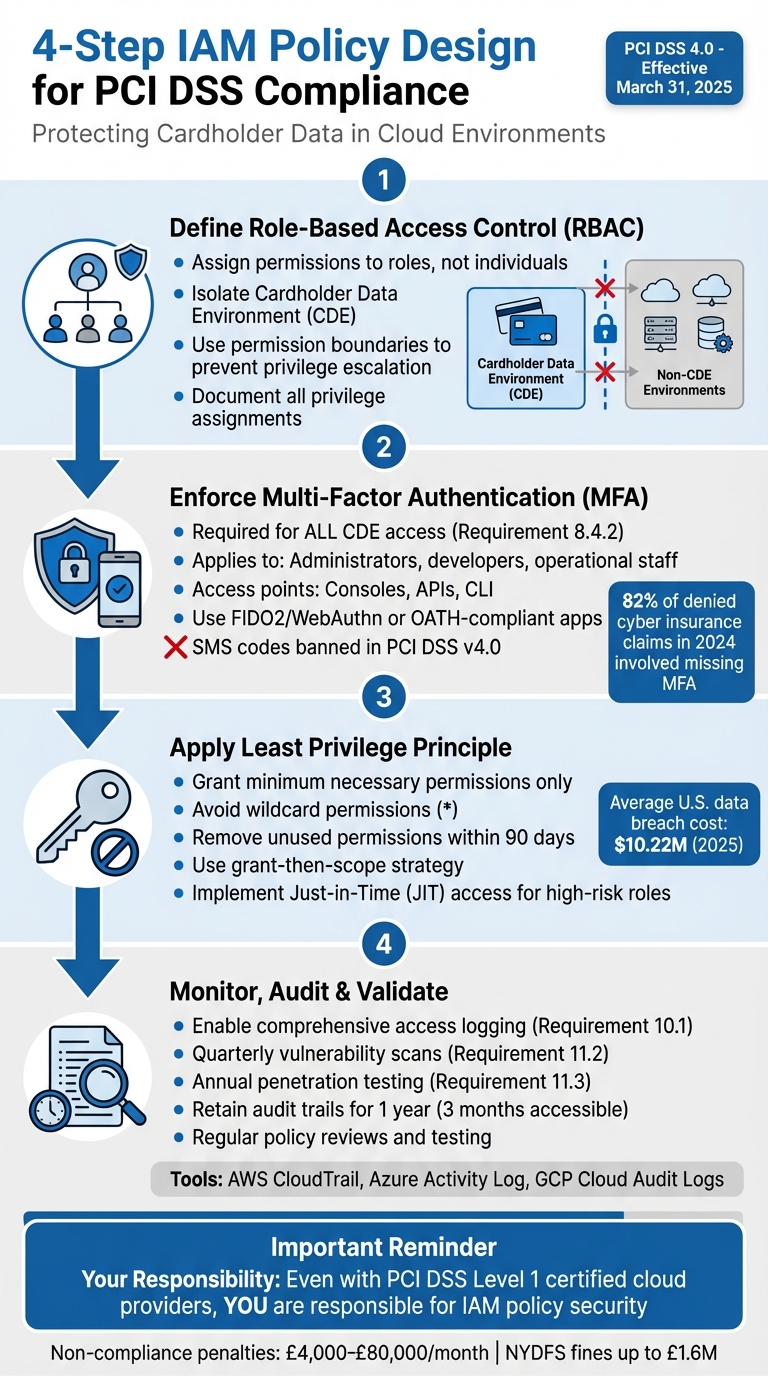 {4-Step IAM Policy Design Framework for PCI DSS Compliance}
:::
{4-Step IAM Policy Design Framework for PCI DSS Compliance}
:::
PCI DSS Revision 4: What You Need to Know for March 2025 Enforcement
Need help optimizing your cloud costs?
Get expert advice on how to reduce your cloud expenses without sacrificing performance.
Step 1: Define and Implement Role-Based Access Control (RBAC)
Role-Based Access Control (RBAC) is a cornerstone of compliant Identity and Access Management (IAM). By assigning permissions to roles rather than individuals, RBAC aligns with PCI DSS's purpose limitation
principle, ensuring users only access what’s necessary for their job functions.
In cloud environments, the challenge lies in balancing security with operational efficiency. Unlike static on-premises systems, cloud-based workloads require a more flexible approach. Under the shared responsibility model, even if your cloud provider holds PCI DSS Level 1 certification, you remain fully responsible for designing IAM policies [1]. Start by carefully defining roles and permissions to maintain precise control.
Identifying Roles and Permissions
Begin by mapping out roles and the access they require. A grant-then-scope
method works well: use broad permissions during development and refine them for production environments using access logs and tools like AWS Access Analyzer or GCP IAM Recommender [2].
For the Cardholder Data Environment (CDE), isolation is critical. Use separate accounts or projects to keep CDE workloads isolated [1]. This setup limits the attack surface if a non-CDE account is compromised.
In AWS, apply permission boundaries to all developer-created roles to prevent privilege escalation [2]. While the terminology varies across cloud providers, the concepts are similar: AWS uses IAM Roles and Policy Attachments, Azure employs Managed Identities and Role Assignments, and GCP relies on Service Accounts and IAM Bindings.
Once roles are established, thorough documentation and validation are key to maintaining compliance.
Documenting and Validating Role Definitions
Documentation is vital for creating a clear audit trail. Ensure all privilege assignments or changes are approved by authorised personnel [4]. Auditors conducting PCI DSS assessments will review your access control processes, making this step essential.
Differentiate between continuous permissions and temporary Just-in-Time (JIT) access. Continuous permissions are always active, while JIT access provides temporary elevated privileges only when needed. This distinction reduces the risk of attackers exploiting privileged accounts [4].
To clarify accountability, consider using a RACI matrix. For example, the Security Team should be Accountable for production roles, while DevOps and Data Owners share Responsibility, and Internal Audit remains Informed [2]. This collaborative approach minimises the risk of misconfigurations. Additionally, ensure compliance with PCI DSS Requirement 10 by securing logs in tamper-proof locations, such as an S3 bucket with Object Lock enabled [1].
PCI DSS 4.0.1 allows tailored access controls, provided they meet security objectives and are well-documented [4]. However, this flexibility demands robust justification. Your documentation must clearly demonstrate how your customised approach achieves equal or better security outcomes.
Step 2: Enforce Multi-Factor Authentication (MFA)
Multi-factor authentication (MFA) is a non-negotiable requirement for PCI DSS compliance. Starting 31st March 2025, PCI DSS Requirement 8.4.2 will enforce MFA for all access to the Cardholder Data Environment (CDE). This applies to everyone from cloud administrators and developers to operational staff and anyone accessing CDE resources via consoles, APIs, or command-line interfaces [8]. Ensuring rigorous enforcement and proper mapping across all CDE access points is vital.
In AWS, the aws:MultiFactorAuthPresent condition key is limited to temporary credentials. To avoid any potential bypass, policies should require users to exchange long-term access keys for temporary credentials using sts:GetSessionToken. Additionally, the BoolIfExists operator should be set to false for sensitive actions [5].
For highly sensitive tasks, such as deleting an S3 bucket or an IAM user, implement a time-based MFA requirement using the aws:MultiFactorAuthAge key. For example, setting this to ensure MFA was performed within the last 300 seconds ensures the user’s active presence. This is especially critical, as data shows that 82% of denied cyber insurance claims in 2024 involved organisations that failed to implement MFA [9].
Scope and Enforcement of MFA
Defining roles is just the beginning. A properly mapped MFA framework adds an extra layer of security to your CDE. Start by identifying all entry points, including web consoles, API endpoints, CLI tools, and cross-account role assumptions. PCI DSS Requirement 8.5.1 specifies that MFA must be completed before access is granted [6]. On Azure, session controls can help restrict sign-in frequency and prevent persistent browser sessions.
A practical method is the Force MFA
strategy. Here, users are initially given only the permissions needed to set up their MFA device. Once authenticated, additional permissions are granted. For cross-account AWS access, include a condition in the role’s trust policy requiring aws:MultiFactorAuthPresent: true before allowing sts:AssumeRole [5]. Non-compliance with these requirements can result in penalties ranging from approximately £4,000 to £80,000 per month [9]. In some instances, regulators like NYDFS have issued fines as high as £1.6 million [9].
Selecting Authentication Factors
While the specifics may differ across cloud platforms, all implementations must meet PCI DSS standards. MFA must include at least two of these three categories: something you know (e.g., a password or PIN), something you have (e.g., a hardware token, smart card, or authenticator app), or something you are (e.g., biometric data like a fingerprint or facial recognition) [7]. Importantly, the factors must be independent. For example, using a password to access an email account where a one-time password is sent does not qualify, as compromising one factor could compromise the other [7].
SMS-based codes are explicitly banned under PCI DSS v4.0 due to vulnerabilities like SIM-swapping [8]. Instead, focus on phishing-resistant options such as FIDO2/WebAuthn hardware keys or OATH-compliant authenticator apps. Out-of-band authentication - where factors are distributed across different networks or devices - adds another layer of security by ensuring that a single compromised device cannot bypass all authentication measures [7]. Always validate authentication factors without revealing specific failure reasons, as this could help attackers probe your defences [7].
These MFA strategies, when combined with other IAM controls, create a robust, layered security framework.
Step 3: Apply the Principle of Least Privilege
The principle of least privilege is about restricting users and services to the bare minimum permissions they need to perform their tasks - nothing more. It’s a core concept for maintaining PCI DSS compliance and ensuring security in cloud environments. Misconfigured Identity and Access Management (IAM) systems are a major risk factor here. In AWS, the principle is enforced through a layered structure: Organisation Service Control Policies (SCPs) set the upper limit, followed by resource-based policies, permission boundaries that cap maximum permissions, and identity-based policies at the base level [2].
A practical way to implement this is the grant-then-scope
strategy. Start by assigning broader managed roles in development environments. Then, use tools like AWS CloudTrail to monitor actual usage patterns. With this data, you can create finely tuned policies for production environments [2]. This strategy reduces risk while avoiding accidental disruptions to legitimate access. Cloud providers offer tools like AWS IAM Access Analyzer, Azure Entra Access Reviews, and GCP IAM Recommender to help identify unused permissions and generate policies based on real-world activity [10][2]. These tools are invaluable for crafting narrowly scoped, effective policies.
Avoiding Overly Permissive Policies
Wildcard permissions (*) are a common pitfall that undermines the principle of least privilege. They grant unrestricted access to all actions or resources, leaving significant security vulnerabilities. In production, replace wildcards with specific API actions and Amazon Resource Names (ARNs). For example, instead of using s3:*, specify only the necessary actions like s3:GetObject and s3:PutObject for the relevant buckets [11][10].
Permission boundaries are another essential tool, especially for preventing privilege escalation. In AWS, these boundaries set a hard limit on what users or roles can do, even if their policies allow broader access. This is particularly useful when developers are tasked with creating policies [2]. For cross-account access, always use ExternalId and aws:PrincipalTag conditions to guard against confused deputy attacks [2].
Non-human accounts - like service accounts, bots, and automated processes - often have excessive permissions. These accounts require the same level of scrutiny as human users. Use simulation tools to test restrictive policies before deploying them, ensuring operations won’t be disrupted [10]. Once policies are refined, conduct regular reviews to maintain compliance and security.
Regular Privilege Reviews
Permissions can drift over time as users change roles, projects end, or services evolve. However, unused permissions often remain in place, creating unnecessary risks. Aim to remove unused permissions and credentials within 90 days [11]. Regular reviews are not only a PCI DSS requirement but also a critical step in reducing risk.
AI-powered IAM recommenders are particularly helpful for identifying over-privileged accounts by analysing historical usage data [2]. These tools can suggest specific permissions to remove, streamlining the review process. For high-risk roles, consider just-in-time (JIT) access solutions like Azure Privileged Identity Management (PIM). This approach replaces standing privileges with temporary, time-limited access, reducing risk without slowing down essential tasks [11][2].
Additionally, maintain two break-glass
accounts equipped with hardware-based MFA and excluded from standard access controls. These accounts act as a failsafe during lockout scenarios while keeping security intact [2]. With the average cost of a data breach in the U.S. hitting $10.22 million in 2025 [3], regular privilege reviews are a vital step in safeguarding your organisation’s resources and reputation.
Step 4: Monitor, Audit, and Validate IAM Policies
Keeping a close eye on your Identity and Access Management (IAM) policies is essential for staying compliant with PCI DSS standards. Even the best-designed policies can become outdated as teams grow, services evolve, and configurations shift. Continuous monitoring is your best defence against vulnerabilities. Misconfigurations are one of the leading causes of cloud security issues [2]. While cloud providers like AWS, Azure, and GCP meet PCI DSS Level 1 certification for their infrastructure, you're fully responsible for configuring and monitoring your IAM policies [1]. Here's how you can keep your policies effective and compliant over time.
Setting Up Access Logging and Audits
PCI DSS Requirement 10.1 requires that all access to system components be traceable to individual users. This includes logging every administrative action, failed access attempt, and any changes to authentication mechanisms. To meet this requirement, enable detailed logging. All major cloud providers offer tools to help with this:
- AWS: Use CloudTrail for tracking API activity.
- Azure: Leverage Activity Log and Entra Audit Logs for identity-related events.
- GCP: Implement Cloud Audit Logs for administrative operations [2].
To protect these logs, use immutable storage solutions like AWS S3 Object Lock [12][1]. If you're running Kubernetes on Azure Kubernetes Service (AKS), enable kube-audit-admin to monitor API server calls that modify the cluster state [12]. Accurate timestamps are also crucial for audit trails, so synchronise your systems using the Network Time Protocol (NTP) [12]. Keep audit trails for at least one year, with the most recent three months readily accessible. Set up automated alerts for log reviews to ensure nothing slips through the cracks [12][1]. Once your logging is in place, regularly review and adjust your IAM policies based on actual usage patterns.
Policy Validation and Testing
Strong logging practices are just the beginning; you also need to validate your IAM policies regularly. Before rolling out any policy changes to production, test them in a controlled environment. Each cloud provider offers tools to help with this:
- AWS: IAM Access Analyzer identifies over-permissioned accounts.
- Azure: Entra Access Reviews provide insights into account usage.
- GCP: IAM Recommender suggests refinements based on activity patterns [2].
PCI DSS Requirement 11.2 calls for quarterly internal and external vulnerability scans, as well as scans after significant network changes [12]. Additionally, Requirement 11.3 requires annual penetration testing of the entire Cardholder Data Environment (CDE) perimeter [12]. To further enhance your compliance efforts, enable File Integrity Monitoring (FIM) to detect unauthorised changes to critical files, as outlined in Requirement 11.5 [12]. This comprehensive testing process ensures that your IAM roles and authentication measures remain secure and effective. Keep monitoring, refining, and re-testing your policies to maintain a strong compliance posture.
Conclusion
Key Takeaways
When designing IAM policies for PCI DSS compliance in cloud environments, a structured approach is essential. Focus on implementing Role-Based Access Control (RBAC) to limit access and enforce Multi-Factor Authentication (MFA) for all administrative and privileged accounts. Stick to the Principle of Least Privilege to minimise access risks, and avoid permissive policies that could expose your system to vulnerabilities. Regularly monitor and audit your IAM policies to catch and address misconfigurations early.
Even if you're using PCI DSS Level 1 certified platforms, the responsibility for securing IAM policies ultimately rests with you. These steps provide a strong foundation for a security strategy that evolves over time.
Treating IAM Policy Design as a Continuous Process
PCI DSS 4.0.1 introduces a shift from traditional point-in-time
audits to a more dynamic, risk-based security model [3]. This means your IAM policies cannot be treated as a one-off task. As your organisation grows, services change, and new threats emerge, your policies must adapt to keep up. In the cloud, identity and metadata now act as the new perimeter
, replacing the physical network boundaries of the past [3]. This evolving landscape requires constant attention.
To maintain compliance, commit to regular reviews, testing, and updates. Schedule quarterly reviews of role assignments, test policies in controlled environments, and keep documentation of access controls current. Set up automated alerts to flag unusual activity and conduct annual penetration tests to uncover potential vulnerabilities before they can be exploited.
Think of IAM policy design as a living framework that evolves alongside your business needs and the threat landscape. Continuous refinement, testing, and monitoring are not optional - they're critical to maintaining both security and compliance. For tailored advice on optimising your cloud IAM policies to meet PCI DSS standards, reach out to Hokstad Consulting at https://hokstadconsulting.com.
FAQs
How do I define the CDE boundary for IAM in the cloud?
To establish the Cardholder Data Environment (CDE) boundary for Identity and Access Management (IAM) in the cloud, start by pinpointing every system that stores, processes, or transmits cardholder data. This step ensures you know exactly where sensitive data resides and flows.
Once identified, implement universal security rules for critical areas like encryption, access control, and logging. These rules should then be aligned with the specific tools and features offered by each cloud provider you use.
To maintain consistency and strengthen security, leverage automated tools. These can help enforce policies across the board. Additionally, adopt practices such as centralised logging, automated identity lifecycle management, and strict access controls. These measures are vital for safeguarding the CDE boundary effectively.
What’s the simplest way to enforce MFA for all CDE access paths?
Creating a unified IAM policy that mandates MFA across all cloud platforms and access points is a straightforward yet powerful approach to enhancing security. Tools like Open Policy Agent or HashiCorp Sentinel can help automate this process by enforcing policies as code. To bolster protection, make sure MFA is consistently activated across all identity providers and access configurations for services such as AWS, Azure, and GCP. This consistency helps close potential security gaps and ensures access remains secure.
How often should I review and remove unused permissions for PCI DSS?
Regularly reviewing and removing unused permissions is a key step for maintaining PCI DSS compliance. It's advised to carry out these reviews every six months. This practice helps prevent privilege creep
, where users accumulate unnecessary access over time. By ensuring permissions are up-to-date and aligned with the principle of least privilege, organisations can reinforce their security measures effectively.