
Audit logs are essential for security and compliance, but they can quickly become expensive to store. This guide outlines 11 practical strategies to help you reduce costs while meeting compliance requirements. Here's what you can do:
- Use tiered storage: Move older logs to cheaper storage options like AWS Glacier or Azure Archive tiers.
- Compress logs: Save up to 90% on storage by compressing log files using algorithms like Zstd or Brotli.
- Set selective retention policies: Retain critical logs longer and delete less important ones sooner.
- Filter unnecessary logs: Exclude redundant logs (e.g., health checks) at ingestion to reduce storage costs by up to 50%.
- Route logs to cheaper storage: Store less critical logs in low-cost solutions like S3 Glacier.
- Analyse billing reports: Identify high-cost log groups and adjust strategies accordingly.
- Sample high-volume logs: Keep only a subset of repetitive logs to reduce storage needs.
- Match retention periods to compliance: Align log retention with regulations like GDPR or PCI DSS to avoid over-retention.
- Systematically archive and delete old logs: Automate lifecycle policies to manage logs efficiently.
- Set alerts for ingestion costs: Monitor and address cost spikes with automated alerts.
- Consult experts: Work with specialists like Hokstad Consulting to optimise costs further.
::: @figure 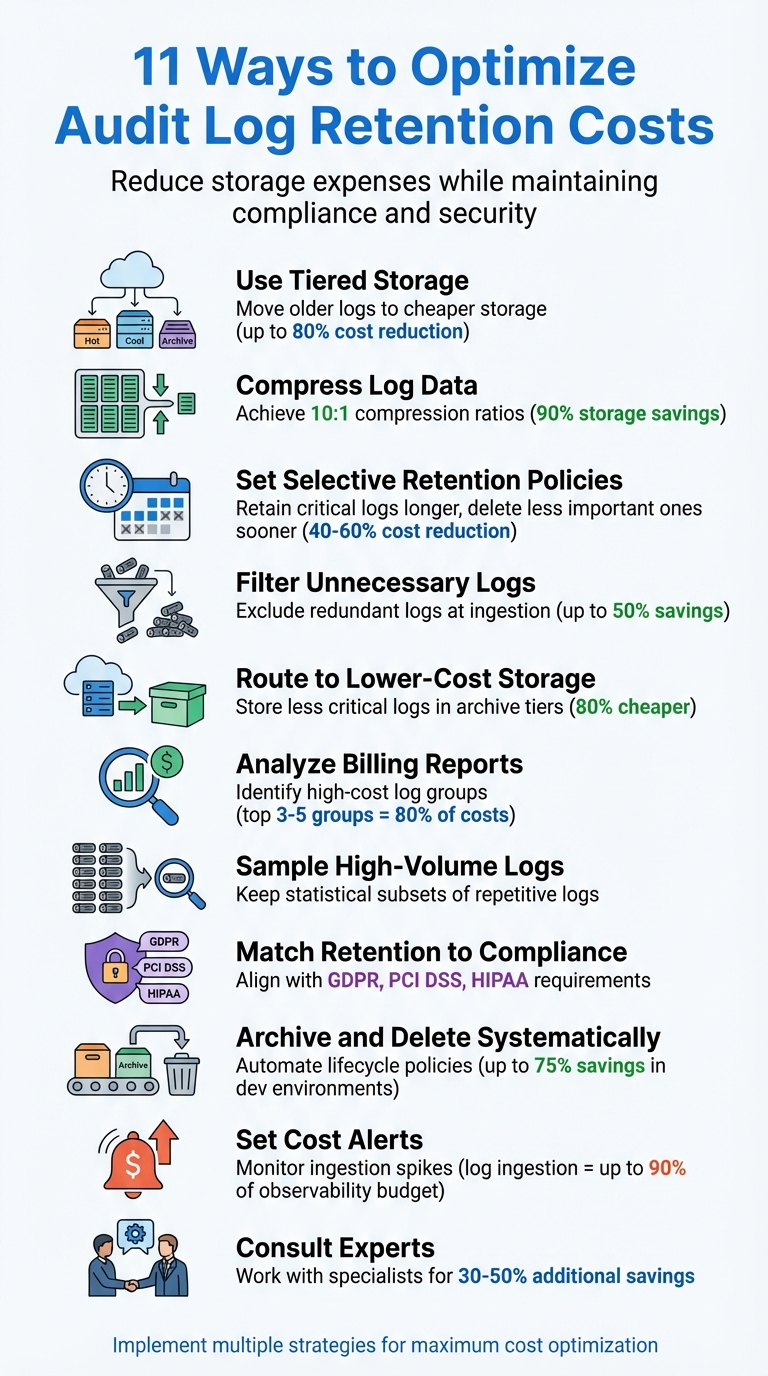 {11 Strategies to Reduce Audit Log Retention Costs}
:::
{11 Strategies to Reduce Audit Log Retention Costs}
:::
Audit Logs: Querying Logs, Pricing and Retention
Need help optimizing your cloud costs?
Get expert advice on how to reduce your cloud expenses without sacrificing performance.
1. Use Tiered Storage for Logs
Organise your audit logs based on how often they're accessed. With tiered storage, you can shift older or less frequently used logs to more affordable storage options, while still keeping them accessible when needed. This way, you align storage costs with how often you query the data.
Cost Reduction Potential
Tiered storage offers significant savings. For example, moving data from interactive storage to an archive tier in Azure can cut costs by about 80%, dropping from £0.08/GB/month to £0.016/GB/month [4]. Similarly, on AWS, transferring cold data to Glacier Deep Archive can be up to 23 times cheaper than using the S3 Standard tier [3]. When you're managing terabytes of logs, these savings can quickly become substantial.
Compliance and Security Maintenance
Tiered storage ensures that logs remain accessible for compliance or forensic needs. By setting table-level retention policies tailored to your requirements, you avoid paying for premium storage unnecessarily. For instance, you can retain critical logs for 1–2 years to meet SOC 2 or GDPR requirements, while deleting less critical performance logs after 30 days [4].
Ease of Implementation
Automation simplifies the process of tiered storage. Use tools like S3 Lifecycle policies or Azure Lifecycle Management to automatically transition logs - for example, moving them to Infrequent Access after 30 days and to Archive after 90 days [2][3]. Compressing logs beforehand can often achieve a 10:1 ratio, further reducing costs [5]. Additionally, use Data Collection Rules to filter out unnecessary log fields before they hit expensive storage tiers [4].
Scalability for Long-Term Use
As your log data grows, tiered storage adapts seamlessly. This approach ensures cost-efficiency over the long term. Tools like S3 Storage Lens or Azure Cost Management can help you identify and clean up zombie
data or orphaned object versions, which can make up 15–20% of storage waste [3]. By regularly monitoring and tweaking your policies, you can ensure that older logs automatically move to the most economical storage tier without needing manual oversight.
2. Compress Your Log Data
Log files are packed with repetitive elements like timestamps, log levels, and service names, making them perfect candidates for compression. By compressing your audit logs, you can significantly cut down on storage expenses while retaining all the critical data needed for compliance and security purposes. Plus, compressed logs make your audit trail more efficient and cost-effective.
Cost Reduction Potential
Log data often achieves compression ratios of 10:1 or better [6]. For instance, if a high-traffic service produces 2 TB of logs daily, compressing those logs could slash monthly storage costs from £165 to £16.50 [6]. Pairing compression with archive storage tiers amplifies the savings - Azure archive storage costs drop to around £0.016/GB/month, an 80% reduction compared to interactive storage [4].
Different compression algorithms offer various benefits:
- Zstd: Strikes a balance between high compression ratios (8–15x) and fast processing speeds, making it a great all-purpose choice.
- Brotli: Achieves even higher compression ratios (10–20x), ideal for archival storage, though it processes data more slowly.
- Lz4: Prioritises speed, offering moderate compression (3–5x) but with very low latency [6].
Ease of Implementation
Many cloud platforms, such as Amazon CloudWatch Logs, already use default compression methods like Gzip (level 6) [2]. You can take this a step further by applying semantic compression techniques - such as field deduplication and timestamp delta encoding - before standard compression. This pre-processing step creates additional patterns for the algorithm to exploit, further improving efficiency [6].
Log data compresses well because of repetitive patterns in timestamps, field names, and message templates.- Nawaz Dhandala, Author, OneUptime [6]
It’s worth noting that higher compression levels require more CPU power, so you’ll need to balance processing costs against storage savings [6]. Structured logs, especially in JSON format, are easier to parse and compress more effectively [2].
Scalability for Long-Term Use
As your data grows from gigabytes per day to terabytes per week, compression becomes non-negotiable [6]. Automated policies can compress logs first and then move them to archive storage tiers. Using column-oriented storage, which groups similar fields together before compression, can further enhance compression ratios [6]. This ensures predictable, scalable costs and fits seamlessly with tiered storage strategies discussed earlier.
3. Set Selective Retention Policies
After implementing tiered storage and compression strategies, introducing selective retention policies adds another layer to your cost-saving measures.
Not all logs are created equal. For instance, critical security logs often need to be retained for extended periods due to compliance requirements, while verbose debug logs might only be relevant for a few days or weeks. Tailoring retention periods to the importance and purpose of each log type can significantly optimise storage costs.
Cost Reduction Potential
Interactive storage rates hover around £0.08/GB/month, whereas archive storage costs are much lower at £0.016/GB/month. By applying selective retention policies, you can cut retention costs by 40–60% [4].
Take this example: a fintech platform faced skyrocketing storage costs, tripling in just a year. By revising their log retention strategy, they categorised transaction logs for retention between 180–365 days and debug logs for only 7–14 days. This adjustment slashed their costs by about 35%, all while extending the retention period for critical logs [8].
Compliance and Security Maintenance
Cybersecurity threats often linger undetected for an average of 181 days, making at least six months of searchable security logs essential for forensic investigations [8]. On top of that, compliance regulations vary widely:
Selective retention policies help you meet these regulatory demands without overspending on less critical data.
Log retention isn't just about keeping logs - it's about keeping the right logs for the right amount of time.- Anjali Udasi, Author, Last9 [7]
Ease of Implementation
Modern log management platforms make it simple to enforce selective retention. Many offer table-level retention overrides, allowing you to set specific retention-time values for crucial tables (like SecurityEvent) while applying shorter retention periods to less critical ones (such as Perf) [4]. You can also automate the transition of logs from hot storage to archive tiers once their troubleshooting window - typically 30–90 days - has passed [1][2].
Scalability for Long-Term Use
Automation is key to scaling selective retention policies effectively. Tools like Infrastructure as Code (IaC) can categorise and manage new resources as they are created, ensuring that expanding log volumes remain under control [1][2]. For example, high-cardinality logs, which contain numerous unique values (like user IDs), can quickly consume storage. By defining retention periods based on their value, you can prevent these logs from overwhelming your system [8].
Selective retention not only keeps your storage costs manageable but also ensures that your growing infrastructure remains efficient and compliant.
4. Filter Out Unnecessary Logs Before Ingestion
Filtering logs at the point of ingestion is a smart way to ensure that only the most useful data is stored. By cutting out logs that don't provide value, you can avoid unnecessary costs and make your logging system more efficient. This step complements selective retention and directly reduces storage expenses.
Cost Reduction Potential
Cloud logging typically costs around £0.38 per GiB after the free tier. By excluding high-volume but low-value logs - like load balancer health check pings or redundant system logs - you could slash logging expenses by 50% or more [9].
A great example comes from the engineering team at Harness, led by Puneet Saraswat. Back in July 2020, their Google Cloud Platform logging costs were soaring at £620 per day. By identifying noisy logs, such as GKE container logs and load balancer health checks, they implemented exclusions and redirected audit logs to BigQuery and Google Cloud Storage. This approach halved their daily logging costs, saving them over £108,000 annually [10].
Exclusion filters are the single most effective way to reduce Cloud Logging costs.– Nawaz Dhandala, Author, OneUptime [9]
Ease of Implementation
Cloud platforms like GCP, AWS, and Azure make log filtering straightforward. With built-in tools, you can drop irrelevant logs before they ever reach storage [9]. The challenge lies in deciding what to exclude. Common examples include:
- Repetitive load balancer health check pings (
200 OKresponses to/healthzendpoints) - DEBUG and TRACE logs in production environments
- System container logs from components like
kube-proxyorkube-dns[9][2]
To start, try excluding 50% of a specific log type and monitor the impact before fully committing. Use tools like Logs Explorer to simulate filter queries, ensuring you know exactly what will be excluded before applying the policy [9].
Scalability for Long-Term Use
For long-term success, automating log filtering is key. Tools like Terraform or CloudFormation can help you deploy consistent filters across your projects [9][2]. In production, configure systems to log only WARN or ERROR levels by default, leaving DEBUG and INFO for development or troubleshooting [2]. For logs needed for compliance but not active monitoring - such as certain VPC flow logs - consider routing them to low-cost storage solutions like AWS S3 Glacier [9][2].
5. Route Logs to Lower-Cost Storage
Routing logs to more affordable storage options is an effective way to cut costs without sacrificing compliance or troubleshooting capabilities. This strategy complements tiered storage and compression methods, offering significant savings.
Non-critical logs can be stored in less expensive locations based on how often they’re accessed. This reduces costs while still keeping essential data accessible for audits or resolving issues.
Cost Reduction Potential
Switching to lower-cost storage can lead to major savings. For instance, in Azure, moving data from interactive to archive storage can lower costs by up to 80%. Similarly, in Google Cloud Platform (GCP), logs stored beyond 30 days cost approximately £0.008 per GB per month [4][12].
A real-world example comes from Harness, where Puneet Saraswat's engineering team implemented Log Sinks in July 2020. By redirecting audit logs from costly Cloud Logging to Google Cloud Storage (GCS) and BigQuery, they halved their daily logging expenses, saving over £108,000 annually [10].
Archiving moves data from the interactive analytics store to a lower-cost archive store... the benefit is that the storage cost drops from about $0.10/GB/month (interactive) to about $0.02/GB/month (archive). That is an 80% reduction.– Nawaz Dhandala, Author, OneUptime [4]
These savings are made even more achievable with the help of built-in tools from cloud providers.
Ease of Implementation
Most cloud platforms offer straightforward tools for log routing. For example:
- GCP: Use Log Sinks to redirect logs to GCS or BigQuery.
- Azure: Diagnostic Settings can route logs to Blob Storage.
- AWS: Kinesis Data Firehose enables sending logs to S3 Glacier.
To optimise further, categorise data into different tiers: 'Hot' (0–30 days), 'Cool' (30–365 days), and 'Archive' (long-term). This tiering ensures you’re storing data at the most appropriate cost level [4].
Scalability for Long-Term Use
For scalable cost control, use table-level retention policies instead of one-size-fits-all rules. For instance, security events might need 90 days in interactive storage and 730 days in archive, while performance counters may only require 30 days total [4].
Automated lifecycle management tools, like Azure Lifecycle Management or AWS S3 Intelligent-Tiering, can handle these transitions seamlessly. These tools move data to lower-cost storage as it ages, ensuring policies are consistently applied without requiring manual adjustments [1][2].
6. Review Log Volume Using Billing Reports
Billing reports can be a treasure trove of insights when it comes to identifying what's driving up your audit log retention costs. By breaking down expenses, you can spot the log groups that are eating into your budget and take specific steps to reduce those costs. This process works hand-in-hand with other cost-saving measures, helping you uncover expenses that might otherwise go unnoticed.
Cost Reduction Potential
Just like tiered storage and selective retention, analysing billing reports allows for informed decisions to control costs. According to research from Stacklet, between 21% and 50% of cloud spending is often wasteful, with 68% of companies wasting around 20% of their cloud budget. Billing reports can help you separate costs related to Log Volume (data ingestion) and Log Storage Volume (keeping data beyond 30 days) [11]. Typically, data ingestion is the bigger expense - for instance, AWS charges approximately £0.37 per GB for data collection in standard regions [14]. Interestingly, the top 3–5 log groups often account for 80% of the total costs [4].
When reviewing metrics, pay close attention to specific usage types in AWS Cost Explorer, such as TimedStorage-ByteHrs (archival storage) and DataProcessing-Bytes (ingestion). These can help you identify the primary cost contributors [13]. Be cautious of log groups with a Never Expire
setting, as they can rack up storage costs indefinitely without delivering much value [14].
Ease of Implementation
Building on earlier cost-saving strategies, using billing reports makes it easier to pinpoint and address cost drivers. Native cloud tools like Google Cloud Monitoring, Azure Monitor Workbooks, and AWS Budgets make tracking log costs straightforward [1][11]. For example, you can filter by log bytes ingested
and group data by resource type or project ID to identify logs with high volumes. Once you've identified these, applying exclusion filters can help reduce unnecessary ingestion costs [11].
AWS Budgets offers a practical solution by allowing you to set up two action-enabled budgets for free. Alerts based on metrics like billing/bytes_ingested can notify you of sudden cost spikes caused by misconfigured debug levels [11][14]. With these billing insights, you can make targeted adjustments to fine-tune your audit log retention strategy even further.
7. Sample High-Volume Audit Logs
After fine-tuning log ingestion and retention, sampling takes optimisation a step further by trimming high-volume logs to reduce costs. Unlike filtering, which discards irrelevant log entries during ingestion, sampling keeps a statistically meaningful subset for trend analysis.
Sampling is particularly useful for repetitive, high-frequency logs like heartbeat signals or system health checks. These logs don't need to be stored in their entirety, as their main purpose is to reveal trends rather than capture every event [2]. By cutting down on the sheer volume of data, sampling not only reduces pay-as-you-go cloud costs but also prevents your logging systems from being overwhelmed [2].
Cost Reduction Potential
The cost-saving potential of sampling is considerable. For instance, data egress costs start at around £0.07 per GB for the first 10 TB, so reducing data volume can make a noticeable financial difference. High-volume telemetry often follows the 80/20 rule, where 20% of tables account for the majority of log volume. Focusing on these tables during ingestion-time transformations can significantly lower costs [4].
In Google Cloud Platform (GCP), 'Admin Activity' logs are free and should always be retained at 100%, while 'Data Access' logs, which generate the most volume, are ideal candidates for sampling [15]. When combined with tiered storage, compression, and filtering, sampling becomes part of a comprehensive cost-saving strategy.
Compliance and Security Maintenance
Knowing what not to sample is just as important as deciding what to sample. Security logs, audit trails related to personal data (GDPR), and financial transaction logs must always retain 100% visibility for compliance and forensic purposes [2][1]. For other log levels, you can apply sampling selectively - retain all FATAL and ERROR logs while sampling INFO or DEBUG levels [2]. This approach ensures that critical issues are captured without compromising compliance.
Retaining too much data can lead to exorbitant costs, while too little retention can hamper troubleshooting and compliance efforts.- DavidW, Author, Overcast Blog [2]
Ease of Implementation
Many cloud platforms simplify sampling with built-in tools. For example, Azure Application Insights automatically reduces telemetry volume with minimal configuration [1]. On Amazon CloudWatch, you can use metric filters to set up threshold-based alarms that monitor log ingestion rates. If volumes spike unexpectedly, these alerts can prompt adjustments to sampling rates [2].
Scalability for Long-Term Use
For extremely large log volumes, stream processing tools like AWS Kinesis Data Analytics (powered by Apache Flink) can filter and aggregate logs in real time before they hit expensive storage tiers [2]. Dynamic sampling mechanisms can also be employed, allowing you to adjust log levels or sampling rates during incidents to capture more detailed data when troubleshooting [2]. If your daily log volume exceeds 100 GB, switching to commitment tiers can provide discounts of up to 29% compared to pay-as-you-go plans [4]. Sampling fits seamlessly into broader cost optimisation strategies, making it a scalable solution for managing audit logs efficiently.
8. Match Retention Periods to Compliance Requirements
Keeping all logs for the same length of time can lead to unnecessary expenses. Different types of logs - whether related to security, applications, or infrastructure - have distinct purposes, and compliance regulations rarely demand a one-size-fits-all approach. By categorising logs based on their purpose, you can assign retention periods that align with specific regulatory requirements [16].
Cost Reduction Potential
Here's a real-world example: In 2025, a fintech company partnered with Stellans to implement a tiered retention strategy using Snowflake and S3 archival. They kept logs from the past 0–3 months hot
in Snowflake for quick access and moved older logs (up to 7 years) to S3 Glacier for long-term storage. The result? A 40–70% reduction in storage costs, while maintaining 99.5% compliance with policies and avoiding any audit issues [17].
This approach met key regulatory requirements, including PCI DSS 4.0's 12-month retention rule (with 3 months of hot
logs) and SOX's 7-year mandate. Not only did this strategy save money, but it also simplified compliance management.
| Regulation | Minimum Retention Period | Key Notes |
|---|---|---|
| UK GDPR | As necessary | Retention must be justified based on the purpose of the data. |
| PCI DSS 4.0 | 12 months | At least 3 months must remain hotor immediately accessible. |
| HIPAA | 6 years | Applies to documentation of PHI access and security measures. |
| SOX | 7 years | Covers critical audit and control documentation. |
| ISO 27001 | 12 months (baseline) | Retention can be adjusted based on risk, with proper justification. |
Compliance and Security Maintenance
UK GDPR and the Data Protection Act 2018 enforce the storage limitation
principle, which means personal data in logs should only be kept as long as necessary for its intended purpose [18]. By documenting your retention schedule, you can justify why, for instance, security logs might need to be retained for 12 months while debug logs are only kept for 30 days. For situations like investigations, legal holds can be applied to preserve specific logs without extending the retention of all data.
Ease of Implementation
Modern cloud platforms simplify the process with automated lifecycle management tools. Services like AWS S3 Lifecycle rules and Azure Lifecycle Management can automatically transition logs to cheaper storage tiers or delete them once they’ve exceeded the required retention period [17]. This automation ensures compliance while keeping costs under control.
9. Archive and Delete Old Logs Systematically
If logs aren’t archived and deleted systematically, they can pile up quickly, leading to higher storage costs. Earlier, we discussed how storage tiers and retention policies form the backbone of effective log management. Now, let’s look at how systematic archiving and deletion can take this further. By moving logs through storage tiers as they age, you can keep recent logs in high-performance storage for active use while transferring older logs to more affordable options like Azure Blob Archive or AWS S3 Glacier [1][16]. This approach not only keeps costs in check but also ensures efficient log management.
Cost Reduction Potential
Logs can become an expensive burden without clear retention policies. For instance, storing just 5GB of logs daily could cost around £615 annually [19]. However, in development environments, automated retention policies can slash these costs by as much as 75% [19]. That’s a significant saving for something as straightforward as proper log lifecycle management.
Compliance and Security Maintenance
Systematic archiving aligned with tailored retention policies ensures compliance without unnecessary data retention. Regulations often require different retention periods, so a blanket approach can be inefficient. For example:
- Security logs might need to be stored for 1–2 years in an Archive tier.
- Application logs could be kept for 30–90 days in Log Analytics.
- Kubernetes logs may only require 7–30 days of retention [1].
For situations like investigations or legal proceedings, Legal Hold features can preserve specific logs without extending retention periods for all data. This targeted approach ensures compliance while keeping storage efficient [16].
Ease of Implementation
Modern cloud platforms simplify lifecycle management by automating much of the process. Tools like AWS S3 Lifecycle Policies, Azure Lifecycle Management Rules, or Elasticsearch Index Lifecycle Management (ILM) can automatically move or delete logs based on their age [1][16]. Additionally, services like Azure Logic Apps or AWS Lambda can trigger the deletion of logs that have surpassed their retention period [1].
Scalability for Long-Term Use
As log volumes grow, manual management becomes unsustainable. Automated tiered storage adapts seamlessly - whether you’re handling 5GB or 500GB of logs daily, the same lifecycle rules can be applied. To maintain control, set up automated alerts to notify your security team of any issues, such as premature deletions or delays in the process. Regularly review your retention settings, ideally on a quarterly basis, to ensure they align with changing business needs and regulatory requirements [16][19].
10. Set Up Alerts for Log Ingestion Costs
Keeping an eye on log ingestion costs is crucial, as these expenses can spiral out of control if left unchecked. For instance, log ingestion fees in CloudWatch Logs can account for up to 90% of a team's overall observability budget [14]. By setting up alerts, you gain an early warning system to spot and resolve issues before they escalate. This complements earlier strategies like log filtering and retention, catching inefficiencies as they arise.
Cost Reduction Potential
The price differences between cloud providers make monitoring log ingestion costs even more important. For example, in standard AWS regions, log ingestion costs about £0.38 per GB (roughly $0.50). Comparatively, Azure Log Analytics charges significantly more, at approximately £2.11 per GB (around $2.76) [14][4]. When dealing with high data volumes, even small inefficiencies can lead to significant expenses. To monitor this effectively, set alerts on metrics such as log bytes ingested
or billing/bytes\_ingested
to identify excessive logging or configuration issues early [11]. In GCP, you can use the sum aligner on the log bytes ingested metric, grouped by resource_type and project_id, to pinpoint the noisiest log sources [11].
Ease of Implementation
Major cloud platforms provide built-in tools for setting up cost alerts, covering both actual and forecasted expenses. AWS Budgets and CloudWatch, Azure Cost Management, and GCP Budgets & Alerts can all send notifications through email, webhooks, or messaging platforms like Slack [4][11]. For a more proactive approach, you can automate responses using AWS Lambda, Azure Functions, or GCP Cloud Functions to address issues as soon as thresholds are breached [4][11]. Additionally, third-party solutions like Infracost can analyse Infrastructure-as-Code (e.g., Terraform) to flag potential cost overruns during development [19][20].
Scalability for Long-Term Use
Automated alerts are highly scalable, adapting seamlessly to changes in your daily ingestion volume. By defining alert policies in tools like Terraform or CloudFormation, you can ensure consistency across all environments [19][2]. To keep these alerts effective, review and adjust thresholds quarterly. This allows you to account for legitimate growth while still catching anomalies. This scalable approach aligns with the broader goal of managing audit log retention costs effectively in dynamic cloud environments.
11. Work with Hokstad Consulting for Cost Reduction
Cost Reduction Potential
Even after implementing the strategies discussed earlier, there’s room for further savings with expert intervention. Hokstad Consulting specialises in audit log retention cost management, using automation to help cut costs by an impressive 30-50%. In development environments, where log retention policies are often overlooked, savings can reach up to 75% [21].
What makes Hokstad Consulting stand out is their No Savings, No Fee
model. You only pay based on the actual savings they deliver, with fees capped as a percentage of those reductions. This performance-based approach eliminates financial risk while ensuring their goals align with yours. Their cloud cost audits target inefficiencies in areas like log ingestion, storage tiers, and retention periods - tackling the same cost challenges highlighted throughout this article but with dedicated engineering expertise.
Compliance and Security Maintenance
Hokstad Consulting prioritises maintaining compliance and security standards while optimising costs. Their regular audits ensure your logging processes stay cost-efficient and adhere to evolving regulations, so you don’t have to choose between saving money and staying compliant.
Scalability for Long-Term Use
As your business grows, Hokstad Consulting’s solutions grow with you. They use Infrastructure-as-Code and automated CI/CD pipelines to ensure cost efficiencies remain intact, even as log volumes increase. Their retainer model provides on-demand DevOps support, infrastructure monitoring, and continuous optimisation - whether you’re working with public, private, or hybrid cloud environments.
Conclusion
Managing audit log retention doesn't have to be expensive. By implementing strategies like tiered storage, compression, selective retention policies, and systematic archiving, you can reduce costs while staying compliant and secure. The trick is to handle logs differently based on their purpose: logs needed for compliance might require long-term storage, while those used for operational troubleshooting can often be deleted after a few weeks [2].
Taking the time to evaluate your logging practices can help you avoid unnecessary expenses, particularly in pay-as-you-go cloud setups. Categorising logs and tailoring policies to each environment - such as enabling verbose logging in development but restricting production to critical-level logs (INFO, WARN, ERROR) - can make a noticeable difference to your monthly costs [2]. This highlights the importance of regularly reviewing your logging strategy.
To get started, examine billing reports, identify high-volume log sources, and assess whether each log is truly necessary.
For even greater savings, Hokstad Consulting offers cloud cost engineering services designed to identify inefficiencies. Their No Savings, No Fee
model ensures you only pay when results are achieved, with potential savings of 30–50% in production environments. Their expertise spans the entire logging lifecycle, helping your infrastructure stay cost-effective as your business grows.
FAQs
Which audit logs must I retain for compliance, and for how long?
When it comes to audit logs, the retention period you need to follow depends on regulations such as GDPR, HIPAA, PCI DSS, SOX, and ISO 27001. These rules can specify retention periods ranging from just a few months to several years. To avoid compliance risks and keep storage costs under control, it’s crucial to align your log retention policies with the specific requirements of these standards.
How do I reduce log ingestion costs without missing critical security events?
Reducing log ingestion costs doesn't mean sacrificing important security data. The key lies in cutting down on unnecessary log volume. Start by filtering logs to prioritise those that are directly linked to security or operational concerns. For instance, focus on high-value logs that provide actionable insights.
You can also set automated policies to minimise verbose logs, such as debug logs, which often add little value in production environments. Regularly reviewing and adjusting logging levels in production is another effective way to ensure you're capturing critical events without driving up costs unnecessarily. This approach keeps your logging efficient and cost-effective.
What’s the quickest way to find which log groups are driving most of my costs?
The quickest way to figure out which log groups are increasing your costs is by using AWS Cost Explorer. Simply filter by 'Usage Type' for CloudWatch Logs, and you'll see a breakdown of costs linked to each log group. This makes it easy to identify the most expensive ones so you can address them and manage your spending more effectively.